A small VSCode extension that adds JavaScript syntax highlighting and syntax error detection for JavaScript code written inside XML CDATA blocks.
This is useful when JavaScript is embedded inside:
<code><![CDATA[ js code ]]></code>
What It Does
This extension detects JavaScript code inside a CDATA block that is wrapped by a <code> tag and applies JavaScript-style editor highlighting.
Features
- Highlights JavaScript keywords, variables, functions, operators, and values
- Improves readability of embedded JavaScript inside XML
- Shows syntax errors inside the JavaScript block
- Works only when the CDATA block is inside a
<code>tag - Does not modify the source file; it only improves editor highlighting and validation
Example
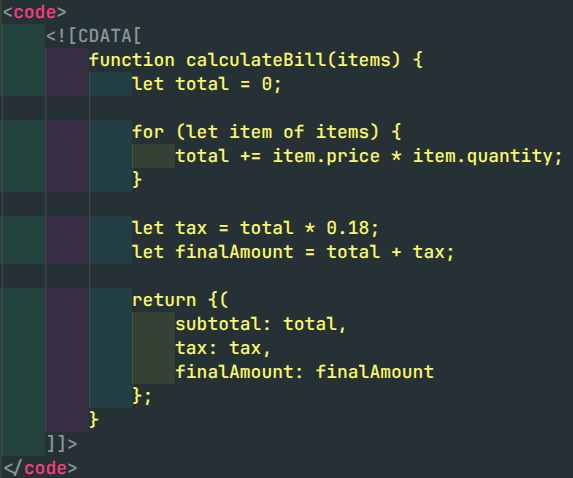
Before
Without this extension, JavaScript inside CDATA appears mostly as plain XML text.
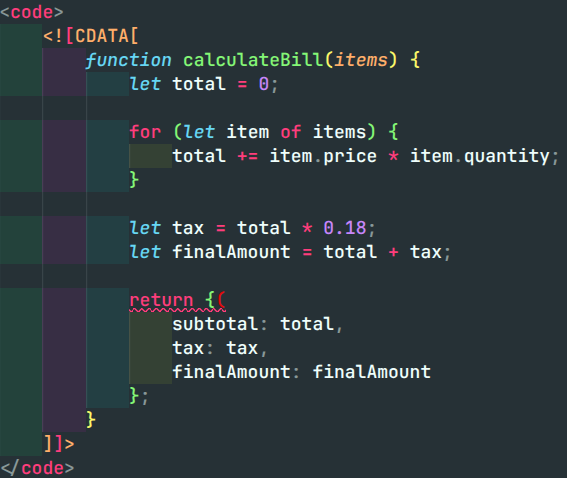
After
With this extension, JavaScript inside CDATA gets proper syntax coloring and syntax error highlighting.
Supported Format
<code>
  <![CDATA[
    // JavaScript code here
  ]]>
</code>
Use Case
This extension is useful for projects where JavaScript logic is stored inside XML configuration files, template files, or custom manifest files using CDATA blocks.
Notes
- JavaScript highlighting is applied only inside CDATA.
- CDATA must be wrapped inside a
<code>tag. - The extension improves readability and helps identify syntax issues inside embedded JavaScript.