Access and update Stripe using familiar SQL — powered by the Stripe Connector for the ZappySys API Driver.
Connect from SQL Server, Power BI, Excel, SSIS, and any ODBC-compatible tool.
Read and write customers, products, subscriptions, and invoices with a low-code DSN wizard, Query Builder, and Stripe [Http] authentication tied to your Stripe API keys.
Part of ZappySys ODBC PowerPack (30+ drivers).
⚡ Key Benefits
- SQL over Stripe APIs — Query and update billing data using SELECT, INSERT, UPDATE, and DELETE patterns from the ODBC guide
- Stripe HTTP authentication — Use Authentication Type
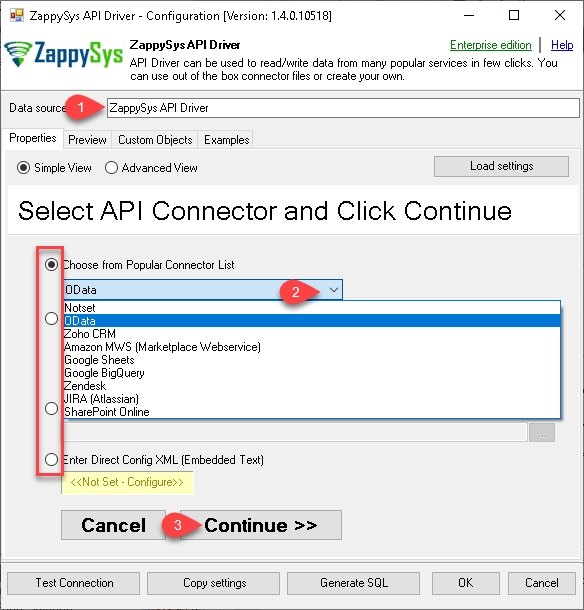
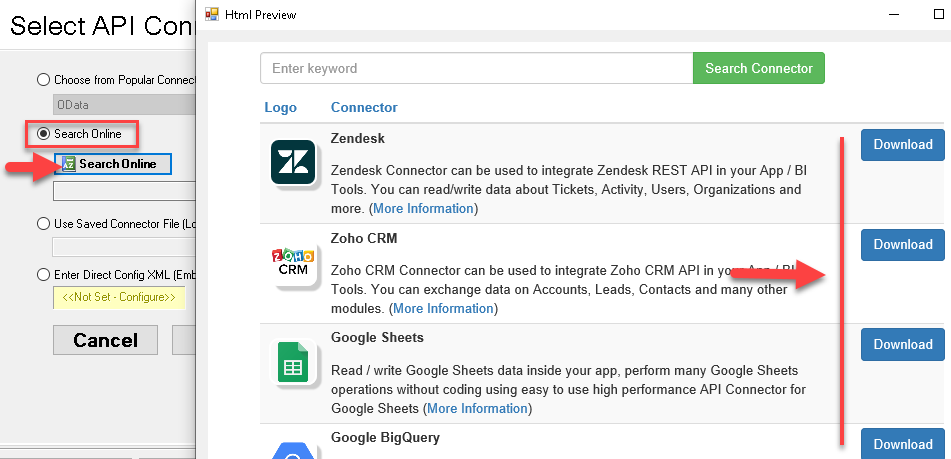
Stripe [Http]with API keys from your Stripe dashboard - Guided DSN setup — Pick Stripe from Popular Connectors or download it with Search Online when it is not embedded
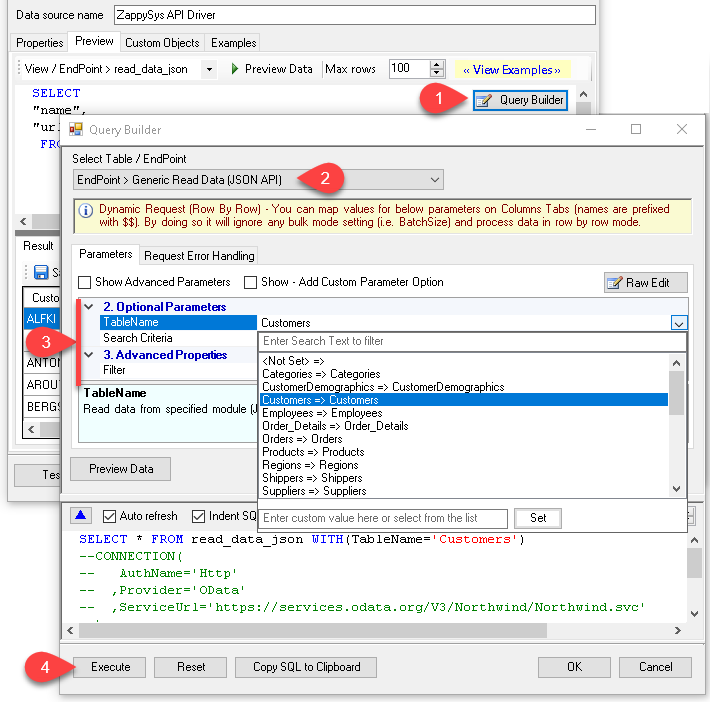
- Query Builder previews — Design filters so work happens on Stripe servers when parameters are passed through the builder
- Throttle-friendly retries — Configure RetryMode, status lists (including
429), counts, and multiply-wait options shown in the walkthrough - Centralized ODBC access — Publish the DSN through ZappySys Data Gateway for JDBC or remote clients without local driver installs
📸 Visual Overview & Setup
|
1. Pick Stripe Connector
|
2. Search Online if Needed
|
3. Build & Preview SQL
|
|
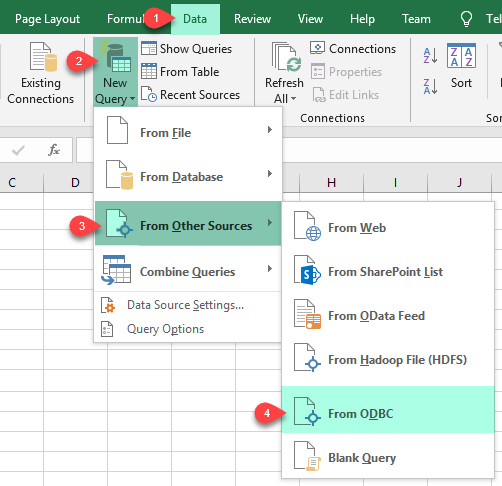
4. Load Stripe Rows into Excel
|
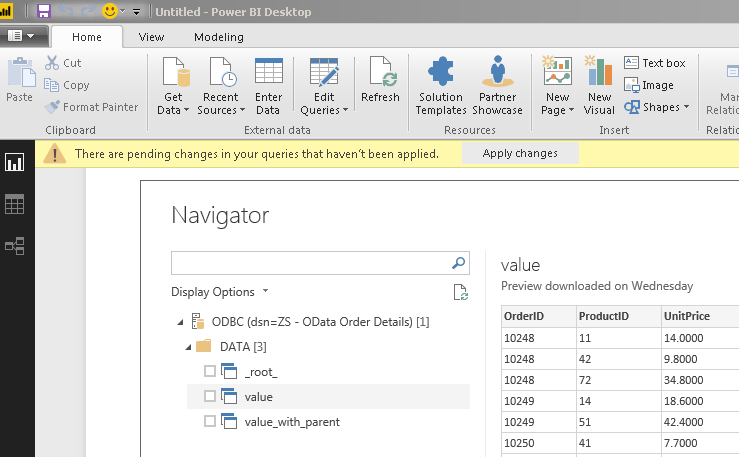
5. Connect from Power BI
|
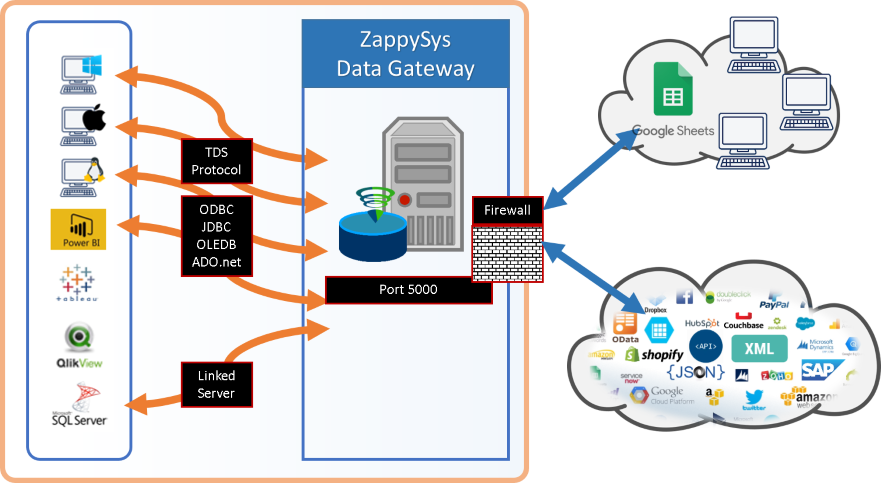
6. Share via Data Gateway
|
🔗 Seamless SQL Query Integration
-- Create a Customer via SQL (Stripe)
INSERT INTO Customers
([Name]
, [Email]
, [Description]
, [Phone]
, [Balance]
, [AddressLine1]
, [AddressLine2]
, [AddressCity]
, [AddressState]
, [AddressCountry]
, [AddressPostalCode]
, [InvoicePrefix]
)
VALUES('Cust-1'
, '[email protected]'
, 'Some desc'
, '+1 222-333-4444'
, 0
, '55 Main St.'
, 'Suite 100'
, 'New York'
, 'NY'
, 'USA'
, '07204' --JSON fragment
, 'INVC'
)
✔ No ETL or custom scripts needed
✔ Works inside SQL Server, Power BI, Excel
🔧 Key Features
Read & query
- Generate SELECT statements from the Query Builder and preview results before you run them in downstream apps
- Filter on the Stripe side whenever the builder exposes parameters so large result sets are not pulled in full unnecessarily
- Base URL defaults to
https://api.stripe.com/v1as shown in the configuration placeholders
Write & actions
- Follow the documented action list (for example create customer, invoice, or subscription flows) and map columns to Stripe fields
- Use INSERT, UPDATE, or DELETE patterns illustrated in the how-to articles linked from the hub page
- Run generic REST requests when you need an endpoint that is not wrapped as a named action
Authentication & connectivity
- Stripe [Http] authentication with keys sourced from the Stripe dashboard
- Detailed parameter reference linked from the landing article for advanced HTTP options
- Standard ODBC 3.x compatibility for BI, ETL, and custom .NET clients
Platform fit
- Reuse the same DSN in Excel, Power BI, SQL Server, SSIS, and other ODBC-aware tools
- Expose the driver through ZappySys Data Gateway when JDBC or remote Windows-less clients need access
💡 Common Use Cases
Typical scenarios for the Stripe ODBC Driver in finance ops, analytics, and integration teams:
-
Billing analytics in Power BI or Excel: Model customers, subscriptions, and invoices with direct ODBC queries.
Example: Refresh a dashboard that tracks MRR without exporting CSVs from the Stripe UI. -
Warehouse landing zones: Stage Stripe charges or balance transactions into SQL Server for accounting.
Example: Nightly ODBC pull that feeds a curated finance mart. -
Operational writebacks: Insert or update Stripe records from approved staging tables.
Example: Create customers from an onboarding spreadsheet after validation. -
SSIS or ETL toolchains: Use the same DSN across ODBC destinations and ADO.NET sources.
Example: Combine Stripe extracts with on-prem ERP data in one package. -
Gateway-only deployments: Keep the driver on a secure integration host while analysts connect remotely.
Example: JDBC services query Stripe through a centralized gateway DSN. -
Support snapshots: Materialize list-style queries for read-only reporting databases.
Example: Provide customer service teams a SQL view without granting Stripe UI access.
🎯 Summary
Bring Stripe into the ODBC stack your team already runs for BI and ETL.
Configure the API Driver once, authenticate with Stripe [Http], and read or write billing data using SQL instead of bespoke REST integrations.

Ready to start querying Stripe?
Install the full ODBC PowerPack to unlock all drivers and start your free trial.