Connect to DuckDB (Parquet) through standard ODBC by configuring the ZappySys JDBC Bridge Driver without Java coding.
Download the duckdb_jdbc JAR, create a DSN with a jdbc:duckdb URL (the guide starts with in-memory jdbc:duckdb:memory:), validate with Test Connection, and preview SQL — including read_parquet — before wiring Excel, Power BI, or ETL jobs.
Part of ZappySys ODBC PowerPack (30+ drivers).
duckdb_jdbc from MVN Repository or the DuckDB Java install page, and point the DSN at a local JAR (for example D:\Drivers\JDBC\duckdb_jdbc.jar). Use a User DSN for interactive design and a System DSN for Windows services; match 32-bit vs 64-bit ODBC Administrator to the host process. For errors after Test Connection, browse the ZappySys Community Parquet-related threads.
⚡ Key Benefits
- Parquet over ODBC — Use DuckDB’s SQL engine (including
read_parquet) through a JDBC Bridge DSN your ODBC tools already understand - Simple JDBC footprint — Configure one
duckdb_jdbcJAR path in the DSN wizard per the setup guide - Validated connectivity — Use Test Connection plus in-DSN SQL preview before production queries
- Operational DSN patterns — Choose User DSN for desktop sessions and System DSN for service accounts (match ODBC bitness)
- Optional Data Gateway — Centralize the DuckDB (Parquet) data source for shared ODBC access and simpler control
📸 Visual Overview & Setup
|
1. Choose JDBC Bridge Driver Type
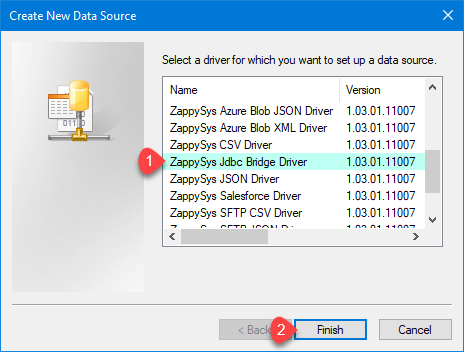
|
2. Enter Full Path for *.jar file (i.e. JDBC driver file)
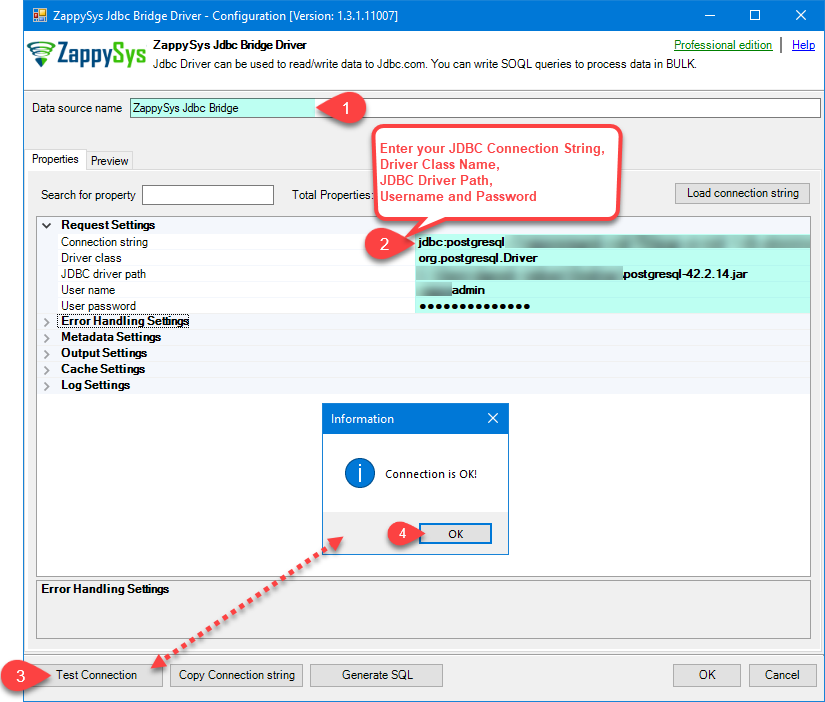
|
3. Preview SQL Query
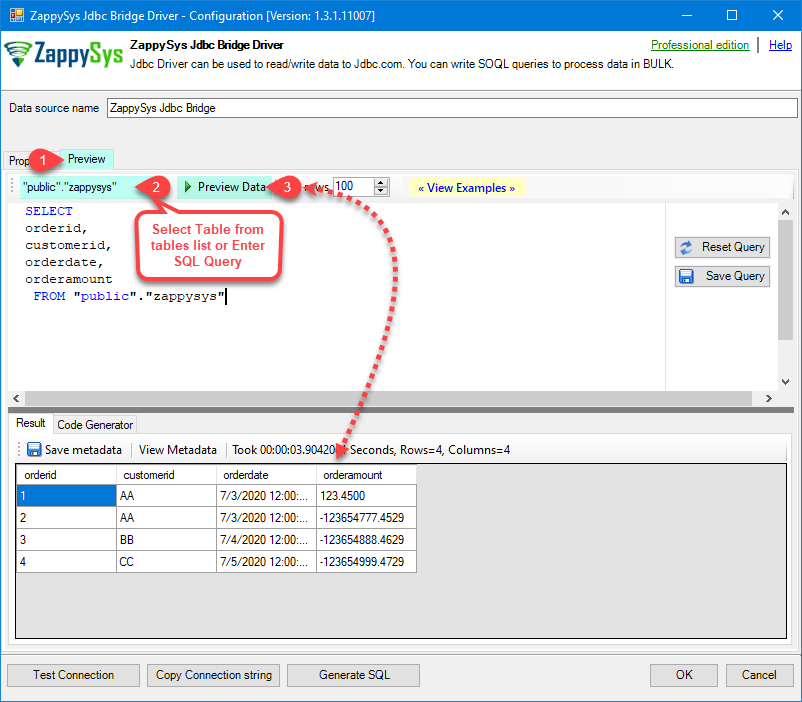
|
|
4. Load DuckDB (Parquet) Rows into Excel
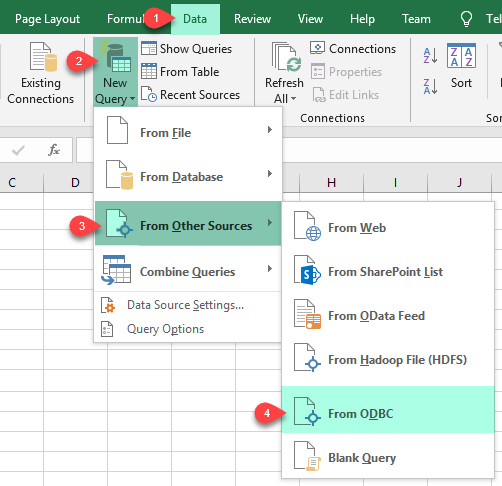
|
5. Connect from Power BI
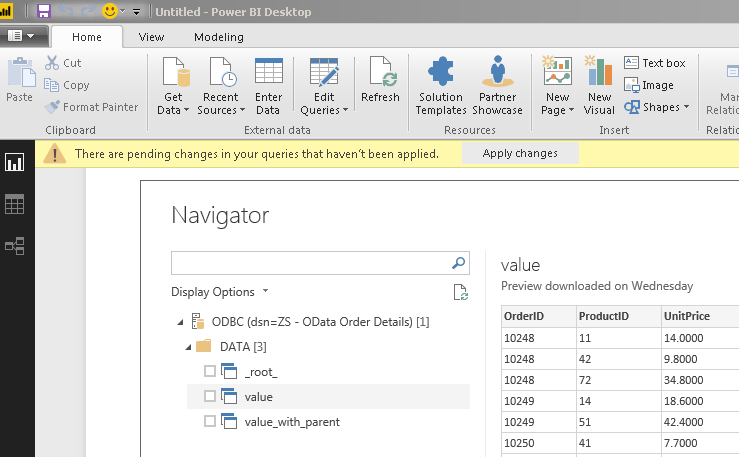
|
6. Share via Data Gateway
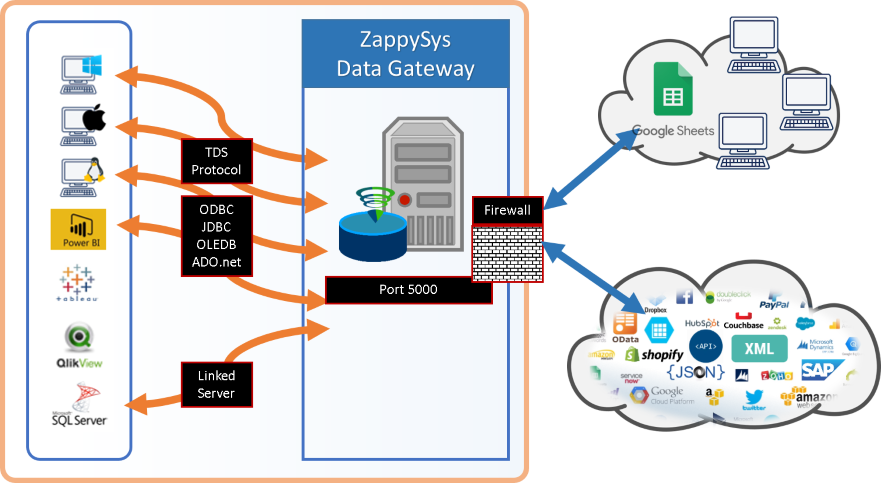
|
🔗 Seamless SQL Query Integration
-- Read remote Parquet (example from the setup guide)
SELECT *
FROM read_parquet('https://hrbrmstr.github.io/large-parquet-test/sample.parquet');read_parquet against URLs or local paths ✔ No ETL or custom scripts required for ad hoc reads
✔ Works inside SQL Server, Power BI, Excel
🔧 Key Features
Read & Query
- Run DuckDB SQL through ODBC after the DSN is configured, including
read_parquetas shown in the guide - Use the preview grid or Select Table metadata picker when the JDBC driver exposes catalogs
- See additional patterns in JDBC Bridge SQL query examples linked from the setup guide
JDBC Bridge Configuration
- Example JDBC URL from the guide:
jdbc:duckdb:memory: - Example DSN name from the guide:
DuckdbParquetDSN - Point JDBC driver file(s) at your local JAR (example path:
D:\Drivers\JDBC\duckdb_jdbc.jar) - Set Connection parameters to
[]when no extra properties are required, or extend per your deployment - Run Test Connection to confirm Java, JAR path, and network reachability (for remote Parquet) before connecting client tools
Writes & Driver Behavior
- The bridge forwards SQL unchanged; INSERT/UPDATE/DELETE support depends on your DuckDB JDBC build and database file mode
- If you see action is not supported, that reflects the JDBC driver rather than the ZappySys bridge
Reliability & Platform Fit
- Standard ODBC 3.x for Power BI, Excel, SQL Server linked servers, SSIS ODBC Source, and custom apps
- Java 8 minimum with Java 21 recommended when your JDBC distribution allows it
- For Data Gateway deployments, copy DSN settings to the gateway host, adjust firewall rules, and restart the gateway service after edits
- Use the guide’s Troubleshooters & resources (JDBC Bridge Driver) list for Java discovery, SSL, multi-JAR merges, logging, and disconnect errors
- Learn more about the bridge in ZappySys JDBC Bridge Driver documentation
💡 Common Use Cases
Typical scenarios for the DuckDB (Parquet) ODBC Driver:
- Parquet analytics: Let analysts pull remote or on-disk Parquet into Excel or Power BI via one DSN.
Example: prototype withread_parquetagainst HTTPS-hosted samples. - Staging and integration: Land DuckDB query results into SQL Server for downstream SSIS or reporting.
Example: scheduled extracts using a System DSN under a service account. - Gateway sharing: Publish
DuckdbParquetDSNon Data Gateway so ODBC Driver for SQL Server clients connect centrally.
Example: remote teams reuseZappySysGatewayDSNwith default database set to the gateway data source name. - Service automation: Schedule jobs under a System DSN so Windows services and SQL Agent see the same credentials.
Example: align 32-bit services with the 32-bit ODBC administrator.
🎯 Summary
Bring DuckDB (Parquet) into ODBC-native tools without maintaining bespoke JDBC plumbing.
Install Java, add the duckdb_jdbc JAR, build a JDBC Bridge DSN, validate connectivity, and reuse the same DSN across Excel, Power BI, SQL Server, and optional Data Gateway deployments.

Ready to query DuckDB (Parquet) over ODBC?
Install the full ODBC PowerPack to unlock all drivers and start your free trial.