Connect Azure Cosmos DB to SQL-first tools with an ODBC DSN and query-based workflow.
Cosmos DB ODBC Driver enables read and write access to databases, containers, users, and documents from SQL Server, Power BI, Excel, Python, and other ODBC clients. Configure API key authentication and drive operations through SQL and query builder endpoints.
Part of ZappySys ODBC PowerPack (30+ drivers).
Recommended starting point
Pro Tip: Use read-only keys for reporting queries and use read-write keys only for insert/update/upsert operations.
Compatibility: Windows ODBC (32/64-bit) | Works with SQL Server, Power BI, Excel, Python |
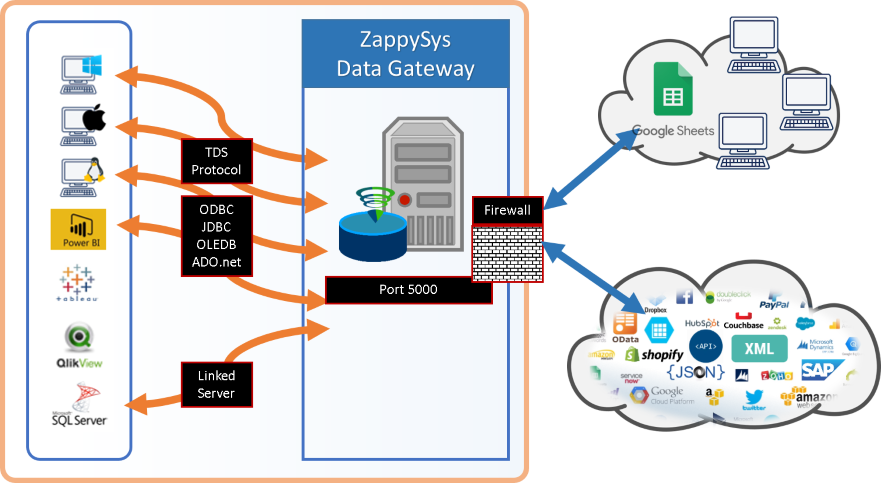
Data Gateway for centralized shared access
⚡ Key Benefits
- SQL-Driven Operations — Read and write Cosmos DB entities through familiar SQL statements
- Flexible Endpoint Access — Work with databases, tables/containers, users, and documents from one DSN
- API Key Authentication — Configure secure account-level access for read and write workflows
- Performance Controls — Push filtering via query builder parameters for server-side execution
- Centralized Governance — Publish one connection through Data Gateway for multiple clients
Learn more about Data Gateway
📸 Visual Overview & Setup
|
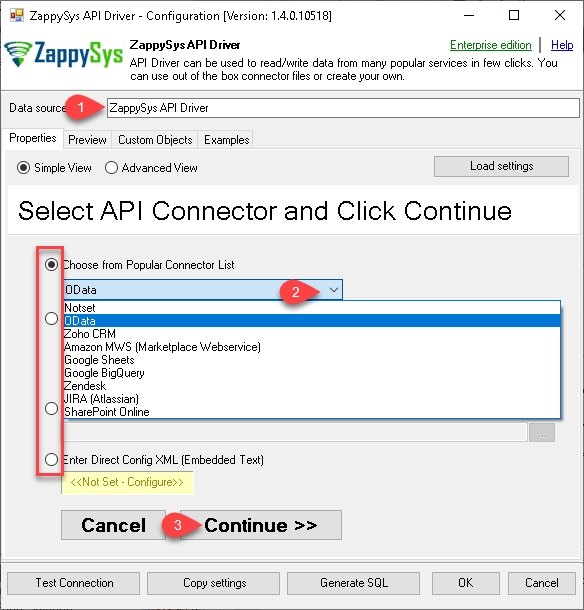
1. Pick Cosmos DB Connector
|
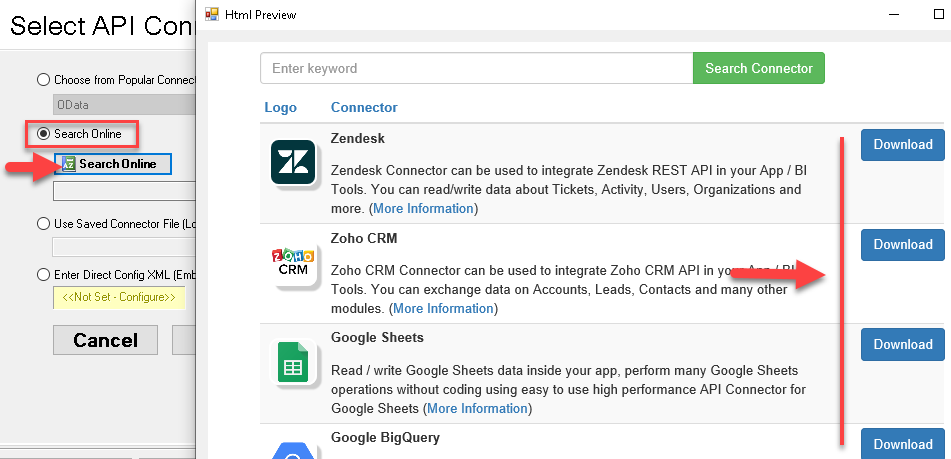
2. Search Online if Not Listed
|
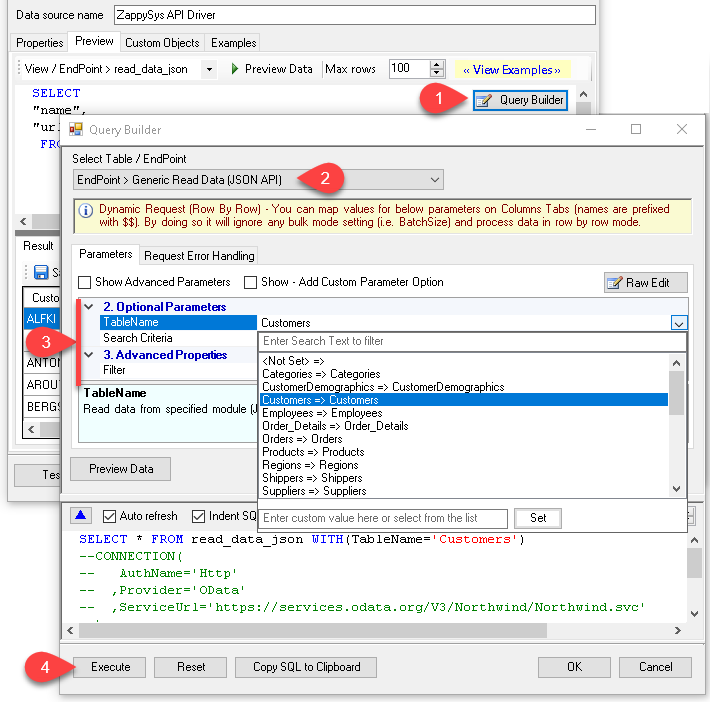
3. Build & Preview SQL Query
|
|
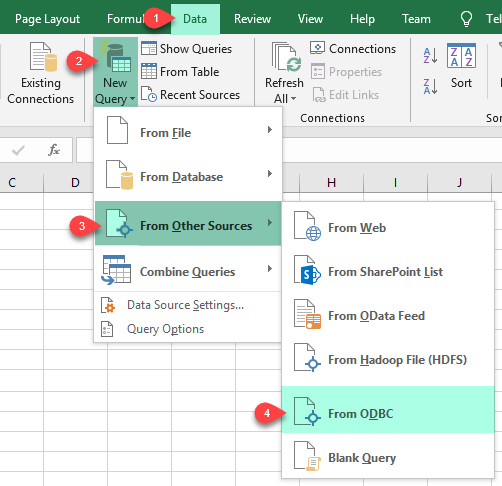
4. Load Cosmos DB Rows into Excel
|
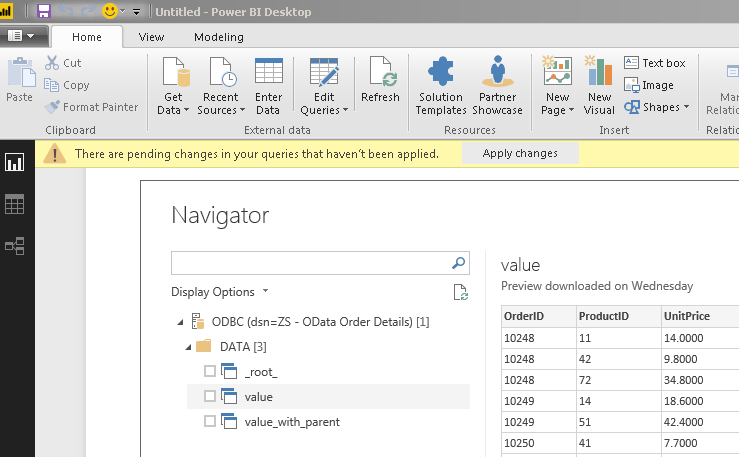
5. Connect from Power BI
|
6. Share via Data Gateway
|
🔗 Seamless SQL Query Integration
Works with REST, OData, files, and databases
-- Create document in Cosmos DB via SQL
INSERT INTO TestContainer (PartitionKey, Document)
VALUES(
'["user2"]',
'{"id":"user2","name":"John Doe","email":"[email protected]","phone":["12345"],"level":"platinum"}'
)
WITH(Upsert='true')
✔ Query APIs like a database
✔ No ETL or custom scripts needed
✔ Works inside SQL Server, Power BI, Excel
✔ No ETL or custom scripts needed
✔ Works inside SQL Server, Power BI, Excel
🔧 Key Features
Read and Write Coverage
- Query documents, databases, containers, and users through table-like endpoints
- Create, update, upsert, and delete documents through SQL-driven operations
- Use generic request endpoints for advanced Cosmos DB API scenarios
Authentication and Security
- API key authentication using primary or secondary key modes
- Support for read-only and read-write key governance models
- Account-scoped access for controlled DSN-level configuration
Operational Fit
- Use query builder parameters to move filtering server-side for faster retrieval
- Handle partition key values and document payloads from SQL
- Share one connection across users using Data Gateway
💡 Common Use Cases
- Document analytics: Query Cosmos DB documents from BI and SQL reporting tools.
- Data synchronization: Insert or upsert JSON documents from ETL output datasets.
- Cross-tool reporting: Reuse one DSN across SQL Server, Power BI, and Excel.
- Centralized access: Govern shared API access via Data Gateway deployment.
- Operational automation: Execute repeatable document workflows from SQL jobs.
🎯 Summary
Bring Azure Cosmos DB into your ODBC ecosystem with SQL-driven access patterns.
Configure once and integrate from reporting, automation, and data engineering tools without custom API wrappers.

Ready to query Cosmos DB via ODBC?
Install the full ODBC PowerPack to unlock all drivers and start your free trial.