The designated editor for .xsvg files — VisionCortex's interactive xsvg
viewer embedded in a
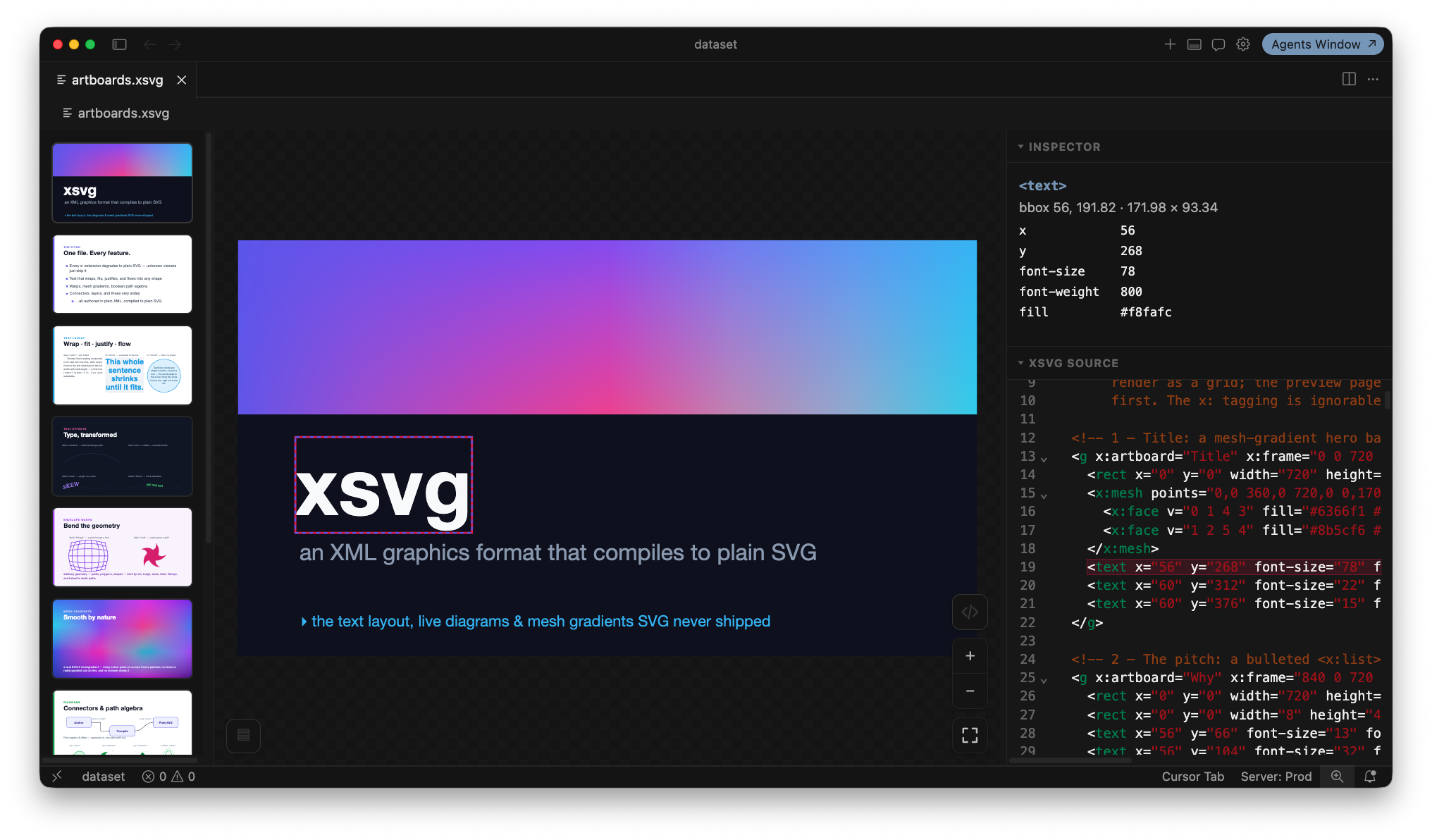
VS Code custom editor. Open a .xsvg file and it renders as the compiled SVG,
with pan/zoom, the multi-artboard slide deck, and a collapsible inspector +
source pane.
Features
- Designated
.xsvgviewer. Opening any.xsvgfile uses this editor by default — no drag-and-drop, no file picker. To edit the XML source, run “xsvg: Open Source in Text Editor” from the command palette (or right-click → Reopen With → Text Editor). - Theme-aware. The canvas, panels, controls, and inspector map onto your
active VS Code color theme via
--vscode-*variables, and follow light/dark automatically. - Live reload. Edits — whether typed in a text editor beside the viewer or made by an external tool on disk — recompile and reframe the drawing instantly.
- Pure JS + WASM. The xsvg compiler ships as WebAssembly inlined into the
viewer bundle. No native modules, no Rust/
wasm-packbuild step — the extension is a self-contained JavaScript + WASM package.
Interacting with the view
- Scroll to zoom, middle-drag (or hold Space and drag) to pan.
- Fit / 1:1 toggle and ± zoom live in the bottom-right control cluster.
- The ‹ › code button toggles the inspector; click any element on the canvas to see its tag, attributes, and bounding box, with the matching source highlighted.
- Multi-artboard documents get a slide rail; navigate with the thumbnails or the ← / → arrow keys.
How it works
The extension registers a CustomTextEditorProvider for *.xsvg. Because it is
text-backed, VS Code keeps the underlying TextDocument in sync with the file on
disk; every change fires onDidChangeTextDocument, which the extension forwards
to the webview. The webview hosts the packaged <xsvg-view-interactive> custom
element and sets its .source property, which recompiles the xsvg to SVG and
reframes it.
Built on @visioncortex/xsvg-viewer.