A VS Code extension that traces AI generated code back to prompts by displaying original prompts.
What It Does
The extension queries the Git repository to reconstruct the history of AI interactions by:
- Reading hidden commits from
refs/tracy/*and the active local chain inrefs/tracy-local/*when present - Extracting metadata from commit objects
- Building a timeline that maps code changes to AI interactions
It also handles setup automatically: initializing Tracybot in a newly opened repository, and installing the plugin for whichever supported agent (OpenCode, Claude Code, Codex) is detected on your machine. No setup steps are required beyond installing the extension itself.
Installation
Installing the extension is the recommended way to get started with Tracybot.
VS Code Marketplace (recommended)
You can install the extension directly within VS Code:
- Open VS Code and go to the Extensions view (
Ctrl+Shift+XorCmd+Shift+X). - Search for
Tracybot. - Click Install.
Alternatively, visit the Tracybot VS Code Marketplace page and follow the instructions on the marketplace page.
CLI Install
Alternatively, install scripts for Windows, Linux, and macOS are provided.
The install scripts use the code CLI, so make sure the VS Code command line tools are available first.
Linux and macOS
curl -fsSL https://raw.githubusercontent.com/TracyTeam/tracybot/main/vscode-extension/install.sh | bash
Windows (Powershell)
irm https://raw.githubusercontent.com/TracyTeam/tracybot/main/vscode-extension/install.ps1 | iex
Usage
- Open a Git repository in VS Code.
- Click the
AI Blamestatus bar item, or runTracybot: Open AI Blame windowfrom the command palette.
Requirements
- VS Code 1.110.0 or later
- A Git repository
Node.js and npm are only required for developing the extension from source.
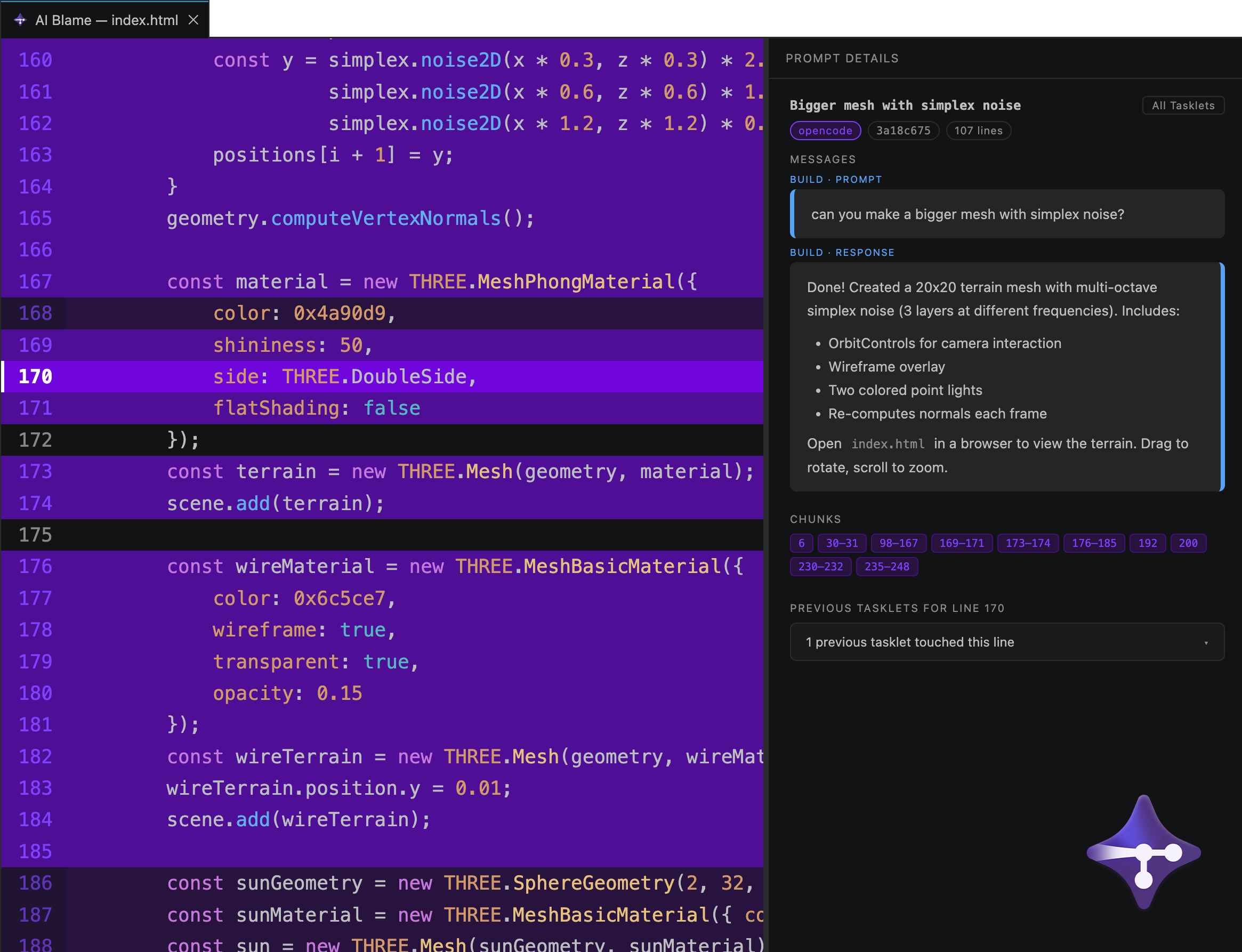
AI Blame Tab
Displays the history of AI-generated code changes in a dedicated editor tab. The AI Blame button is shown in the right side of the VS Code status bar.
- Highlighted lines: Each file highlights AI-generated lines
- Tasklet details: Click on any highlighted line to see the originating tasklet, including which agent (OpenCode, Claude Code, or Codex) produced it
- For OpenCode, a tasklet consists of 0 or more plan prompts followed by a build prompt
- Claude Code and Codex have no separate planning stage, so their tasklets are a single prompt/response turn
- File history: View all tasklets that modified the current version of the file
Research Mode
An optional, opt-in feature to share your Tasklet history for a research study on AI-assisted coding behavior. Off by default, decided per-repository, and can be disabled at any time from the Research Mode status bar item. See docs/research-mode.md in the main repository for what's collected and how consent works.
Keybindings
Cmd+Shift+0(Mac) /Ctrl+Shift+0(Windows/Linux) - Open AI Blame window
Contributing
Building or debugging the extension from source? See DEVELOPMENT.md.