

When your cursor lands on a C/C++ preprocessor directive (#if, #ifdef, #ifndef, #else, #elif, #endif), all matching directives in the same block are highlighted simultaneously — even across hundreds of lines.
Preview
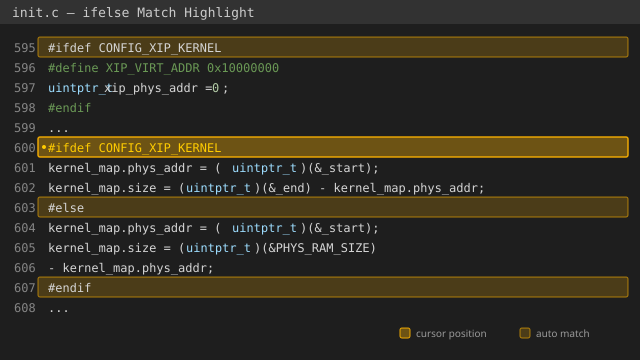
Features
- Auto-detect matching
#if/#else/#elif/#endifpairs - Highlight the entire directive chain at once (not just jump to one)
- Works with nested preprocessor blocks (correctly handles stacking)
- Supports C, C++, GNU Assembly (
.S/.s), and any file with#ifdirectives - Configurable highlight colors
- Lightweight — zero dependencies, pure VS Code API
Why this extension?
VS Code's built-in bracket matching can jump between #if and #endif (Ctrl+Shift+), but it doesn't show you the whole picture at a glance. This extension highlights the entire #if → #else → #endif chain simultaneously, so you can instantly see the structure of complex conditional compilation blocks.
Installation
Search ifelse Match Highlight in the VS Code Extensions panel, or install via command line:
code --install-extension ifelse-match-highlight.vsix
Configuration
| Setting | Default | Description |
|---|---|---|
ifelseMatchHighlight.enabled |
true |
Enable/disable the extension |
ifelseMatchHighlight.decorationColor |
rgba(255, 200, 0, 0.2) |
Background color of highlighted lines |
ifelseMatchHighlight.borderColor |
rgba(255, 180, 0, 0.8) |
Border color of highlighted lines |
License
MIT