Work with the TESAIoT DevKit and PSoC Edge AI from your IDE. Stream live Bitstream data, build visual flows, and explore digital twins.
Connect over USB, Wi‑Fi, or MQTT, or work without hardware using Simulation mode. Configure sensors, watch the live telemetry deck, and check system health, all inside VS Code or Cursor.
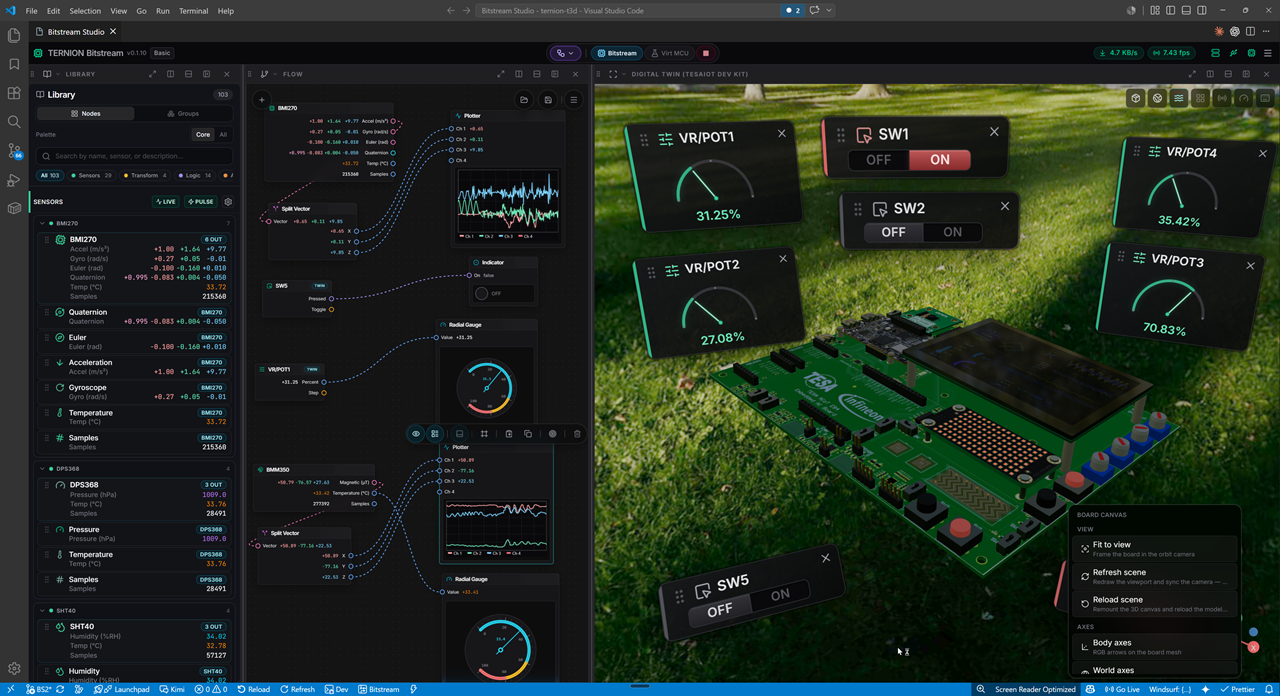
Build flows in a node-based editor with on-screen indicators and interactive 2D and 3D views, including digital twins for robot arms, machines, drones, development boards, and more.
Install and more information: Visual Studio Marketplace: Bitstream Studio
Screenshots
Sensor Studio: flow editor with live sensor nodes, gauges, and a TESAIoT DevKit digital twin.
What you can do
| Area | In practice |
|---|---|
| Sensor configuration | Choose which sensors publish, how often, and what appears on the live deck |
| Real-time streaming | Watch values update as your board or simulator sends data |
| System diagnostics | Activity log, link status, and connection health while you work |
| Connectivity | Serial port (USB), Wi‑Fi, and MQTT setup from the app menu |
| Digital twin | Interactive 3D models (robot arms, machines, drones, dev kits, and more) with realistic graphics, physics, and live sensor-driven motion |
| Visual flows | Drag-and-drop nodes for logic, math, indicators, and outputs wired to live streams |
Two workspaces
Sensor Telemetry
Your control room for bring-up and monitoring:
- Sensor configuration and live telemetry deck
- 3D orientation preview for motion sensors
- Activity log for system events and diagnostics
Sensor Studio
Your visual lab for experiments and demos:
- Node-based flow editor: connect sensors, logic, and outputs
- Digital twin views: 3D models for robots, machines, vehicles, boards, and more
- Output nodes: gauges, plotters, LEDs, and other on-screen indicators
- Works in 2D (flow canvas, widgets) and 3D (twins, previews, interaction)
Node library (this release): real-time sensor nodes, logic and math, indicator / output widgets, transform helpers, and utility nodes. More families (audio, camera/video, full 3D stage, physics) and the Twin Factory workspace are available in PRO / PRO+ product builds.
Connectivity
Open the menu (☰) to manage how your device talks to the app:
| Path | Use when |
|---|---|
| Serial port | USB cable to the DevKit or PSoC Edge AI board |
| Wi‑Fi | Device on your wireless network |
| MQTT | Cloud or LAN broker telemetry |
Start Bitstream Studio: Start Serial Bridge, pick Bitstream or Simulator on the toolbar, then Link.
Hardware and simulation
With hardware
- Connect your TESAIoT DevKit or PSoC Edge AI board over USB
- Start the serial bridge → toolbar Bitstream → Link
Without hardware
- Install the separate Bitstream Simulator extension
- Start Streaming there → Bitstream Studio toolbar Simulator → Link
First run: 3D models
On first install, the app downloads 3D models (robot arms, machines, drones, dev kits, and environment assets) before workspace cards unlock. Later opens skip this step.
If previews stay blank: Bitstream Studio: Sync Free Pack to Disk. Internet required once; no GitHub account needed.
Quick start
- Command Palette → Bitstream Studio: Open Bitstream Studio
- Command Palette → Bitstream Studio: Start Serial Bridge
- Toolbar → Bitstream or Simulator → Link
Install
VS Code 1.75+ · Windows or macOS
The easiest way to install is from the Marketplace listing. Open it in a browser and click Install, or use Install in the Extensions view inside VS Code.
code --install-extension TERNIONDEV.bitstream-studio
On Cursor, use cursor instead of code.
Requirements
| VS Code | 1.75+ (or Cursor) |
| OS | Windows / macOS |
| Board | Optional (Simulator mode available) |
| Node.js | Not required for normal use |
Troubleshooting
| Symptom | Fix |
|---|---|
| No live samples | Start Serial Bridge; check USB port; Reload Window |
| WebSocket / bridge error | Start Serial Bridge, then Link |
| Blank 3D preview | Wait for first-run download or Sync Free Pack to Disk |
Console removeChild warning |
Usually harmless after first open. Use Reload Window. |
| Extension activation error | Reinstall from Marketplace |
This release (v0.1)
Includes Sensor Telemetry and Sensor Studio with digital twin 3D views and the node flow editor. Sensor Apply in the UI updates a local configuration draft; advanced device programming may use firmware tools alongside the app.
Links
- Marketplace (install & overview): marketplace.visualstudio.com/items?itemName=TERNIONDEV.bitstream-studio
- Publisher: TERNIONDEV
License
MIT. See LICENSE.