A VS Code extension that compares two folders and displays the differences in a tree view.
Features
Folder Selection
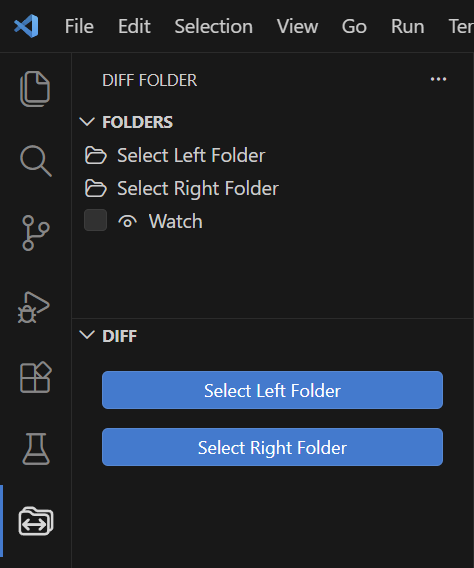
Open the Diff Folder view from the Activity Bar and select the left and right folders using the buttons.
You can also set folders by dragging and dropping them from the Explorer onto the buttons in the FOLDERS section.
Difference Tree View
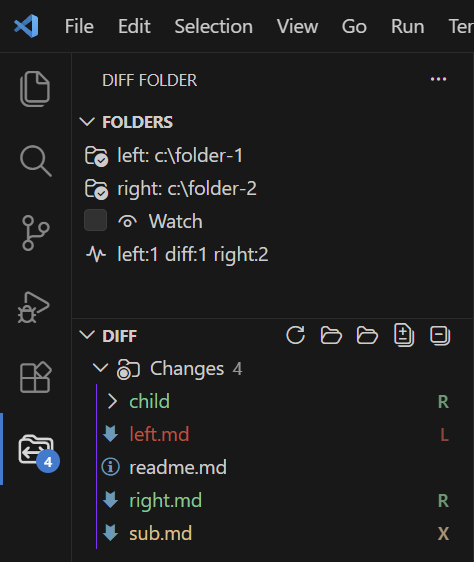
Once two folders are selected, a difference tree is displayed in the DIFF section.
The following indicators are used:
- L: File exists only in the Left folder
- R: File exists only in the Right folder
- X: File exists in both folders, but the contents differ
- (No mark): File exists in both folders and the contents are identical
When Watch is enabled, file changes within the selected folders are detected automatically, and the difference tree is refreshed.
Settings
diff-folder.useGitignore
- Type: boolean
- Default:
true - Description: When set to
true, files matching patterns defined in.gitignoreare excluded from comparison.
diff-folder.excludePatterns
- Type: array of strings
- Default:
["**/.git"] - Description: Files matching the specified patterns can be excluded from the difference tree view.