AI usage and cost tracking for Claude Code, GitHub Copilot, Codex CLI, and OpenCode - fully local.
A VS Code extension that tracks token usage for Claude Code, GitHub Copilot, Codex CLI, and OpenCode in one place. LedgerLM is token-first, with cost shown only when the data is reliable. It includes a tabbed dashboard (Overview / Sessions / Models / Agents & Tools), time-window filtering, token/cache deep dives, cache-break impact, agent & tool usage analytics, budgets, live updates, and CSV/JSON export.
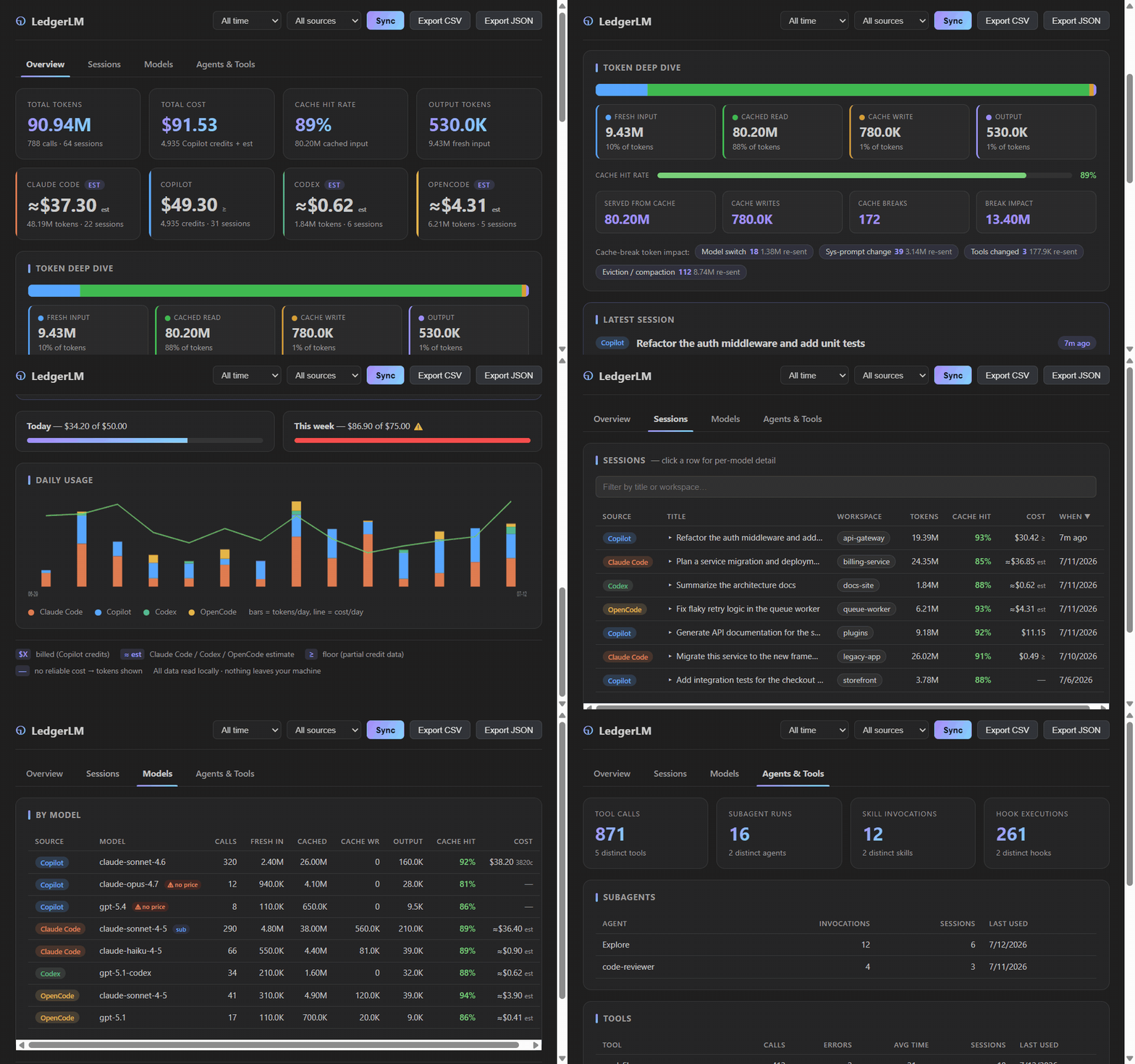
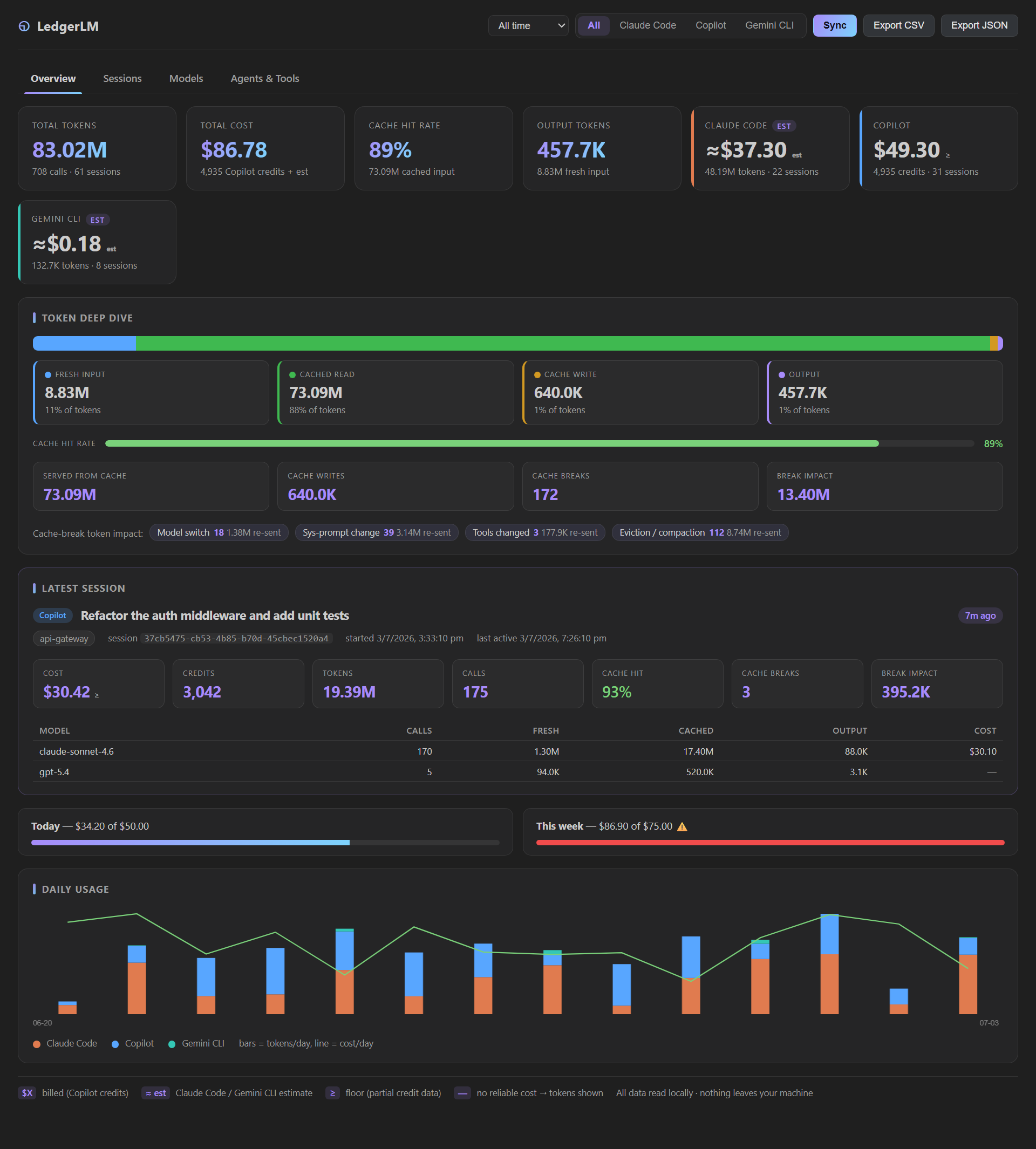
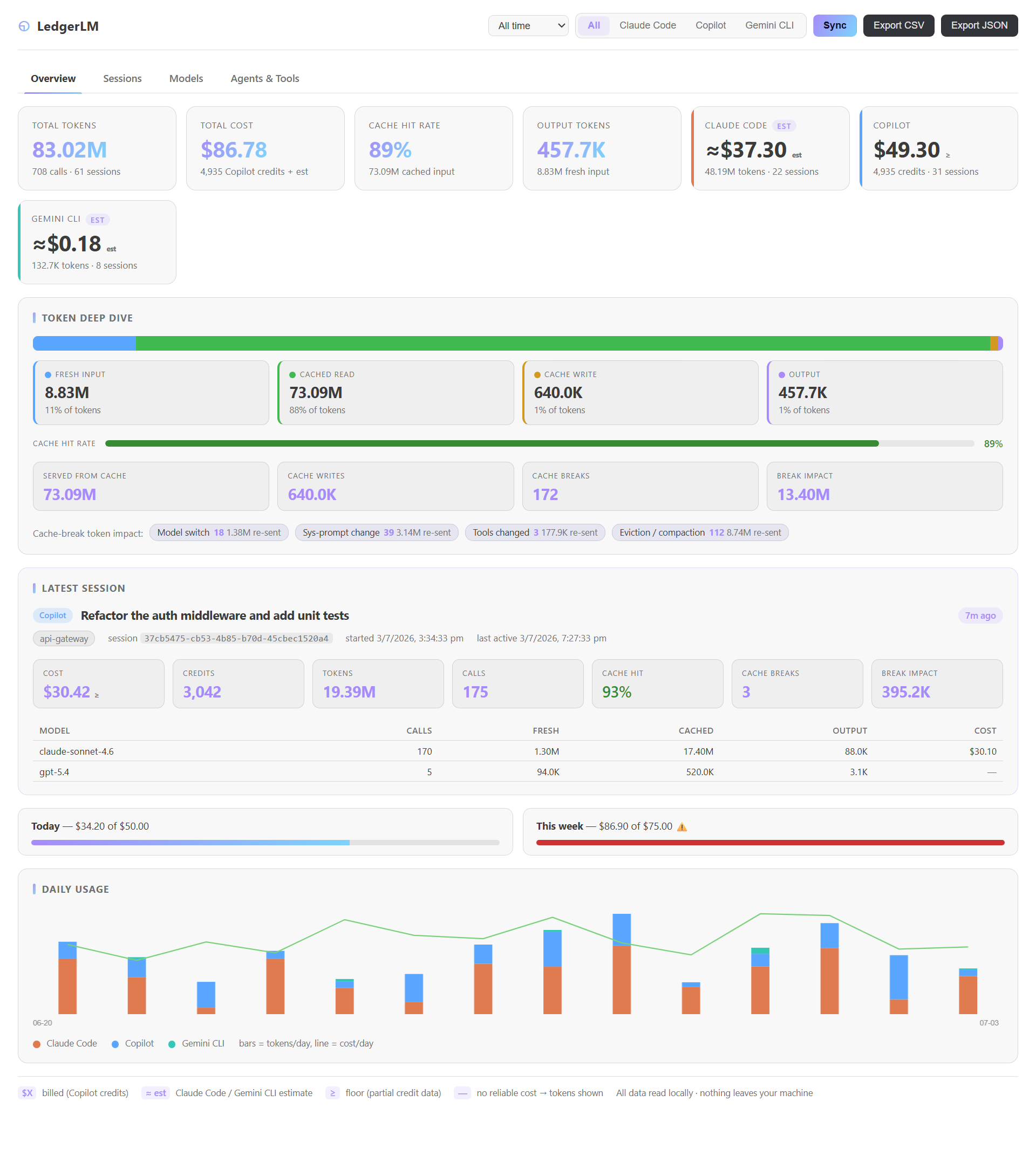
The LedgerLM panel: per-source cards, token & cache deep dive, latest session, budgets, daily usage chart, and a by-model breakdown. It also follows your VS Code light theme:
100% local - no cloud, no telemetry
Your data never leaves your machine. LedgerLM reads the log files your AI tools already write to disk, computes everything locally, and stores results in a local SQLite file inside VS Code's own storage. There are no servers, no accounts, no outbound network calls, and no telemetry. Source logs are opened read-only and are never modified.
Token-first by design. AI tools do not bill the same way - Copilot meters premium-request credits, Claude Code is commonly a flat subscription, and Codex rides on a ChatGPT plan. LedgerLM prioritizes tokens and cache behavior (always exact) and shows USD only when confidence is clear. See Cost methodology.
Features
Unified dashboard
- Per-source cards - tokens, cost (with confidence), credits, and cache-hit for Claude Code, Copilot, Codex, and OpenCode side by side.
- Time window - All time / 1h / 3h / 6h / 12h / 24h / 48h / 7 days / custom date range; filters every panel.
- Source selector - a dropdown to focus on one tool (Claude Code, Copilot, Codex, OpenCode) or all at once.
- Daily chart - stacked token bars per source + a combined cost line.
Token & cache deep dive
- Token breakdown - fresh input · cached read · cache write · output, as a proportion bar with counts and %.
- Cache efficiency, tokens served from cache, cache writes, and cache breaks (when a warm prompt cache was lost). See Tokens & cache.
- By-model table - per-model token split + color-coded cache-hit;
subbadge for sub-agent calls;⚠ no pricefor unpriced models.
Sessions
- Latest Session panel - most recent session's stats + per-model mini-table, auto-refreshing.
- All sessions - sortable columns; click a row to expand an inline per-model breakdown.
sub/⚠badges.
Agents, tools, skills & hooks
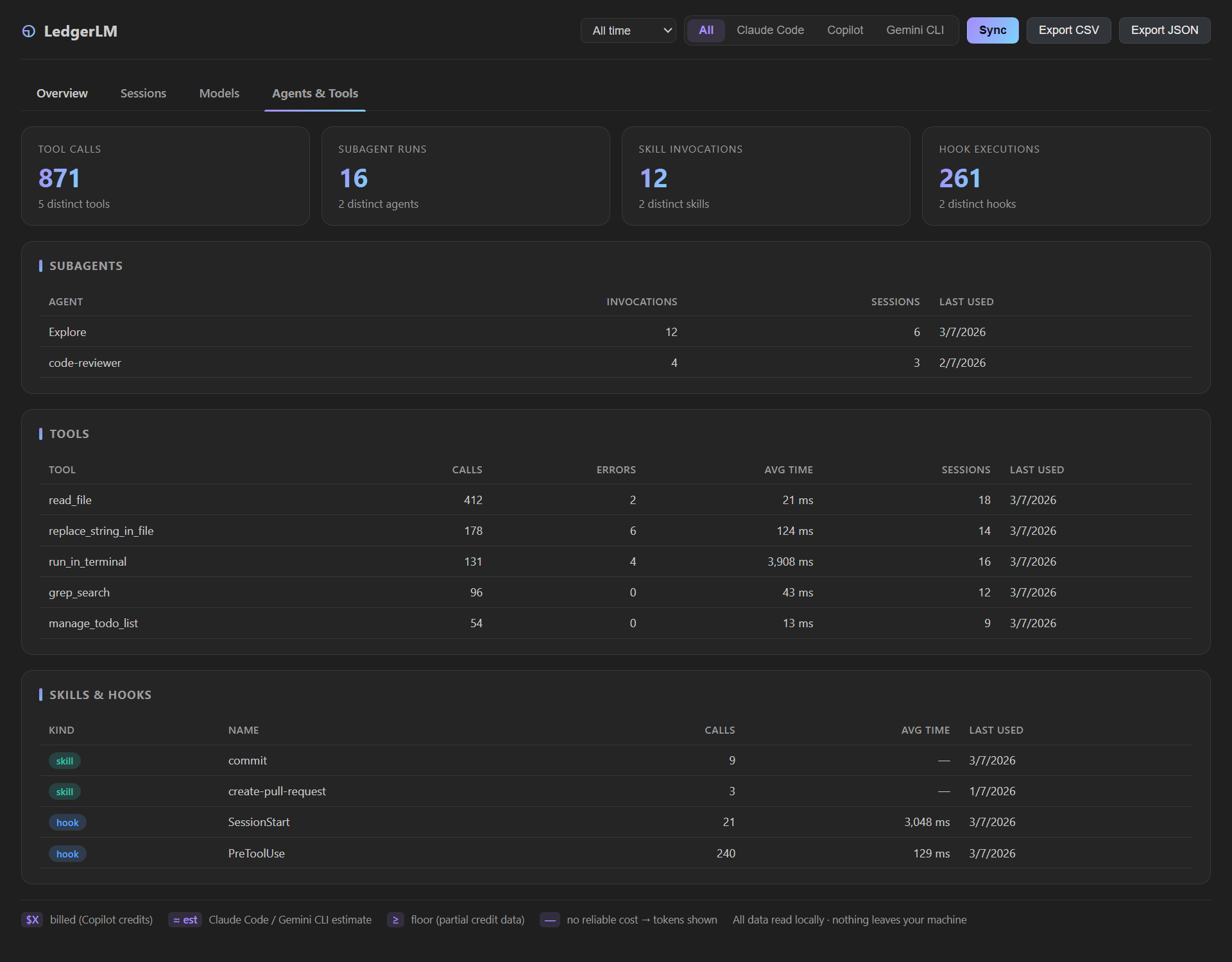
- Subagents - which agents ran (and how often, across how many sessions).
- Tools - per-tool call counts, error counts, and average execution time.
- Skills & hooks - skill invocations and hook executions with timing, so you can spot slow hooks.
Cost - only when trustworthy
- Copilot -> premium-request AI credits (
copilotUsageNanoAiu, $0.01/credit).≥marks a floor when some calls predate the credit field. - Claude Code / Codex -> ≈ API-equivalent estimate from bundled price tables (you likely pay a flat subscription, so it is labeled
est; hide it withledgerLM.showEstimatedCost). - OpenCode -> the per-message cost OpenCode itself records (provider list price) - shown as an estimate since it is not a bill.
—→ no reliable cost; tokens are shown instead. Unpriced models are excluded from totals.
Budgets, live, export
- Budget alerts - daily/weekly USD thresholds; one VS Code warning per period; status bar shows today's tokens / ≈USD.
- Live tracking - watches all log roots (
fs.watch) and refreshes within ~2s as you work. - Export - CSV/JSON of sessions (window- and source-filtered) from the dashboard or the command palette.
Where the data comes from / where it's stored
| Claude Code | GitHub Copilot | Codex CLI | OpenCode | |
|---|---|---|---|---|
| Source logs (read-only) | ~/.claude/projects/<cwd>/<uuid>.jsonl (+ …/<uuid>/subagents/agent-*.jsonl) |
VS Code workspaceStorage/<hash>/GitHub.copilot-chat/debug-logs/<sid>/main.jsonl (+ system_prompt_*.json, tools_*.json, models.json) |
~/.codex/sessions/<Y>/<M>/<D>/rollout-*.jsonl |
~/.local/share/opencode/**/storage/session/message/<sid>/*.json (+ session/info/<sid>.json) |
| Per-call usage | message.usage.{input_tokens, cache_read_input_tokens, cache_creation_input_tokens, output_tokens} |
attrs.{inputTokens, cachedTokens, outputTokens, copilotUsageNanoAiu, systemPromptFile, toolsFile} |
token_count events: {input_tokens, cached_input_tokens, output_tokens, reasoning_output_tokens} |
tokens.{input, output, reasoning, cache.{read, write}} |
| Cost signal | bundled Anthropic price table → estimate | copilotUsageNanoAiu → credits → USD |
bundled OpenAI price table → estimate | cost recorded per message → estimate |
Computed data lives in a local sql.js SQLite file under the extension's VS Code globalStorage (ai-cost.db). Source logs are never modified. See Architecture.
Privacy
LedgerLM is local-first and offline by design:
- No network. Nothing is uploaded, no analytics, no telemetry, no accounts or sign-in. The extension makes zero outbound requests.
- Read-only. Your AI tool logs are opened read-only; LedgerLM never edits or deletes them.
- Local storage only. All computed data stays in a SQLite file inside VS Code's
globalStorageon your disk. Uninstalling clears it. - No bundled secrets. Pricing tables ship with the extension; no API keys are used or required.
- Open source. Audit every line - see the repository.
Install / develop
npm install
npm test                 # vitest unit tests
node scripts/smoke.js    # end-to-end sync against your real logs, prints totals
npm run dev:vscode       # package .vsix and install into VS Code
# or press F5 in VS Code for an Extension Development Host
Open the dashboard from the activity-bar icon, the status bar item, or LedgerLM: Open Dashboard.
Settings
| Setting | Default | Description |
|---|---|---|
ledgerLM.sources |
["claudeCode","copilot","codex","opencode"] |
Which tools to track. |
ledgerLM.autoSyncOnStartup |
true |
Sync on VS Code start. |
ledgerLM.liveTracking |
true |
Watch logs and refresh as you work. |
ledgerLM.claudeCodeHome |
"" |
Override ~/.claude (or set $CLAUDE_CONFIG_DIR). |
ledgerLM.codexHome |
"" |
Override ~/.codex (or set $CODEX_HOME). |
ledgerLM.opencodeHome |
"" |
Override ~/.local/share/opencode. |
ledgerLM.cacheWriteTtl |
5m |
Cache-write pricing tier for Claude Code estimates (5m = 1.25×, 1h = 2×). |
ledgerLM.showEstimatedCost |
true |
Show Claude Code / Codex / OpenCode estimates. Off → tokens only, no USD. |
ledgerLM.budget.dailyUSD / weeklyUSD |
0 |
Spend thresholds (0 = off). |
ledgerLM.debugLogging |
false |
Verbose output channel. |
Docs
- Architecture — modules, data flow, schema.
- Cost methodology — how cost is computed and the confidence levels.
- Tokens & cache — token types, cache breaks, and the relationship to VS Code's Agent Debug / Cache Explorer.
- Changelog.
License
MIT.