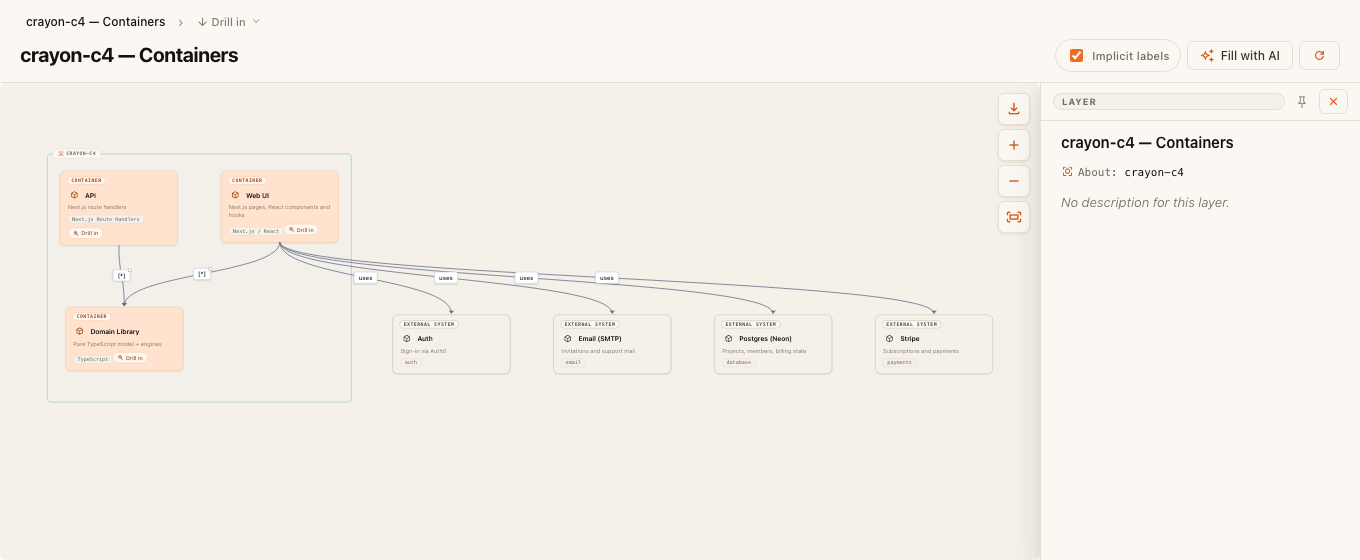
Sketch the system — straight from your code. Generate a CRAYON-C4 architecture model from the workspace, explore it in an interactive C4 viewer inside VS Code, refine it with AI, and hand off to the web app for rich editing — where a non-destructive merge preserves your manual curation across re-runs.
Supported stacks: Next.js · React · .NET · Java (Maven & Gradle).
Commands
- CRAYON-C4: Generate Model — analyze the workspace (multi-project → pick which), choose the model depth (context / container / component / code), and write
crayon-c4-project.json+ provenance + enrichment tasks into each project's own folder. - CRAYON-C4: Open Architecture Viewer — interactive C4 diagram in a panel: drill between levels, select elements, read details. The same viewer component the web app uses.
- CRAYON-C4: Regenerate — re-run and refresh the viewer. Re-runs are merge-safe: renames, descriptions, colours, and layout you curated are preserved.
- CRAYON-C4: Enrich with AI — launch your AI agent CLI (default
claude) in a terminal, seeded with a prompt that fills the empty description fields from the real source files. The viewer's Fill with AI button does the same for just the elements on screen. - CRAYON-C4: Model Flows & Deployment with AI — a deeper, opt-in AI pass that models behavioral flows (
.f4) and deployment topology (.deployCanvas) from the code. It never touches the C4 structure. - CRAYON-C4: Send to Web App — opens the web import so the model flows through the merge (your edits stay protected).
Per-project settings — .crayon/config.json
Put a .crayon/config.json in the analyzed repo to control generation per project (it travels with the repo — every machine and editor behaves the same):
{
  "schema": 1,
  "prompts": { "append": "Describe everything in payments-domain terms." },
  "projects": {
    "exclude": ["*.Tests", "packages/*"],
    "bundles": [{ "name": "Shared packages", "match": ["Acme.Common*"] }]
  },
  "flows": {
    "entryPoints": [
      { "match": "src/app/api/checkout/**", "name": "Checkout endpoint" },
      { "match": "PaymentController" }
    ]
  }
}
prompts— project-scoped instructions for every AI pass (thecrayonC4.promptAppenduser setting is appended after these).projects.exclude/projects.bundles— keep clutter projects off the diagrams, or collapse many small projects into one container. The run report always says what was excluded or bundled.flows.entryPoints— API endpoints, UI components, or classes that deserve a fully traced F4 flow diagram, at method level (BuyButton → HTTP POST /api/checkout → chargeOrder() → taxFor()), with error boundary events where the code actually catches.
The full reference lives in the crayon-c4 CLI docs on npm — the extension and the CLI share one engine, so the config means the same thing everywhere.
Extension settings
| Setting | Default | Meaning |
|---|---|---|
crayonC4.webAppUrl |
https://crayon-c4.com/projects |
Web import entry opened by Send to Web App. |
crayonC4.agentCommand |
claude |
CLI launched for the AI passes. Supports a {prompt} placeholder; otherwise the quoted prompt is appended. |
crayonC4.promptAppend |
— | Extra user-level instructions appended to every AI prompt (after the repo's own .crayon prompts). |
crayonC4.modelDepth |
component |
Default depth for Generate Model. |
Requirements
- The AI commands need an agent CLI on your
PATH(default Claude Code; pointcrayonC4.agentCommandat Codex, Aider, or any other CLI). Everything else — generate, viewer, send to web — is fully offline and needs nothing.
License
Free to use, for commercial and non-commercial work — see the bundled LICENSE (also shown on this extension's License tab). The source code is proprietary (not open source). The standalone CLI (npx crayon-c4 .) is the same engine; the web app offers a free tier with a subset of its functionality.