See your C/C++ codebase, completely visible.
C Through brings Source Insight-style code intelligence into VS Code — built specifically for C and C++ developers who need more than what a standard editor provides.
Large C codebases are hard to navigate. Functions call other functions across dozens of files. Global variables get written in one place and read in five others. You spend more time chasing references than writing code. Source Insight solved this for decades with its Relational Window — but it's a separate, aging tool that lives outside your modern workflow.
C Through closes that gap. It runs entirely inside VS Code, requires zero configuration, no compiler, no build system — just open a file and your code structure appears instantly.
Current Version: 2.4.0
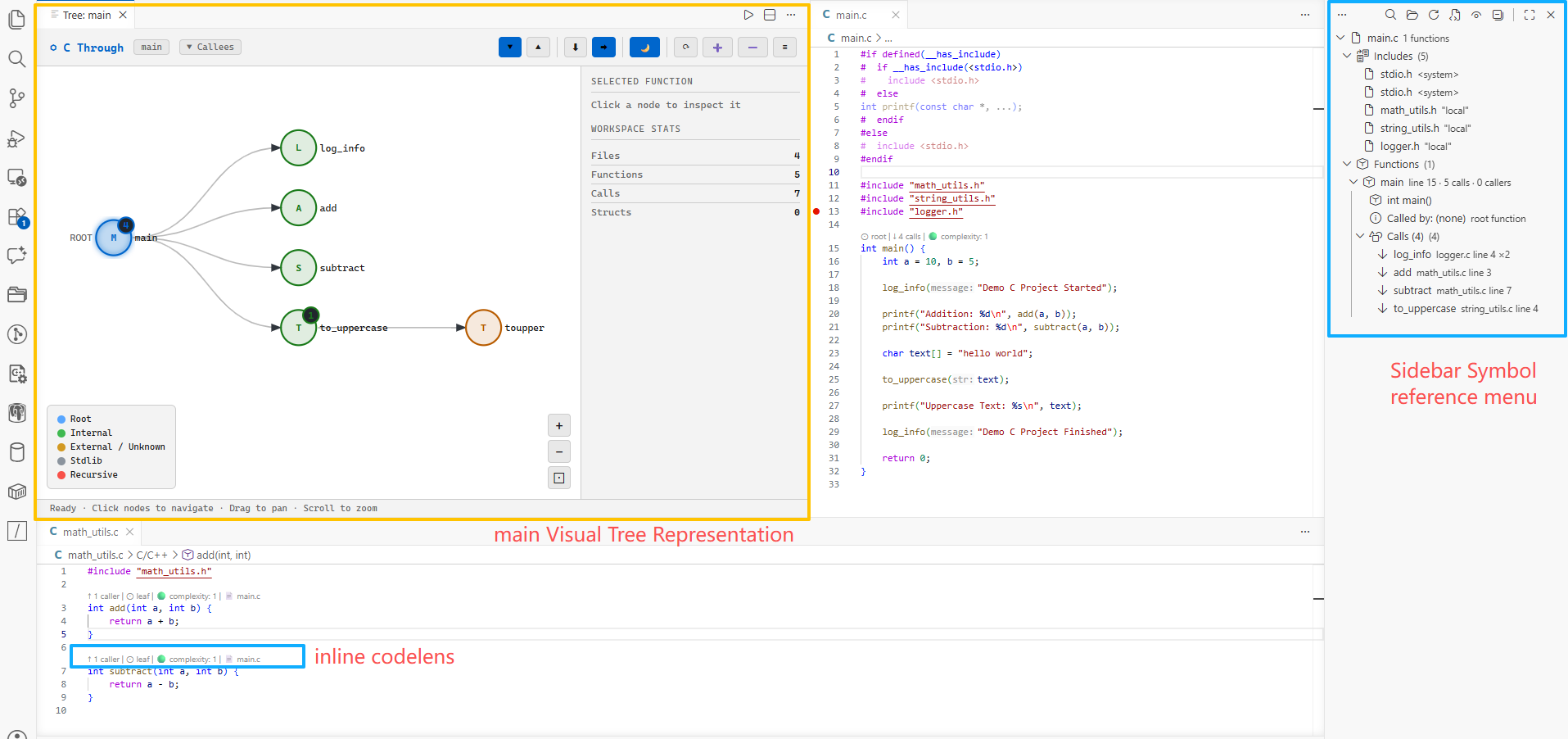
Features
🌳 Sidebar Tree View
A live, structured breakdown of every C/C++ file — organized into collapsible sections:
- Includes — all
#includedependencies with system vs local distinction - Structs / Types — every
structandtypedefwith field listings - Macros — function-like and value macros with their expansions
- Global Variables — file-scope variable declarations
- Functions — every function with its callers, callees, return type, and line number
Click any item to jump directly to its definition in the source file.
🔍 Interactive Call Graph
A fully interactive visual graph of function call relationships.
- Pan — click and drag the canvas
- Zoom — scroll wheel or +/− buttons
- Click node — highlights it and fills the Selected Node card with its details
- Double-click node — collapse or expand that node's children independently
- Click +N badge — toggle a single node without affecting siblings
- ⬇ Top→Down / ➡ Left→Right — toggle layout direction
- Drill down — re-root the tree on any node
- ☰ Sidebar — collapsible Legend and Workspace Stats sections
Node colors:
| Color | Meaning |
|---|---|
| 🔵 Blue | Root function (current focus) |
| 🟢 Green | Internal project function |
| 🟠 Orange | External / unknown function |
| 🔴 Red | Recursive call detected |
◇ Data Symbols in the Graph
The graph isn't limited to callers and callees. Toggle the ◇ toolbar button to see the globals, macros, and structs each function actually touches, drawn as diamond nodes attached to it.
| Shape / Color | Meaning |
|---|---|
| ◇ Orange | Global — written |
| ◇ Blue | Global — read |
| ◇ Purple | Global — address taken |
| ◇ Cyan | Macro |
| ◇ Pink | Struct / union |
- Use the Globals / Macros / Structs checkboxes in the Legend to show only the kinds you care about
- Click any diamond to jump straight to that symbol's definition
- Selecting a function node lists every global, macro, and struct it uses in the Selected Node card — each one clickable — even with the ◇ nodes turned off
💡 CodeLens Inline Metrics
Clickable annotations appear directly above every function definition — no panel switching required.
  ↑ 4 callers  ↓ 7 calls  🟡 complexity: 11  📄 main.c, driver.c
  int process_packet(PacketHeader *hdr, uint8_t *buf, int len) {
| Lens | Click Action |
|---|---|
↑ N callers |
Open callers tree |
↓ N calls |
Open callees tree |
🟢/🟡/🔴 complexity: N |
Open relational tree |
📄 file1.c, file2.c |
Open callers tree (cross-file) |
⊙ referenced N× |
No direct callers — registered via pointer (hover for sites) |
🌐 globals: g1, g2 · ✏️ 2 writes · 👁 3 reads |
Globals this function touches |
⚠ dead code — no callers found |
Trigger workspace scan |
Complexity thresholds:
- 🟢 1–9 — Simple, easy to test
- 🟡 10–19 — High, consider refactoring
- 🔴 20+ — Very high, hard to maintain
📂 Flexible Scan Scope
| Scope | How |
|---|---|
| Single file | Auto-analyzed on open |
| Specific directory | Right-click any folder → C Through: Analyze This Directory |
| Entire workspace | C Through: Analyze Entire Workspace |
| Re-scan | Re-scan Last Scope button in sidebar toolbar |
Cross-file caller/callee relationships are fully resolved after any multi-file scan.
🔍 Search & Filter
Sidebar Search & Filter: The C Through: Search & Filter panel sits above the sidebar tree with an embedded search box and category checkboxes.
- Type any part of a name in the search box — Includes, Structs, Macros, Globals, and Functions filter to matches instantly (no pop-up)
- Toggle the Includes / Structs / Macros / Globals / Functions checkboxes to show or hide whole sections, with Select all / Clear all shortcuts
- Click ✕ to clear the search
- The 🔍 toolbar icon (or
Ctrl+Shift+P→C Through: Search Sidebar) reveals and focuses the search box - Press
Ctrl+Alt+S(Cmd+Alt+Son macOS) to jump straight into the search box from anywhere — rebind it via the ⌨ Shortcut link in the panel orC Through: Configure Keyboard Shortcuts
Call Graph Search: Search inside the visual call graph to find nodes quickly.
- Type in the Search nodes… input box in the call graph toolbar
- Matching nodes are highlighted at full opacity with a glow effect
- Non-matching nodes are dimmed to 20% opacity
- Click ✕ to clear the search
- Search term persists across panel re-opens
Cursor Sync: Keep the sidebar in step with where you are in the code.
- Move the editor cursor to a function or global variable — the C Through tree selects and reveals that symbol
- Placing the cursor on a call site reveals the called function's definition; elsewhere it selects the enclosing function
- Highlights without stealing focus from the editor
- Toggle off with the
cThrough.syncCursorsetting
☠ Dead Code Report
A dedicated report panel showing all dead and unused code across your entire workspace.
Open via Ctrl+Shift+P → C Through: Show Dead Code Report or the ⚠ button in the sidebar toolbar.
Detects:
- Unused Functions — no callers and no indirect references, with severity and confidence rating. Functions registered in command tables or used as thread entries / callbacks are recognised as live and not reported
- Unused Globals — declared but never referenced, or written but never read
- Unused Macros — defined but never referenced in any function body
- Unresolved Externs — extern declarations with no definition found in scanned files
Panel features:
- Summary dashboard with counts by category and severity
- Tabs: All / Functions / Globals / Macros / Unresolved Externs
- Filter bar to search findings by name or file
- Click any row to jump directly to that source line
- ⟳ Analyze Workspace button to re-scan and refresh the report
- Dark / Light theme toggle
Severity levels:
| Level | Meaning |
|---|---|
| 🔴 High | Static function with no callers, or global never referenced |
| 🟡 Medium | Non-static function with no callers, or write-only global |
| 🟢 Low | Unused macro |
| ⚪ Info | Unresolved extern declaration |
Note: Always run Analyze Entire Workspace before opening the report for accurate cross-file results.
🔗 Indirect References — Commands, Threads & Callbacks
Not every function is called directly. In embedded and CLI codebases, functions are registered in command tables, handed to task-creation APIs, or wired up as callbacks — so a naive "who calls this?" says nobody.
C Through finds those registration sites:
static struct cmds show_subcmds[] = {
    { "config-list", MATCH_AMB, 0, 0, do_show_config_list, NULL, ... },  // ← found
};
tid = thread_create("ipacl", PRI_NORMAL, 0, 1024*64, ip_acl, NULL, 0);      // ← found
- Functions referenced by pointer show a Referenced (N) section listing every registration site
- CodeLens shows
⊙ referenced N×instead of💀 0 callers - They are excluded from the Dead Code Report — no more false "unused function" noise
- Scope-aware: a parameter or local named like a function (
int vty) is not mistaken for a reference
These are references, not resolved call edges — C Through shows you where a function is registered, and treats it as live. It does not draw a fake call arrow from the dispatcher.
⚡ Auto-Refresh on Save
Save a file and only that file is re-parsed — the sidebar, CodeLens, and indexes update in place, with no full workspace rescan.
- Enabled by default; turn off with
cThrough.autoRefresh - Only files inside your last scan scope are refreshed
- A 4,700-line file re-parses in roughly 75 ms
🔎 Global Variable Reference Tracker
Expand any global variable in the sidebar to see its complete usage across all files:
- Defined / Extern declared — where it lives and where it is imported
- Written — every function that assigns to it, with file and line
- Read — every function that reads it (conditions, expressions, right-hand values)
- Address taken — every
&varusage
Writes are detected beyond plain = assignment:
| Pattern | Counted as |
|---|---|
g = x; · g += x; · g++ |
write |
arr[i] = x; · s[6].field = x; · p->next->val = x; |
write to the base global |
strcpy(g, s) · memcpy(g, …) · sprintf(g, …) · memset(&g, …) |
write (destination argument) |
if (g == 1) · y = g + 1; · f(g) |
read |
Every entry is clickable and jumps to the exact source line.
CodeLens above every global declaration shows:
    🌐 global  int    ✏️ 3 writes  👁 7 reads  · 4 functions  · 2 files
    int g_counter = 0;
Installation
From VS Code Marketplace
- Press
Ctrl+Shift+X - Search "C Through"
- Click Install
From VSIX
code --install-extension c-through-2.4.0.vsix
Usage
Quick Start
- Open any
.cor.hfile — auto-analyzed, C Through panel appears in Explorer sidebar - Place cursor on any function name → right-click → C Through: Show Relational Tree
Commands (Ctrl+Shift+P)
| Command | Description |
|---|---|
C Through: Analyze Current File |
Parse the active C/C++ file |
C Through: Analyze Entire Workspace |
Scan all C/C++ files in workspace |
C Through: Analyze This Directory |
Pick a folder to scan |
C Through: Re-scan Last Scope |
Repeat the previous scan |
C Through: Show Relational Tree |
Open call graph for symbol at cursor |
C Through: Show Functions Called By This |
Open callees tree |
C Through: Show Functions Calling This |
Open callers tree |
C Through: Toggle CodeLens |
Show/hide inline CodeLens |
C Through: Search Sidebar |
Reveal & focus the Search & Filter box (Ctrl+Alt+S) |
C Through: Configure Keyboard Shortcuts |
Open Keyboard Shortcuts filtered to C Through commands |
C Through: Show Dead Code Report |
Open the dead code analysis report panel |
Context Menus
- Editor — right-click inside any C/C++ file for tree commands
- Explorer — right-click any folder for Analyze This Directory
Settings
| Setting | Default | Description |
|---|---|---|
cThrough.maxDepth |
5 |
Maximum call tree traversal depth |
cThrough.showStdLib |
false |
Include stdlib calls in tree |
cThrough.autoRefresh |
true |
Re-parse file on save |
cThrough.enableCodeLens |
true |
Show inline CodeLens |
cThrough.syncCursor |
true |
Select the symbol at the editor cursor in the sidebar |
cThrough.includeGlob |
**/*.{c,h,cpp,hpp} |
File pattern for scan |
cThrough.excludeGlob |
**/node_modules/** |
Paths to exclude from scan |
Example — scan only src/, skip build/ and vendor/:
{
  "cThrough.includeGlob": "src/**/*.{c,h}",
  "cThrough.excludeGlob": "{**/build/**,**/vendor/**,**/third_party/**}"
}
How It Works
C Through uses regex-based static analysis — no compiler, no language server, no build system required. It indexes code that would otherwise need a working compile_commands.json, which makes it useful on vendor SDKs and embedded trees that never build cleanly inside an IDE.
The parser:
- Strips comments and string/char literal contents (line positions preserved)
- Extracts
#include,#define,struct/typedefdefinitions - Identifies function definitions by signature pattern matching
- Extracts all call sites inside each function body
- Classifies global variable access per function — read / write / address-taken
- Collects macro and struct/type usage per function
- Finds indirect references (function names used as values, not calls)
- Calculates cyclomatic complexity per function
- Builds a cross-file caller/callee index across all scanned files
Speed — measured on a real embedded C tree (81 files, 28.5k lines):
| Operation | Time |
|---|---|
| Analyze workspace (28.5k lines) | ~430 ms |
| Analyze workspace (286k lines) | ~3.5 s |
| Sidebar load | ~2 ms |
| Call graph (2,000 nodes) | ~9 ms |
| Re-parse on save (4,700-line file) | ~75 ms |
Known Limitations
C Through trades compiler-grade accuracy for zero setup and speed. Where that shows:
- No preprocessor evaluation — code inside
#if/#ifdefbranches is parsed regardless of whether it would actually compile - Function-pointer call targets are not resolved —
fp()is recorded as a call tofp, not to whatever it points at. (Where a function is registered — command tables, thread entries, callbacks — is detected; see Indirect References) - Macro-generated signatures are not expanded — when a macro builds the whole declaration (
DEFINE_HANDLER(alpha) { … }), the real function name is never seen, and the macro name can surface as a symbol instead. Macro-prefixed signatures (PAM_EXTERN int f(),ULONG f(),BOOL f()) parse correctly - Macro and struct usage links to the definition, not to each use site — they are matched by name against the macro/struct tables, so there is no per-use line number
- C++ support is minimal — the parser targets C. Templates and class member functions are not indexed;
.cpp/.hppfiles are scanned for C-style constructs only - Analysis is in-memory — there is no on-disk symbol database, so a workspace scan is repeated after a VS Code restart
For compiler-accurate go-to-definition and find-all-references, pair C Through with clangd or C/C++ IntelliSense — C Through is for seeing the shape of the code, especially where those tools cannot be configured.
License
MIT © 2026