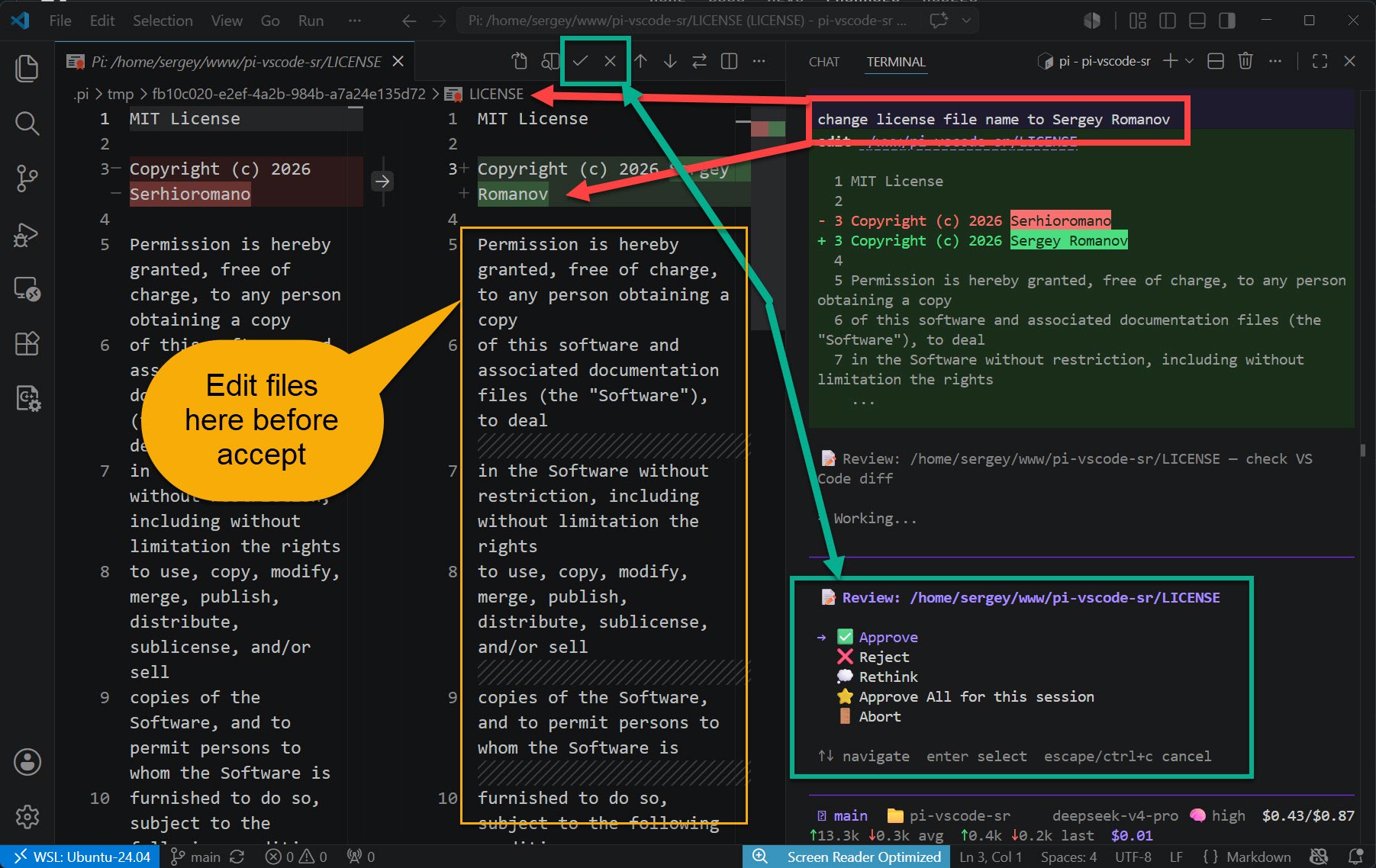
Code review companion for the Pi Coding Agent. When Pi proposes a file change, you can review it either in VS Code's diff editor or directly in the terminal — both interfaces work in parallel, and whichever responds first wins.
Review options
| Interface | Available actions |
|---|---|
| VS Code diff editor | ✓ Approve, ✗ Reject |
| Terminal TUI (command line) | ✅ Approve, ❌ Reject, 💭 Rethink, ⭐ Approve All, 🚪 Abort |
- Approve — writes the proposed change to the file
- Reject — discards the change, file untouched
- Rethink (terminal only) — discards the change and sends feedback back to the agent so it can try again
- Approve All (terminal only) — auto-approves all changes for the rest of the current prompt
- Abort (terminal only) — immediately stops the agent session
How it works
- Pi agent wants to write or edit a file
- The pi-vscode-sr npm package intercepts the tool call and writes a review request to
.pi/review-requests/{uuid}.json - The terminal TUI appears immediately; simultaneously, this VS Code extension watches for new requests, opens a diff editor with Accept/Reject buttons
- You can respond in either interface — they race, and whichever answers first wins
- Your decision is written to
.pi/review-results/{uuid}.json— Pi reads it and either applies or discards the change
Prerequisites
Install the Pi extension first:
[!IMPORTANT] Add into
.gitignorefile
- .pi/review-requests/
- .pi/review-results/
- .pi/tmp/
- .pi/.vscode-ready
pi install npm:pi-vscode-sr
Or install locally (Recommended):
[!IMPORTANT] I recommend to install it locally because not every folder is a project of Visual Studio Code. Although there is a mechanism to detect if project is opened in VS Code or not anyway it could lead to unexpected behavior.
pi install npm:pi-vscode-sr -l