
Real-time secret & API key detection for VS Code — before you commit, before it's too late.




Why SecretGuard?
Every day, developers accidentally push API keys, database credentials, and tokens to public repositories. Once a secret is in git history — it's permanent. Deleting the file doesn't help; anyone with git log can recover it.
SecretGuard stops secrets at three layers — before they ever leave your machine:
| Layer | When | How |
|---|---|---|
| 🔴 While you type | Real-time | Red squiggly underlines in the editor |
| 🔴 Before you commit | At git commit |
Pre-commit hook blocks the commit |
| 🔴 Across your workspace | On startup | Full scan of every file |
Features
- Real-time detection — scans as you type with an 800ms debounce; no manual action needed
- Inline diagnostics — red squiggly underlines using the VS Code Diagnostics API, exactly like ESLint
- Sidebar findings panel — lists every detected secret grouped by file; click any finding to jump to that exact line
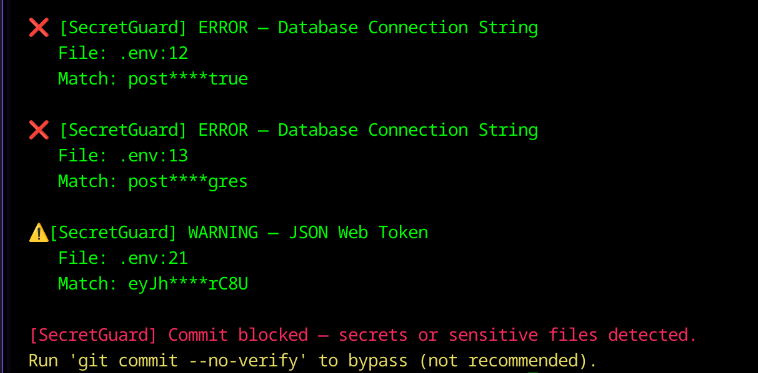
- Commit blocker — git pre-commit hook prevents
git commitif secrets are staged, with redacted output and a rotation link - Shannon entropy analysis — distinguishes real secrets from placeholders like
YOUR_API_KEY_HERE - Git history audit — scans the last 500 commits for previously leaked secrets
- Export reports — one-click HTML or JSON scan report
- Auto-gitignore — automatically adds flagged sensitive files to
.gitignore - Status bar indicator — shield icon confirms SecretGuard is actively running
What It Detects
30+ Secret Patterns
| Secret Type | Pattern | Severity |
|---|---|---|
| AWS Access Key ID | AKIA[0-9A-Z]{16} |
🔴 Error |
| AWS Secret Access Key | 40-char base64 near aws |
🔴 Error |
| GitHub PAT | ghp_[A-Za-z0-9]{36} |
🔴 Error |
| GitHub OAuth Token | gho_[A-Za-z0-9]{36} |
🔴 Error |
| Stripe Live Secret Key | sk_live_[A-Za-z0-9]{24} |
🔴 Error |
| Stripe Test Key | sk_test_[A-Za-z0-9]{24} |
🟡 Warning |
| Google API Key | AIza[0-9A-Za-z_-]{35} |
🔴 Error |
| OpenAI API Key | sk-proj-[A-Za-z0-9]{48} |
🔴 Error |
| Anthropic API Key | sk-ant-[A-Za-z0-9]{40} |
🔴 Error |
| Slack Webhook | hooks.slack.com/services/... |
🔴 Error |
| Discord Webhook | discord.com/api/webhooks/... |
🔴 Error |
| Slack Bot Token | xoxb-[0-9]{11}-... |
🔴 Error |
| Twilio Account SID | AC[a-z0-9]{32} |
🔴 Error |
| SendGrid API Key | SG.[A-Za-z0-9]{22}.[A-Za-z0-9]{43} |
🔴 Error |
| JWT Token | eyJ... |
🟡 Warning |
| PEM Private Key | -----BEGIN.*PRIVATE KEY----- |
🔴 Error |
| SSH Private Key | -----BEGIN OPENSSH PRIVATE KEY----- |
🔴 Error |
| Database URL | postgres://, mysql://, mongodb:// with credentials |
🔴 Error |
| Generic secret assignment | password = "...", secret = "..." |
🟡 Warning |
| High-entropy string | Any 20+ char string with entropy ≥ 3.5 bits/char | 🟡 Warning |
25+ Sensitive Filenames
.env  .env.local  .env.production     → Always flagged
id_rsa  id_ed25519                    → SSH private keys
*.pem  *.p12  *.pfx                   → Certificate files
credentials.json  *service-account*   → GCP / AWS credential files
.vault-token  .netrc  .npmrc          → Auth token files
How It Works
1. Real-time squiggly lines
const stripe_key = "sk_live_aBcDeFgHiJkLmNoPqRsTuV";
//                  ^^^^^^^^^^^^^^^^^^^^^^^^^^^^^^^^^^^
// ⚠ SecretGuard: Stripe Live Secret Key detected
//   Rotate at: https://dashboard.stripe.com/apikeys
2. Sidebar findings panel
SECRETGUARD — FINDINGS
└── 📄 config.js
    ├── 🔴 Stripe Live Secret Key        Line 3
    ├── 🔴 AWS Access Key ID             Line 7
    └── 🟡 Generic Secret Assignment     Line 12
└── 📄 .env
    ├── 🔴 Database URL                  Line 1
    └── 🔴 GitHub PAT                    Line 4
3. Commit blocker
$ git commit -m "add config"

❌ [SecretGuard] ERROR — Stripe Live Secret Key
   File:  config.js:3
   Match: sk_live_****VwXy
   Rotate at: https://dashboard.stripe.com/apikeys

❌ Commit BLOCKED. Fix the issues above, then commit again.
SecretGuard vs. GitHub Push Protection
| Feature | SecretGuard | GitHub Push Protection |
|---|---|---|
| Catches secrets while typing | ✅ | ❌ |
| Catches secrets at commit | ✅ | ❌ |
| Catches secrets at push | ✅ | ✅ |
| Works offline | ✅ | ❌ |
| Works with GitLab, Bitbucket, etc. | ✅ | ❌ |
| Custom detection rules | ✅ | ⚠️ Enterprise only |
| Shows exact line in editor | ✅ | ❌ |
| Entropy-based detection | ✅ | ⚠️ Unknown |
| Git history audit | ✅ Last 500 commits | ⚠️ Push-time only |
| Export scan report | ✅ HTML + JSON | ❌ |
| Auto-gitignore helper | ✅ | ❌ |
| Remediation links per secret | ✅ | ❌ |
| Response time | ✅ Milliseconds (local) | ⚠️ Seconds (network) |
| Cost | ✅ Free / MIT | ✅ Free for public repos |
GitHub Push Protection is your last line of defense. SecretGuard is your first three.
Getting Started
Install from Marketplace
- Open VS Code
- Press
Ctrl+Shift+Xto open Extensions - Search SecretGuard
- Click Install
Install from VSIX
code --install-extension secretguard-git-protect-1.0.1.vsix
Enable the commit blocker
Open the command palette (Ctrl+Shift+P) and run:
SecretGuard: Install Git Pre-commit Hook
Configuration
Open VS Code Settings (Ctrl+,) and search secretguard:
| Setting | Default | Description |
|---|---|---|
secretguard.enableRealtime |
true |
Scan as you type |
secretguard.debounceMs |
800 |
Delay (ms) after keystroke before scanning |
secretguard.entropyThreshold |
3.5 |
Entropy cutoff — raise to reduce false positives |
secretguard.scanOnOpen |
true |
Full workspace scan when extension activates |
secretguard.maxFileSizeKb |
500 |
Skip files larger than this |
secretguard.excludePatterns |
node_modules, dist, .git |
Glob patterns to skip |
Commands
Ctrl+Shift+P → type SecretGuard:
| Command | Description |
|---|---|
SecretGuard: Scan Entire Workspace |
Scan all files in the workspace |
SecretGuard: Scan Current File |
Scan only the active editor file |
SecretGuard: Scan Git History |
Audit the last 500 commits |
SecretGuard: Show All Findings |
Focus the sidebar findings panel |
SecretGuard: Export Scan Report |
Save HTML or JSON report to disk |
SecretGuard: Add Flagged Files to .gitignore |
Auto-gitignore sensitive files |
SecretGuard: Clear All Warnings |
Reset all findings |
SecretGuard: Toggle Real-time Scanning |
Enable or disable live scanning |
Testing
Test Suites: 2 passed
Tests:       43 passed ✓

Coverage:
  ✓ AWS key detection + redaction
  ✓ GitHub PAT detection
  ✓ Stripe live / test keys
  ✓ PostgreSQL + MongoDB URLs
  ✓ PEM / SSH key headers
  ✓ Google API key
  ✓ OpenAI + Anthropic keys
  ✓ Slack + Discord webhooks
  ✓ Placeholder suppression (false positives)
  ✓ Custom entropy thresholds
  ✓ Filename blocklist (.env, id_rsa, etc.)
Tech Stack
| Layer | Technology |
|---|---|
| Language | TypeScript (strict mode) |
| Bundler | esbuild — 31.7 KB output |
| Detection engine | Regex + Shannon entropy |
| VS Code integration | Diagnostics API, TreeDataProvider, StatusBar |
| Git integration | Pre-commit hook (Node.js CLI) |
| Testing | Jest + ts-jest (43 tests) |
For architecture details, see ARCHITECTURE.md.
Local Development
# Clone
git clone https://github.com/Dharaneswara-Reddy/secretguard-vscode.git
cd secretguard-vscode

# Install dependencies
npm install

# Build
npm run build

# Run tests
npm test

# Press F5 in VS Code to launch the Extension Development Host
Contributing
Contributions are welcome. To add a new secret pattern:
- Fork the repository
- Add your rule to
src/rules/contentRules.ts - Add a test case to
test/scanner.test.ts - Open a Pull Request
Known Limitations
| Limitation | Notes |
|---|---|
| Desktop VS Code only | No browser or web editor support |
| Text files only | Binary files are skipped |
| Obfuscated secrets may pass | Base64-encoded secrets won't match patterns |
| Entropy may flag long variable names | Raise entropyThreshold to reduce false positives |
License
MIT © 2026 Palle Venkata Dharaneswara Reddy — see LICENSE
⭐ If SecretGuard saved you from a security breach, give it a star on GitHub and a review on the Marketplace.
Built to keep developer secrets safe.