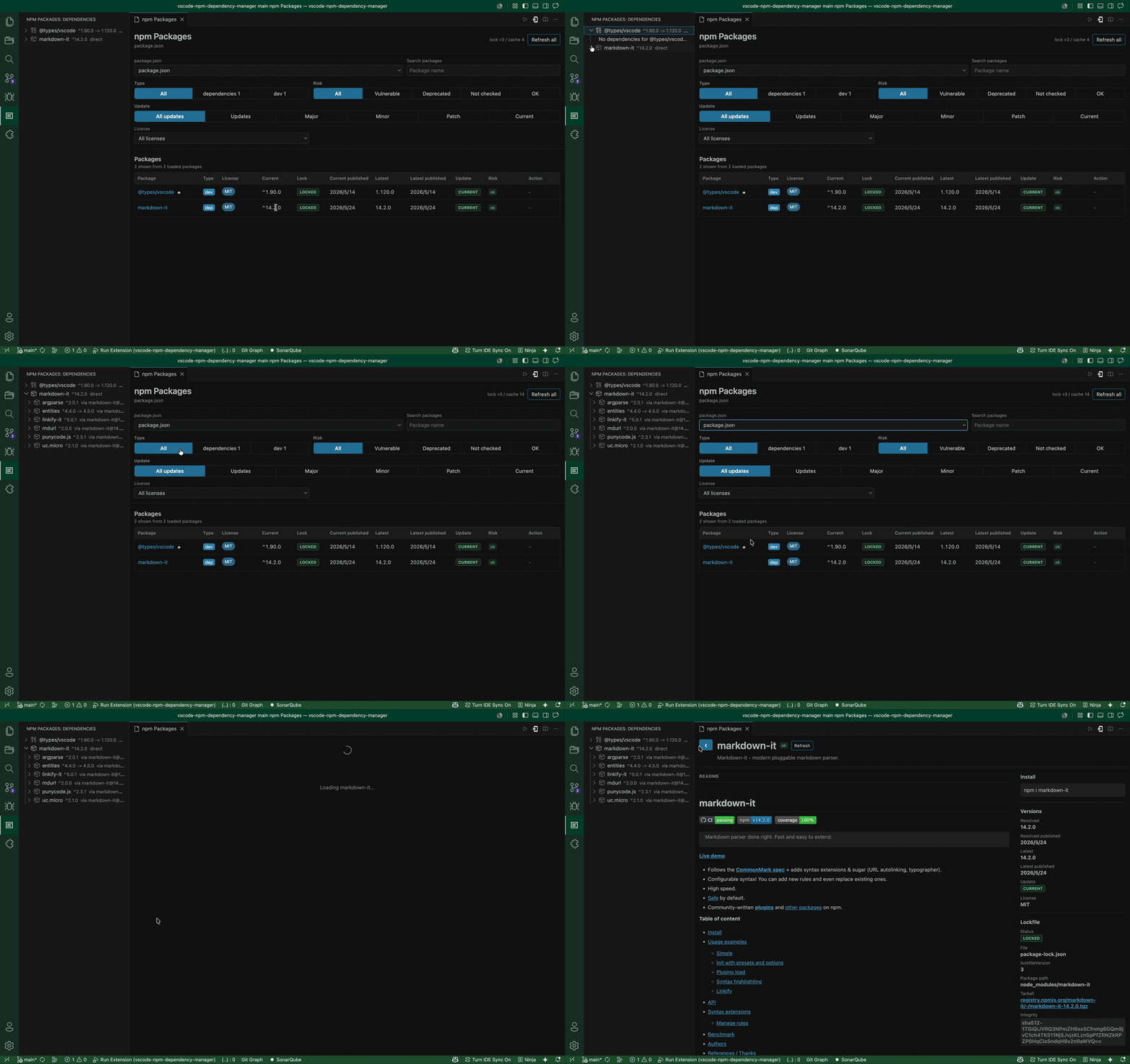
npm-dependency-manager helps you inspect npm dependencies without leaving VS Code. It finds package.json files in the current workspace, shows the selected package list in the activity bar, and opens a richer dashboard in the editor for updates, lockfile data, README content, downloads, and security signals.
Features
- Finds workspace
package.jsonfiles and prefers the workspace rootpackage.jsonby default. - Detects npm, pnpm, Yarn, or Bun from the
packageManagerfield first, then frompackage-lock.json,pnpm-lock.yaml,yarn.lock,bun.lock, orbun.lockb. - Uses the detected package manager for update actions and package detail install commands.
- Shows only the selected
package.jsondependencies in the sidebar. - Expands packages in the sidebar to browse transitive dependencies from npm registry metadata.
- Searches package names and descriptions without refetching registry data.
- Filters by
dependencies,devDependencies, vulnerable packages, deprecated packages, unknown audit state, healthy packages, and update candidates. - Remembers search and filter selections per workspace.
- Shows package licenses in the dependency list and filters by detected license.
- Compares the requested version, package-lock resolved version, latest version, and publish dates.
- Lets you show, hide, and resize dependency table columns, with column preferences remembered.
- Highlights major, minor, and patch update candidates.
- Runs guarded update actions from the list or package detail page with a confirmation prompt.
- Reads
package-lock.jsonfor resolved versions, lock paths, and dependency tree context. - Exports the selected project as a CycloneDX 1.5 JSON or SPDX 2.3 JSON SBOM. Both formats include the resolved npm dependency graph when
package-lock.jsonis available. - Exports a CSV dependency report for all direct dependencies or the current search and filter results. It includes versions, license, update, lockfile, and vulnerability information.
- Checks npm audit bulk advisories for direct and transitive vulnerabilities when a resolved version is available.
- Adds OSV vulnerability results plus CVE-linked EPSS and CISA KEV signals when available.
- Shows deprecated package messages from npm registry metadata.
- Opens a polished package detail page with npm metadata, weekly downloads, links, security information, lockfile context, dependencies, and rendered README content.
- Falls back to GitHub README files when the npm registry does not publish useful README content, including when GitHub repositories use common HTTPS, SSH, or hosted shorthand URL formats.
- Opens README external links through VS Code.
- Includes cache controls and explicit refresh actions for registry, audit, README, dependency, and download data.
Requirements
The extension reads package metadata from the public npm registry and related npm APIs:
https://registry.npmjs.orghttps://api.npmjs.orghttps://api.osv.devhttps://api.first.orghttps://www.cisa.gov
Some README fallbacks are loaded from repository URLs such as https://raw.githubusercontent.com when the npm registry only exposes a README filename or placeholder text.
Vulnerability and dependency tree results are most accurate when a package-lock.json exists next to the selected package.json.
Usage
- Open a Node.js workspace in VS Code.
- Select the
npm Packagesactivity bar view. - Pick a
package.jsonfrom the dashboard dropdown when the workspace contains more than one. - Use the sticky search and filters to narrow the list.
- Select a package to open the package detail page.
- Adjust visible columns or resize column widths when you want a denser or simpler table.
- Expand packages in the sidebar to inspect transitive dependencies.
- Select Export SBOM in the dashboard, or run the export command, then choose CycloneDX or SPDX JSON.
- Select Export CSV to save all direct dependencies or the current search and filter results as a spreadsheet-friendly report.
Commands
npm Packages: Show Dashboardnpm Packages: Refreshnpm Packages: Export SBOM(CycloneDX JSON or SPDX JSON)npm Packages: Export Dependency Report CSVnpm Packages: Open Package
Known Limitations
- npm audit and OSV checks require a resolved package version. Add or update
package-lock.jsonfor packages that showVulnerabilities not checked. - Per-package lockfile parsing, resolved versions, and dependency tree context currently support
package-lock.json. pnpm, Yarn, and Bun lockfiles are detected and used for update-command selection. - SBOM dependency-graph export currently parses
package-lock.json. Without it, the SBOM contains the direct dependencies frompackage.jsonas unresolved components. - Transitive vulnerability attribution depends on the dependency graph recorded in
package-lock.json. - EPSS and KEV signals are shown only for advisories that expose CVE identifiers.
- README rendering supports common npm/GitHub Markdown, but unusual HTML or repository asset layouts may not render exactly like npmjs.com.