Every commit tells a story. This one wears a trench coat.
Noir Commits is a VS Code extension that reads your git commits and generates a living noir detective novel — chapter by chapter — powered by Claude AI.
Your developers become detectives. Your bugs become crimes. Your refactors become late-night re-examinations of cold case files.
Features
- Generates a new noir story chapter from each git commit
- Maintains narrative continuity — characters, open threads, and story arcs persist across chapters
- Maps commit types to noir events: bugs are crimes, features are new leads, fixes close cases
- Auto-trigger mode writes a chapter automatically after every commit
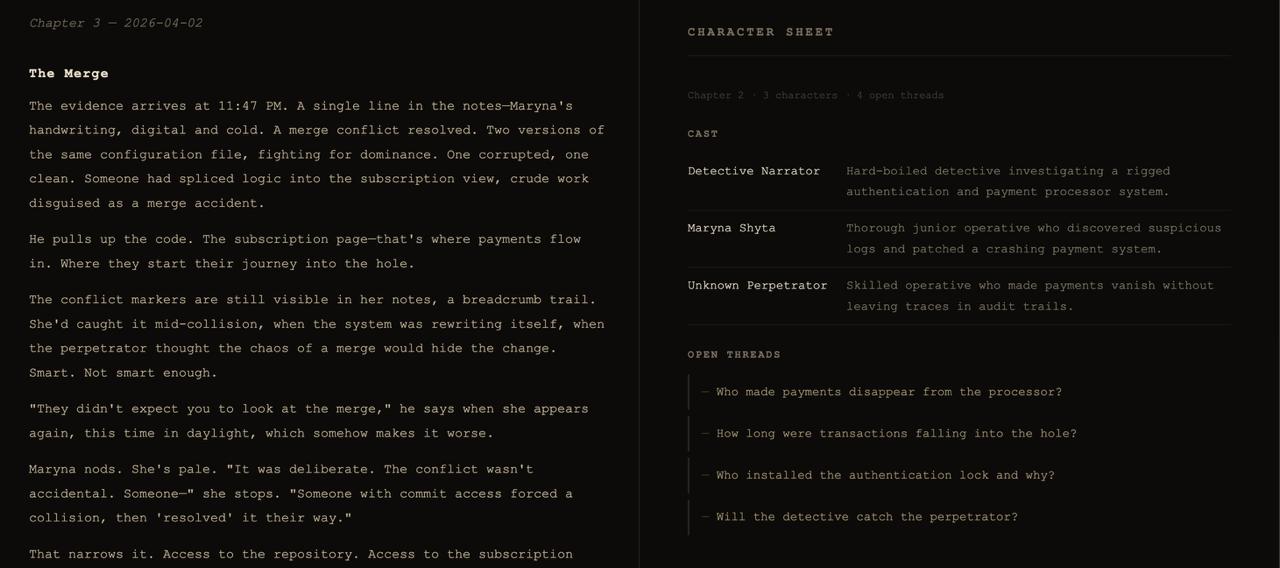
- Story preview panel — dedicated dark-themed webview renders your story in noir style
- Character sheet — tracks the full cast and open plot threads accumulated across chapters
- Detective name — set your own alias; your real git author name is never sent to any AI provider
Requirements
An Anthropic API key. On first activation, the extension will walk you through setup.
Getting Started
- Install the extension
- A setup wizard runs automatically on first activation — choose your AI provider and set a detective alias
- Open a git repository and run Noir Commits: Write Next Chapter
The chapter opens in the story preview panel and is also written to story.md in your workspace root.
Commands
| Command | Description |
|---|---|
Noir Commits: Write Next Chapter |
Generate a chapter from the latest commit |
Noir Commits: Skip Current Commit |
Mark the latest commit as processed without writing a chapter |
Noir Commits: Open Story Preview |
Open the noir-themed story panel |
Noir Commits: Show Character Sheet |
View the full cast and open plot threads |
Noir Commits: Toggle Auto-Generate After Commit |
Enable or disable auto-generation after each commit |
Noir Commits: Set Detective Name |
Set or change your character alias in the story |
Noir Commits: Set API Key |
Store your Anthropic API key securely |
Noir Commits: Remove API Key |
Delete the stored API key |
Settings
| Setting | Default | Description |
|---|---|---|
noirCommits.detectiveName |
"" |
Your detective alias in the story — replaces your git author name |
noirCommits.model |
claude-haiku-4-5-20251001 |
Claude model — Haiku (fast, cheap) or Sonnet (richer prose) |
noirCommits.autoTrigger |
false |
Automatically write a chapter after each commit |
noirCommits.projectDescription |
"" |
A short project description used as narrative backdrop |
Privacy
- Your git author name is never sent to any AI provider — use a detective alias instead
- Commit messages, dates, and file-change summaries are sent to the selected AI provider to generate story text
- Your API key is stored in VS Code SecretStorage (OS keychain) — never written to disk or sent anywhere except the Anthropic API. Uninstalling the extension does not remove the key — use Noir Commits: Remove API Key before uninstalling if you want it deleted
- Story state is saved to
.noir-commits-state.jsonin your workspace root — add it to.gitignoreto keep it private - Generated story content is labeled as AI-generated in the preview panel and in
story.md - To report an issue or unexpected output: open an issue
The city doesn't care about your sprint velocity. But it remembers every commit.