Instantly render Python math expressions as beautifully formatted equations. Supports NumPy, SymPy, SciPy, and standard Python math — works in .py files and Jupyter notebooks.
Usage
- Select any Python math expression or line
- Press
Shift+Alt+VorShift+option+Vto open the equation preview - Click "Open Extended Viewer" for a larger view with Raw / Evaluated toggle
Examples
| Python | Rendered |
|---|---|
sp.integrate(f, (x, 0, 1)) |
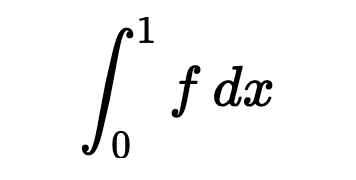 |
np.linalg.det(A) |
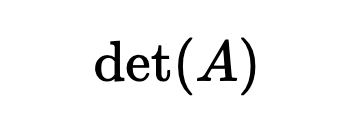 |
sp.diff(f, x, 2) |
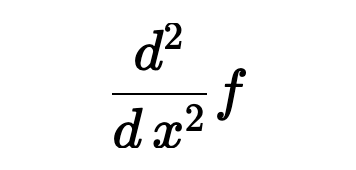 |
sp.Matrix([[a, b], [c, d]]) |
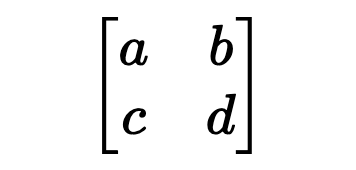 |
np.sqrt(x**2 + y**2) |
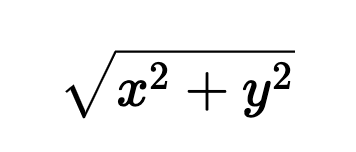 |
Features
- Library-agnostic —
np.trapz,sp.integrate, andscipy.integrate.quadall render as ∫ - SymPy evaluation — when SymPy is installed, shows both the raw equation and the evaluated/simplified result
- Wide coverage — trig, hyperbolic, inverse trig, integrals, derivatives, limits, sums, products, matrices, special functions (Γ, erf, Bessel, etc.), Fourier transforms, and more
- Greek letters & subscripts —
theta,omega2,x_iall render correctly - Works in Jupyter notebooks
Keybinding
| Action | Windows / Linux | Mac |
|---|---|---|
| Quick preview | Shift+Alt+V |
Shift+Option+V |
You can also right-click a selection and choose "Visualize Expression" from the context menu.
Requirements
- Python + SymPy (optional) — if installed, enables the "Evaluated" view showing simplified results
- No other dependencies required — the extension works offline out of the box
Support
If you find this extension useful, consider supporting its development:
