




Turn engineering best practices into automated, predictable code reviews — without leaving your editor.
Code generation is fast. Code review is the new bottleneck. LLMs produce pull requests in minutes; reviewing them thoroughly still takes hours. Linters catch syntax. Unit tests check behavior. OpenShrike systematically verifies that a change follows the architectural decisions, security practices, and engineering standards set by your team.
This extension brings the OpenShrike security-first, self-hosted code reviewer into VS Code. Run a scan from the sidebar, browse findings with evidence and remediation, and fix them with an agent — all against the LLM provider of your choice, with your code never leaving your machine.
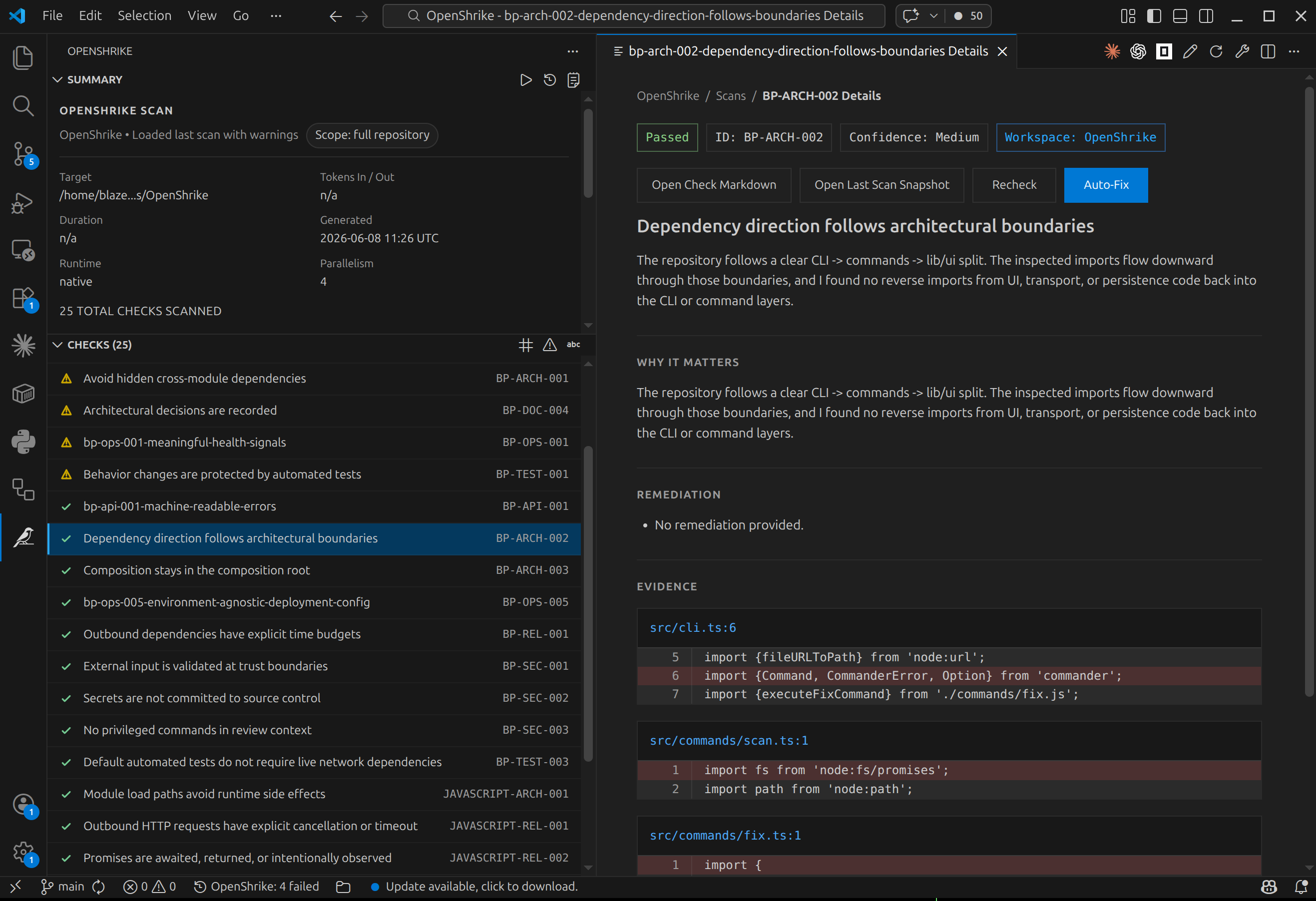
Features
- Scan from the sidebar. A dedicated OpenShrike activity-bar view with a Summary and a Checks panel. Kick off a scan, watch progress live, and cancel at any time.
- Findings with evidence. Each finding opens a detail view with the rationale, the offending code, and concrete remediation — click through to the exact evidence in your source.
- Auto-fix with agents. Hit Fix on a failing check to spawn an agent that repairs the violation, then Recheck to confirm it passes.
- Predictable, Markdown-driven checks. Your standards live in the repo as
versioned Markdown under
.openshrike/checks/. You know exactly what is verified on every change — no free-form prompt, no proprietary DSL, no external dashboard. - Beyond linters and tests. Enforce architectural boundaries, test discipline, boundary validation, secret hygiene, timeouts and cancellation, observability, and API safety.
- Flexible scope. Scan uncommitted changes, a branch diff, a PR-style diff, or the whole repository — switch scope and runtime straight from the view title bar.
- BYOK. Bring your own key and model — OpenAI, Anthropic, Bedrock, Azure, Ollama, LMStudio, and anything else OpenCode supports.
- Self-hosted. Runs locally or on
docker. Your code does not leave your infrastructure if you use local model.
Getting started
1. Install the CLI
The extension drives the shrike CLI. Install it once with
Node.js 22+:
npm install -g @networkperspective/openshrike
2. Initialize your project
From the integrated terminal, run the interactive setup. It detects the
project, helps establish AI provider access, lets you choose defaults, and seeds
.openshrike/checks/:
shrike init
You can also trigger this from the command palette: OpenShrike: Run Init In Terminal.
3. Scan
Open the OpenShrike view in the activity bar and press Run Scan (or run OpenShrike: Run Scan from the command palette). By default it scans uncommitted changes; use Change Scope to target a branch, a PR diff, or the full repository.
How it works
OpenShrike policies are bundles of checks for things like:
- architecture and dependency boundaries,
- behavior-covering and deterministic tests,
- boundary validation and secret hygiene,
- time budgets, retries, and cancellation,
- deployability, health signals, and observability,
- API and data-shaping safety.
shrike init seeds the selected policies into repo-local Markdown under
.openshrike/checks/, so the checks that actually run can be reviewed in code
review and edited or extended by maintainers. OpenShrike then executes those
project-local checks with OpenCode and produces findings with evidence,
rationale, and remediation.
Commands
All commands are available from the command palette under the OpenShrike category, and the most common ones from the view title bars:
| Command | Description |
|---|---|
| Run Scan | Scan using your saved defaults |
| Run Scan With Overrides | Scan with one-off scope / runtime / policy overrides |
| Change Scope | Switch between uncommitted, branch, PR, or full-repo scans |
| Change Runtime | Switch between native and docker runtimes |
| Cancel Scan | Stop the current scan |
| Load Last Scan | Restore the most recent scan results |
| Fix | Spawn an agent to repair a failing check |
| Recheck | Re-run a single check after editing or fixing |
| Run Init In Terminal | Run shrike init in the integrated terminal |
Requirements
- Node.js 22+
- The
@networkperspective/openshrikeCLI on yourPATH - An LLM provider configured via
shrike init(BYOK)
Links
- Website: https://network-perspective.github.io/OpenShrike/
- GitHub: https://github.com/Network-Perspective/OpenShrike
- npm (CLI): https://www.npmjs.com/package/@networkperspective/openshrike
- Discord: https://discord.gg/4MKThAVsy2
- Issues: https://github.com/Network-Perspective/OpenShrike/issues