Other AI tools fix your bug silently. You ship it, and learn nothing.
Neo Bug Forge fixes the bug and makes sure you understand it — the concept behind it, why you hit it, and what to watch for next time. Click any red squiggle, stay in your editor, come out a better developer.
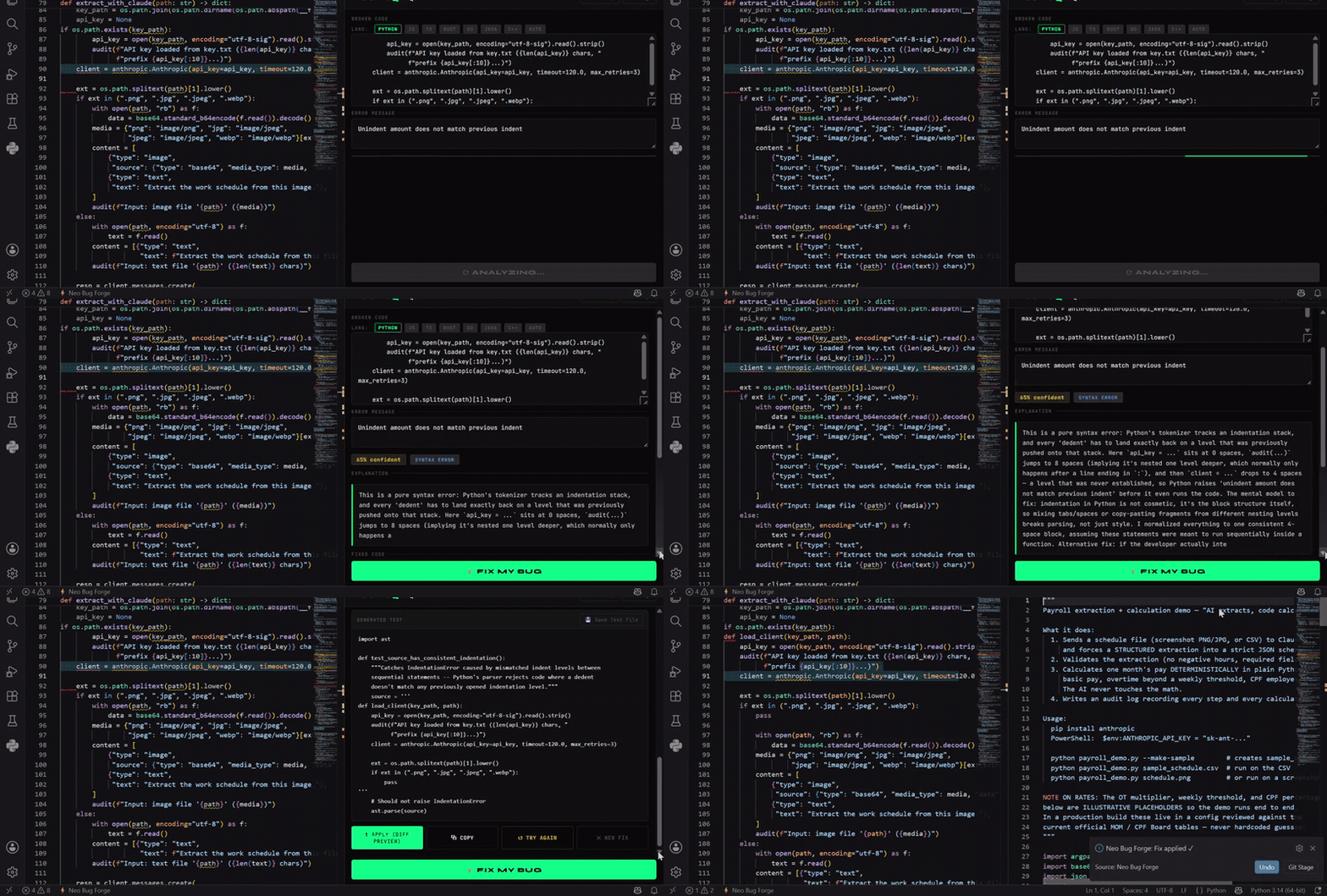
Key Features
- 🎓 Teaches, doesn't just patch — every fix names the underlying concept and the mental-model gap that caused the bug, in plain English
- 🔀 Shows you the fork in the road — when a bug has more than one valid fix, it tells you both and how to choose. Most tools silently decide for you
- 🧪 Self-explaining tests — generated tests open with what they catch and why, so you learn what makes a good regression test
- ⚡ Lightbulb Quick Fix — click any red squiggle → Fix with AI
- 🚀 No signup to start — 10 free fixes the moment you install
- 🧠 Deep workspace context — understands your entire project
- 🔍 Explain Code — learn what any code does, and why it works that way
- ✅ One-click apply — fix goes straight into your file, no copy-paste
- ⚡ Works in Cursor and VS Code
Built for developers who want to get better, not just get unblocked — juniors levelling up, and anyone working in an unfamiliar codebase.
How it works
Install → start fixing immediately. No API key. No signup. No friction.
- Install the extension
- See a red squiggle → click the 💡 lightbulb → ⚡ Fix with AI — Neo Bug Forge
- Fixed code appears in seconds — click Apply to apply it directly
You get 10 free fixes instantly with no account needed. Sign up free at neobugforge.io for 100 fixes/month.
Installation
- Open VS Code → Extensions (
Ctrl+Shift+X) - Search "Neo Bug Forge"
- Click Install
- That's it — start fixing bugs immediately, no setup required
(Optional) Sign up at neobugforge.io to unlock 100 free fixes/month
Usage
Lightbulb — fastest way
- Hover over any red squiggle
- Click the 💡 lightbulb (or press
Ctrl+.) - Select ⚡ Fix with AI — Neo Bug Forge
- Fix appears and applies directly in your file
Keyboard shortcut
Select broken code → press Ctrl+Shift+F (Mac: Cmd+Shift+F) → fix appears
Right-click menu
Select code → right-click → choose:
- Neo Bug Forge: Fix Selected Code — fix bugs
- Neo Bug Forge: Explain Code — understand what the code does
- Neo Bug Forge: Write Test — generate unit tests
Panel
Command Palette → Neo Bug Forge: Open Panel → paste code and error → ⚡ Fix My Bug
What you get back
| ✅ Fixed code | Complete, corrected version — applied directly to your file |
| 🧠 Explanation | Plain-English: what was wrong and what changed |
| 📊 Confidence | How certain the AI is (0–100%) |
| 🏷 Root cause | null_reference · type_mismatch · off_by_one · logic_error · and more |
| 🧪 Test case | Minimal unit test that would have caught this bug |
Lightbulb Quick Fix
Neo Bug Forge integrates with VS Code's diagnostic system. Whenever your language server, TypeScript, ESLint, or any linter flags an error, the ⚡ lightbulb appears automatically.
Configure in Settings:
neo-bug-forge.diagnostics.enabled— turn the lightbulb on/off (default: on)neo-bug-forge.diagnostics.severityThreshold—error(default) ·warning·all
Workspace Context
When you trigger a fix, Neo Bug Forge automatically includes related files for deeper context:
- Files open in your editor
- Files in the same folder as the broken code
- Files that reference the same functions or classes
You'll see a 📎 X context files included badge in the panel.
Configure in Settings:
neo-bug-forge.context.enabled— turn off for sensitive codeneo-bug-forge.context.maxFiles— how many files to include (default: 5, max: 10)
Supported Languages
Python · JavaScript · TypeScript · Java · Rust · Go · C++ · C · C# · Ruby · PHP · Swift · Kotlin · and more (auto-detect)
Pricing
| Plan | Fixes/month | Price |
|---|---|---|
| Keyless trial | 10 | Free — no account, works on install |
| Free | 100 | Free — sign up at neobugforge.io |
| Pro | 500 | $12.99/mo |
| Team | Unlimited (fair use, up to 10 seats) | $49.99/mo |
Sign up at neobugforge.io
Security
- API key stored in VS Code SecretStorage — never written to disk in plaintext
- Code sent over HTTPS, never used to train AI models
- Context collection skips
node_modules,dist, and build folders automatically
Links
👨💻 Available for Hire
Neo Bug Forge was built by Yousef — a full-stack developer specialising in AI-powered tools, VS Code extensions, FastAPI backends, and React apps.
If you need help building something similar — a developer tool, VS Code extension, AI integration, or SaaS backend — I'm available for freelance work.
MIT © 2026 Neo Bug Forge