A VS Code extension that routes a task to the cheapest LLM that clears a confirmed benchmark bar, using the live Modelglass pricing and capability feed. Since v0.3.0 it can also execute the call directly against your own provider key — a fully client-side, BYOK (bring-your-own-key) router: no Modelglass proxy in the request path, ever. Since v0.6.0, it also generates video (via Runway) and audio (via ElevenLabs) the same way — your own keys, no proxy — see Generate Video and Generate Audio below.
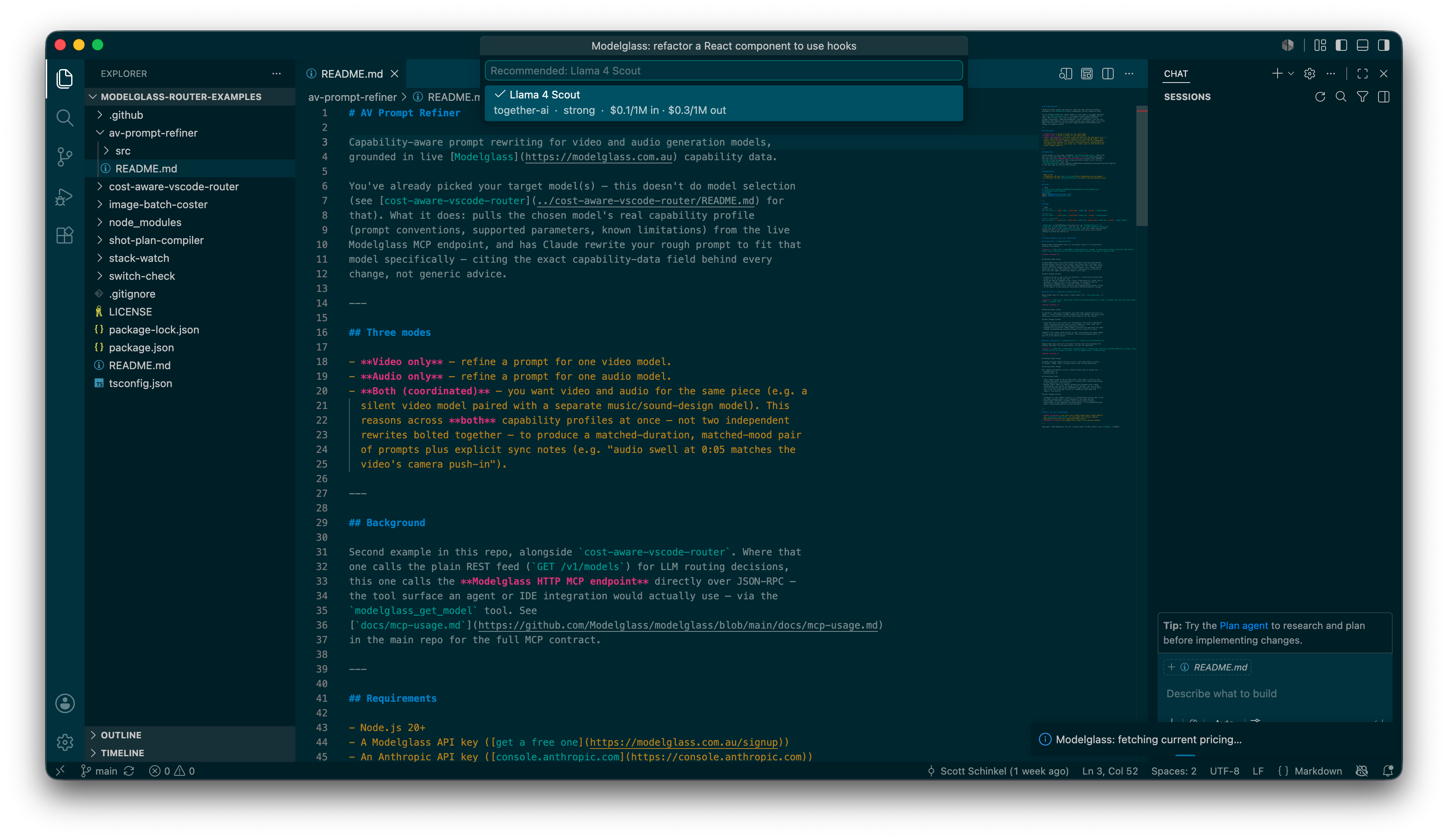
There are two distinct routing commands in this extension — see Commands below for exactly how they differ. Route Task (the original MVP command) only recommends a model; it never calls any provider API. Run Task (new in v0.3.0) executes the call, using a provider key you supply. Since v0.4.0, the router is also available directly inside Copilot Chat — see Use inside Copilot Chat below.
Table of contents
- Use inside Copilot Chat
- Route Task to Cheapest Capable Model
- Run Task on Cheapest Capable Model
- Compare Two Models
- Generate Video (Runway)
- Generate Audio (ElevenLabs)
- Install and Setup
- Commands
- Scope
- Known limitations
- Relationship to
cost-aware-vscode-router - Development
- License
Use inside Copilot Chat
What it does
Brings Run Task's routing directly into Copilot Chat's model picker
(Modelglass Router, new in v0.4.0) — 9 selectable models, one per Run
Task's existing task category (Bug fix / debug, New code generation,
Terminal/CLI/DevOps, Library-aware feature work, Refactor, Test generation,
Documentation generation, Chat/explain, Autocomplete). Every message routes
through the exact same ranking, Pro/Starter fallback chain, and
.modelglass/routing-rules.json support as Run Task, using your own
configured key(s), with no Modelglass proxy in the request path (ADR-0012,
unchanged). Deliberately no automatic task-classifier: nine explicit models,
not one smart one, matching this extension's "explicit choice over hidden
magic" philosophy for Run Task's own category picker.
How to use it
- Configure a provider key first (see Provider API keys below).
- Open Copilot Chat's model picker and select Modelglass Router.
- Pick the model matching what you're doing and chat normally.
A model whose category has no routable model for your configured provider(s) right now still appears in the picker (never hidden — see Provider API keys below for the same principle applied to key setup) and responds with a clear explanation instead of a routed answer.
Requires VS Code 1.104 or newer. On an older VS Code, this integration silently doesn't register — every other command in this extension is unaffected.
Route Task to Cheapest Capable Model
What it does
Recommends the cheapest LLM that clears a confirmed benchmark bar for your task, using the live Modelglass pricing/capability feed — coding tasks ranked by SWE-bench Verified, writing/general tasks by instruction-following rating. Recommendation only — nothing is executed, no provider key needed.
How to use it
- Run Modelglass: Route Task to Cheapest Capable Model from the Command Palette.
- Describe what you're about to do. The extension infers a starting task type (coding / writing / general) from your active file's language — always overridable.
Run Task on Cheapest Capable Model
What it does
Executes a task against your own configured provider key(s) — a fully client-side, BYOK router with no Modelglass proxy in the request path. Ranks your configured provider's models against Modelglass's live benchmark/capability feed (SWE-bench Pro/Verified, Terminal-Bench 2.1, Aider Polyglot/LiveCodeBench, or BigCodeBench, depending on category — with a qualitative capability-rating fallback for categories no benchmark covers well) and calls the cheapest model that still clears a quality bar, using your own key — not simply the highest-scoring one regardless of price, matching this command's own name. Supports OpenAI, Anthropic, DeepSeek, xAI, Mistral, Groq, Together AI, and OpenRouter.
Each of the five benchmark-scored categories has its own default bar (calibrated to that benchmark's real score range — e.g. 60% on SWE-bench Verified, 50% on Aider Polyglot); if every model in your configured provider(s) happens to fall below it, that's a sign the bar doesn't fit today's pool and the extension falls back to the highest-scoring model instead of reporting nothing. The feed is cached locally for ~5 minutes, so a brief Modelglass API blip doesn't block a Run Task call — a fetch failure past that window falls back to the last known-good feed instead of failing the run.
How to use it
- Configure a provider key first — Modelglass: Set Provider API Key (see Provider API keys below).
- Run Modelglass: Run Task on Cheapest Capable Model, pick one of nine task categories (bug fix/debug, new code generation, terminal/CLI/DevOps, library-aware feature work, refactor, test generation, documentation generation, chat/explain, autocomplete), and describe the task. If you have an editor open, your current selection (or the whole file, if nothing's selected) is automatically attached as context — the model sees the code you're actually working on, not just your description of it. No open editor: the task runs on your typed description alone.
- The response opens in its own editor tab beside your code (not the Output channel) — labeled with the category and model that produced it, and flagged if the provider reports the response was cut off at its max output token limit.
Starter vs. Pro
- Starter (one configured key): one execution attempt. A failure (invalid key, rate limit, network/provider error, or a request that times out after 60s with no response) is reported clearly — no automatic retry.
- Pro (multiple configured keys, via Modelglass: Add Provider API
Key): on a failure — including a timeout — automatically retries the
next-best-ranked model on a different configured provider (never the
same provider twice), up to one attempt per configured provider. Pro also
unlocks an optional
.modelglass/routing-rules.jsonfile in your workspace to override the default ranking per category — exclude a provider, force cheapest-first ignoring quality entirely, set an exact model priority order, or set your ownminScore(0–1) quality bar in place of the built-in per-benchmark default described above.minScore/strategy/priorityonly apply to the five benchmark-scored categories (bug fix, new code generation, terminal/CLI, library-aware feature work, refactor);minScorespecifically is a no-op for the four categories that fall back to a qualitative capability rating (those already land on cheapest-among-the-top-rating-tier by default, since a coarse rating scale ties far more often than a continuous benchmark score). A Starter user with arouting-rules.jsonpresent, or attempting to configure more than one provider key, gets a clear upgrade prompt rather than a silent failure.
Compare Two Models
What it does
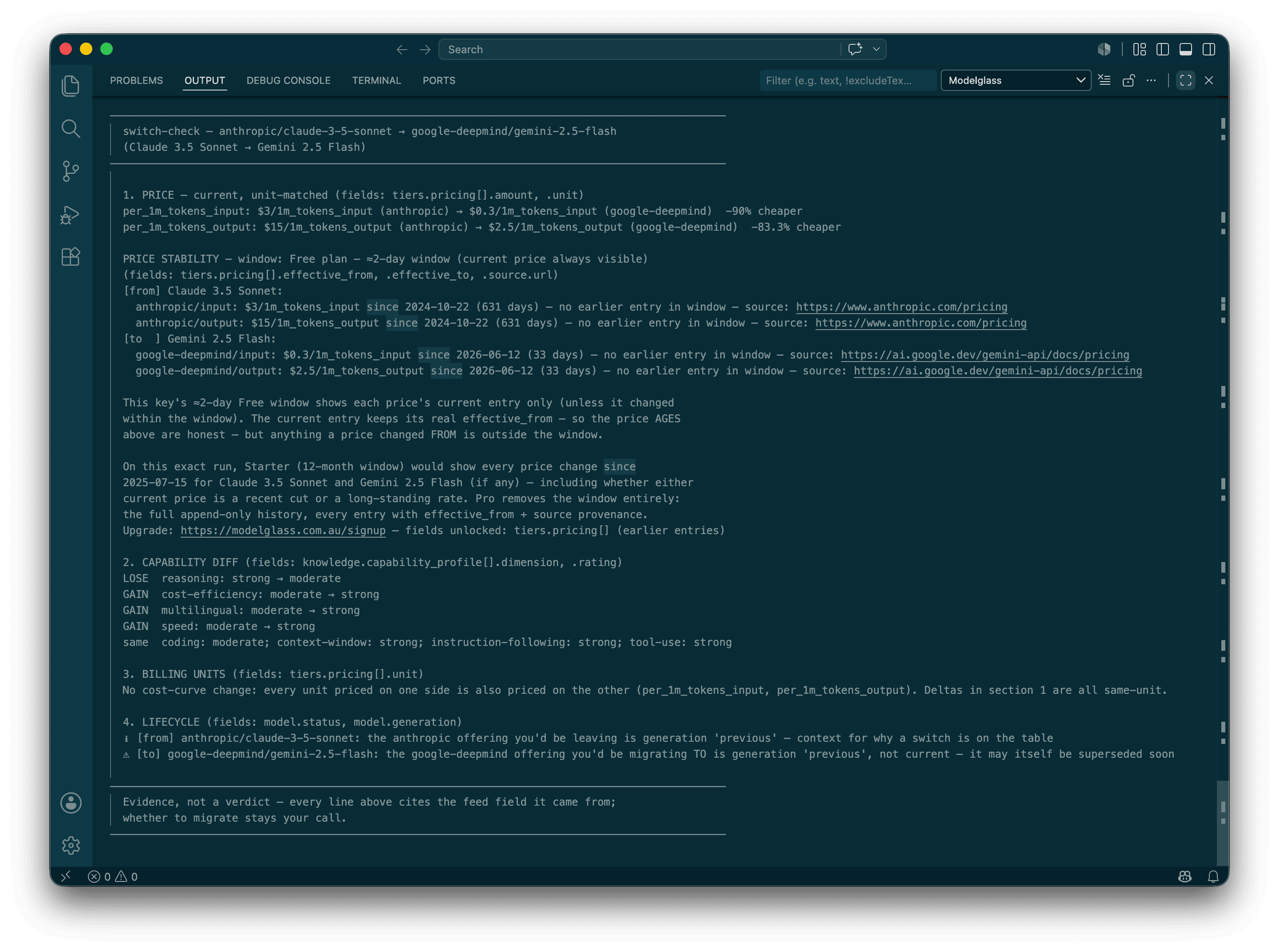
A grounded migration diff between two models — reports the unit-matched price delta and price stability (from the append-only price history), a per-dimension capability diff, billing-unit change warnings, and lifecycle checks. Works across image/LLM/video/audio, and on every plan tier including Free.
How to use it
- Run Modelglass: Compare Two Models from the Command Palette.
- Pick a "from" model, then a "to" model — or accept one of the feed's own suggested competitors.
- Read the diff in the Modelglass Output panel.
Generate Video (Runway)
What it does
Generates video via Runway, using your own Runway API key (BYOK, no proxy) — ranks Runway's video models cheapest-first from the live Modelglass feed. 5 of the registry's 7 Runway entries are offered (see Known limitations). Output ratio is a fixed 1280:720 landscape default, not yet user-selectable. Starter/Pro only, same BYOK tiering as Run Task.
How to use it
- Configure a Runway provider key (see Provider API keys below).
- Run Modelglass: Generate Video (Runway).
- Pick a model, then describe what you want — plus an input image/video file, if the model needs one.
- The job submits and polls to completion with a cancellable progress
notification. The result saves to
.modelglass/generated/and reveals itself in the OS file explorer.
Generate Audio (ElevenLabs)
What it does
Generates or transforms audio via ElevenLabs, using your own ElevenLabs API key (BYOK, no proxy). Starter/Pro only, same BYOK tiering as Run Task.
How to use it
- Configure an ElevenLabs provider key (see Provider API keys below).
- Run Modelglass: Generate Audio (ElevenLabs).
- Choose a mode: Text to Speech (synchronous), Dub Audio/Video (async, polled with a cancellable progress notification), or Clone a Voice (Instant Voice Cloning, synchronous).
- TTS/dubbing results save to
.modelglass/generated/and reveal themselves in the OS file explorer; voice cloning reports the new voice ID instead (it produces no file).
ElevenLabs has no confirmed dubbing-cancel endpoint, so canceling a dubbing job only stops this extension from waiting — see Known limitations.
Install and Setup
From the Marketplace: search Modelglass Cost-Aware Router in VS Code's Extensions view, or run:
code --install-extension modelglass.cost-aware-router
From a .vsix file directly (e.g. for testing a pre-release build):
code --install-extension path/to/cost-aware-router-0.1.0.vsix
First run
No account or setup needed: the extension silently provisions its own free
Modelglass API key the first time you run a command, stored in VS Code's
SecretStorage — never in a settings file or anything synced elsewhere.
Look in the Modelglass output channel (View → Output) to confirm it
provisioned successfully. If the API is unreachable, it offers to retry or
let you enter a key manually instead. This free Modelglass key is what
Run Task also checks against to determine Pro vs Starter access — it's
the same key, not a separate credential.
Provider API keys
Run Task needs a key from whichever LLM provider(s) you want it to call — these are entirely separate from the free Modelglass key above, and are never sent to Modelglass, only to the provider itself.
- Modelglass: Set Provider API Key — the Starter flow: pick a provider, paste its key. Exclusive — setting a new provider's key replaces whichever one was configured before (with a confirmation warning).
- Modelglass: Add Provider API Key — the Pro flow: pick a provider, paste its key, alongside any other already-configured provider(s) — this is what builds the fallback chain. Adding a first key, or rotating an already-configured provider's own key, is never gated; adding a second simultaneous provider requires Pro.
Both store into VS Code's SecretStorage, same mechanism as the free
Modelglass key.
Right after a key is saved, the extension previews which of the nine task categories that provider actually has routable models for — registry benchmark coverage is sparse enough that some providers/categories resolve to zero models today, and this makes that gap visible immediately (Output channel breakdown, plus a notification if coverage is partial or zero) instead of discovered mid-task. Since v0.4.0, both the Set and Add provider pickers show this same coverage (e.g. "7/9 categories routable today") right on each provider option, before you even paste a key.
Commands
| Command | What it does |
|---|---|
| Modelglass: Route Task to Cheapest Capable Model | Prompts for a task description, then recommends the cheapest LLM that clears the relevant quality bar for it. Coding/writing/general only. Never calls a provider API. |
| Modelglass: Run Task on Cheapest Capable Model | Prompts for a task category and description, then executes the call against the top-ranked model using your own configured provider key(s). See Run Task above. |
| Modelglass: Compare Two Models | Grounded migration diff between two models — pick a "from" model, then a "to" model (or the feed's own suggested competitors). Reports the unit-matched price delta and price stability (from the append-only price history), a per-dimension capability diff, billing-unit change warnings, and lifecycle checks, in the Modelglass Output panel. Works across image/llm/video/audio, and on every plan tier including Free. See Compare Two Models above. |
| Modelglass: Set API Key | Enter an existing free Modelglass API key, or clear the stored one (forcing re-provisioning on next use). |
| Modelglass: Set Provider API Key | Starter: store a single provider key (LLM execution), replacing any previous one. |
| Modelglass: Add Provider API Key | Pro: store an additional provider key alongside existing ones, for fallback chains. |
| Modelglass: Generate Video (Runway) | Starter/Pro. Picks a Runway video model (ranked cheapest-first from the Modelglass feed), prompts for a text description (plus an input image/video file when the model needs one), submits the job, and polls to completion with a cancellable progress notification. See Generate Video above. |
| Modelglass: Generate Audio (ElevenLabs) | Starter/Pro. Choose Text to Speech (sync), Dub Audio/Video (async, polled with a cancellable progress notification), or Clone a Voice (Instant Voice Cloning, sync). See Generate Audio above. |
Scope
- Route Task is LLM routing only (coding + writing/general), recommendation only, no execution — the original MVP command, unchanged since v0.1.0. Run Task (BYOK router, v0.3.0+) is also LLM-only, but ranks across nine finer-grained task categories and actually executes. Neither routes image/video/audio.
- Generate Video/Generate Audio (BYOK, Starter/Pro) route video
(Runway) and audio (ElevenLabs TTS/dubbing/IVC) generation specifically —
a separate, much simpler price-only ranking (
src/media-routing-lib.ts) from Run Task's nine-category benchmark ranking, since this registry has no capability-benchmark data for video/audio generation to rank on. Image generation is explicitly out of scope for now (fal.ai, the likely provider, isn't confirmed yet — a separate future addition). No fallback chain for either command, on any tier — one attempt per invocation, same as Route Task/Run Task, but deliberately with no same-provider retry either (ADR-0012 Amendment 2). Compare Two Models remains the only command that's cross-modality (image/llm/video/audio) in the sense of comparing pricing across any of them; Generate Video/Audio only execute against Runway/ElevenLabs specifically. - Run Task doesn't offer the composite "agentic multi-step" category — that needs its own subtask-decomposition UI, not built yet. It routes one task to one category per invocation, same "once per invocation" scope as Route Task.
- Only eight providers have a working execution adapter today: OpenAI,
Anthropic, DeepSeek, xAI, Mistral, Groq, Together AI, OpenRouter. A
provider-API model-identifier heuristic is used (documented in
src/provider-execute.ts) since Modelglass's registry doesn't carry a dedicated field for a provider's literal model string — OpenRouter and Together AI are the two providers where this heuristic is least reliable. - No MCP exposure yet — Run Task's routing/execution is VS Code-only for now; exposing it as an MCP tool for agent frameworks outside VS Code is a possible future direction, not built.
- No escalation/usage-logging (the CLI's
reportcommand's feature set) — out of scope for this extension. - Copilot Chat integration (v0.4.0) is v1-scoped: text-only (no image input, no tool calling — a message containing only non-text parts is answered as if it were empty rather than erroring), non-streaming (one complete response per turn, not token-by-token — VS Code's own official sample extension does the same, so this isn't a stopgap), and no deep cancellation into the underlying provider call once it's started. All three are real, separately-scoped follow-ups, not silently dropped.
Known limitations
Specific to Generate Video/Generate Audio (SCO-430), called out here rather than left implicit:
- Video output ratio is a fixed 1280:720 landscape default — Runway requires an explicit ratio for some models (Gen-4.5, Gen-4 Turbo) with no server-side default of its own, and this release always supplies the same one rather than offering a picker. Portrait/square output isn't reachable yet.
- Gen-3 Alpha is not offered — it was retired from Runway's API (2026-07-30) and no longer has a working model identifier, even though it may still show as available on modelglass.com.au itself (a separate registry-data staleness issue, tracked independently).
- Act-Two is not offered — it requires a different Runway endpoint (Character Performance, a reference-video-plus-character-image input shape) than this release's adapter supports.
- ElevenLabs dubbing has no confirmed cancel endpoint. Canceling a dubbing job stops this extension from polling it, but the job may keep running (and billing) on ElevenLabs' side regardless — disclosed in the progress notification, not silently assumed away.
Relationship to cost-aware-vscode-router
The core selection logic behind Route Task (src/lib.ts) is vendored from
modelglass-router-examples/cost-aware-vscode-router/src/lib.ts —
same pricing/quality-bar logic, same tests. There's no published shared
package to depend on instead, so this is a deliberate copy, kept in sync by
hand. requireApiKey() (that repo's CLI-only key handling, which calls
process.exit(1) on failure — not safe inside an Extension Host) is replaced
entirely by src/auth.ts.
Run Task (src/routing-engine.ts, src/run-task*.ts,
src/provider-*.ts, src/routing-rules*.ts, src/pro-gate*.ts) is original
code written for this extension — not vendored from anywhere.
Development
npm install
npm run typecheck
npm test
npm run build      # bundles src/extension.ts -> dist/extension.cjs via esbuild
npm run watch       # same, rebuilding on change
npm run package     # builds + bundles a .vsix via vsce
Press F5 in VS Code (with this folder open) to launch an Extension
Development Host for manual testing.
License
MIT — see LICENSE. Consistent with modelglass-router-examples
(SCO-170) — this extension is meant to be installed, read, and adapted.