|
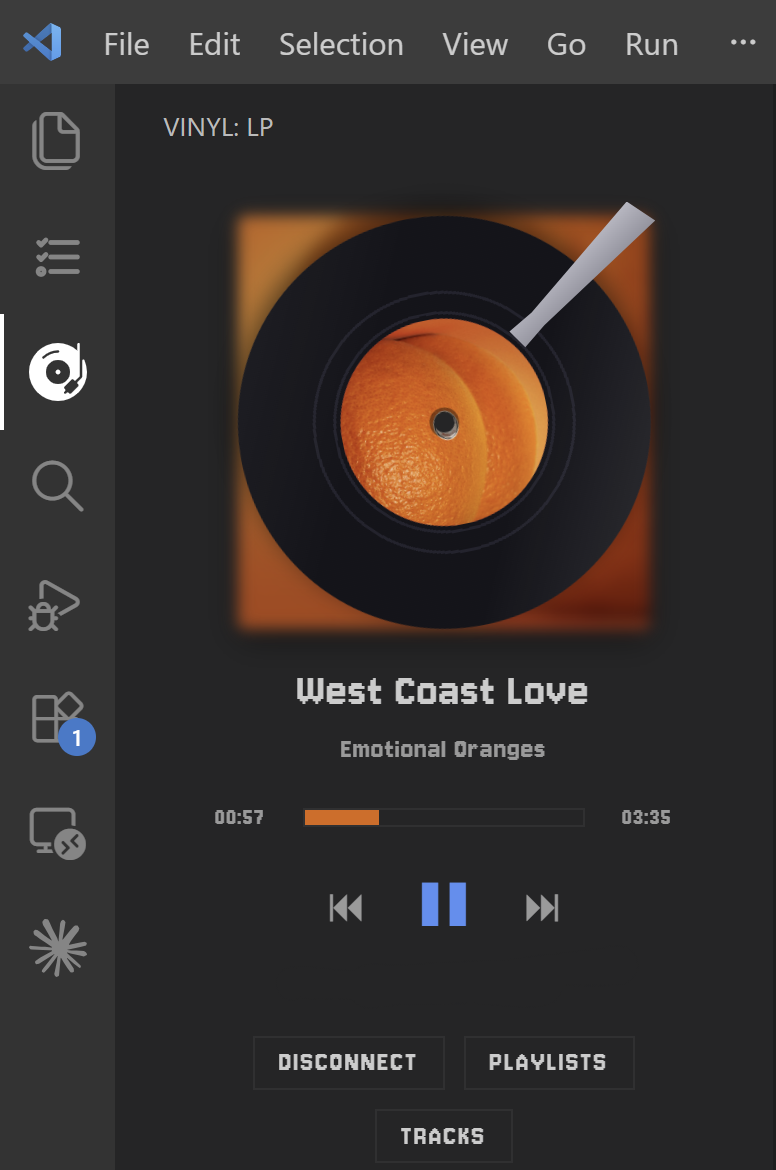
A spinning LP in your VS Code sidebar that remote-controls Spotify — play/pause, skip, seek, browse playlists, and jump between tracks while the album art spins.
Requires Spotify Premium and an active Spotify session somewhere (open Spotify and play once). |
🚀 Setup (one time, ~2 minutes)
Each user connects with their own free Spotify app (Spotify policy). It's just copy-paste, and your tokens stay on your machine.
Step 1 — Create a Spotify app
- Open the Spotify Developer Dashboard and log in.
- Click Create app.
- App name / description: anything (e.g.
My Vinyl Player). - Redirect URI: type this exactly, then click Add:
http://127.0.0.1:9876/callback⚠️ Must match character-for-character. If port
9876is taken, change Vinyl: Redirect Port in settings and use the matchinghttp://127.0.0.1:<your-port>/callbackhere. - Under Which API/SDKs are you planning to use?, check Web API.
- Agree to the terms and click Save.
Step 2 — Copy your Client ID
- Open your new app → Settings (or its main page).
- Copy the Client ID.
🔒 No Client Secret needed — Vinyl uses the secure PKCE flow.
Step 3 — Paste it into VS Code
- Open Settings:
Ctrl/Cmd + ,→ searchvinyl. - Paste it into Vinyl: Spotify Client Id.
💾 Settings auto-save — no Enter/Save button, just click elsewhere.
Step 4 — Connect
- Click the Vinyl icon in the Activity Bar (left edge).
- Click Connect Spotify → approve in the browser. Done! 🎉
🎧 Usage
- Open the Vinyl icon in the Activity Bar (drag it to the panel/secondary sidebar if you like).
- Play a song from Spotify so there's an active session.
⏮ ⏯ ⏭control playback; click or drag the bar to seek.- Playlists — open the list and click one to start playing it.
- Tracks — appears while playing from a playlist; open it to see every song and click one to jump to it.
- Command Palette: Vinyl: Play / Pause, Next Track, Previous Track, Choose Playlist, Connect / Disconnect Spotify.
⚙️ Settings
| Setting | Default | Description |
|---|---|---|
vscodeVinyl.spotifyClientId |
"" |
Your Spotify app's Client ID (from setup). |
vscodeVinyl.redirectPort |
9876 |
Loopback port for the OAuth redirect. Must match your app's Redirect URI. |
vscodeVinyl.pollIntervalMs |
4000 |
How often (ms) to refresh now-playing. |
vscodeVinyl.lpSkin |
album |
Look of the record label. |
🩹 Troubleshooting
- "No active device" — open Spotify and play once; the panel then controls it.
- "Playback control requires Spotify Premium" — the control API is Premium-only.
- Browser opened but never connected — your Redirect URI must exactly match
http://127.0.0.1:<port>/callback(port =Vinyl: Redirect Port). - Tracks list empty / "Forbidden" — Spotify blocks reading its own playlists (Daily Mix, Discover Weekly, editorial, etc.). Play from a playlist you created.
Tokens are stored in VS Code's encrypted Secret Storage; calls go straight to Spotify with no third-party server. MIT License.