Live token usage, cost & rate-limit quota for Claude Code and GLM (z.ai) — always visible in your VS Code status bar.



Overview
A Visual Studio Code extension that monitors your coding-agent usage in real time — for both Claude Code and GLM (z.ai) — without leaving your editor.
It reads session data from ~/.claude/projects/ locally (no extra network calls) and shows
live utilization, cost, and rate-limit quota right in the status bar, with a rich dashboard
one click away. Every token is priced per model — Claude and GLM rates are built in — so
cost is accurate even when you mix providers in the same session.

[!NOTE] API calls are minimal. The Claude.ai rate-limit call fires only when a JSONL file was recently updated — when you stop using Claude Code, the extension stops calling the API entirely. Each call uses ≈ 9 tokens of
claude-haiku-4-5(≈ $0.00013). Typical cost with default settings: < $0.01 / month. SetclaudeStatus.rateLimitApi.enabled: falseto stop all new API calls. GLM (z.ai) quota is fetched from z.ai's own monitor endpoint using your existingANTHROPIC_AUTH_TOKEN.
[!WARNING] Cost figures are estimates. Default rates track publicly announced Claude and GLM pricing at implementation time and may drift. Update
claudeStatus.pricing.*/claudeStatus.pricing.modelsto match current rates (Anthropic pricing · z.ai pricing).
🔀 Two providers, one meter — Claude Code + GLM
This extension treats Claude Code and GLM (z.ai) as first-class providers and
auto-detects which one you're using from ~/.claude/settings.json.
| Claude.ai (Pro / Max) | GLM / z.ai | |
|---|---|---|
| Rate-limit quota | 5 h + 7 d utilization % (from Anthropic API) | Real 5 h + weekly quota (from z.ai monitor endpoint) |
| Cost | Per-model Claude pricing | Per-model GLM pricing (GLM-4.5/4.6/4.7/5.x, flash tiers free) |
| Detection | credentials file / API key | ANTHROPIC_BASE_URL host *.z.ai |
| Status bar | 🤖 5h:45% 7d:62% |
🤖 5h:6% 7d:22% (Z.AI / GLM) |
Mixed usage is priced correctly — each JSONL entry is priced by its own message.model, so
a window that used both Claude and GLM shows an accurate blended cost.
Point Claude Code at GLM (z.ai)
Add to ~/.claude/settings.json:
{ "env": {
  "ANTHROPIC_BASE_URL": "https://api.z.ai/api/anthropic",
  "ANTHROPIC_AUTH_TOKEN": "<your z.ai key>"
} }
The extension then auto-detects z.ai and:
- shows your real z.ai quota — the 5-hour and weekly utilization % from z.ai's subscription
dashboard (fetched from
…/api/monitor/usage/quota/limitusing yourANTHROPIC_AUTH_TOKEN). Falls back to cost-only if no token is found. - prices each entry by its GLM model using a built-in GLM price table — so cost is accurate
instead of Claude's ~5–7× higher rates. Override or add model rates with
claudeStatus.pricing.models.
Other Anthropic-compatible providers (AWS Bedrock, direct API key, custom endpoints) are supported too — cost-only, priced from local JSONL. See Provider Compatibility.
Features
📊 Status Bar — Always Visible
Real-time usage summary pinned to the VS Code status bar.
| State | Example |
|---|---|
| Normal (% mode, Claude.ai Max) | 🤖 5h:45% 7d:62% |
| GLM / z.ai (real quota) | 🤖 5h:6% 7d:22% |
| Warning ≥ 75% | 🤖 5h:78%⚠ 7d:84%⚠ |
| Rate limit hit | 🤖 5h:100%✗ |
| 5h-only plan (no 7d window) | 🤖 5h:45% |
| Cost mode | 🤖 5h:$14.21 7d:$53.17 |
| AWS Bedrock / API key (cost only) | 🤖 5h:$0.15 7d:$0.42 |
| With project cost | 🤖 5h:78% 7d:84% | my-app:$3.21 |
| Stale cache | 🤖 5h:78% 7d:84% [10m ago] |
| Not logged in | 🤖 Not logged in |
Hover for a detailed tooltip with full token breakdown and reset times.
🗂 Dashboard Panel
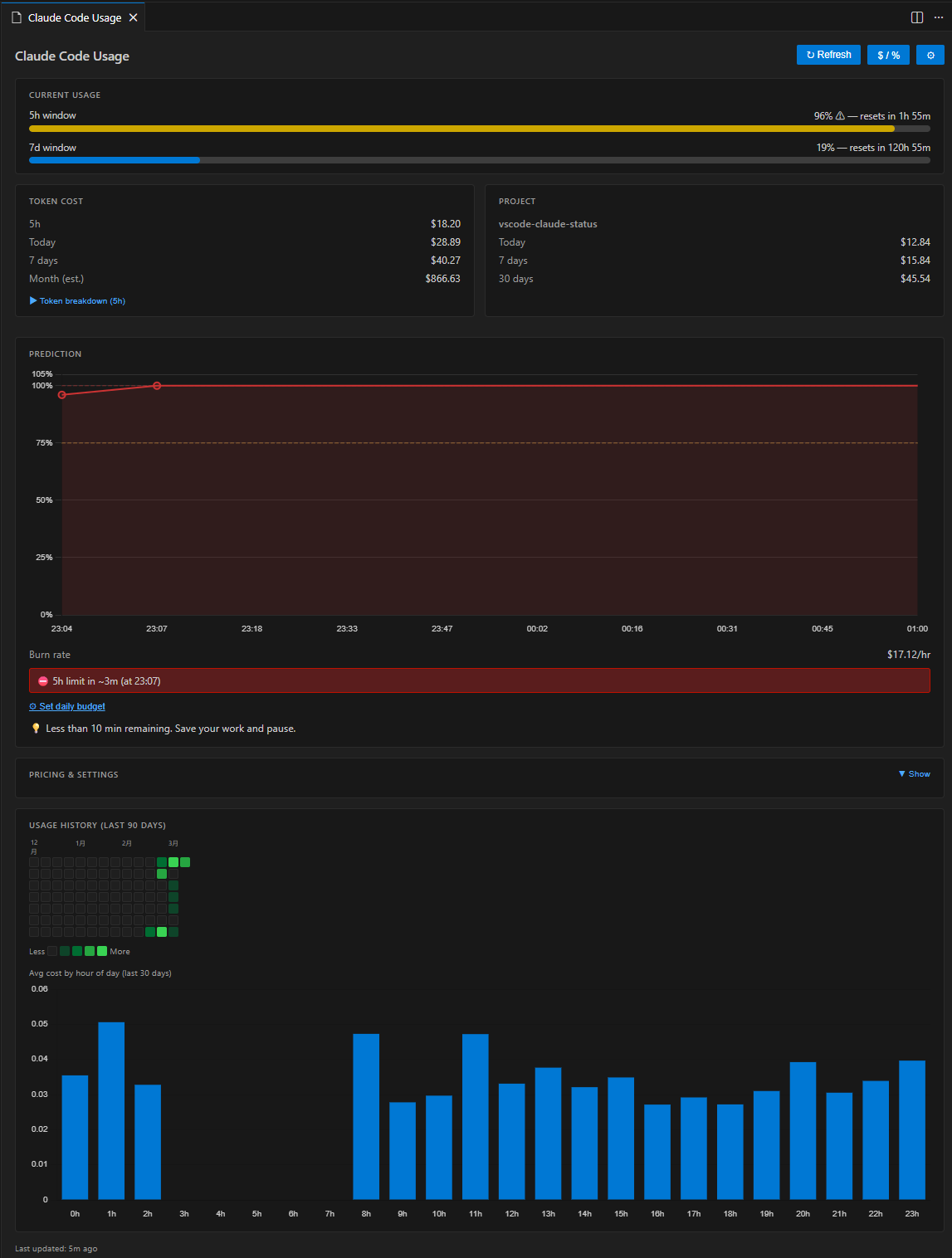
Click the status bar item to open a rich dashboard panel with:
- Current Usage — colour-coded progress bars for 5 h and 7 d windows
- Token Cost — 5 h / today / 7 d / month (est.) costs; expandable token breakdown shows per-type counts (input / output / cache read / cache create) with individual costs and cache hit ratio
- Project Cost — per-workspace breakdown (today / 7 days / 30 days)
- Prediction — burn rate ($/hr), time-to-exhaustion, daily & weekly budget tracking; Rate Limit Timeline chart visualises the projected 5 h utilization from now to reset
- Pricing & Settings — always-visible card showing current token pricing rates, provider, API state, and cache TTL; opens VS Code settings with one click
- Usage History — GitHub-style daily heatmap + hourly pattern bar chart
The panel supports light, dark, and high-contrast VS Code themes natively.
🗂 Project-Level Cost Tracking
Automatically maps the open workspace folder to its Claude Code session directory and shows how much you've spent for that specific project — today, this week, and this month.
Multi-root workspaces are fully supported: each folder gets its own breakdown in the dashboard, and the status bar shows the aggregate.
🤖 5h:78% 7d:84% | my-app:$3.21          ← single workspace
🤖 5h:78% 7d:84% | PJ:$5.43              ← multi-root aggregate
🔮 Usage Prediction & Budget Alerts
Based on the last 30 minutes of activity, the extension predicts how long until the 5 h rate limit is exhausted and warns you before it happens.
- Burn rate — current consumption in $/hr (rolling 30-minute window)
- Time-to-exhaustion — estimated minutes until the 5 h window is full, capped at the next window reset time
- Daily / weekly budget — set optional USD caps; progress bars and alerts fire when the configured threshold (default 80 %) is reached
- VS Code notifications — non-blocking warning as the limit approaches, error dialog when it's nearly reached (with "Open Dashboard" action)
Configure via Settings → Claude Code + GLM Usage or the command palette (Claude+GLM: Set Budget…).
📅 Usage History Heatmap
- Daily heatmap — GitHub Contributions-style grid for the last 30 / 60 / 90 days; intensity reflects daily spend; hover any cell for exact date and cost
- Hourly bar chart — average cost per hour of day (last 30 days)
Number of days is configurable via claudeStatus.heatmap.days (30 / 60 / 90).
Requirements
- VS Code 1.73 or newer
- Claude Code CLI with active sessions — the extension reads
~/.claude/projects/**/*.jsonlfor token cost data (this path is shared whether Claude Code talks to Claude.ai, z.ai/GLM, Bedrock, or a custom endpoint)
Authentication is optional depending on your provider:
| Provider | Authentication | Display |
|---|---|---|
| Claude.ai subscription | claude login — credentials stored in macOS Keychain (v2.x+) or ~/.claude/.credentials.json; detected automatically |
Rate-limit % + cost |
| GLM / z.ai | ANTHROPIC_AUTH_TOKEN in ~/.claude/settings.json |
Real quota % + GLM cost |
| AWS Bedrock | AWS credentials (env vars or ~/.aws/) |
Cost only |
| Anthropic API key | ANTHROPIC_API_KEY env var |
Cost only |
Provider Compatibility
If auto-detection does not work for your setup, set claudeStatus.claudeProvider explicitly in
VS Code Settings.
| Provider | Rate-limit display | 7d window |
|---|---|---|
| Claude.ai Pro / Max (5h + 7d) | 5h:45% 7d:32% |
✅ |
| Claude.ai any 5h-only tier | 5h:45% |
auto-hidden |
| GLM / z.ai | 5h:6% 7d:22% (real quota) + cost per GLM model |
✅ (weekly) |
| AWS Bedrock | cost only (5h:$0.15 7d:$0.42) |
N/A |
| Anthropic API key | cost only | N/A |
| Custom Anthropic-compatible endpoint | cost only | N/A |
Installation
VS Code Marketplace
Search "Claude Code GLM Usage" in the Extensions panel, or:
code --install-extension max-riabov.claude-glm-usage
Install from VSIX
- Download the
.vsixfrom the Releases page. - In VS Code: Extensions (Ctrl+Shift+X) → ⋯ → Install from VSIX…
Build from Source
git clone https://github.com/MaxRyabov/claude-glm-usage.git
cd claude-glm-usage
npm install
npm run package       # → claude-glm-usage-*.vsix
Usage
The extension activates automatically on VS Code startup (onStartupFinished).
| Action | Result |
|---|---|
| Glance at status bar | Live utilization / cost |
| Click status bar | Open dashboard panel |
Ctrl+Shift+Alt+C (⌘⇧⌥C on Mac) |
Toggle % ↔ $ display mode |
| Claude+GLM: Refresh Now | Force API refresh |
| Claude+GLM: Open Dashboard | Open dashboard panel |
| Claude+GLM: Toggle % / $ Display | Switch display mode |
| Claude+GLM: Set Budget… | Set or disable daily USD budget |
Configuration
All settings are under the claudeStatus namespace in VS Code Settings.
| Setting | Type | Default | Description |
|---|---|---|---|
claudeStatus.displayMode |
"percent" | "cost" |
"percent" |
Status bar display mode |
claudeStatus.statusBar.alignment |
"left" | "right" |
"left" |
Status bar position |
claudeStatus.statusBar.showProjectCost |
boolean |
true |
Show project cost in status bar |
claudeStatus.cache.ttlSeconds |
number (60–3600) |
300 |
API cache TTL in seconds |
claudeStatus.rateLimitApi.enabled |
boolean |
true |
Fetch rate-limit % from provider API. When disabled, cached % is still shown with a staleness indicator ([Xm ago]) if available |
claudeStatus.realtime.enabled |
boolean |
false |
Poll rate-limit API every TTL seconds (requires rateLimitApi.enabled) |
claudeStatus.budget.dailyUsd |
number | null |
null |
Daily budget in USD (null = disabled) |
claudeStatus.budget.weeklyUsd |
number | null |
null |
Weekly budget in USD |
claudeStatus.budget.alertThresholdPercent |
number (1–100) |
80 |
Budget alert threshold % |
claudeStatus.notifications.rateLimitWarning |
boolean |
true |
Warn when rate limit is near |
claudeStatus.notifications.budgetWarning |
boolean |
true |
Warn when budget threshold exceeded |
claudeStatus.heatmap.days |
30 | 60 | 90 |
90 |
Days shown in usage heatmap |
claudeStatus.credentials.path |
string | null |
null |
Custom credentials file path |
claudeStatus.claudeProvider |
"auto" | "claude-ai" | "z-ai" | "custom-endpoint" | "aws-bedrock" | "api-key" |
"auto" |
Provider type (auto-detect or explicit) |
claudeStatus.pricing.inputPerMillion |
number |
3.00 |
Fallback USD per 1M input tokens (unknown models) |
claudeStatus.pricing.outputPerMillion |
number |
15.00 |
Fallback USD per 1M output tokens (unknown models) |
claudeStatus.pricing.cacheReadPerMillion |
number |
0.30 |
Fallback USD per 1M cache-read tokens (unknown models) |
claudeStatus.pricing.cacheCreatePerMillion |
number |
3.75 |
Fallback USD per 1M cache-creation tokens (unknown models) |
claudeStatus.pricing.models |
object |
{} |
Per-model price overrides keyed by model name/prefix (e.g. "glm-4.6", "claude-opus") |
// Example: settings.json
{
  "claudeStatus.displayMode": "cost",
  "claudeStatus.budget.dailyUsd": 5.00,
  "claudeStatus.statusBar.showProjectCost": true,
  // Force GLM/z.ai if auto-detect doesn't pick it up:
  // "claudeStatus.claudeProvider": "z-ai",
  // Add or override a model's rates:
  "claudeStatus.pricing.models": {
    "glm-4.6": { "inputPerMillion": 0.60, "outputPerMillion": 2.20, "cacheReadPerMillion": 0.11, "cacheCreatePerMillion": 0.60 }
  }
}
Credits
This project is based on long-910/vscode-claude-status (MIT) — huge thanks to the original author. It has been rebranded and repositioned around dual Claude Code + GLM (z.ai) support.
Contributing
Contributions are welcome. See CONTRIBUTING.md for setup instructions, architecture overview, and release procedures.