VS Code extension that improves the experience of writing Miranda code, with a focus on the standard Prelude (the language's built-in library).
Install
Install from the VS Code Marketplace
Or search Miranda Prelude in the Extensions view for bilingual Prelude hover docs, highlighting, and autocompletion.
Features
Syntax highlighting
.m files are colored automatically. Prelude functions (map, filter, sort, hd, foldl, etc.) appear in a different color from user-defined code, making it easy to tell standard library calls from your own definitions at a glance.
Autocompletion
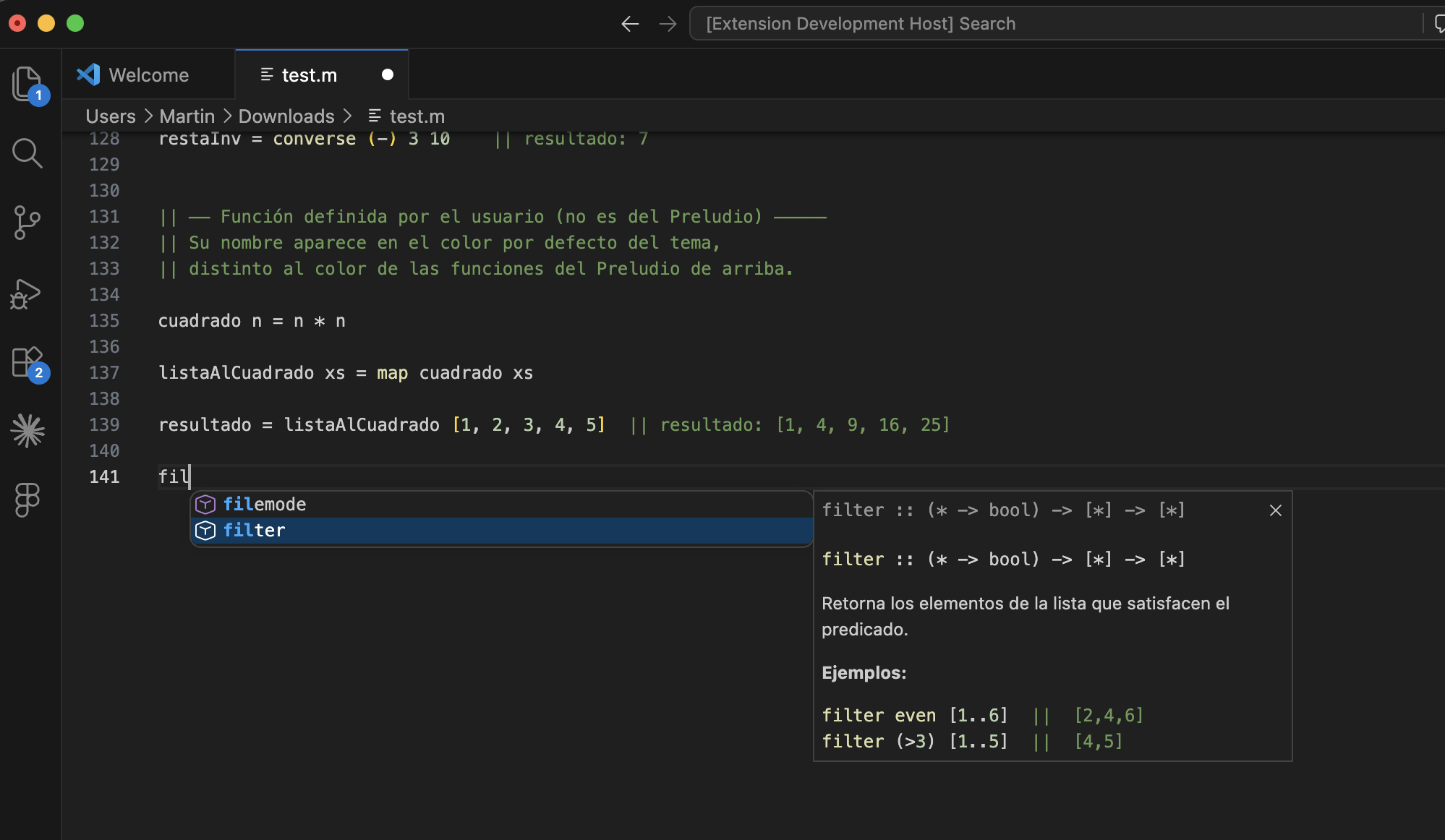
When you start typing a Prelude function name, IntelliSense suggests matches with their type signature. Selecting a suggestion shows full documentation with a description and examples.
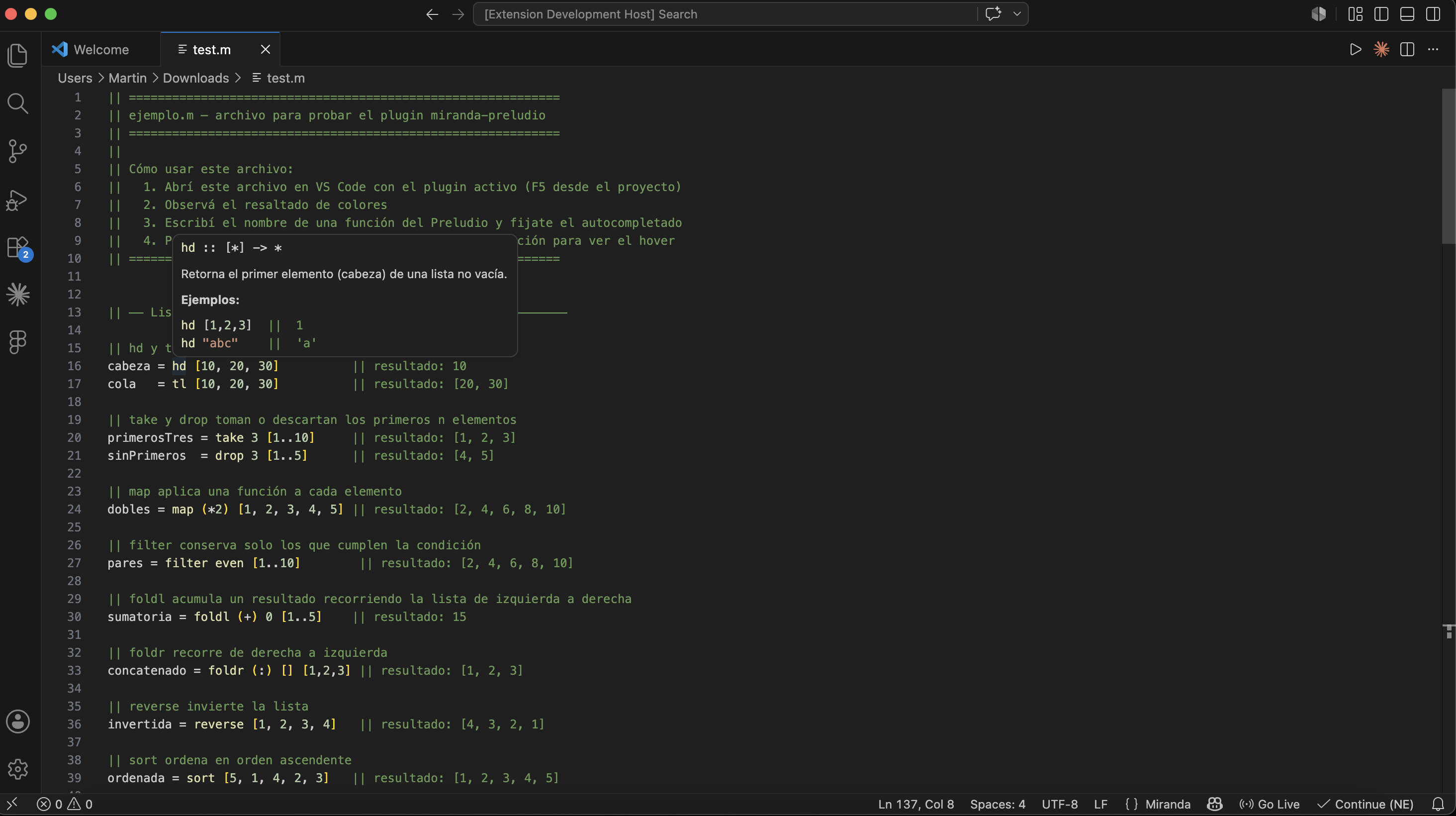
Hover documentation
Hovering over a Prelude function shows a tooltip with:
- The type signature in Miranda notation
- A description of what the function does
- Concrete usage examples with their results
Documentation language follows the VS Code UI language (English by default). You can override it with the miranda-preludio.documentationLanguage setting (auto, en, or es).
Covered functions
The extension documents more than 95 standard Miranda Prelude functions, organized into these categories:
| Category | Examples |
|---|---|
| Lists | hd, tl, map, filter, foldl, foldr, sort, zip2, take, drop |
| Arithmetic | abs, sqrt, even, odd, gcd, lcm, entier, sin, cos, pi |
| Characters and strings | code, decode, digit, letter, shownum, numval, lines, spaces |
| Combinators | id, const, converse, until, limit, force, error |
| Tuples | fst, snd |
| System | read, getenv, system |
Usage
The extension activates automatically when you open any .m file.
- Autocompletion: start typing a function name — suggestions appear on their own. If not, press
Ctrl+Space(Cmd+Spaceon Mac). - Hover: place the cursor over any Prelude function and wait a moment.
- Comments: the toggle-line-comment shortcut inserts
||(Miranda's comment syntax). - Brackets:
[,(, and"are closed automatically.
Example files
example.en.m— sample Miranda code with English commentsexample.es.m— same examples with Spanish comments
Requirements
- Visual Studio Code 1.118.0 or later
- Miranda files with the
.mextension
Release notes
1.0.1
Hover improvements: category label (lists, arithmetic, etc.) at the top of tooltips, and no false-positive hovers inside comments or strings.
0.0.3
README wording: removed references to other Miranda extensions.
0.0.2
Fix Marketplace README image and example file links after making the repository public.
0.0.1
Initial release. Includes syntax highlighting, autocompletion, and bilingual hover documentation (English and Spanish) for all standard Miranda Prelude functions.
Miranda Prelude
Extensión de VS Code que mejora la experiencia al escribir código en Miranda, enfocándose en las funciones del Preludio estándar (la librería incorporada del lenguaje).
Instalación
Instalá desde el VS Code Marketplace
O buscá Miranda Prelude en la vista de Extensiones para documentación bilingüe del Preludio, resaltado y autocompletado.
Funcionalidades
Resaltado de sintaxis
Los archivos .m se colorean automáticamente. Las funciones del Preludio (map, filter, sort, hd, foldl, etc.) aparecen en un color distinto al del código definido por el usuario, lo que permite distinguir de un vistazo qué pertenece a la librería estándar y qué es propio del programa.
Autocompletado
Al empezar a escribir el nombre de cualquier función del Preludio, IntelliSense sugiere las coincidencias con su firma de tipo. Al seleccionar una sugerencia, se despliega la documentación completa con descripción y ejemplos.
Hover con documentación
Al posicionar el cursor sobre una función del Preludio aparece un tooltip con:
- La firma de tipo en notación Miranda
- Una descripción de lo que hace la función
- Ejemplos concretos de uso con su resultado
El idioma de la documentación sigue el idioma de la interfaz de VS Code (inglés por defecto). Podés cambiarlo con el setting miranda-preludio.documentationLanguage (auto, en o es).
Funciones cubiertas
La extensión incluye documentación para más de 95 funciones del Preludio estándar de Miranda, organizadas en las siguientes categorías:
| Categoría | Ejemplos |
|---|---|
| Listas | hd, tl, map, filter, foldl, foldr, sort, zip2, take, drop |
| Aritmética | abs, sqrt, even, odd, gcd, lcm, entier, sin, cos, pi |
| Caracteres y cadenas | code, decode, digit, letter, shownum, numval, lines, spaces |
| Combinadores | id, const, converse, until, limit, force, error |
| Tuplas | fst, snd |
| Sistema | read, getenv, system |
Uso
La extensión se activa automáticamente al abrir cualquier archivo con extensión .m.
- Autocompletado: empezá a escribir el nombre de una función — las sugerencias aparecen solas. Si no, presioná
Ctrl+Space(Cmd+Spaceen Mac). - Hover: posicioná el cursor sobre cualquier función del Preludio y esperá un momento.
- Comentarios: el atajo de comentar línea inserta
||(la sintaxis de Miranda). - Brackets:
[,(y"se cierran automáticamente.
Archivos de ejemplo
example.en.m— código Miranda de prueba con comentarios en inglésexample.es.m— los mismos ejemplos con comentarios en español
Requisitos
- Visual Studio Code 1.118.0 o superior
- Archivos Miranda con extensión
.m
Notas de versión
1.0.1
Mejoras en hover: etiqueta de categoría (listas, aritmética, etc.) arriba del tooltip, y sin falsos positivos en comentarios o strings.
0.0.3
Redacción del README: se quitaron referencias a otras extensiones Miranda.
0.0.2
Corrección de links de imágenes y archivos de ejemplo en el README del Marketplace tras hacer público el repositorio.
0.0.1
Versión inicial. Incluye resaltado de sintaxis, autocompletado y documentación bilingüe en hover (inglés y español) para todas las funciones del Preludio estándar de Miranda.