Focused Git workflows for Visual Studio Code.
面向 Visual Studio Code 的紧凑 Git 工作流扩展。
0.1.7— Refined Worktree creation and management for multi-repository Git workflows.
Product tour / 功能预览
Commit workspace, Commit Log and Git Blame / 提交工作区、提交日志与 Git Blame
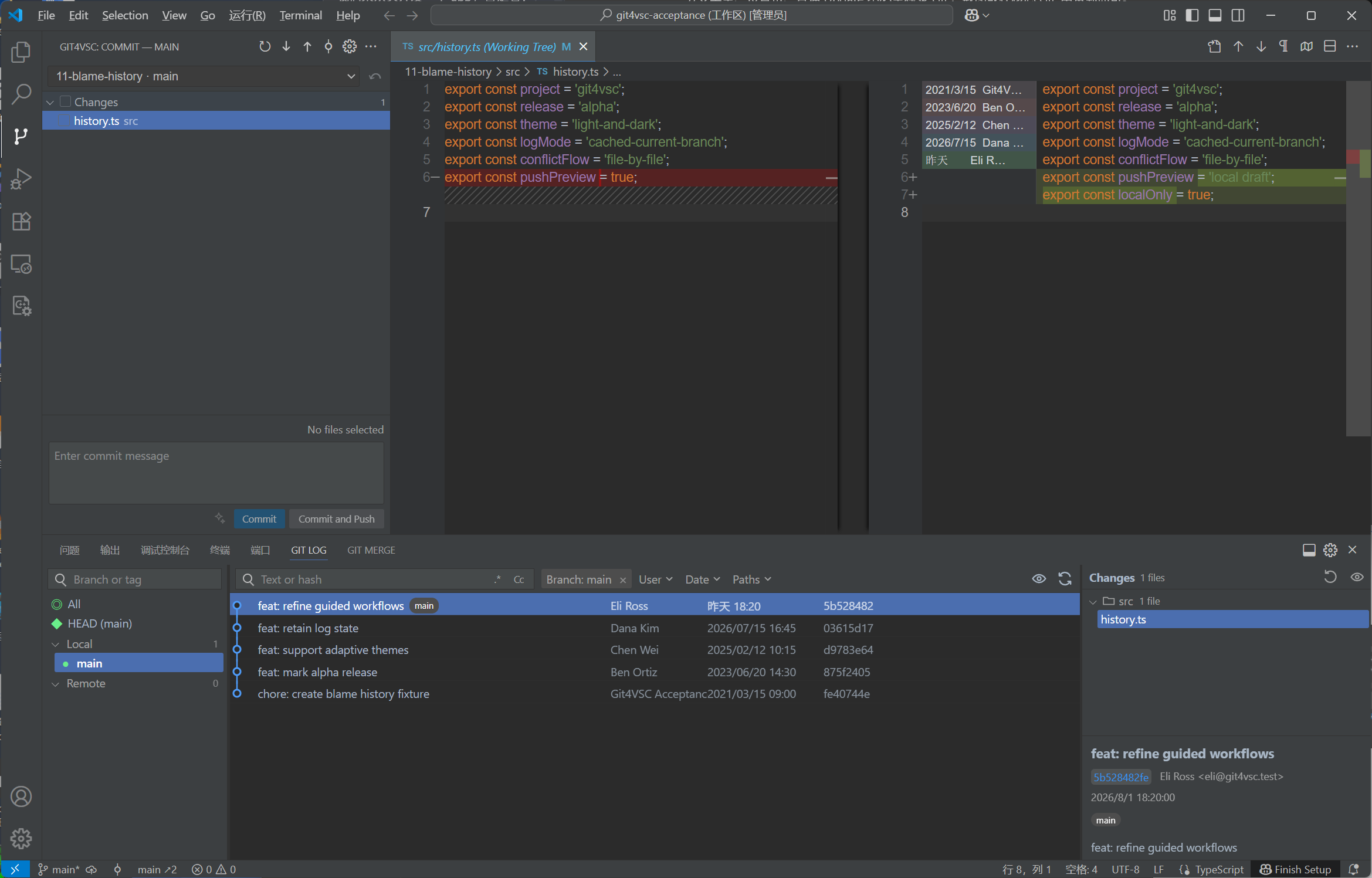
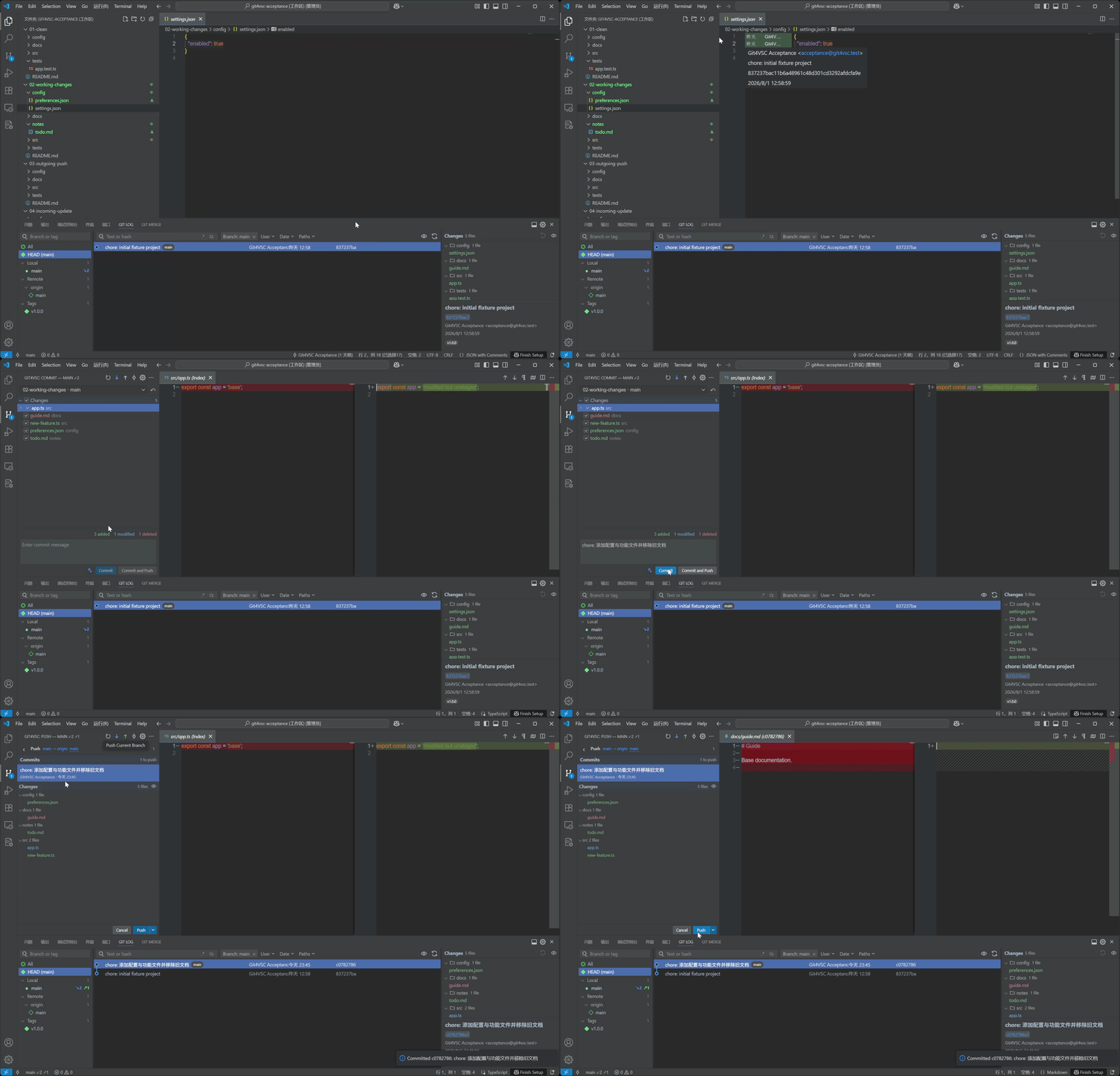
From Annotate with Git Blame to Commit / 从代码追溯到完成提交
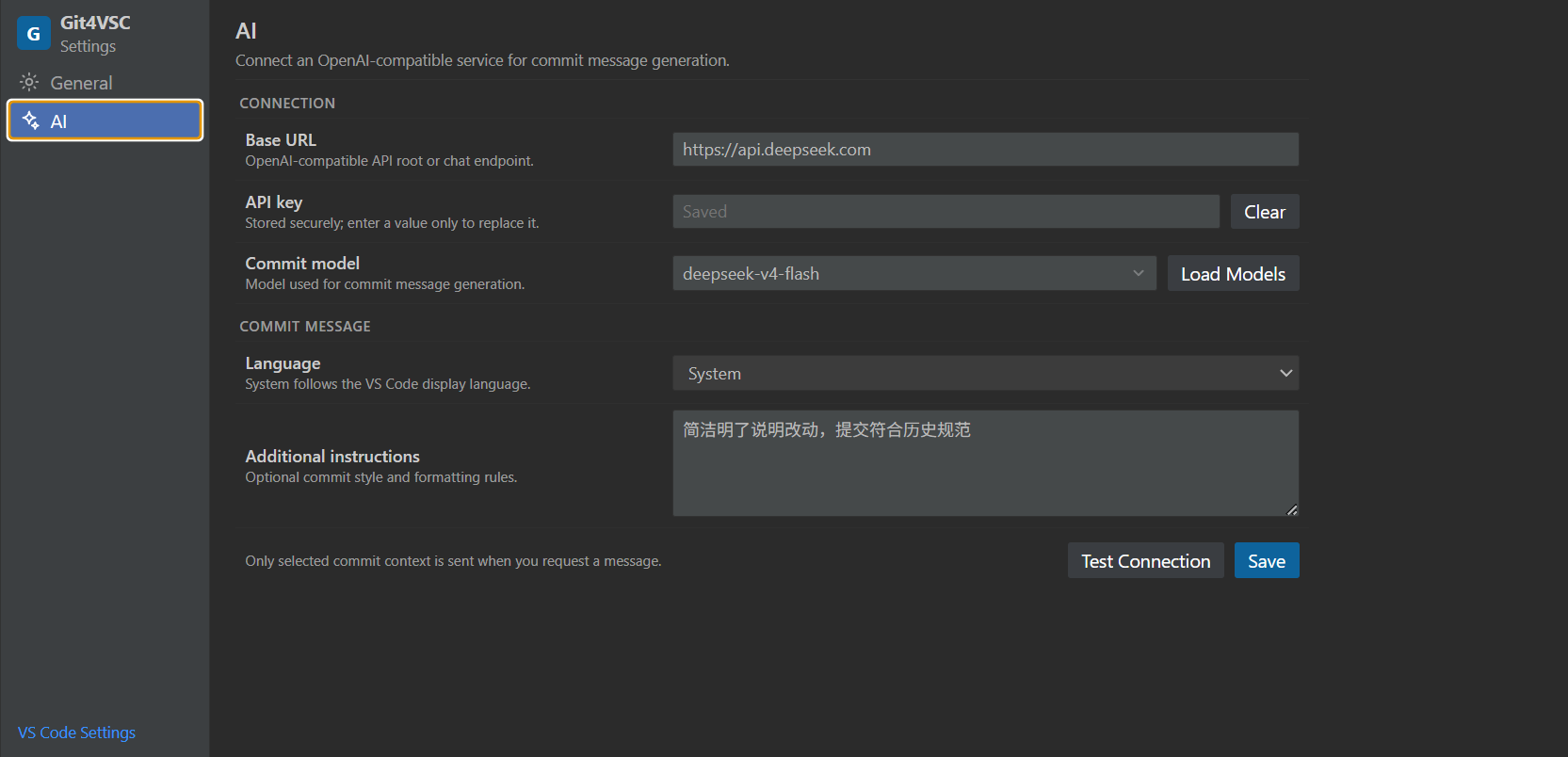
Optional AI commit message settings / 可选的 AI 提交信息设置
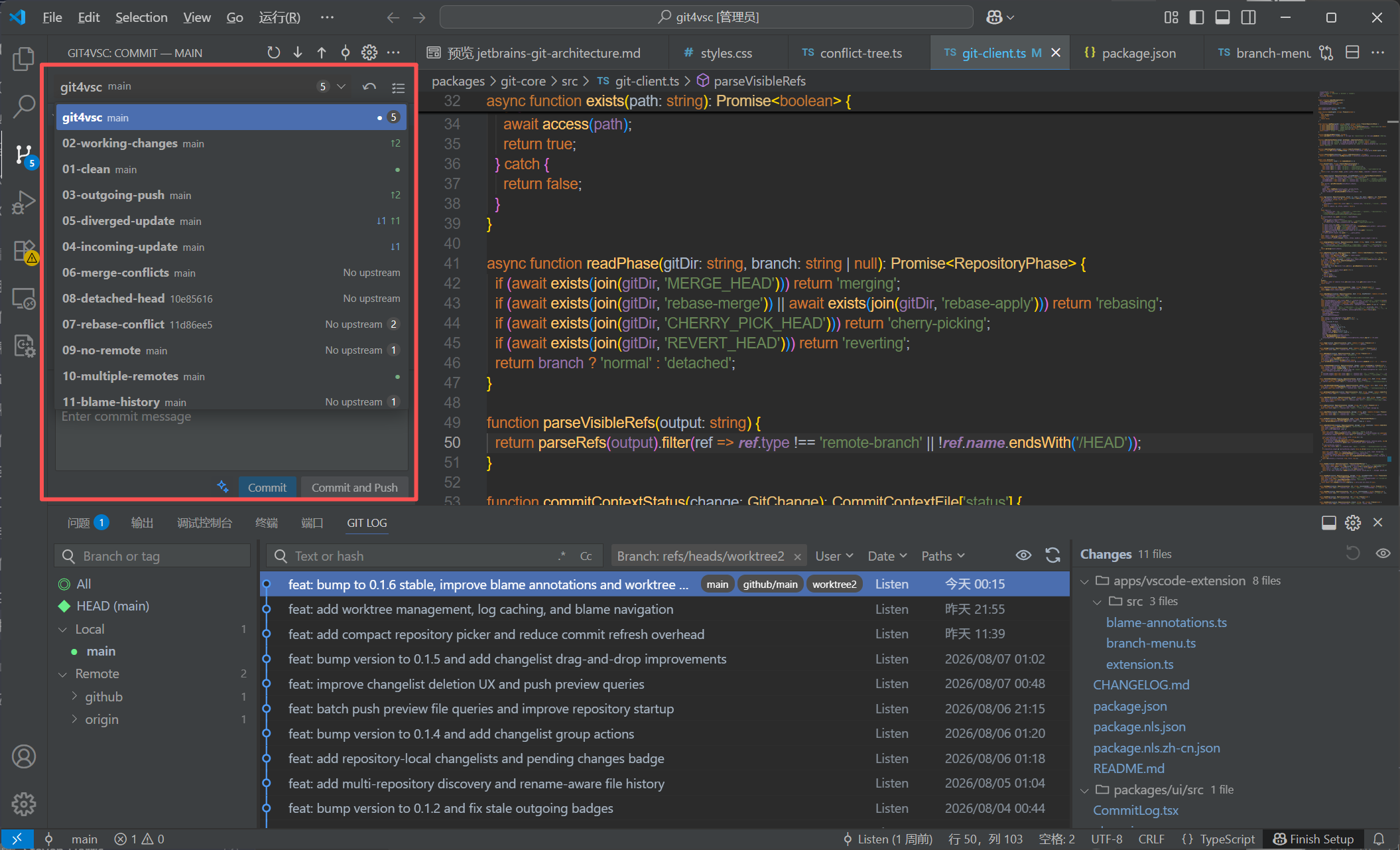
Multiple repositories / 多仓库管理
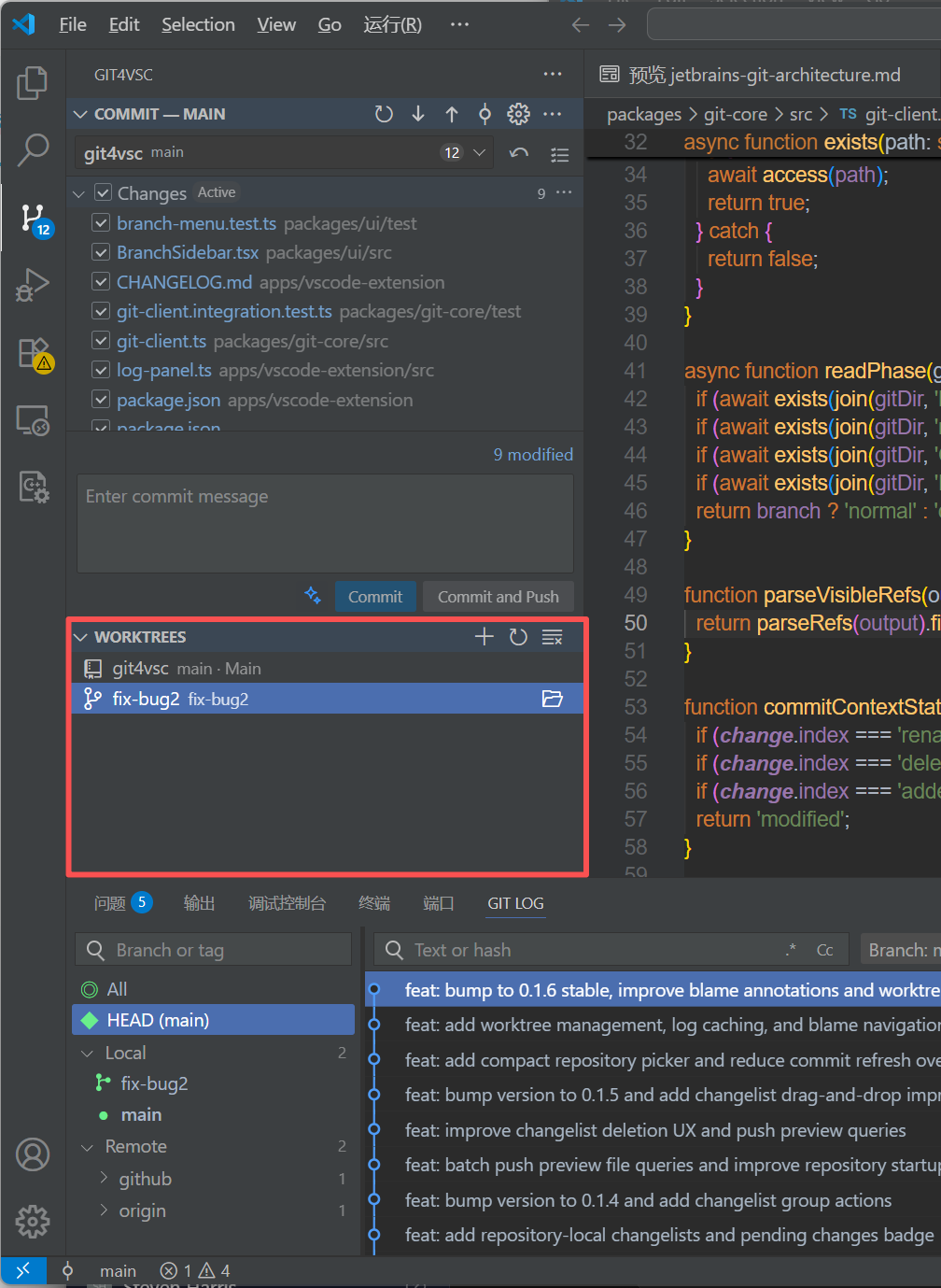
Worktree management / Worktree 管理
English
Git4VSC brings a focused commit window, a topology-aware Commit Log, branch status, push previews, and guided conflict resolution to VS Code. It uses the local Git CLI and keeps VS Code's native editor, Diff viewer, and Merge Editor at the center of the workflow.
Highlights
- Focused commit workflow: Select files, review diffs, roll back changes, and use Commit or Commit and Push.
- Changelists: Create, edit, delete, activate, and move files between repository-local change groups without changing the Git index.
- Native-style selection: File-row selection is independent from commit checkboxes, with Ctrl/Cmd multi-select and Shift range selection for context actions and drag-and-drop.
- Update and repository status: Update with Merge or Rebase, monitor ahead/behind counts, and receive unobtrusive progress and result feedback.
- Safe push workflow: Preview outgoing commits, protect branch patterns from Force Push, confirm history rewrites, and recover rejected pushes with Merge or Rebase.
- Commit Log: Browse a topology graph with persistent selection, a disk-backed warm first page, virtual scrolling, relative dates, and adaptive columns.
- Multiple repositories: Discover Git repositories at the workspace root or within three directory levels, then switch the active repository from Commit.
- Pending changes badge: The Activity Bar badge shows changed files in the selected repository, while its tooltip also reports the workspace-wide total.
- Powerful filtering: Search text or hashes with regex, case matching, and recent history; combine Branch, User, Date, and custom Path filters.
- Commit and file actions: Compare revisions, Cherry-Pick, Revert, Reset, create branches or tags, export patches, restore files, and apply selected file changes.
- Branch and Worktree workflows: Manage branches, tags, remotes, and worktrees; create, open, lock, prune, or safely remove linked worktrees.
- Smart operations and Stash: When local changes block Update or Checkout, stash and restore them automatically; create, apply, pop, drop, inspect, or branch from Git stashes.
- Guided conflicts: Resolve files one by one in a Current / Result / Incoming column layout, then continue or abort Merge, Rebase, Cherry-Pick, or Revert.
- Git Blame: Toggle time-colored annotations from the line-number menu and open the blamed commit in Commit Log from its hover.
- File History: Open rename-aware history from the editor and continue working in the same Commit Log workspace.
- Optional AI messages: Generate a commit message from the selected changes through your own OpenAI-compatible endpoint.
Getting started
- Open a workspace containing a Git repository.
- Select Git4VSC in the Activity Bar.
- Select the files to commit and double-click a file to review its Diff.
- Enter a commit message, then select Commit or Commit and Push.
- Review outgoing commits and files before pushing.
Press Alt+3 to toggle Commit Log. Select the status-bar branch name for repository and branch actions, or select the adjacent Commit Log icon to toggle only the log panel.
Main interactions
| Interaction | Result |
|---|---|
| Double-click a changed file | Open its Diff |
| Right-click a file in Commit | Commit, move to another changelist, rollback, delete, open, add, or ignore it |
| Right-click a commit | Branch, tag, checkout, Cherry-Pick, Revert, or Reset |
| Right-click files in commit details | Compare, restore, patch, Revert, or Cherry-Pick selected changes |
| Right-click editor line numbers | Toggle Git Blame annotations |
| Right-click the editor or line numbers | Open rename-aware File History |
Alt+3 |
Toggle Commit Log |
Repository feedback
Ahead and behind counts appear in the Commit title, branch list, and status bar. Long-running operations show progress without shifting file layouts, and short notifications report results such as an already up-to-date branch.
AI and privacy
Open Git4VSC Settings → AI to configure a Base URL, API key, model, language, and optional instructions. The API key is stored in VS Code SecretStorage. Git4VSC sends only the selected change context, and only when you explicitly request a message. The extension contains no telemetry.
Current scope
- Changelists organize and commit whole files. The existing hunk-patch engine remains internal so the Commit tree stays compact.
- Worktrees have a dedicated panel for create, open, lock/unlock, prune, and directory-aware removal.
- File History is available from the editor context menu and follows renames in the existing Git Log workspace.
- Git Stash is available; Shelf and Interactive Rebase are not included yet.
Requirements
- Visual Studio Code
1.102.0or newer. - Git
2.23or newer available to the extension host. - One or more Git repositories in the current local or remote workspace.
简体中文
Git4VSC 为 VS Code 提供聚焦的 Commit 工具窗口、拓扑 Commit Log、分支状态、Push 预览和逐文件冲突流程。扩展调用本机 Git CLI,并继续使用 VS Code 原生编辑器、Diff 和 Merge Editor。
主要功能
- 紧凑提交: 勾选文件、检查 Diff、回滚变更,并使用 Commit 或 Commit and Push。
- Changelists: 在每个仓库内创建、编辑、删除和激活变更清单,在清单间移动文件,并且不改写 Git index。
- 原生列表选择: 文件行高亮与提交勾选互相独立,支持 Ctrl/Cmd 多选和 Shift 连选,右键及拖拽只作用于高亮文件。
- 更新与仓库状态: 使用 Merge 或 Rebase 更新,查看 ahead/behind 数量,并获得不干扰布局的进度和结果反馈。
- 安全 Push: 检查待推送提交和文件,保护指定分支免受 Force Push,在历史改写前确认,并用 Merge/Rebase 恢复被拒绝的 Push。
- Commit Log: 浏览拓扑图,使用持久化首页缓存与静默预热,并保留选择、筛选、相对时间和自适应列。
- 多仓库: 自动发现工作区根目录及最多三层子目录中的 Git 仓库,并可在 Commit 中切换当前仓库。
- 待提交角标: Activity Bar 角标显示当前仓库的变更文件数量,悬浮时同时显示整个工作区的汇总数量。
- 组合筛选: Text or hash 支持正则、大小写匹配和最近搜索,并可组合 Branch、User、Date、Paths 条件。
- 提交与文件操作: 比较版本、Cherry-Pick、Revert、Reset、创建分支或 Tag、导出 Patch、恢复文件和选择性应用变更。
- 分支与 Worktree: 管理分支、Tag、Remote 和 Worktree,并支持创建、打开、锁定、Prune 与安全删除链接工作树。
- Smart Operation 与 Stash: 本地修改阻塞 Update/Checkout 时自动暂存并恢复;支持创建、Apply、Pop、Drop、查看 Stash 或从 Stash 建分支。
- 冲突流程: 在 Current / Result / Incoming 三列 Merge Editor 中逐个解决文件,然后 Continue 或 Abort Merge、Rebase、Cherry-Pick、Revert。
- Git Blame: 从编辑器行号菜单开关注释,悬浮时查看详情并在 Commit Log 中定位对应提交。
- 文件历史: 从编辑器打开支持重命名跟踪的 File History,并继续在同一个 Commit Log 工作区操作。
- 可选 AI 消息: 通过用户自己的 OpenAI-compatible 服务,根据本次选中变更生成提交信息。
快速开始
- 打开包含 Git 仓库的工作区。
- 在 Activity Bar 选择 Git4VSC。
- 勾选本次提交的文件,双击文件检查 Diff。
- 输入提交信息,然后选择 Commit 或 Commit and Push。
- 在 Push 前检查待推送提交和文件。
按 Alt+3 打开或关闭 Commit Log。点击状态栏分支名打开仓库与分支操作菜单;点击相邻的 Commit Log 图标只切换日志面板。
常用操作
| 操作 | 结果 |
|---|---|
| 双击变更文件 | 打开 Diff |
| 右键 Commit 文件 | 提交、移动到其他 Changelist、回滚、删除、打开、加入版本控制或忽略 |
| 右键提交 | 创建分支/Tag、Checkout、Cherry-Pick、Revert 或 Reset |
| 右键提交详情文件 | 比较、恢复、创建 Patch、选择性 Revert 或 Cherry-Pick |
| 右键编辑器行号 | 打开或关闭 Git Blame |
| 右键编辑器内容或行号 | 打开跟踪重命名的 File History |
Alt+3 |
打开或关闭 Commit Log |
仓库状态反馈
Commit 标题、分支列表和状态栏都会显示 ahead/behind 数量。长时间操作会在不引起文件列表跳动的位置显示进度,完成后通过短提示报告已更新、已推送或已经是最新状态等结果。
AI 与隐私
打开 Git4VSC Settings → AI 配置 Base URL、API Key、模型、语言和额外指令。API Key 保存在 VS Code SecretStorage;只有用户主动生成时才会发送本次选中变更的上下文。扩展不包含遥测。
当前范围
- Changelists 当前按整文件组织和提交;hunk patch 底层能力仍保留,但不在 Commit 文件树增加额外层级。
- Worktrees 面板支持创建、打开、锁定/解锁、Prune 和删除。
- 编辑器右键可打开 File History,并在现有 Git Log 工作区中跟踪文件重命名历史。
- Git Stash 已可用;Shelf 和 Interactive Rebase 暂未包含。
运行要求
- Visual Studio Code
1.102.0或更高版本。 - Extension Host 可访问 Git
2.23或更高版本。 - 当前本地或远程工作区中包含一个或多个 Git 仓库。
Feedback / 反馈
Git4VSC is an independent project and is not affiliated with or endorsed by JetBrains s.r.o. or Microsoft Corporation. Git4VSC 是独立项目,与 JetBrains s.r.o. 或 Microsoft Corporation 不存在隶属或背书关系。