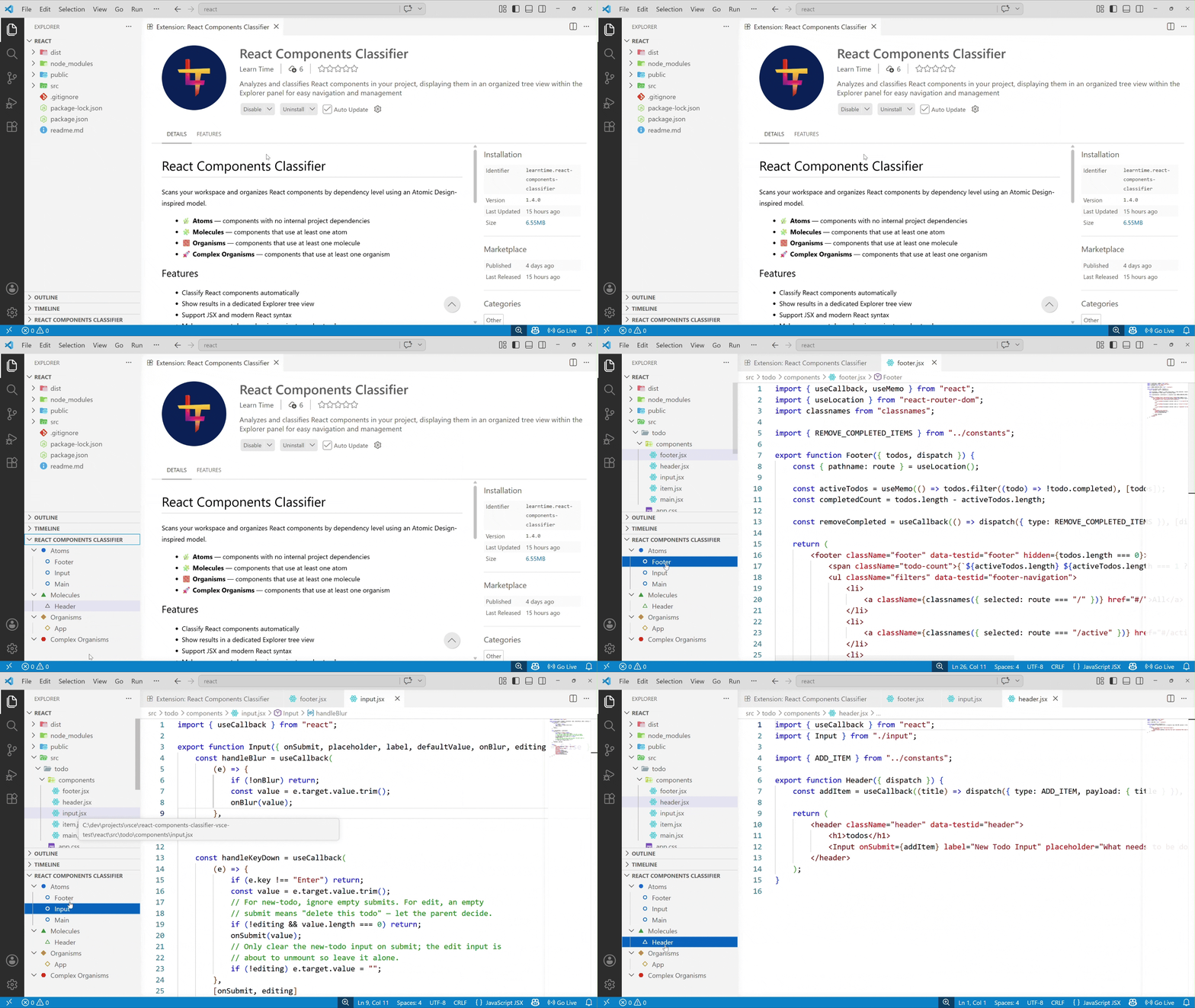
Scans your workspace and organizes React components by dependency level using an Atomic Design-inspired model.
- 🌿 Atoms — components with no internal project dependencies
- 🧩 Molecules — components that use at least one atom
- 🧱 Organisms — components that use at least one molecule
- 🚀 Complex Organisms — components that use at least one organism
Features
- Classify React components automatically
- Show results in a dedicated Explorer tree view
- Support JSX and modern React syntax
- Make component dependencies easier to understand
- Tag unused components (components not referenced by other components are marked (unused) in the tree view)- Filter components by name in the tree view
Usage
- Open the Command Palette (
Ctrl+Shift+P/Cmd+Shift+P). - Run
React Explorer: Generate. - Open the
React Explorerview in Explorer. - Use
React Explorer: Filterfrom the Command Palette or the tree title buttons to narrow the view. - Use
React Explorer: Clear filterto restore the full tree. - Expand levels and click a component to open the source file.
Demo
Feedback
If you have suggestions or encounter issues, please open an issue in the repository.
License
MIT