KO_OP Visual Studio Code extension for config .yaml files, which do not natively support cross-file references.
Our config files support:
- reusing content blocks with
include: ITemplateNameor the shorthand$ITemplateName - referencing library elements, such as a
Quest,Recipe, orShopspecifying anItem: KeyNamethat exists inItems.yaml > Elements > KeyName
This extension adds editing support for these cross-file references:
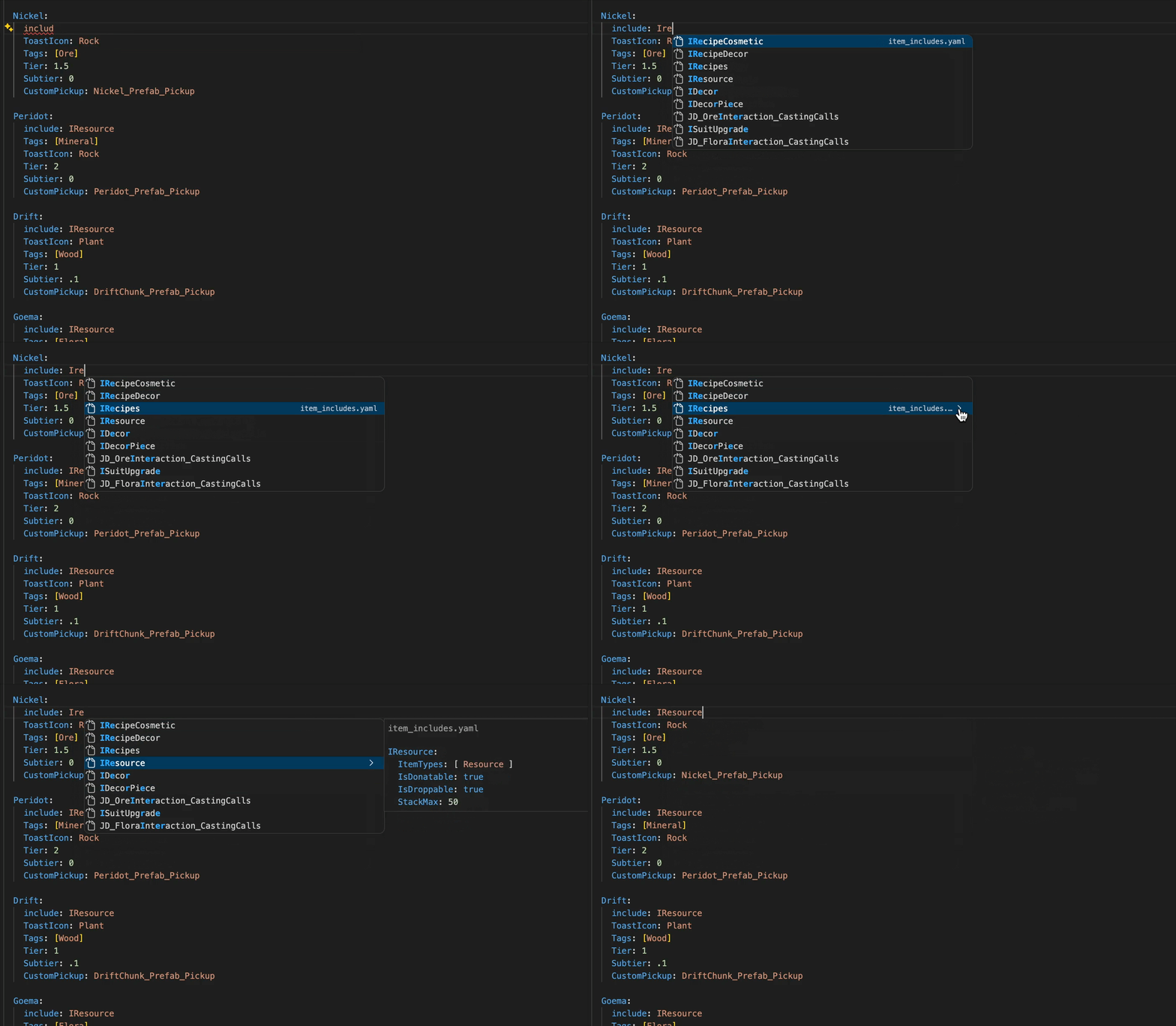
- Auto-complete: suggest all valid entries for the key with an inline preview of the content. Use the arrow keys to quickly cycle between them, and enter to select.
- Hover: show an inline preview of the include contents when you hover a name
- Go-to-definition: jump to file and line where the name is defined (
Ctrl/Cmd + Click)
Instructions
-
Install the extension and be sure to enable Auto-Update https://marketplace.visualstudio.com/items?itemName=koop.ko-op-yaml
-
Open a
.yamlfile inConfigs/(or any sub-directory thereof) -
🚨 Important: to get the full use of autocomplete and see content previews, you MUST manually click on the > in the far right of the tooltip at least once.
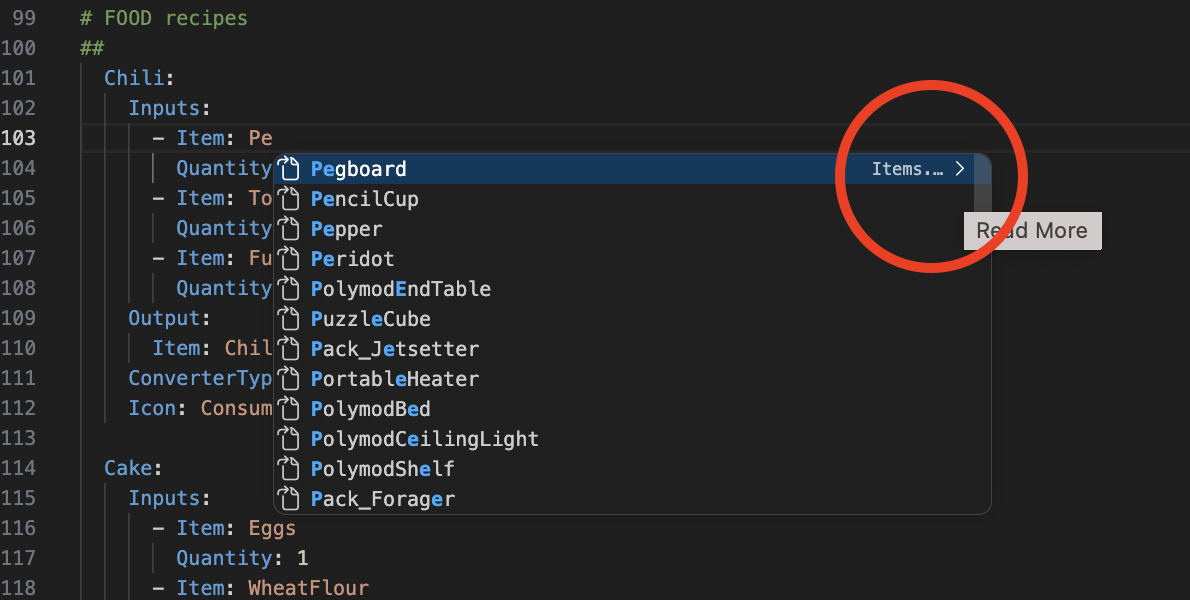 ❌ Wrong, click the arrow circled
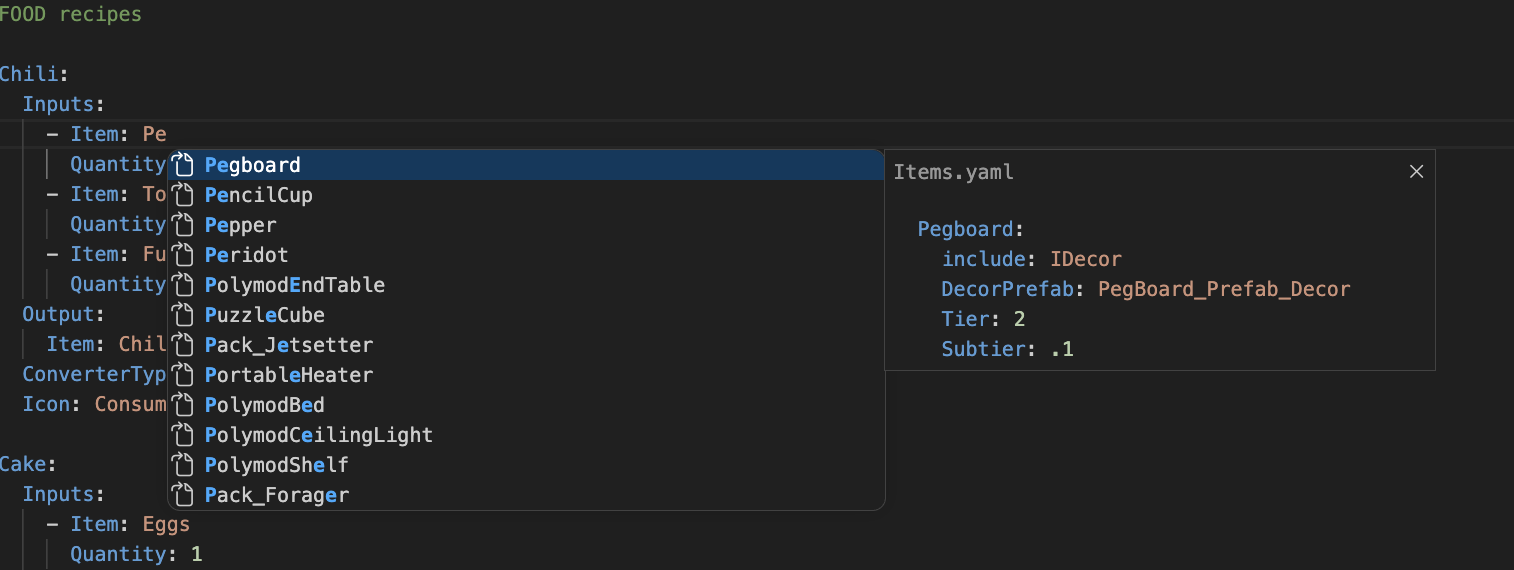 ✅ Correct
Requirements
- Only activates for
.yamlfiles in aConfigs/directory (or sub-directory thereof) - Expects an optional
Configs/Includesdirectory for include lookups - Expects an optional
Configs/Extension/element_mappings.jsondirectory for element mappings (see below)
Features
Include references (include:)
Resolves values of the include: key to entries defined in Configs/Include/*.yaml.
include: SiteDefaults # hover or Ctrl+click to jump to definition
include: [$SiteDefaults, CommonItem] # works with lists too
Element references
Resolves values of recognized element keys (e.g. Item:, Reward:, Recipe:) to named entries in the corresponding source YAML file.
Item: EggSandwich            # hover or Ctrl+click → Items.yaml > Elements > EggSandwich
Items: [EggSandwich, Wrench] # works with lists too
Droptable: CommonLoot

Items:                       # mult-line list support
  - EggSandwich
  - Wrench
Adding element mappings
Library element key → file mappings are defined in Configs/Extension/element_mappings.json in our repository, and update in readtime.
Developers can and should freely add to these (and commit them) as they create new config definitions! Some sample mappings:
| YAML Key | Source File |
|---|---|
Item(s) |
Source/Items.yaml |
Items |
Source/Items.yaml |
Droptable |
Source/Droptables.yaml |
Locale |
Source/World/Locales.yaml |
Tableau |
Source/World/Tableaus.yaml |
SpawnTable |
Source/World/PrefabSpawnTables.yaml |
Reward |
Source/Economy/Rewards.yaml |
ConverterTypes |
Source/Crafting/RecipeConverters.yaml |
ShopItem(s) |
Source/Economy/ShopItems.yaml |
Recipe |
Source/Crafting/Recipes.yaml |
Format
A flat JSON object mapping YAML key names to file paths relative to the Configs/ root, using forward slashes:
{
  "Item":      "Source/Items.yaml",
  "Items":     "Source/Items.yaml",
  "Reward":    "Source/Economy/Rewards.yaml",
  "MyNewKey":  "Source/MyNewFile.yaml"
}
It could have been a cheeky .yaml file itself, but this way makes it clear it's not at all a config file.
Supported value forms
| YAML form | Example |
|---|---|
| Single value | Item: EggSandwich |
| Inline list | Items: [EggSandwich, Wrench] |
| Block list | Items: followed by - EggSandwich lines |
Target file format
Element source files must contain a top-level Elements: key with two-space-indented child keys:
Elements:
  EggSandwich:
    DisplayName: Egg Sandwich
    Weight: 0.3
  Wrench:
    DisplayName: Wrench
    Weight: 1.2
FAQ
How does this work / how do I make an extension like this?
It's surprisingly simple!
VS Code exposes a provider API that lets an extension register handlers for editor actions on specific files - in our case, .yaml files in a Configs/ directory.
Each provider is a class with a single method that VS Code calls when the user triggers the action — you return a result or undefined to pass. This extension registers three:
- Jump to Definition:
registerDefinitionProvider— called on Ctrl/Cmd+Click (or F12). Return aLocationpointing at the target file and line. - Hover/Tooltips:
registerHoverProvider— called when the cursor lingers over text. Return aHovercontaining aMarkdownStringto display in the tooltip. - Auto-complete:
registerCompletionItemProvider— called as the user types. Return an array ofCompletionItems, each with a label, detail, and optional documentation shown in the suggestion widget.
All three providers share the same core logic: parse the current line to identify the key and value under the cursor, resolve which source file that key maps to, then read that file to find the matching Elements: entry.
The VS Code Extension tutorial is a great starting point, along with the API reference:
- https://code.visualstudio.com/api/get-started/your-first-extension
- https://code.visualstudio.com/api/references/vscode-api
Why not use the Language Server Protocol?
I don't know how.
Why regex instead of parsing the YAML nodes properly?
We needed to keep editor character positioning and comments for previews; parsing the yaml directly loses all that. Also, this lets us support any syntax that might not be valid YAML.