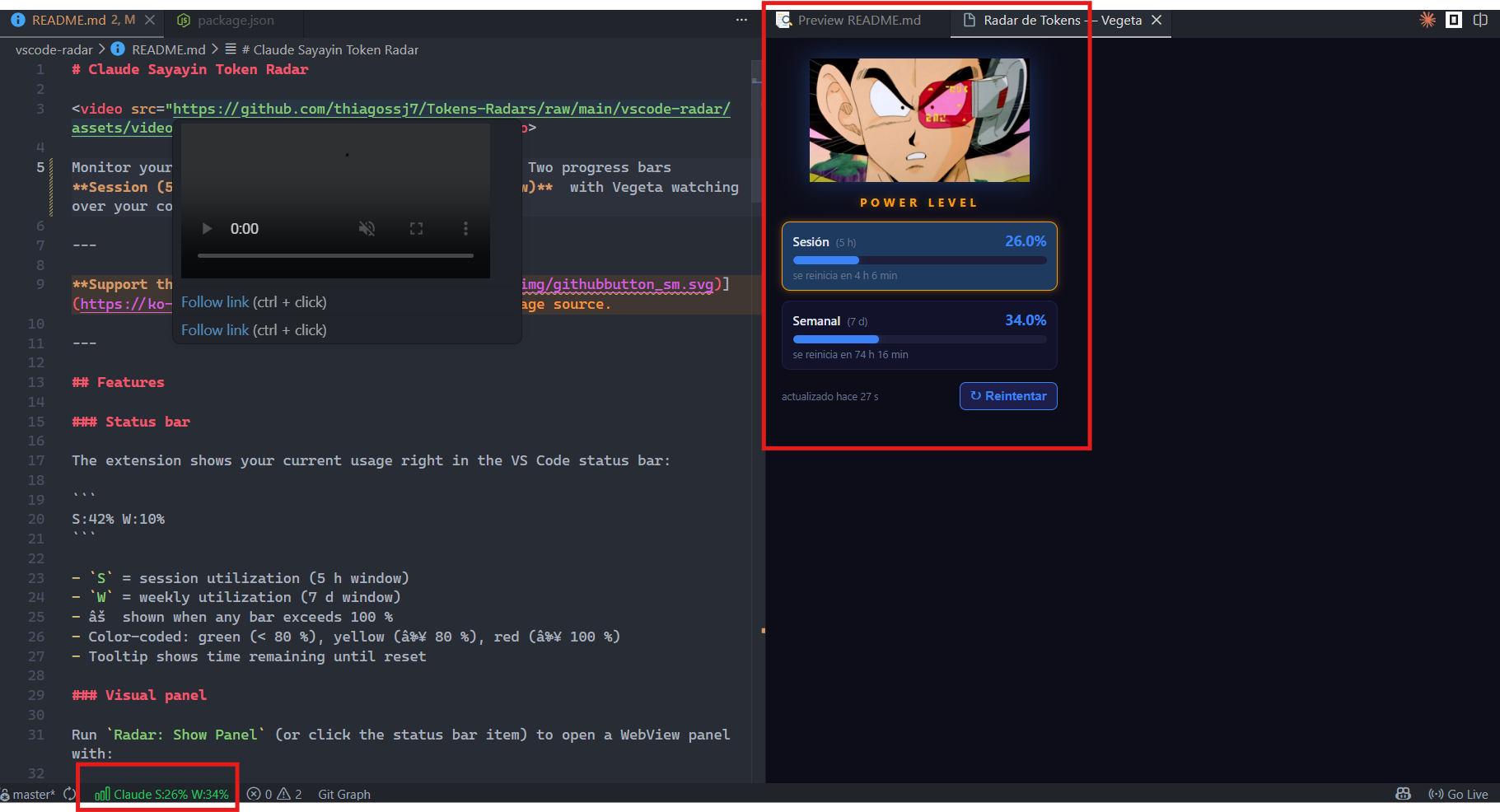
Monitor your Claude plan usage directly from VS Code. Two progress bars Session (5-hour window) and Weekly (7-day window) with Vegeta watching over your consumption.
Support the project:

Features
Status bar
The extension shows your current usage right in the VS Code status bar:
S:42% W:10%
S= session utilization (5 h window)W= weekly utilization (7 d window)- ⚠ shown when any bar exceeds 100 %
- Color-coded: green (< 80 %), yellow (≥ 80 %), red (≥ 100 %)
- Tooltip shows time remaining until reset
Visual panel
Run Radar: Show Panel (or click the status bar item) to open a WebView panel with:
- Vegeta image with glow effect
- Animated progress bars
- Gold border on the bar that is currently limiting you (
representative claim) - Last updated timestamp
Rupture sequence
When a bar reaches ≥ 90 %, a visual alert triggers:
- The critical bar flashes red
- Vegeta pulses red
- A full-screen overlay appears with an animated GIF (over.gif for weekly only, vegeta-scanning.gif when session is also critical)
Auto-refresh
- Polls Claude's API every 60 seconds
- Retry button in the panel forces a fresh reading
- Status bar updates in real time
Commands
| Command | Description |
|---|---|
Radar: Show Panel |
Opens the usage panel |
Radar: Refresh |
Forces a new reading from the API |
Radar: Close Panel |
Closes the panel |
Requirements
- VS Code ≥ 1.85
- Claude account (Pro/Max plan)
- Claude Code CLI installed and logged in (provides the OAuth token)
Installation
From VS Code Marketplace
Search for "Claude Sayayin Token Radar" in the Extensions view (Ctrl+Shift+X) and click Install.
Or install directly from the VS Code Marketplace page.
From VSIX
- Download
radar-tokens-vegeta-1.0.0.vsixfrom the releases page - In VS Code: Extensions (Ctrl+Shift+X) → ⋯ → Install from VSIX...
- Select the file
Development
See DEVELOPMENT.md.
Daily Use
- Open VS Code — the extension starts automatically
- The status bar shows
S:XX% W:XX% - Click the status bar item to open the visual panel
Troubleshooting
| Symptom | Cause | Solution |
|---|---|---|
| Status bar shows "no auth" | OAuth token not found | Run claude in your terminal to log in |
| Status bar stuck on "Radar..." | Token missing or expired | Run claude to refresh your session |
| Panel won't open | Window too narrow | Resize or open VS Code in a wider window |
Changelog
1.0.0
- Status bar with session and weekly percentages
- WebView panel with Vegeta and animated bars
- Rupture sequence on ≥ 90 % usage
- Auto-refresh every 60 seconds
- Commands: Show Panel, Refresh, Close Panel
Also available for Google Chrome
See the GitHub repository for the Chrome extension version and full documentation.
Technical notes
- The
anthropic-ratelimit-unified-*headers are unofficial — discovered through reverse engineering of Claude Code's OAuth protocol. They may change or disappear without notice. Reference: claude-rate-monitor - Your OAuth token never leaves your machine and is never exposed to the extension UI
Support the project: