A Cursor / VS Code extension that monitors NVIDIA GPU usage across your SSH servers, reading host configuration directly from ~/.ssh/config.
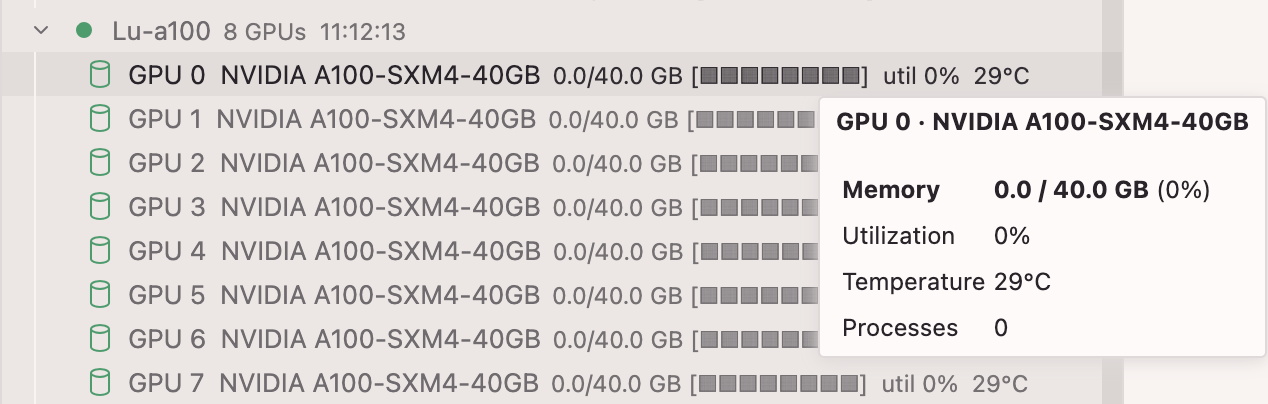
Features
- Live GPU stats — utilization %, VRAM usage (GB), temperature
- Visual memory bar —
[████████░░]per GPU - Process list — which processes are using each GPU (collapsed by default, click to expand)
- Auto-sync — reloads server list when
~/.ssh/configchanges - Password auth — prompts once, stores securely in VS Code Secret Storage
- Settings UI — gear icon in panel header
Requirements
- Node.js (for building)
- SSH servers running
nvidia-smi - SSH keys or passwords already configured in
~/.ssh/config
Installation
macOS / Linux
git clone https://github.com/huia711/gpu-monitor
cd gpu-monitor
bash install.sh
Then restart Cursor / VS Code.
Windows
git clone https://github.com/huia711/gpu-monitor
cd gpu-monitor
.\install.ps1
If PowerShell blocks the script:
Set-ExecutionPolicy -Scope CurrentUser RemoteSigned
Configuration
Click the ⚙ gear icon in the GPU Monitor panel, or edit settings manually:
| Setting | Default | Description |
|---|---|---|
gpuMonitor.refreshInterval |
30 |
Auto-refresh interval (seconds) |
gpuMonitor.connectionTimeout |
8 |
SSH connection timeout (seconds) |
gpuMonitor.excludedServers |
[] |
Host aliases to skip |
gpuMonitor.servers |
[] |
Only monitor these hosts (empty = all) |
Authentication
| Type | How it works |
|---|---|
| SSH key | Uses your system ssh command — ProxyJump, ssh-agent, etc. all work automatically |
| Password | Click the 🔑 key icon next to the server. Password is stored in VS Code Secret Storage and reused on subsequent refreshes. Right-click → Clear Saved Password to reset. |
Updating
git pull
bash install.sh   # or .\install.ps1 on Windows
Then restart Cursor / VS Code.