See who calls what and who reads vs writes a symbol in C/C++ — powered by your C/C++ language server — clangd (recommended) or Microsoft C/C++.




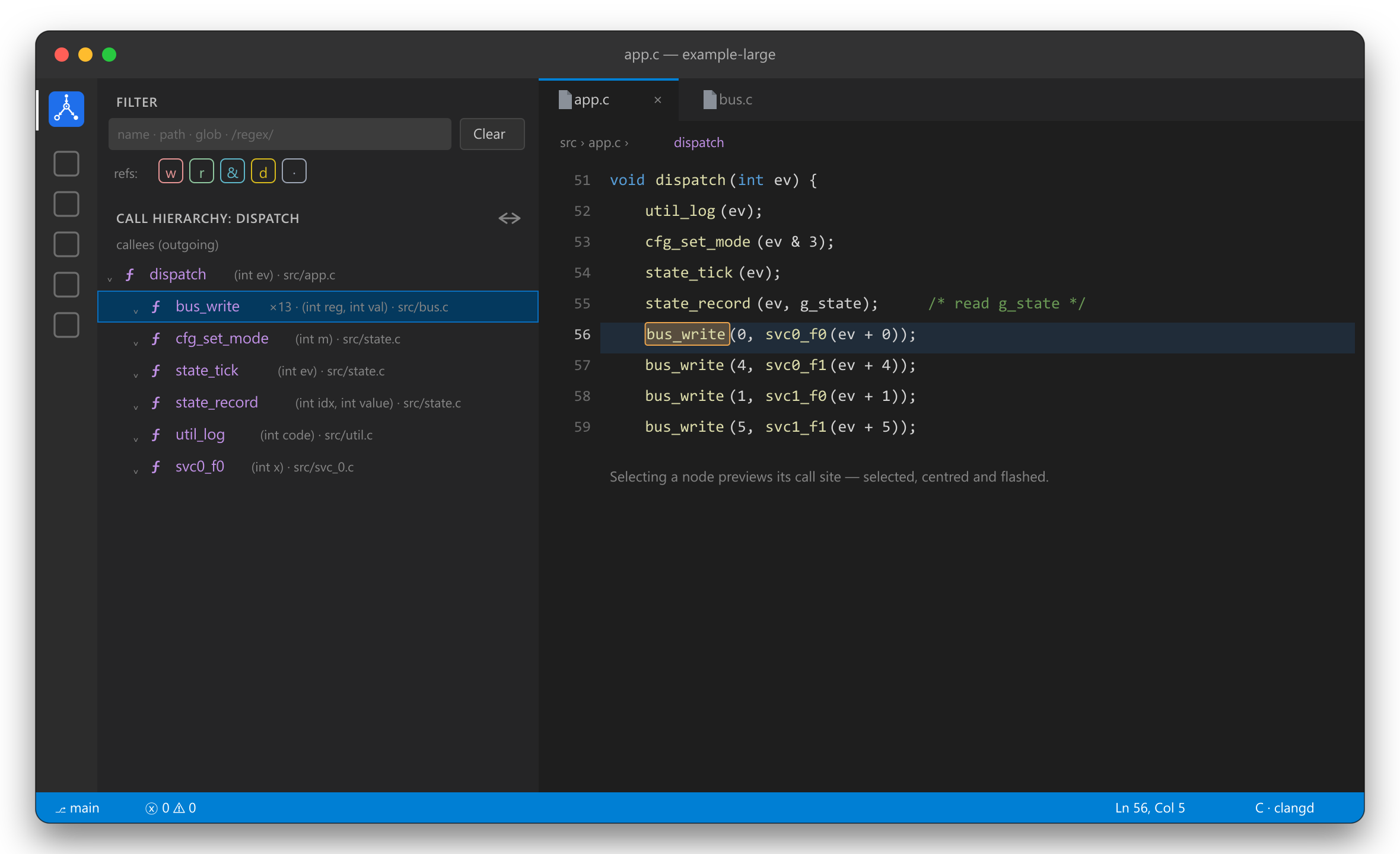
clangd already knows your code. C Call Hierarchy & References re-presents what it knows the way you actually want it: callers and callees at once, references split into reads vs writes, and third-party noise filtered out — without leaving the sidebar.
It does not run its own language server. It consumes your C/C++ provider's results through VS Code's provider commands, so accuracy equals your provider's — with zero extra setup.
✨ Features
Call hierarchy — incoming or outgoing
Put the cursor on a function and run Show call hierarchy. The tree shows callers (incoming) or callees (outgoing) — flip between them with the toggle in the view title. Nodes show the function's parameter types, a ×N badge when clangd merges several call sites into one, and are cycle-safe and depth-capped. Selecting a node previews the call site — selected, centered and briefly flashed — while focus stays in the tree, so you can keep arrowing up and down the hierarchy. On a ×N node (several merged call sites) you can step through the sites two ways without leaving the tree: press Enter repeatedly to preview each in turn (wrapping around), or re-click the inline Open in editor action to open each for real. Either way the walk is per-node — arrow to another function and Enter/Open acts on that node, never the previous one. The inline Open in editor action also moves focus to the editor.
Find references — read vs write
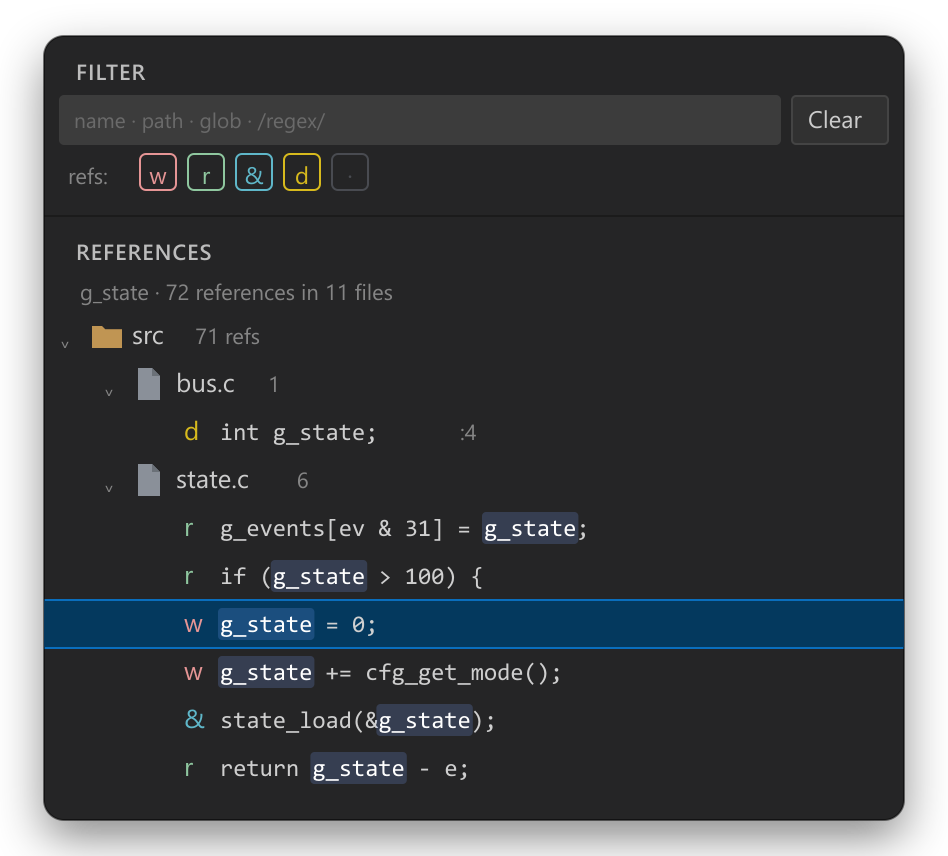
Find references opens a dedicated tree where every occurrence is badged:
- w — write (assignment,
++/--, compound assignment) - r — read
- & — address-of (
&x) — a potential write through the pointer - d — declaration / definition
- · — unknown (e.g. inside a macro)
Group by folder or flat by file, toggle which kinds show with the w r d · chips, and the
matched symbol is highlighted on each line. Read/write comes from clangd's documentHighlight roles, with
a syntactic fallback when the provider doesn't tag a role.
One filter for everything
A fixed Filter pane at the top searches by function name or path across both views, live:
| You type | Match |
|---|---|
bus |
case-insensitive contains (name or path) |
src/net/** |
glob |
/drv_\d+/ |
regular expression |
Matches are also highlighted in the call tree — the part of the function name (or, when the query matches the path, the path shown next to the name) is tinted, so it's clear at a glance why a node is shown.
✅ Requirements
- A C/C++ language provider with call-hierarchy support, installed and active — clangd
(
llvm-vs-code-extensions.vscode-clangd, recommended) or Microsoft C/C++ (ms-vscode.cpptools). - A project index your provider can use: a
compile_commands.jsonorcompile_flags.txt.
If both clangd and ms-vscode.cpptools are installed, make sure clangd is the active C/C++ provider for best read/write accuracy.
🚀 Getting started
- Install this extension and a C/C++ provider (clangd recommended), and open a C/C++ project it can index.
- Click the C Call Hierarchy & References icon in the Activity Bar.
- Right-click a function → Show call hierarchy / Find references.
⚙️ Settings
| Setting | Default | Description |
|---|---|---|
cCallHierarchyReferences.showSignatures |
true |
Show caller parameter types in the call tree. |
Filtering by name/path is done live in the Filter pane — there are no glob settings.
🧠 How it works
For call hierarchy, references and signatures the extension calls VS Code's built-in provider commands
(prepareCallHierarchy, provideIncoming/OutgoingCalls, executeReferenceProvider,
executeDocumentHighlights, executeHoverProvider) which delegate to your C/C++ provider. No second language
server is spawned.
❓ FAQ
Nothing shows up. Make sure your C/C++ provider (clangd or Microsoft C/C++) is installed, active, and has finished indexing — clangd gives the most accurate read/write classification.
Read/write looks wrong. Read/write is recovered from clangd's highlight roles; if another provider answers without roles, a syntactic fallback kicks in. Globals/struct fields are the clearest demo.
Both callers and callees are shown — can I get only one? Expand just the branch you care about; the other stays collapsed.
🛠️ Develop
npm install
npm run compile      # or: npm run watch
Press F5 to launch an Extension Development Host with the bundled example-large/ project (regenerate
or scale it with node tools/gen-large-example.js).
📄 License
MIT © Halis Taha Sahin