Every bro carries a diff he cannot explain. He types
fix stuff, and the night forgives him — but git never forgets. Six months on, another bro runsgit logand finds only silence where a story should have been.So commit, bro. Say what changed, and why it had to. Code is what you wrote; the log is what you meant.
Generate detailed, comprehensive git commit messages from your changes using any of 7 LLM providers — Gemini, OpenAI, DeepSeek, GLM, Anthropic Claude, Kimi, or MiniMax — one click in the Source Control panel.
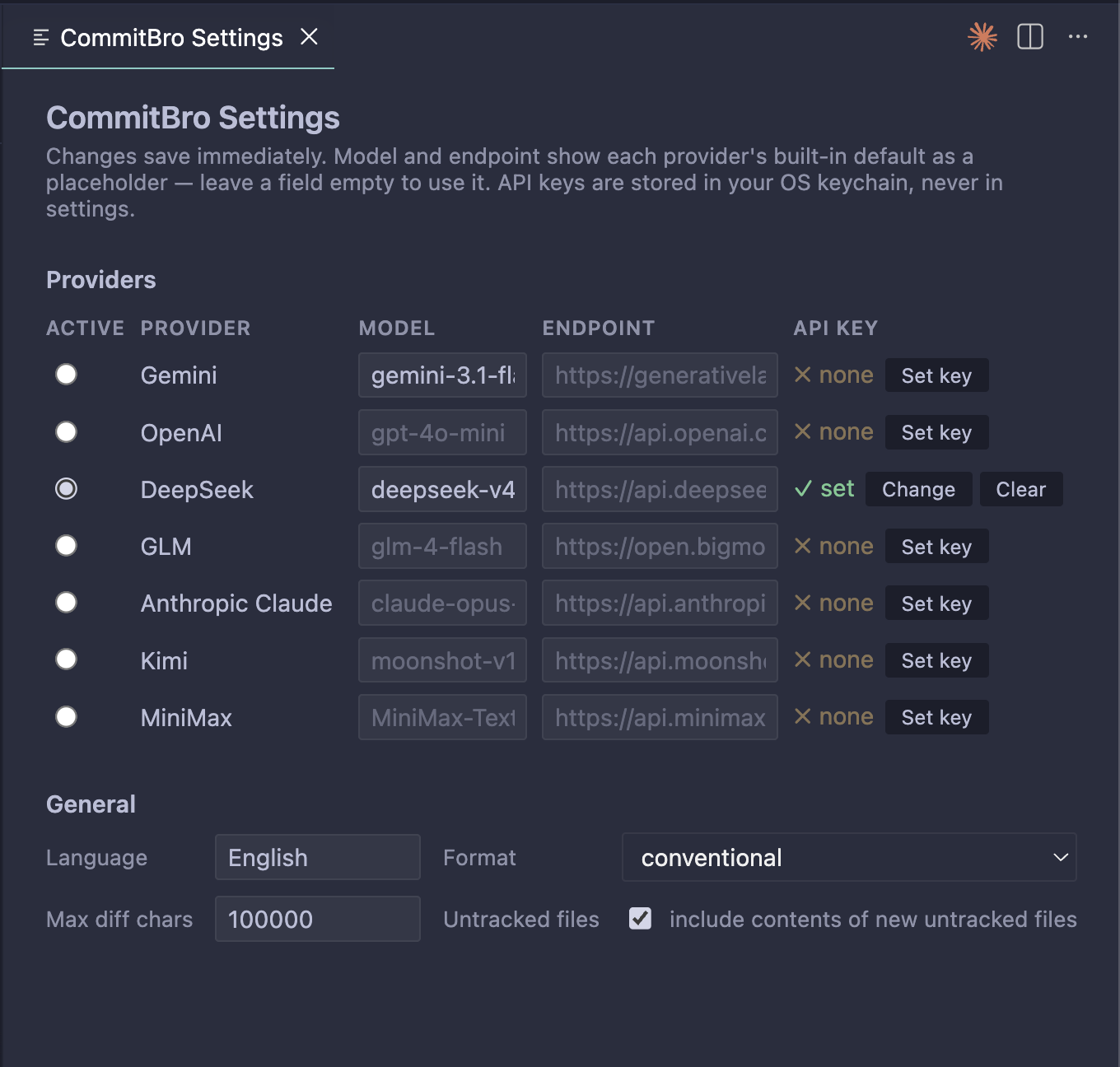
Every provider, model, endpoint, and key in one place — pick one, paste a key, and you're done.
Features
- ✨ button in the Source Control title bar (and a Command Palette command).
- Analyzes all changes: staged, unstaged tracked, and new untracked files.
- Conventional Commits or freeform, in the language you choose.
- Switch provider, model, and API endpoint from the panel — no settings.json editing required.
- Each provider's API key is stored securely in VSCode SecretStorage — never in settings.
- Generated message streams in with a typewriter animation as it arrives.
Setup
- Open the CommitBro panel from the Activity Bar (left sidebar) and
expand its collapsible provider section, or set
commitBro.providerdirectly in Settings. - Pick a provider and set its API key — the panel's Set key button,
the CommitBro: Set API Key command, or paste it into the provider's
apiKeyfield in thecommitBro.providerssetting (it is moved to your OS keychain and erased from the setting immediately). - Click ✨ Generate.
Usage
The CommitBro panel works like Source Control, in one place:
- Make some changes in a git repository.
- Click ✨ Generate — the commit message box fills from all your changes. Edit it if you like.
- Click ✓ Commit (stages everything with
git add -A, then commits) or ↑ Commit & Push (also runsgit push, publishing the branch tooriginthe first time). If new untracked files would be included, you're asked to confirm first.
The two steps are reported separately, so a push that fails never hides a commit that worked. When the commit lands but the push does not — no network, expired credentials, a rejected non-fast-forward — you get "Committed, but the push failed" with the reason git gave, and a Retry Push button that keeps offering until the push succeeds or you dismiss it.
The panel header (branch · N changes) shows what will be committed. The
collapsible section above the message box holds the provider dropdown, model
and endpoint overrides (blank = built-in default; hover the endpoint field to
see the full value), and key status/Set key button.
You can also trigger generation the classic ways: the ✨ button in the built-in Source Control panel, or CommitBro: Generate Commit Message from the Command Palette — both fill the Source Control message box.
Settings
| Setting | Default | Description |
|---|---|---|
commitBro.provider |
gemini |
Active provider: gemini, openai, deepseek, glm, anthropic, kimi, or minimax. |
commitBro.providers |
{} |
All per-provider settings in one map, keyed by provider id. Each entry may set model, baseUrl, and apiKey — see below. |
commitBro.language |
English |
Language for the generated commit message (e.g. English, Bahasa Indonesia). |
commitBro.format |
conventional |
conventional or freeform. |
commitBro.maxDiffChars |
100000 |
Maximum characters of change context sent to the provider. |
commitBro.includeUntracked |
true |
Include contents of new untracked files in the analysis. |
Per-provider settings
The easiest editor is CommitBro: Open Settings — the GUI table pictured at
the top of this page, no JSON involved. Under the hood everything specific to
one provider lives in a single commitBro.providers entry:
"commitBro.providers": {
  "openai": {
    "model": "gpt-4o",
    "baseUrl": "https://my-proxy.example/v1",
    "apiKey": "sk-..."
  }
}
model/baseUrl— omit or leave blank to use the provider's built-in default. Both are also editable from the panel's provider section.apiKey— a write-through input: the key is moved to secure storage (your OS keychain) and erased from this setting immediately, so it normally reads empty. An empty field means the key is stored safely, not missing. Keys under an unrecognized provider name are left in place and reported, never silently deleted.
The separate models, baseUrls, and apiKeys maps of older versions are
folded into commitBro.providers automatically on first activation.
Regional endpoints
A few providers default to a mainland-China endpoint; international accounts
need a baseUrl override, for example:
- Kimi (Moonshot AI):
https://api.moonshot.ai/v1 - GLM (Zhipu AI):
https://api.z.ai/api/paas/v4 - MiniMax:
https://api.minimaxi.com/v1
Commands
- CommitBro: Generate Commit Message
- CommitBro: Set API Key
- CommitBro: Clear API Key
- CommitBro: Open Settings — opens the extension's own settings editor: a table of all seven providers (model, endpoint, API key status with Set/Clear buttons per row), the active-provider picker, and the general options. No JSON editing needed; also reachable from the gear icon on the panel.
Upgrading from an older version? Command ids have changed twice —
geminiCommit.*(Gemini-only), thenaiCommit.*, and nowcommitBro.*. Update any custom keybindings that reference the old ids. SeeCHANGELOG.md.
Migrating from an earlier version
Existing installs are migrated automatically the first time this version
activates: settings and stored API keys from either older namespace —
geminiCommit.* or aiCommit.* — are copied to their commitBro.*
equivalents, including installs that skipped a version. Where both exist,
aiCommit.* wins, being the more recent. The old settings and keys are left
in place (not deleted), so downgrading stays possible.
Develop
npm install
npm run compile      # bundle to dist/extension.js
npm test             # run unit tests
Press F5 in VSCode to launch an Extension Development Host.