



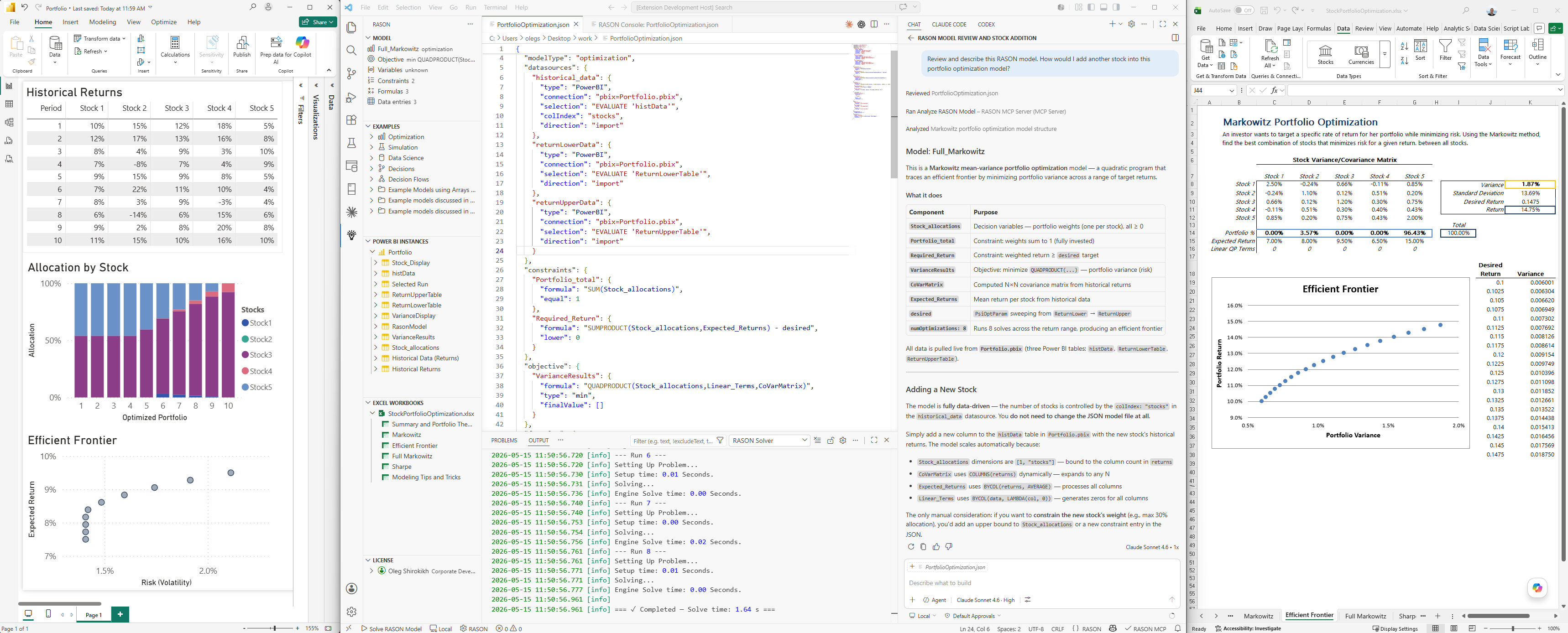
With RASON® Desktop, you can create and solve a full range of analytic decision models, with editing and AI assistance in VS Code, data and results in Power BI and Excel — on your desktop or laptop, moving easily to the Azure cloud when you're ready.
From left to right: Power BI Desktop, VS Code with RASON Desktop extension, and Excel Desktop - showcasing RASON Desktop results in Power BI and Excel on a Markowitz portfolio optimization model.
🔍 Click the screenshot to view full size.
What is RASON?
RASON (Restful Analytic Solver® Object Notation) is a multi-purpose modeling language and decision intelligence platform by Frontline Systems for building, analyzing, and solving mathematical optimization, simulation / risk analysis, and data science / machine learning models, plus business decision rules and multi-stage decision flows.
You can use RASON models on your desktop with VS Code, Power BI Desktop and Excel Desktop; in the Azure cloud with a REST API working with Microsoft Fabric, Power BI Service and Excel for the Web; in Docker containers; and in your own app written in C/C++, C#, Java, Python, and R via Frontline's Solver SDK.
RASON comes with world-class solvers for mathematical optimization, advanced probability distributions and simulation, powerful machine learning algorithms, rich DMN business rule handling, and easy-to-build multi-stage decision flows with an in-memory SQL engine.
Features
- Rich editing: syntax highlighting, IntelliSense, signature help (for hundreds of Excel-compatible built-in functions), and real-time validation for RASON models
- AI-assisted modeling and solving in GitHub Copilot, enriched by RASON MCP Server
- Solvers included for every RASON model type, no extra tools required
- Local and Cloud solving: just click to use either method
- Structural model diagnostics and a sidebar with analyzed model statistics
- Model templates for optimization, simulation, data science, decision tables, multi-stage flows, and Power BI–connected models, inserted via quick pick
- Examples sidebar with a searchable library of ready-to-run RASON models, organized by category
- Live Power BI integration: browse open Power BI datasets, read/write data directly; charts refresh automatically
- Live Excel integration: browse open Excel workbooks, pick ranges, read/write data directly; charts refresh automatically
- Export results to Power BI, CSV, or Excel directly from the RASON Console
- License view for managing your RASON and Solver licenses
Getting Started
- Get a RASON model into the editor — open an existing file, pick one from the Examples sidebar, or insert a starter with RASON: Insert Template.
- Click Solve RASON Model in the status bar, or run it from the Command Palette.
- View progress and results in the RASON Console.
- From the RASON Console, export selected results to Power BI, CSV, or Excel with a single click.
Power BI Integration
The extension connects directly to running instances of Power BI Desktop, letting you read inputs and write results — without leaving VS Code.
- Auto-discovery: open Power BI Desktop instances are detected automatically and shown in the RASON sidebar
- Read from tables: bind RASON datasources to Power BI tables, columns, or measures, listed for you in the RASON sidebar
- Pick tables interactively: drag Power BI data into your model to auto-generate a Power BI datasource, with the DAX query written for you
- Write results to Power BI: after solving a model, export any result data directly to a Power BI table with a single click
- Live updates: charts and visuals in Power BI refresh automatically, preserving your own columns, labels and categories
- Embed models in reports: save the full RASON model inside the Power BI report so it travels with the file and can be reused later
Excel Integration
The extension connects directly to running instances of Microsoft Excel, letting you read inputs and write results — without leaving VS Code.
- Auto-discovery: open Excel workbooks and their worksheets are shown in the RASON sidebar
- Read from ranges: bind RASON datasources to Excel cell ranges by dragging a worksheet or range into your model
- Pick ranges interactively: select a cell range in Excel and have its address written for you into your model
- Write results to Excel: export any result data from the Solve Console directly into an Excel cell range
- Live updates: Excel charts linked to your data refresh automatically, preserving your chart annotations
- Embed models in workbooks: save the full RASON model inside the workbook as a custom XML part so it travels with the file and can be reused later
Sharing Models with End Users (RASON Runner)
Once you've embedded a RASON model into a Power BI report or an Excel workbook (see the Embed models in... options above), you can hand that file to end users who don't run VS Code or RASON Desktop. After installing RASON Runner, they can run the embedded model and refresh its results directly from Power BI or Excel, no modeling environment required.
See Installing RASON Runner for the download and setup steps.
Solver Modes
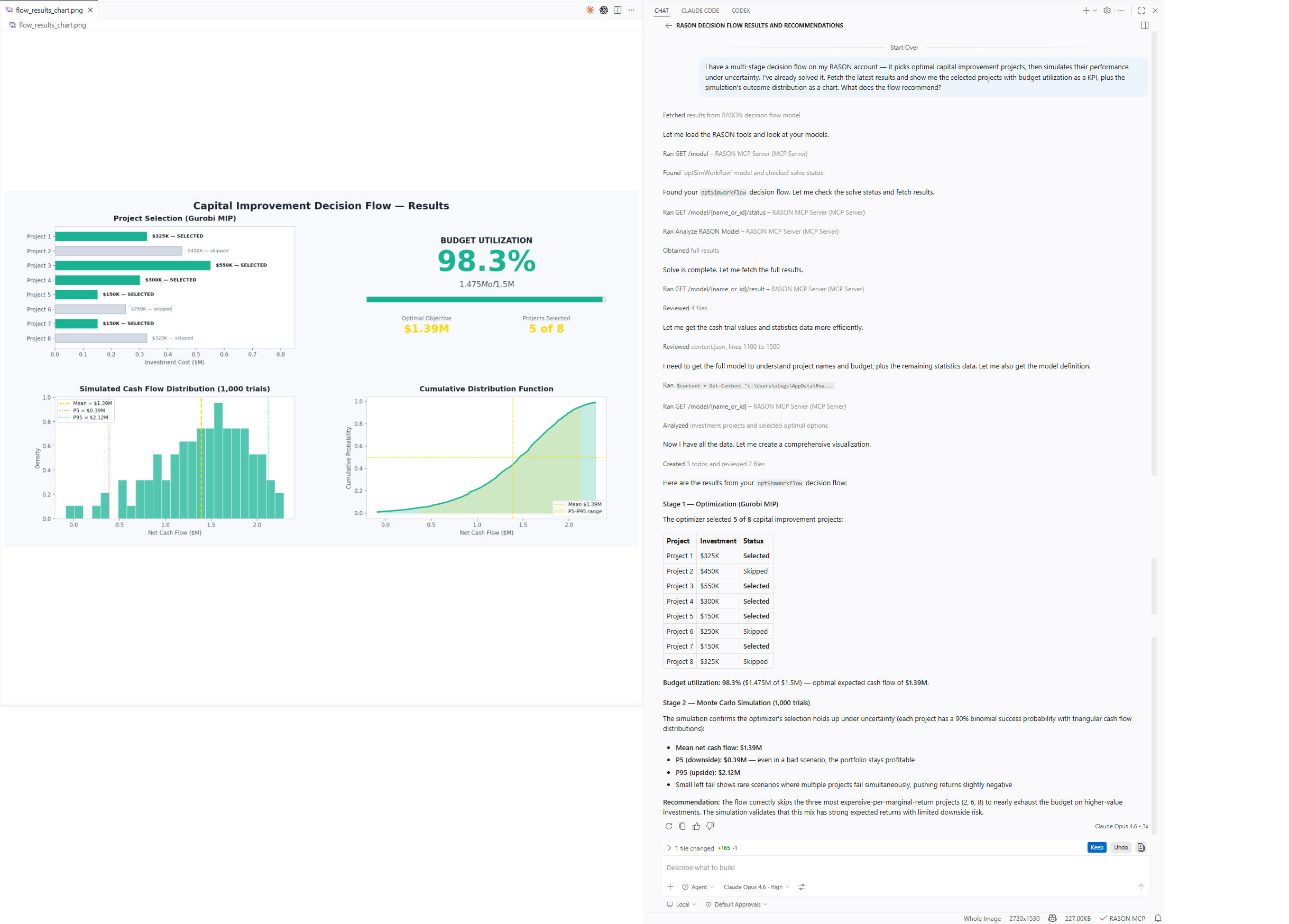
The extension includes a collection of powerful solvers capable of handling the full range of RASON models — mathematical optimization, simulation / risk analysis, data science / machine learning, business rules, and multi-stage decision flows where one model's solution feeds into the next. Licenses (desktop and/or cloud) for all these solvers are available from Frontline Systems.
You can also solve in the cloud directly from VS Code on your desktop, using Frontline's hosted RASON service and its REST API. Three solver modes are available via the status bar or the Toggle Solver Mode command:
- Local: use the bundled solver (default)
- Cloud (Synchronous): submit to rason.net and wait for the result
- Cloud (Asynchronous): submit long-running models and poll for completion
Cloud solving requires a RASON auth token. Get one from your account at rason.com, then set it via RASON: Set Auth Token.
Included MCP Server Gives You a Copilot "RASON Expert"
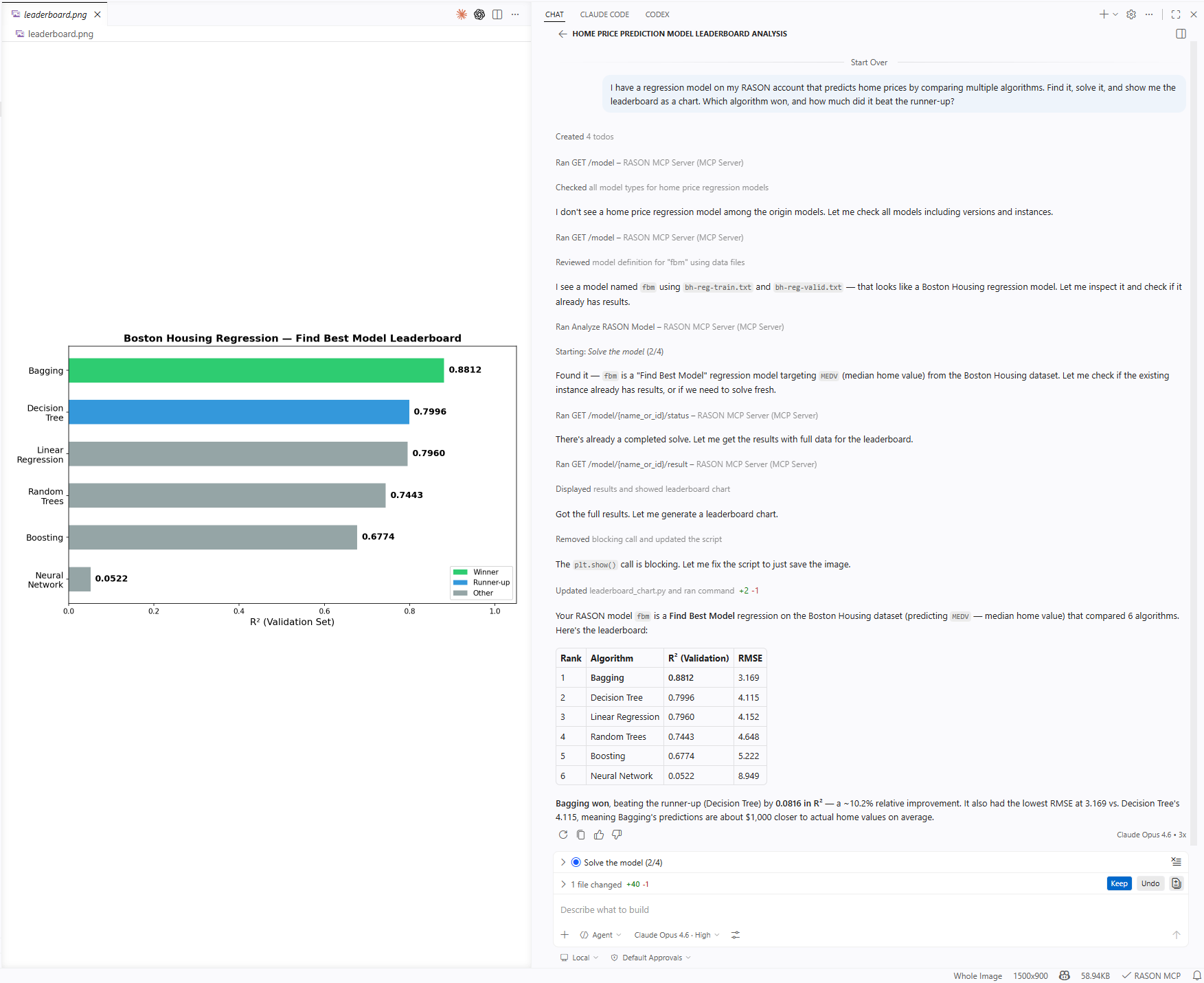
RASON Desktop includes the RASON MCP Server, giving GitHub Copilot Chat full access to RASON's modeling, analysis, and solving capabilities. It's more than a REST API wrapper — the server includes a searchable library of nearly 200 example models, templates that guide model generation, structural analysis, and solve result interpretation.
Open Copilot Chat and start asking — example search, templates, model analysis, and RASON info work immediately. Solving and model management require the same auth token as cloud solving.
Works across all major RASON model types
Click any model type to see it in action.
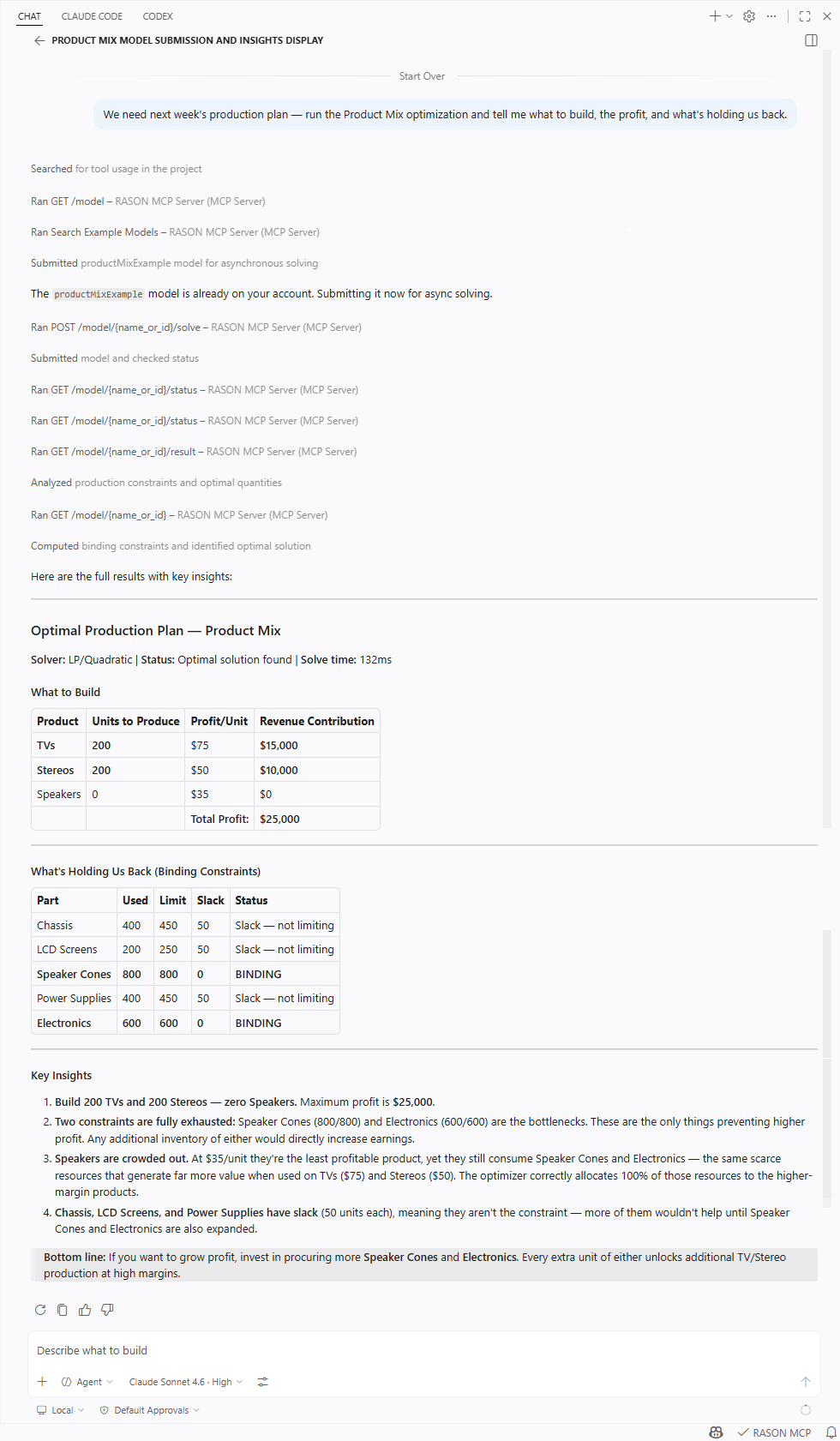 Optimization |
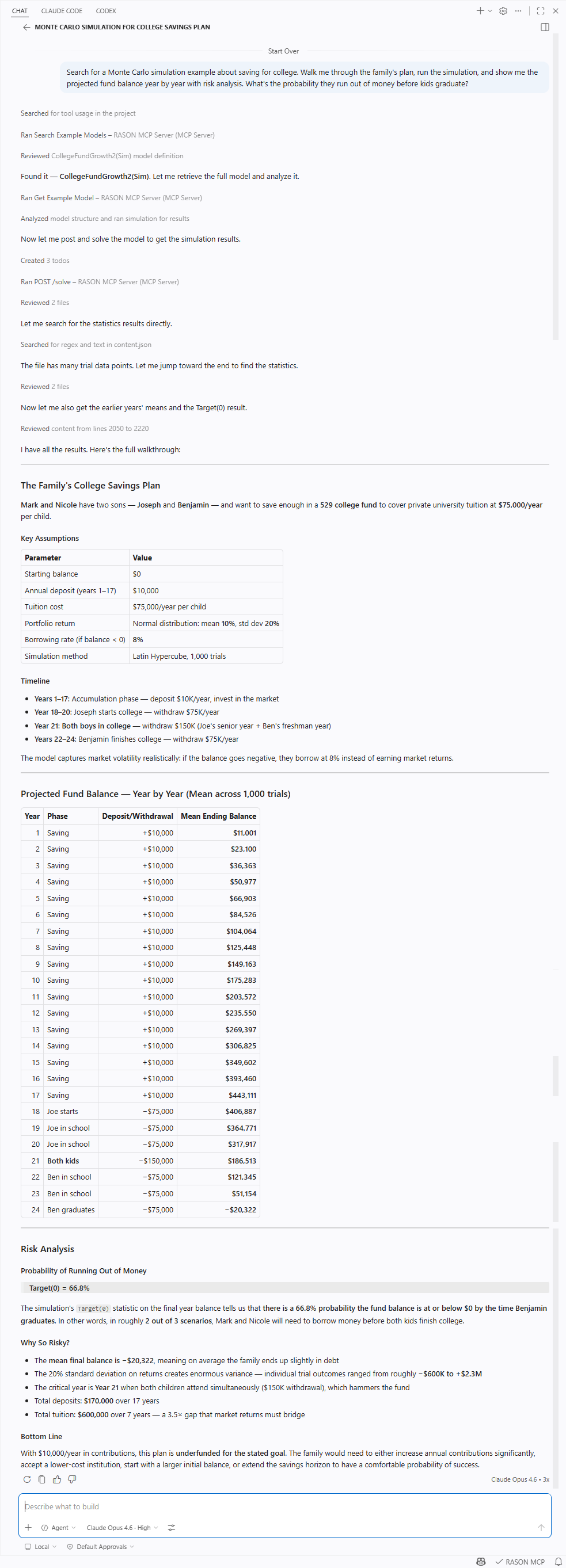 Simulation |
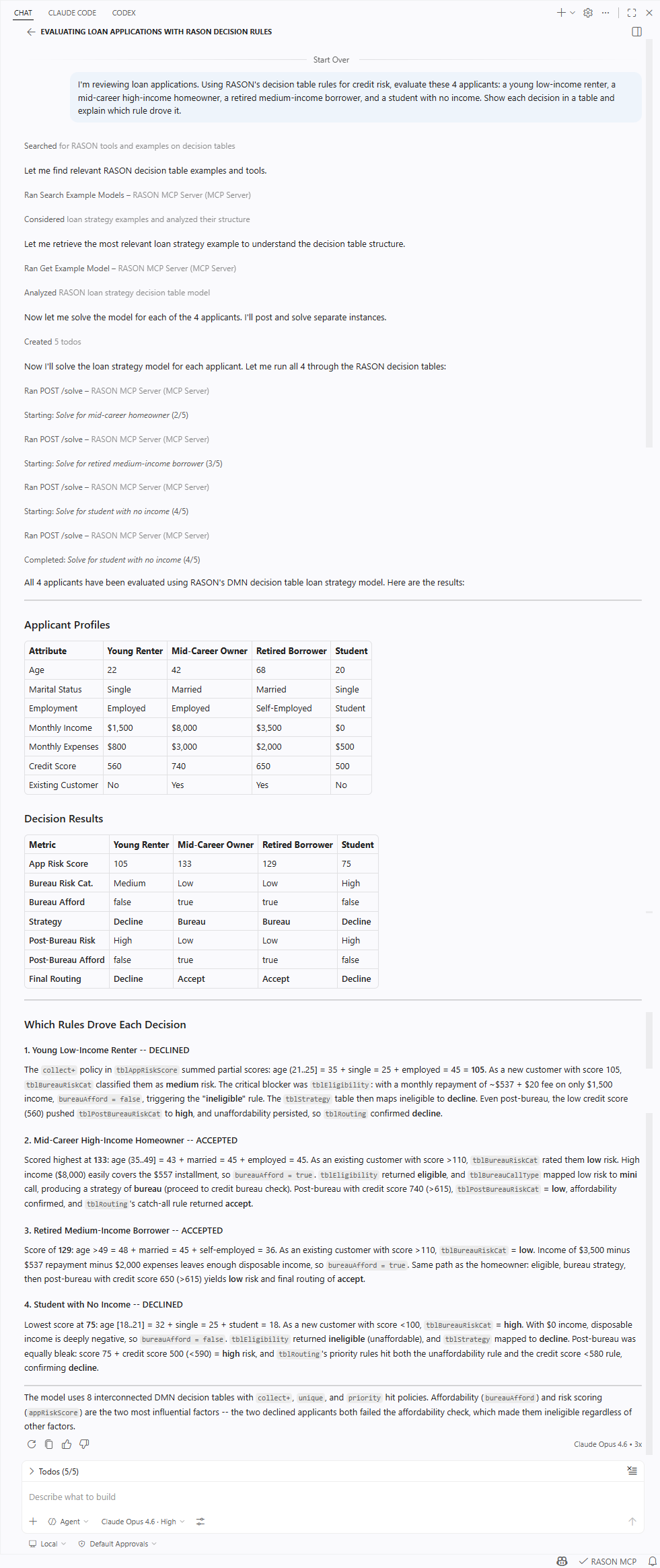 Decision Tables |
 Data Science |
 Multi-Stage Flows |
The MCP server is also available separately — handy if you want it in another MCP client, or in VS Code without the RASON editor, Power BI, and Excel integrations:
- RASON MCP Server: standalone VS Code extension (MCP server only)
- Claude Desktop MCPB release: drop-in extension for Claude Desktop
- @frontlinesystems/rason-mcp-server: npm package for use with Claude Desktop, Cursor, Windsurf, Claude Code, and other MCP clients
Settings
Extension
| Setting | Default | Description |
|---|---|---|
rason.solverMode |
Local |
Solver mode: Local, Cloud (Synchronous), or Cloud (Asynchronous) |
Shared (extension + MCP server)
| Setting | Default | Description |
|---|---|---|
rason.authToken |
"" |
Bearer token for the RASON REST API. Required for cloud solving and AI-driven model management. |
rason.cloudSolverUri |
https://rason.net |
Base URL of the RASON server. |
MCP Server
| Setting | Default | Description |
|---|---|---|
rason.mcp.resultArrayLimit |
25 |
Max array/dataFrame rows before summarizing. |
rason.mcp.resultSizeLimit |
50000 |
Max result characters before truncating. |
Disclaimer
This software is provided "as is", without warranty of any kind. Use of RASON Desktop may involve interaction with external cloud services (RASON REST API) and third-party desktop applications such as Microsoft Excel and Power BI Desktop. You are responsible for reviewing actions before they are executed, managing your credentials securely, and ensuring compliance with applicable terms of service. Before uploading models, files, or data to RASON cloud services, review Frontline Systems' Terms and Conditions and Privacy Policy. AI-generated model formulations and interpretations of solve results should be validated before use in production or decision-making.
License
Copyright © 2026 Frontline Systems, Inc. All rights reserved. This is proprietary software; no part may be reproduced, distributed, or modified without prior written permission from Frontline Systems. Use is governed by the Frontline Systems Software License. For licensing inquiries, contact Frontline Systems.
Feedback and Support
This software is developed and maintained by Frontline Systems, Inc. For questions, feedback, or licensing inquiries, please contact your Frontline representative or reach us at solver.com/how-may-we-help-you.
Links
- RASON Portal: create a free account, manage models, documentation
- RASON Runner: let end users run embedded models from Power BI and Excel
- Frontline Systems: the company behind RASON and Analytic Solver
- MCP Protocol: learn about the Model Context Protocol