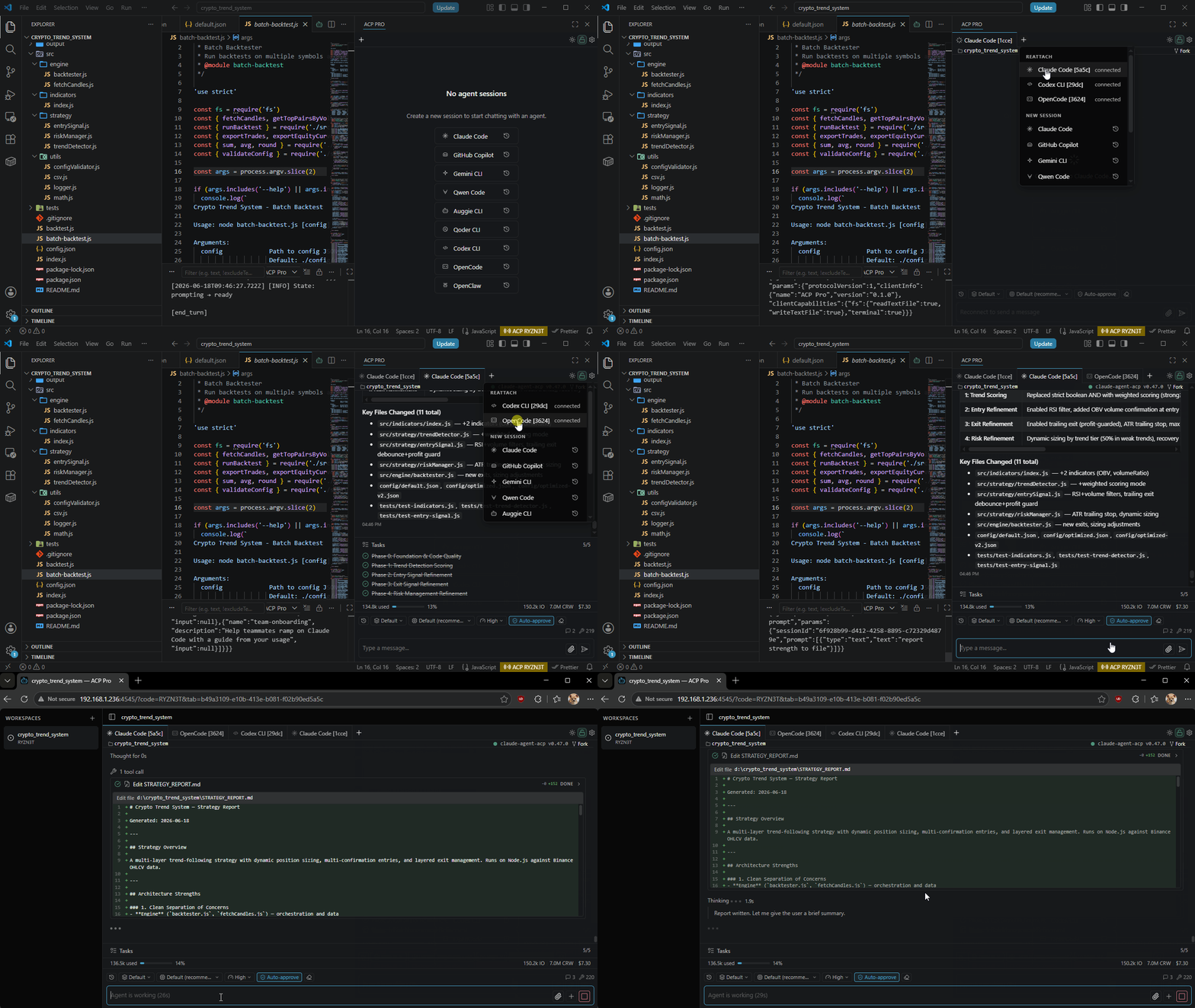
A unified GUI interface for AI coding agents in VS Code. Run multiple agent sessions side-by-side in tabs, stream tool calls and inline diffs; you can watch, approve, and steer your agent from your phone or any browser while away from your desk, or just share live sessions with teammates. Drop open files in as @-context, run multiple sessions at once, keep resumable chat history, generate images & video inline. If you’d rather stay in VS Code than a terminal, this brings any AI agent into your sidebar.
ACP Pro speaks the Agent Client Protocol (ACP), so it works with any ACP-compatible agent: Claude Code, Codex, Grok Build, Antigravity CLI, GitHub Copilot CLI, Gemini CLI, Qwen Code, Auggie CLI, OpenCode, Qoder CLI, and more.
Current release: 0.3.0 — Grok Build as a built-in agent, stable streamed Markdown, and reliable transcript position across tab switches.
Features
- One sidebar, many agents — Run Claude, Copilot, Codex, Qwen, Auggie, Qoder, OpenCode, and OpenClaw side-by-side; pick a different agent per tab, or add more from the registry in Settings.
- Unified Session Switcher — Navigate Live and Recent conversations from one menu, search each agent's history, and close live sessions without discarding their restorable history.
- Bounded live sessions — Keep agent processes under a configurable cap and dehydrate finished, unattended sessions after an idle timeout; active work, drafts, permission prompts, and remotely viewed sessions stay live.
- Per-tab cwd & fork — Pick a working directory per tab from the chat header (workspace folders + recent dirs), or fork the active tab to spin off a new session with the same agent, model, mode, and cwd.
- Sticky chat-view header — Every tab gets a 16px header strip with a session-state dot (one-click refresh on disconnect), the agent's client name and version, the active cwd, and a powerlevel10k-style git pill (branch + ahead/behind/stash/staged/unstaged/untracked counters) that stays synced with the tab's cwd.
- Live tool streaming — Watch
read,edit,bash,web_search, and other tool kinds appear as they run, with kind icons, friendly status labels, inline file diffs, accurate changed-line totals, raw edit output, and word-level highlights. - Responsive long sessions — Streamed chunks are batched per frame, transcripts are virtualized, only the active tab panel is mounted, and attachment bytes live in a bounded store so long conversations stay smooth while preserving each tab's reading position and bottom-follow intent.
- Rich content blocks — Tool calls and messages render image, audio, diff, resource, and resource-link blocks inline; image attachments open in a preview modal; text and terminal output stay scoped to a collapsible details panel, while failed tool-call errors surface outside it.
- Plans and thinking, separated — Execution plans render in a collapsible task panel; reasoning streams as safe Markdown into its own thought block you can expand on demand.
- Smart composer —
/for slash commands and provider-discovered skills,@for files and workspace mentions (with the active editor selection as the first option), drag-and-paste for attachments,:after a path to pin a line range, clickable mention pills, and previewable attachment pills for queued prompts. - Prompt timers — Set or edit a compact delay (
4m,1h4m) for the current draft or a queued prompt; it sends automatically when due. - Send selection to chat — Cmd+Alt+L (or Ctrl+Alt+L) injects the editor selection as an
@<path>:<lines>mention into the active tab; auto-creates a tab when none is open. - Markdown answers — GitHub-Flavored Markdown streams without flicker, with
highlight.js-powered code blocks and inline or display LaTeX for assistant replies; URLs and file paths in code blocks are clickable, and wide tables scroll horizontally instead of fragmenting words. - Controllable remote bridge — A built-in HTTP + WebSocket server exposes your tabs to a teammate's browser via a 6-character share code; turn browser sharing off per workspace when you only want local VS Code chat, or use LAN sharing and VS Code port forwarding from local or remote workspaces.
- Pro sharing controls — Activate a license to unlock a persistent, customizable workspace share code and an owner password. Browser viewers claim ownership with the password; owners flip the workspace between read-only and full-write access from a tab-bar lock toggle. The extension stays free — licensing only unlocks these optional sharing features, and one activation follows your VS Code client profile across its local and remote workspace hosts.
- Light & dark themes — A sun/moon toggle in the tab bar flips themes, or pick System / Dark / Light in Settings → Appearance. System mode follows VS Code automatically.
- Per-session controls — Switch permission mode, model, reasoning effort, and any additional select controls an agent advertises (such as Codex fast mode); cycle modes with Shift+Tab, cancel a turn with Esc, and queue follow-up prompts mid-stream.
- Built-in agent authentication — When an ACP agent requests authentication, complete its advertised flow locally in VS Code; short-lived credentials stay out of settings, session data, bridge traffic, and diagnostics.
- Status-bar telemetry — Per-session token usage and cost surface in the status bar; the bridge share link is one click away.
- Resilient sessions — The last active session restores on window reload by default, persisted conversations reopen through
session/loadorsession/resume, and dropped sessions recover at the same cwd. Each window reads its sessions directly from the extension host, so it keeps rendering even when another window's bridge leader goes away. - Settings built for repeated use — Add agents from the registry, reorder them by drag-and-drop, test commands, reset to built-in defaults, and see when a registry-sourced agent has an update available.
- Debug logging on demand — Keep production output quiet, then use
ACP Pro: Toggle Debug Modewhen you need live ACP request and response logs.
Bridge — Remote Session Sharing
ACP Pro embeds a tiny HTTP + WebSocket server that starts automatically with the extension. The first VS Code window of a user becomes the leader and binds the configured port; subsequent windows join as followers over loopback IPC.
- Status bar indicator —
$(broadcast) ACP <shareCode>. Click to copy the shareable URL. - Loopback (
127.0.0.1) — URL resolves viavscode.env.asExternalUri, so VS Code port forwarding (Remote - Tunnels / Codespaces / SSH) automatically produces a public URL. - All interfaces (
0.0.0.0) — URL resolves to the host's first non-loopback IPv4 address for LAN sharing. - Auth — Every HTTP route and WebSocket upgrade validates the
?code=<shareCode>query. - Lockfile — Stored under the extension's per-installation global storage as
acp-pro/bridge.lock(mode0600, ephemeral per session), keeping bridge coordination isolated between local and remote extension hosts. License entitlement is shared separately through the VS Code client profile.
Licensing & Pro Features
ACP Pro is free. A license unlocks optional sharing controls without touching the core experience.
- Get a license — Purchase a Pro key from Gumroad.
- Activate once per VS Code profile — Settings → License. Enter your key once; ACP Pro caches the entitlement in
context.globalState, re-checks it on startup, and reuses it in local, SSH, Tunnel, WSL, Dev Container, and Codespaces workspace extension hosts opened by the same VS Code client profile. Profiles without shared license state show the Free tier. - Shared entitlement, host-bound unlock — Workspace hosts in the same VS Code client profile present one shared license fingerprint, but each host still uses its own device key. The server delivers the Pro CEK in an encrypted envelope for that host; copied device-key or CEK material cannot be unsealed on another host.
- Pro unlocks — A persistent, customizable workspace share code; an owner password for browser viewers to claim ownership; and an owner-only tab-bar toggle to switch the workspace between read-only and full-write viewer access.
- Offline-resilient — A host that already has a validated, loadable CEK keeps Pro unlocked when the license server is unreachable. A newly joined host retains the shared entitlement but may show Pro unavailable until it can fetch an envelope for its device key.
- Remove anytime — Settings → License → Remove (inline two-click confirm) clears the license from the shared VS Code client profile; you can reactivate the same key later.
Requirements
- VS Code 1.96 or later
- Node.js 20 or later (agents launched via
npxrequire a working Node toolchain on yourPATH) - An ACP-compatible agent. See Supported Agents — all defaults use
npx, so no manual install is required.
Quick Start
- Click the ACP Pro icon in the Activity Bar (it uses the VS Code
sparkleicon). - The chat sidebar opens with an empty session. The default agent is Claude Code.
- Type a prompt and press Enter. The extension launches the agent via
npxon first use (subsequent runs are cached). - Use the New session button to start another conversation, then use the Session Switcher to move between Live and Recent sessions.
Sharing a Session
The bridge starts automatically when the extension activates. Browser sharing is enabled by default and can be turned off per workspace from Settings -> Bridge Server.
- Look at the status bar for
$(broadcast) ACP <shareCode>(a fresh 6-character code is generated each activation). - Click it to copy the share URL (
http://<host>:<port>?code=<shareCode>). - Open the URL in a browser to load your live tabs in a read-only view.
- To share beyond LAN, enable VS Code port forwarding for the bridge port — the status bar URL updates to the forwarded address automatically.
Configuration
All settings live under acpPro.* and can be edited via VS Code Settings UI or settings.json.
| Setting | Type | Default | Description |
|---|---|---|---|
acpPro.agents |
array | 8 built-in agents | Ordered stdio agent entries with name, command, and optional args and env. |
acpPro.defaultAgent |
string | Claude Code |
Agent used for new tabs. |
acpPro.defaultModel |
string | — | Model to request from the agent (optional, agent-dependent). |
acpPro.autoApproveDefault |
boolean | false |
Auto-approve tool calls for new sessions. |
acpPro.session.liveSessionCap |
integer | 8 |
Maximum number of agent sessions kept live at once. |
acpPro.session.idleTimeoutMinutes |
integer | 60 |
Minutes a finished, unattended session stays live before dehydration. 0 disables timeout-based dehydration. |
acpPro.session.restoreLastActive |
boolean | true |
Reopen the last active session after a VS Code reload. |
acpPro.bridge.port |
integer | 4545 |
Preferred TCP port. 0 = ephemeral. Falls back to ephemeral if busy. |
acpPro.bridge.listenHost |
enum | 127.0.0.1 |
127.0.0.1 (loopback only) or 0.0.0.0 (all interfaces). |
acpPro.notificationSound |
enum | Abstract Chime |
Sound: Abstract Chime, Gentle Bell, Soft Ping, Digital Tone, None. |
acpPro.licenseServerUrl |
string | — | Host server used to activate and check a Pro license. Must be https:// (loopback http allowed for self-hosting); insecure or invalid values fall back to the secure default. |
Example: custom agent over stdio
{
  "acpPro.agents": [
    {
      "name": "My Local Agent",
      "command": "node",
      "args": ["/path/to/my-agent.js", "--acp"],
      "env": { "MY_AGENT_API_KEY": "sk-..." }
    }
  ]
}
Supported Agents
Defaults shipped in acpPro.agents:
| Agent | Command |
|---|---|
| Claude Code | npx @agentclientprotocol/claude-agent-acp@latest |
| Codex | npx @agentclientprotocol/codex-acp@latest |
| Grok Build | npx @xai-official/grok@latest agent stdio |
| OpenCode | npx opencode-ai@latest acp |
| GitHub Copilot | npx @github/copilot-language-server@latest --acp |
| Qwen Code | npx @qwen-code/qwen-code@latest --acp --experimental-skills |
| Auggie CLI | npx @augmentcode/auggie@latest --acp |
| Qoder CLI | npx @qoder-ai/qodercli@latest --acp |
| OpenClaw | npx openclaw acp |
Any agent that implements the Agent Client Protocol will work — add it from Settings -> Agents when it appears in the registry, or add it manually to acpPro.agents.
Commands
All commands are available via the Command Palette (Ctrl/Cmd+Shift+P):
| Command | Title |
|---|---|
acp-pro.newTab |
ACP Pro: New Tab |
acp-pro.closeTab |
ACP Pro: Close Active Tab |
acp-pro.cancelTurn |
ACP Pro: Cancel Current Turn |
acp-pro.focusChatView |
ACP Pro: Focus Chat View |
acp-pro.copyShareInfo |
ACP Pro: Copy Bridge Share Link |
acp-pro.doctor |
ACP Pro: Toggle Debug Mode |
acp-pro.forkTab |
ACP Pro: Fork Active Tab |
acp-pro.pickTabCwd |
ACP Pro: Pick Working Directory for Active Tab |
acp-pro.sendSelectionToActiveTab |
ACP Pro: Send Selection to Active Tab |
Focus Chat View also appears as a bot-glyph button in the editor title bar, and reveals the chat at its current docked location rather than forcing it back into the sidebar.
Keyboard Shortcuts
ACP Pro ships one default keybinding:
| Command | Windows / Linux | macOS | When |
|---|---|---|---|
acp-pro.sendSelectionToActiveTab |
Ctrl+Alt+L | Cmd+Alt+L | editor has focus and a selection |
Inside the chat webview:
- Enter — send prompt
- Shift+Enter — newline
- Shift+Tab — cycle the active tab's permission mode
- Esc — cancel the current turn
- / — open slash-command autocomplete
- @ — open file/mention autocomplete
Bind any command via keybindings.json — for example:
{
  "key": "ctrl+alt+c",
  "command": "acp-pro.copyShareInfo"
}
Troubleshooting
- Agent fails to start — Check the Output panel → "ACP Pro" channel. First run may take time while
npxdownloads the agent package. - Bridge port in use — The extension falls back to an ephemeral port and surfaces a warning. Set
acpPro.bridge.portto0to always use ephemeral. - Share URL is
127.0.0.1— That meansasExternalUridid not produce a forwarded URL. Enable VS Code port forwarding for the bridge port, or switchacpPro.bridge.listenHostto0.0.0.0. - Stale lockfile — Delete
acp-pro/bridge.lockfrom the extension's global storage directory and restart the affected local or remote VS Code extension host.
License
ACP Pro is proprietary, commercial software — © Duc Lv, All Rights Reserved. It is licensed, not sold, under the End-User License Agreement in LICENSE. The core experience is free to install and use; Pro features require a valid license entitlement, shared by a VS Code client profile and protected by host-bound encrypted Pro keys. You may not copy, redistribute, resell, reverse-engineer, or circumvent the licensing or encryption mechanisms. See LICENSE for the full terms.