
Premium Markdown authoring for Visual Studio Code — a live, in-preview editable document with a formatting ribbon and design templates.
Features · Design templates · Getting started · Keyboard shortcuts · Requirements · Release notes
Zentra Studio turns the Markdown preview into a first-class writing surface. The rendered document is fully editable — type, split a paragraph, press Enter inside a heading or list, and Zentra Studio serializes your changes back into the source as precise range edits. No context switching between source and preview, no flicker, no guesswork.
Features
Two-way preview editing
The preview is a live, editable document. Every change you make in the rendered view is parsed back to Markdown and applied to the source file as a minimal, precise edit — the two always stay in sync.
- Type, delete, and merge paragraphs directly in the preview
- Press Enter inside a heading, list, or blockquote to continue it naturally
- Full
contenteditablebehavior, with Markdown-aware serialization
Formatting ribbon
A formatting ribbon at the top of the preview gives you everything you need — text styling, block styles, lists, links, and undo/redo — no keyboard shortcuts required.
| Inline | Blocks | History |
|---|---|---|
| Bold | Heading 1 / 2 / 3 | Undo |
| Italic | Bulleted / numbered / task lists | Redo |
| Strikethrough | Blockquote | Clear formatting |
| Inline code | Code block / HR | |
| Link |
Active formats highlight in a pressed state, and the ribbon slides up to keep the document unobstructed.
Screenshot
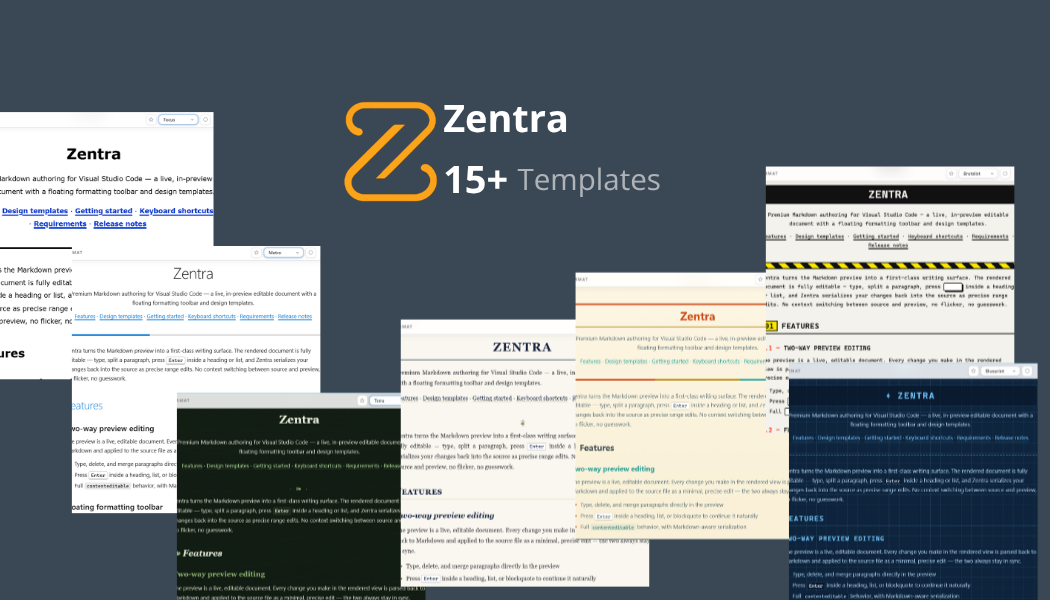
Design templates
A template switcher in the ribbon strip lets you restyle the document instantly. Your chosen template is remembered per document. 18 hand-crafted templates are bundled:
| Template | Aesthetic |
|---|---|
| Cupertino | Minimal, native-feeling typography — personal notes, readmes |
| Ledger | Crisp, high-contrast — API documentation, technical specs |
| Sprint | Dark-mode, dense — changelogs, project-management docs |
| Edge | Stark monochrome, oversized headings — blogs, manifestos |
| Manuscript | Elegant serifs, print margins — academic papers, essays |
| Academia | Scholarly navy & gilt — theses, formal writing |
| Arctic | Low-contrast frost, soft cards — calm quiet notes |
| Blueprint | Engineering drawing sheet — specs, manuals |
| Brutalist | Raw mono print, offset shadows — manifestos, zines |
| Focus | Accessibility-first, large type — high-legibility reading |
| Gazette | Broadsheet newspaper — journals, newsletters |
| Metro | Flat tile design — interface docs, guides |
| Noir | Film-noir charcoal & crimson — cinematic docs |
| Notebook | Ruled paper, handwritten — planning, journals |
| Phosphor | Retro CRT terminal glow — hacker logs, sci-fi |
| Solstice | Solarized warmth, burnt orange — long-form reading |
| Synthwave | Neon retro-future — vibrant docs |
| Terra | Botanical greenhouse — environmental topics, field notes |
Live code highlighting
Fenced code blocks render with syntax highlighting from a curated highlight.js subset — applied lazily only when a block scrolls into view, so large documents stay fast.
Getting started
Install
- Open the Extensions view (Ctrl+Shift+X).
- Search for Zentra Studio and select Install.
Or from a Markdown file, use the built-in editor-title preview button.
Open a preview
- Open a Markdown (
.md) file. - Run one of the commands below — or click the split-screen icon in the editor title bar.
| Command | Shortcut |
|---|---|
Zentra Studio: Open Preview |
Ctrl+Shift+V |
Zentra Studio: Open Preview to the Side |
Ctrl+Shift+Z or Ctrl+K V |
Switch templates
Use the template switcher in the ribbon at the top of the preview to change designs. The active template persists for the current document.
Keyboard shortcuts
| Shortcut | Action |
|---|---|
| Ctrl+Shift+V | Open the Zentra Studio preview |
| Ctrl+Shift+Z | Open the Zentra Studio preview to the side |
| Ctrl+K V | Open the Zentra Studio preview to the side |
All shortcuts only fire while a Markdown editor is focused, so they never interfere with other workflows.
Requirements
- Visual Studio Code 1.90.0 or later
- Markdown files are the only supported document type
Release notes
See the CHANGELOG for the full history of every release.
Website
Made with ❤️ by dotHP