Functionality
This CStar IDE works for C files (referred to as CStar files). It is a client for
the cstarc lsp language server.
It has the following features:
Enjoy the Features
Preparatory Work
- Install the CStar toolchain. If
cstarcis not found when the extension activates, it offers to download and install the toolchain for you; you can also run theCStar IDE: Download CStar Toolchaincommand at any time. - Make sure the
cstarcbinary is on yourPATH, or setCstar: Pathto the directory that contains it. The server resolves itsinclude/libruntime directories relative to the binary, so keep the standard layout. - Fix your configuration in Settings
- Cstar: Path
- This extension depends on the clangd
extension, which VS Code installs automatically. Set
Clangd: Path(clangd.path) tocst_clangd, the clangd binary distributed within the CStar toolchain, so C language features match the CStar dialect. If you also have Microsoft's C/C++ extension installed, disable it — it conflicts with clangd, and the extension will warn you on activation. - Start the HOL server by running the
CStar IDE: Start HOL Light Servercommand. It serves on127.0.0.1:7000by default.
Show Symbolic State
Show the symbolic state and in-scope variables at the current line:
- Open your CStar file.
- Make sure the HOL server is running, and you may need to restart it from time to time.
- Move your cursor to the line of interest, then run the
CStar IDE: Show Symbolic Statecommand (keybindingCtrl+Alt+Right, orAlt+Righton Linux). - The panel shows the enclosing function, its symbolic state, and the in-scope ghost variables grouped by scope; each section is collapsible, and an item's fold/unfold status is preserved across updates even when its content changes or it is temporarily absent.
- Each symbolic-state branch has its own tab. Within a branch, outer
existential binders, pure
factresources, local-variabledata_atandundef_data_atresources, and the remaining heap resources are shown as Existentials, Facts, Locals, and Heap. A cell resource is a Local only when its address is a program-variable address such asx__addr; field and computed addresses stay in Heap. - If the preceding successful query was for an earlier line in the same file,
and the document has not been edited between queries, the panel shows the
previous and current symbolic states side by side. An old conjunct consumed by
the transition is marked on the left, a new conjunct is marked as produced on
the right, and matching frame conjuncts are left unmarked. Each changed
existential binder or resource is highlighted independently rather than
highlighting its whole row. Conjuncts and binders are compared as multisets
within order-aligned outer
||branches. Matching is currently textual and does not use alpha equivalence. - When the server also returns verification conditions, they appear as an additional collapsible section in the same panel, alongside the symbolic state and scopes.
- The code from the top of the file through the queried line is backlit in the editor to show what has been symbolically executed so far. The backlight rolls back to the line before your edit when you change the highlighted region, and clears when the file is closed.
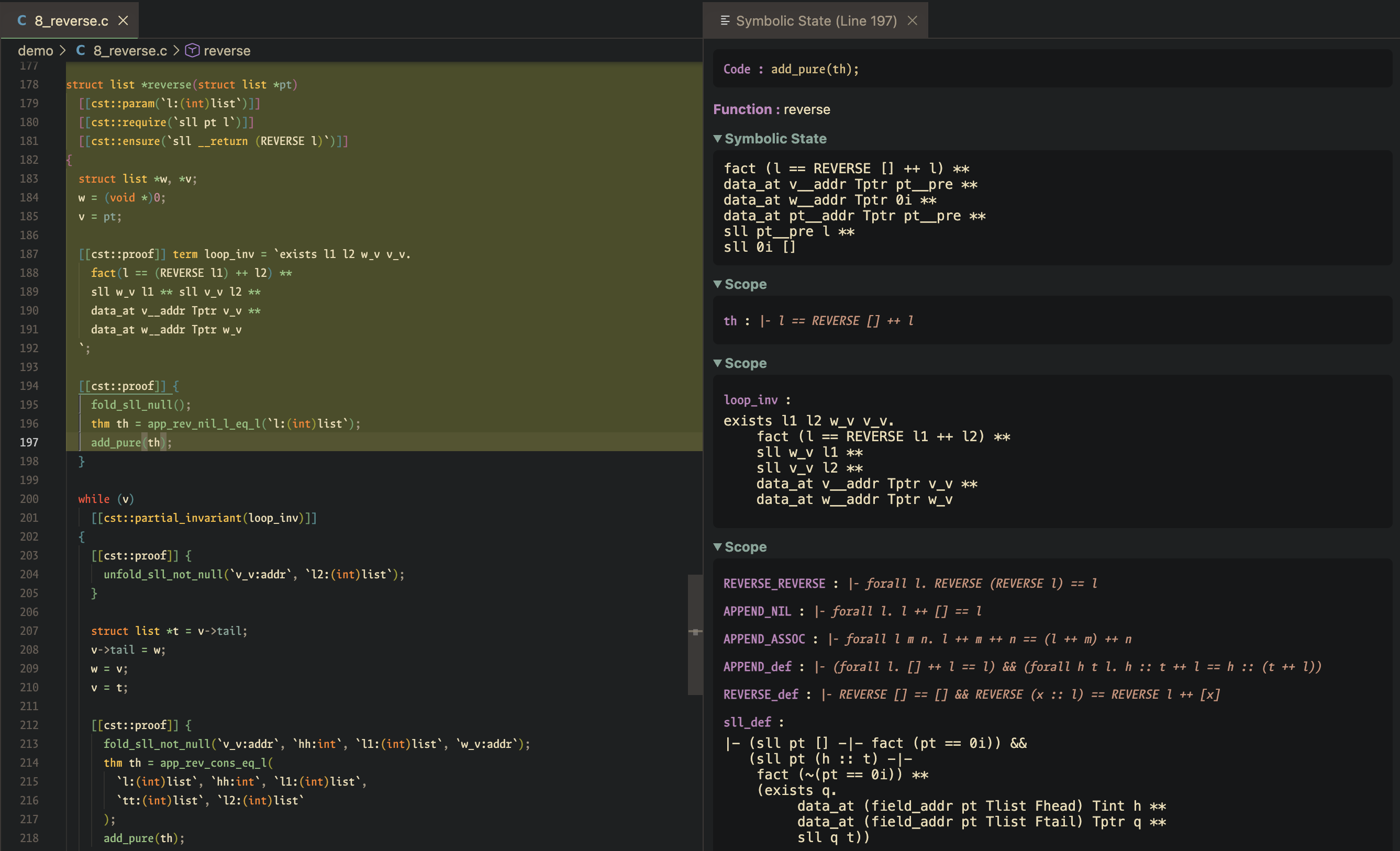
Stop Symbolic State Daemon
To speed up repeated queries, the server keeps a warm incremental-verification
daemon per file. If it gets into a bad state, run the CStar IDE: Stop Symbolic State Daemon command (keybinding Ctrl+Alt+Left, or Alt+Left on Linux)
to tear down the daemon for the backlit file (or the active file)
and clear the backlight; the next Show Symbolic State respawns a fresh one.