Deterministic project scaffolding for VS Code and AI agents.
Critical Templates generates files from team-owned templates stored in your workspace. It helps developers and AI coding agents create new components, routes, pages, docs, workflows, and other project artifacts in the right location with the right structure every time.
Features
- Generate files from
.critical-templatesusing the VS Code Activity Bar or Command Palette. - Keep templates in your repository so conventions travel with the project.
- Prompt for variables with native VS Code inputs.
- Support Handlebars, Liquid, Mustache, and raw file templates.
- Generate optional companion files with conditional templates.
- Group templates by category in a friendly side panel.
- Bootstrap Codex-ready project docs, skills, and a local CLI for deterministic AI agent workflows.
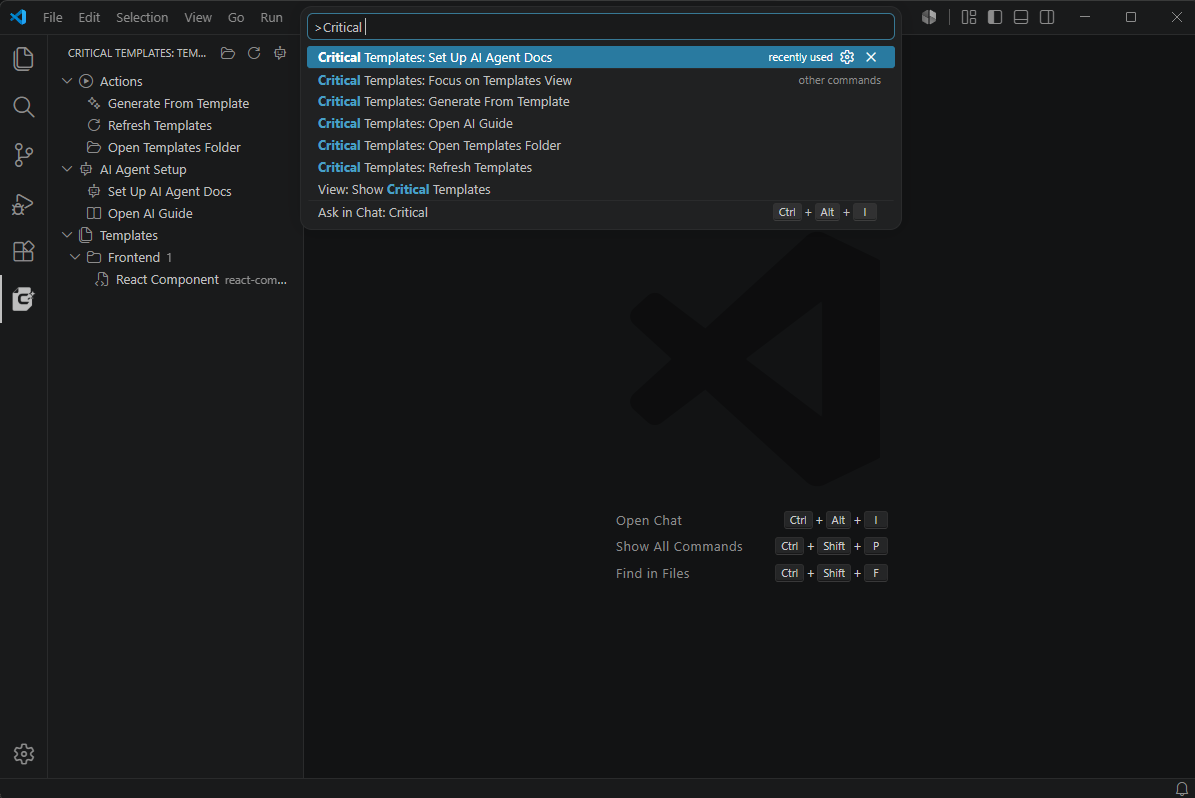
Screenshot
Quick Start
- Create a template under
.critical-templates. - Open the Critical Templates Activity Bar view.
- Select Generate From Template.
- Choose a template and answer the prompts.
Example workspace structure:
.critical-templates/
  react-component/
    template.yaml
    files/
      src/components/{{pascalName}}/{{pascalName}}.tsx.hbs
      src/components/{{pascalName}}/{{pascalName}}.scss.hbs
Example Template
apiVersion: criticaltemplates/v1
id: react-component
title: React Component
description: Generate a React component with an optional SCSS file.
category: frontend
engine: handlebars
root: files
conflictPolicy: ask
skipEmptyFiles: true
variablesSchema:
  type: object
  additionalProperties: false
  properties:
    name:
      type: string
      minLength: 2
      description: Component name, for example Button
    withScss:
      type: boolean
      default: true
      description: Include SCSS file and import
  required:
    - name
ui:
  order:
    - name
    - withScss
computed:
  pascalName: "{{pascalCase name}}"
  kebabName: "{{kebabCase name}}"
Template file:
.critical-templates/react-component/files/src/components/{{pascalName}}/{{pascalName}}.tsx.hbs
import React from "react";
{{#if withScss}}
import "./{{pascalName}}.scss";
{{/if}}

const {{pascalName}} = () => {
  return <div className="{{kebabName}}-container"></div>;
};

export default {{pascalName}};
Generated output for name=Button:
src/components/Button/Button.tsx
src/components/Button/Button.scss
Activity Bar
The Critical Templates side panel is organized into sections:
- Actions: generate files, refresh templates, open the templates folder.
- AI Agent Setup: install or open Codex-oriented project documentation.
- Templates: templates grouped by manifest category.
Commands
Critical Templates: Generate From TemplateCritical Templates: Refresh TemplatesCritical Templates: Open Templates FolderCritical Templates: Open AI GuideCritical Templates: Set Up AI Agent Docs
AI Agent Setup
Run Critical Templates: Set Up AI Agent Docs in a project to install:
.codex/tools/critical-templates-cli.cjs
.codex/skills/critical-templates/SKILL.md
docs/ai/critical-templates.md
AGENTS.md
Existing AGENTS.md content is preserved. The extension updates only its managed Critical Templates section. Existing skill or guide files without Critical Templates markers require confirmation before replacement.
After setup, Codex and other agents can use the project-local CLI instead of inventing file structures:
node .codex/tools/critical-templates-cli.cjs list --workspace .
node .codex/tools/critical-templates-cli.cjs inspect react-component --workspace .
node .codex/tools/critical-templates-cli.cjs plan react-component --workspace . --var name=Button --var withScss=true
node .codex/tools/critical-templates-cli.cjs generate react-component --workspace . --var name=Button --var withScss=true --conflict overwrite
This makes templates a shared contract between human developers and AI agents.
Template Manifest
Supported manifest files:
template.yamltemplate.ymltemplate.json
Required fields:
apiVersionidtitle
Common optional fields:
descriptioncategoryengine:handlebars,liquid,mustache, orrawroot: defaults tofilesconflictPolicy:ask,overwrite,skip, orrenameskipEmptyFiles: skip files that render to whitespace onlyvariablesSchema: JSON Schema for user inputsui.order,ui.labels,ui.placeholderscomputed: derived values such aspascalNameandkebabName
Settings
criticalTemplates.defaultConflictPolicycriticalTemplates.enableLiquid: allow or block Liquid templates in VS Code generation.criticalTemplates.enableHandlebars: allow or block Handlebars templates in VS Code generation.
Workspace Trust, Privacy, and Security
Critical Templates is designed as a local workspace tool. It reads project templates from the current workspace and writes generated files back to that workspace.
- Local files only: template discovery, rendering, and file generation happen locally through VS Code workspace APIs.
- No external template upload: template contents, variable values, and generated files are not sent to Critical Developer or any third-party service.
- No telemetry: the extension does not currently collect or emit telemetry.
- Workspace Trust required: generation is blocked until the workspace is trusted.
- Path containment: generated paths are validated to stay inside the selected workspace folder.
- AI setup is explicit:
Critical Templates: Set Up AI Agent Docswrites project-local files under.codex,docs/ai, andAGENTS.md. - Safe AI doc updates: existing
AGENTS.mdcontent is preserved, managed Critical Templates blocks are updated in place, and unmarked existing skill or guide files require confirmation before replacement. - Project-local CLI: the AI setup command installs a local CLI copy at
.codex/tools/critical-templates-cli.cjsso agents can use project templates deterministically without invoking VS Code UI. - Rollback on generation failure: if a multi-file generation fails partway through, the VS Code and CLI paths attempt to remove created files and restore overwritten files.
Known Limitations
- Web workspaces such as
vscode.devare not a primary target yet. - The project-local CLI is installed only after running
Critical Templates: Set Up AI Agent Docs. - Template generation requires Workspace Trust.
- EJS-style arbitrary JavaScript templates are intentionally not supported.
Requirements
VS Code 1.90.0 or newer.
Quality Checks
The project includes tests for case helpers, CLI/core generation, optional file skipping, path escape rejection, CLI rollback, and command manifest coverage.
Release Notes
See CHANGELOG.md.