
Corrdex is an intelligent AI coding assistant and architecture enforcement extension for VS Code. It parses your codebase into a rich semantic AST, checks for real-time architectural rule violations, and seamlessly synchronizes your project context with the Corrdex Web Dashboard.
Screenshots
| Live Diagnostics | Corrdex Settings |
|---|---|
 |
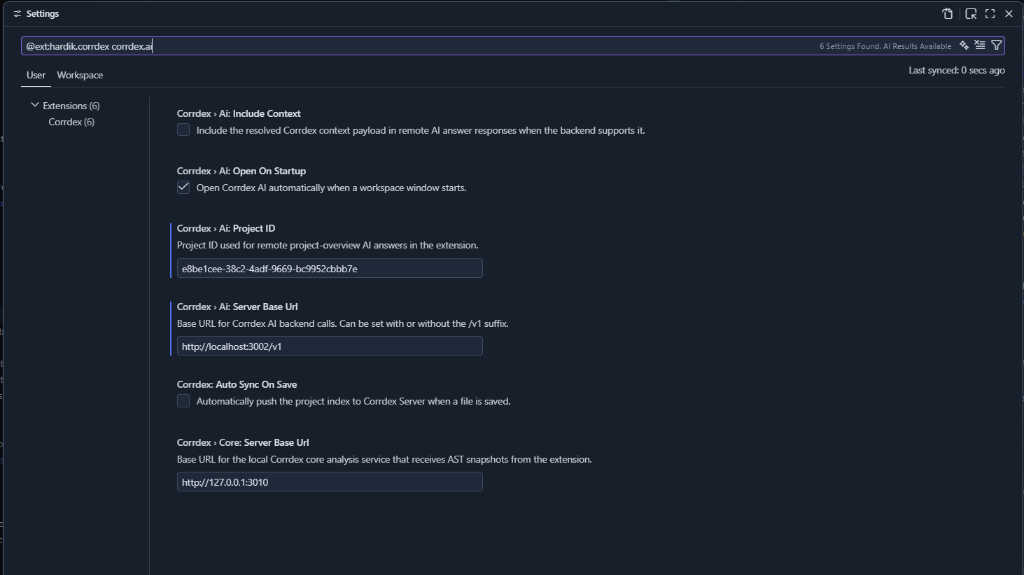 |
| Custom File Icons | AI Assistant Sidebar |
 |
(Coming Soon) |
| Cloud Synchronization | Automated Analysis |
 |
 |
Features
- Live Architectural Diagnostics: Uses the local
corrdexcoreengine to scan your code as you type, instantly flagging architectural violations based on your team's custom policies. - Deep Codebase AI: A dedicated AI Assistant panel embedded right inside VS Code that understands your entire project's semantic structure.
- Dual Push Sync: One-click synchronization of your semantic codebase index and live scan violations to the Corrdex Cloud server.
- Auto-Sync: Optionally enable
Auto Sync On Saveto keep the remote Corrdex AI perfectly in sync with your local edits.
Setup Instructions
-
Get your API Key & Project ID
- Create a project on your Corrdex Server dashboard.
- Generate an API Key and note your Project ID.
-
Configure your API Key
- Open the VS Code Command Palette (
Ctrl+Shift+P/Cmd+Shift+P). - Run the command:
Corrdex: Set AI API Key. - Paste your API Key. It is securely stored in your local VS Code SecretStorage.
- Open the VS Code Command Palette (
-
Workspace Configuration
- Create a
corrdex.config.jsonfile in the root of your workspace to bind the project and define your custom rules:{ "project": "your-project-id", "rules": { "no-external-api-in-controller": "error", "must-use-repository-pattern": "warning" } }
- Create a
-
Your First Sync
- Look at the bottom-right of your VS Code Status Bar.
- Click the ☁ Push button to manually trigger a dual-push sync.
- You will see a green success notification once your Semantic Index and Scan Run are uploaded to the dashboard!
Extension Settings
You can customize the extension via your VS Code Settings (Ctrl+,):
corrdex.ai.serverBaseUrl: Base URL for Corrdex AI backend calls (Default:http://localhost:3003/v1).corrdex.core.serverBaseUrl: Base URL for the local Corrdex AST engine (Default:http://127.0.0.1:3010).corrdex.autoSyncOnSave: Enable automatic background pushing when saving files (Default:false).
Commands
Corrdex: Open AI: Opens the AI assistant panel.Corrdex: Set AI API Key: Securely store your API Key.Corrdex: Clear AI API Key: Removes your API Key from storage.Corrdex: Refresh Sidebar: Refreshes the project overview in the Explorer.
VSX Namespace verification request
Verifying ownership for Open VSX namespace claim: (link to your GitHub issue here)