Current top-tier models, intelligently routed. Your project memory, already there.
ContextCode is a context-native coding agent that remembers the project: managed model routing for each role and task, backed by ContextStream's durable memory, hybrid search, knowledge graph, coding graph, and inspectable grounding receipts. There is no provider key to paste and no model pin to babysit.
Better context. More finished work.
| 96% task success | 9 of 9 memory tasks | 90.0% LongMemEval-S |
|---|---|---|
| ContextStream memory: 23/24 agent tasks completed, versus 14/24 without it | Tasks that required prior project memory: 9/9 completed, versus 0/9 without it | 450/500 on the full benchmark; statistical parity with Zep and above supermemory |
These are measured results, not a demo-script score. The July 2026 agent study used the same Claude Sonnet 4.6 agent, repositories, and prompts across eight tasks with three trials per arm. LongMemEval-S used the full 500-question set and the official GPT-4o judge.
Explore the benchmark methodology and evidence →
Stop rebuilding context at the start of every chat. ContextCode retrieves the small, relevant evidence set from your code, decisions, lessons, plans, tickets, docs, and prior sessions before work begins. The model spends its window on the task instead of a giant pasted history or another round of project rediscovery.
“Pick up the permissions refactor. Keep the decision to use device-flow sign-in, run the focused checks once, and show me exactly what changed.”
When that decision lives in your ContextStream workspace, ContextCode can surface it, ground the task, work under the permission posture you choose, and bring you back a checkpointed diff with evidence. You can inspect the context and proof instead of relying on a ritual recap or a vague “looks good” handoff.
Install from the VS Code Marketplace · See plans · Get help or share feedback
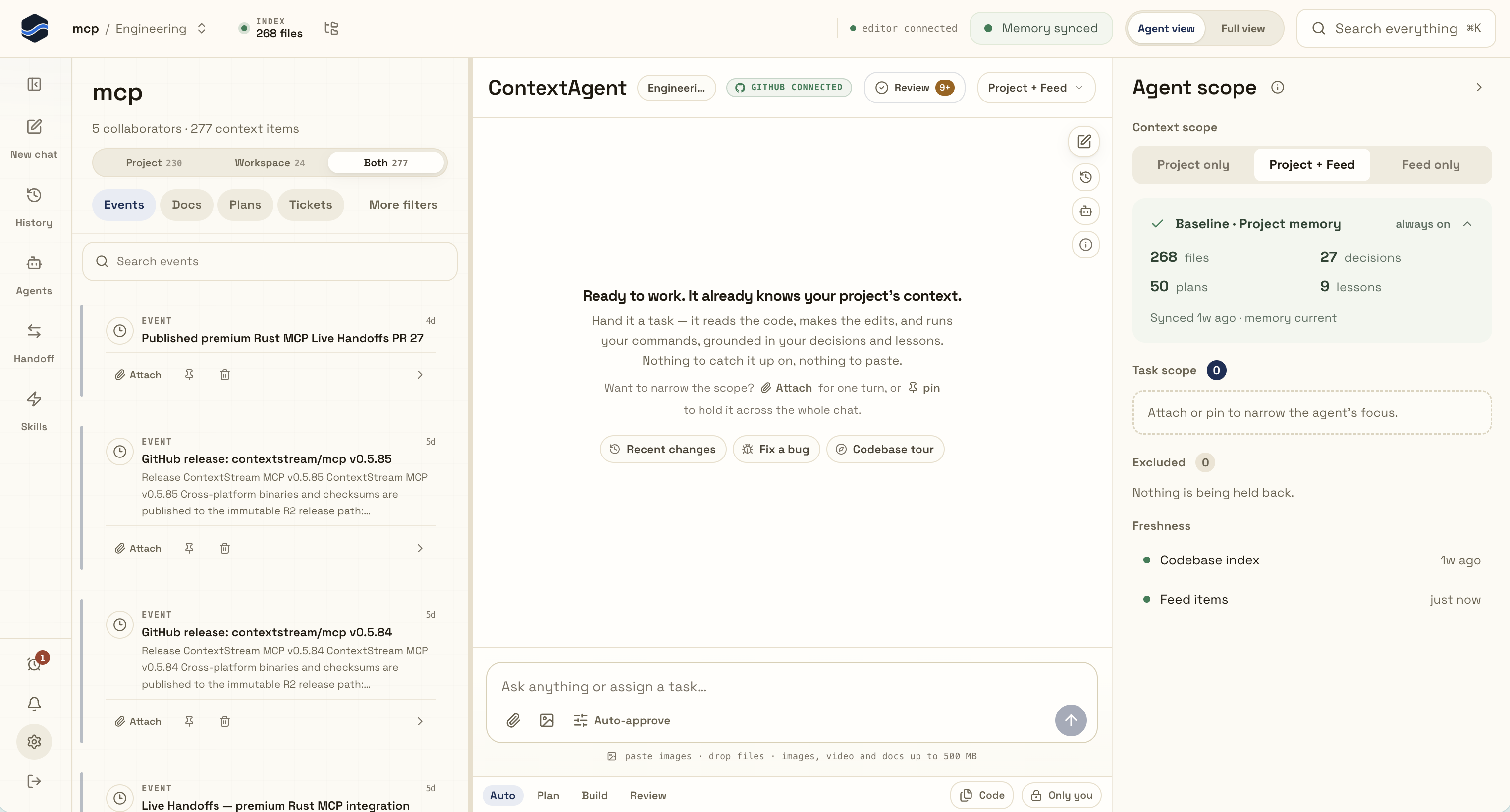
What you get from the first task
- A useful starting point. Relevant project decisions and prior work can surface before the agent acts, so a task does not begin from an empty chat.
- Proof you can inspect. Grounding sources, exact checks, test results, and changed files remain visible instead of being flattened into confident prose.
- Control that stays yours. Choose read-only analysis, explicit approvals, or safe workspace autonomy while sensitive capabilities keep their hard guardrails.
- Parallel work without file collisions. Focused agents can work in isolated Git worktrees and return a result for review.
- Managed access to top-tier models. ContextCode routes each task by role, complexity, and capability. You get one supported experience instead of a provider-key matrix that shifts setup and reliability work onto you.
Try it in 60 seconds
ContextCode agent access starts at Pro. You need VS Code 1.95 or later; you do not need an API key or an open folder to create your ContextCode session.
- Install ContextCode and open ContextCode from the Activity Bar—even from an empty VS Code window.
- Select Sign in with ContextStream. Approve the secure browser device flow; no token copy/paste is required.
- Open the project you want to work on and trust that workspace when VS Code asks. ContextCode does not read files or launch project tools before trust.
- Paste this first read-only task:
“Explain why this module is structured this way. Cite the project decisions and source files you relied on. Suggest the smallest safe improvement, but do not edit anything yet.”
New conversations start with Safe autonomy: structured workspace edits may proceed, while shell, network, package, external-service, credential, destructive, and publication actions still ask or remain blocked. The sample task above is explicitly read-only.
The matching ContextCode engine is already inside the platform-specific extension package. ContextCode verifies its target, protocol version, and SHA-256 checksum before launch; there is no separate engine install.
Pricing and credits
ContextCode agent access starts with Pro at $19/month, including 25,000 credits each month. Credits are one meter for managed model inference and the context work around it: retrieval, embeddings, graph traversal, indexing, and distillation.
| Plan | Price | Included credits | Best fit |
|---|---|---|---|
| Starter | $0 | 3,000 / month | Explore core ContextStream memory and search; ContextCode agent access starts at Pro |
| Pro | $19 / month | 25,000 / month | Individual ContextCode use with the full core context product |
| Elite | $49 / month | 100,000 / month | Full call, dataflow, and type graphs plus Enhanced Context |
| Team | $79 / user / month | 200,000 pooled / seat | Shared memory, governance, and higher concurrency; three-seat minimum |
The benefit is not a promise that every successful task consumes fewer raw tokens. ContextStream ranks useful project evidence before the model call, so the available context window goes toward relevant code and durable knowledge instead of repeated catch-up. See the current limits and inclusions on the pricing page.
The memory layer behind the coding agent
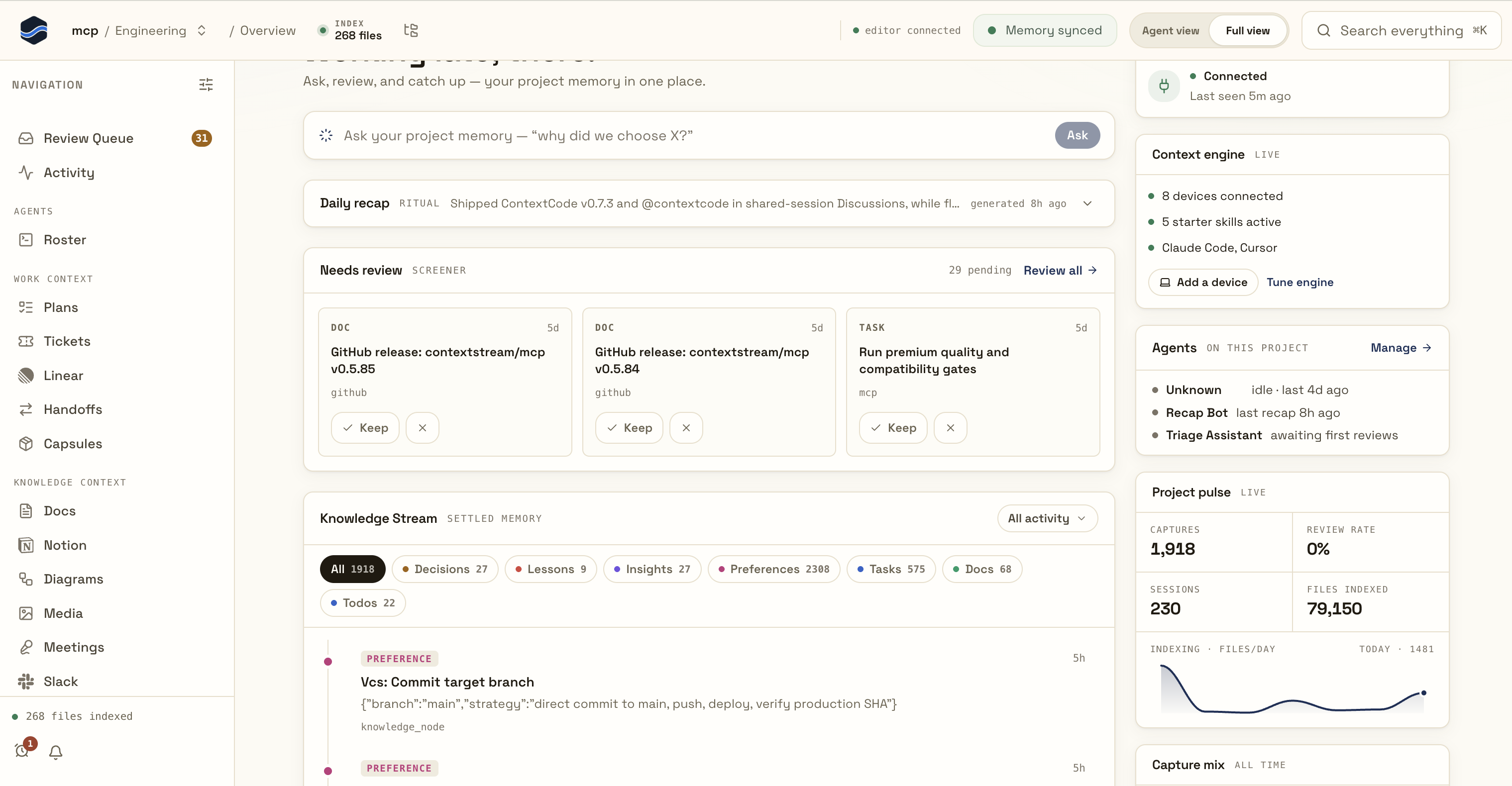
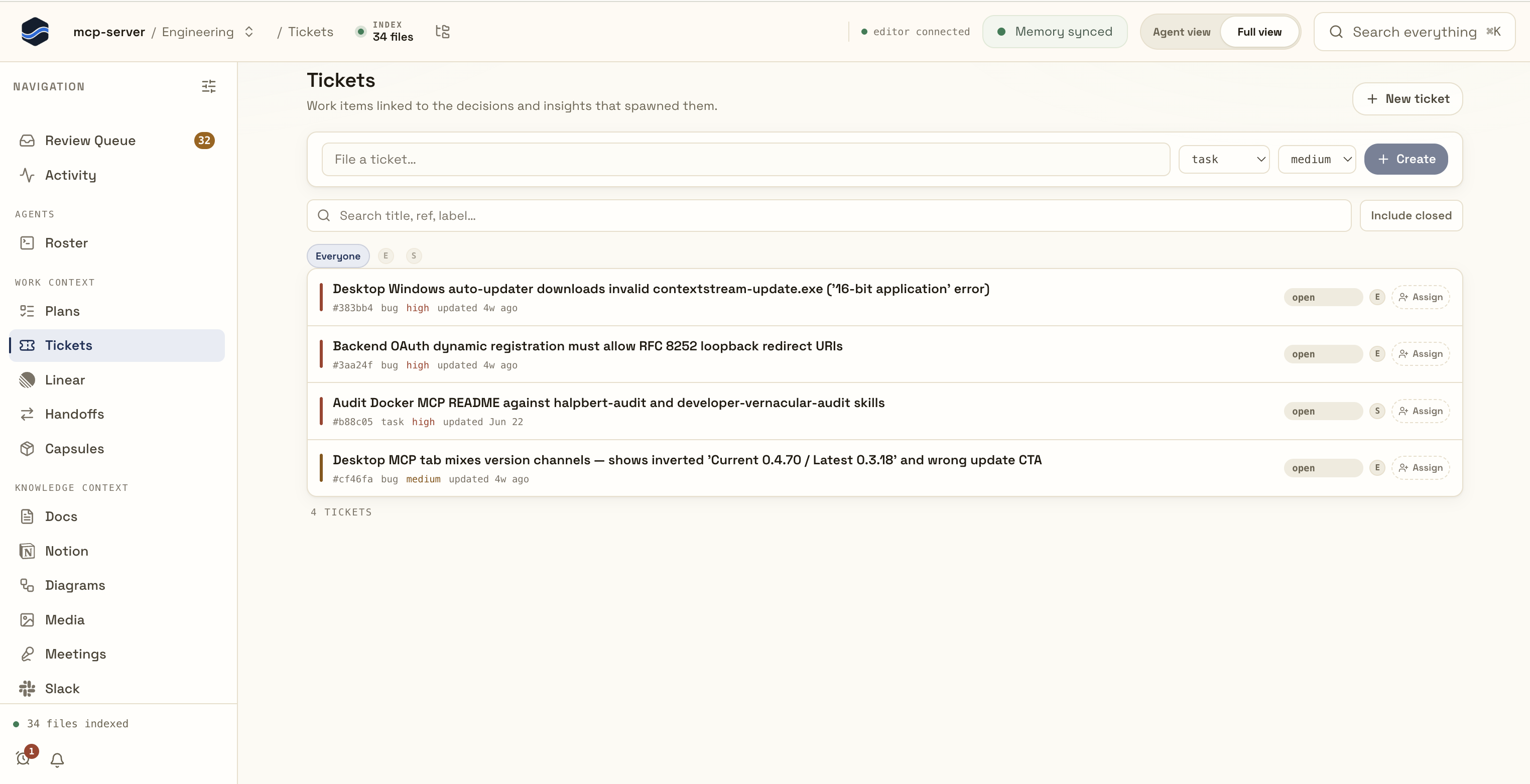
ContextCode, ContextStream Desktop, and the ContextStream dashboard share the same project-scoped memory. Review what the agent knows, search across every entity, and keep plans, tickets, handoffs, documents, media, and prior sessions connected to the code they affect.
Inspect the exact context an agent carries
Review decisions, lessons, plans, and indexed knowledge
Keep work items connected to the knowledge that created them
Why it feels different
| The usual friction | The ContextCode approach |
|---|---|
| Every chat starts cold | Durable project memory and prior work can resurface automatically |
| Model setup is a matrix of keys, providers, and pins | Managed routing selects a current top-tier model for each role and task |
| You cannot tell what the agent assumed | Grounding receipts show which context was used and how fresh it is |
| “Done” is just prose | Requested checks, test counts, and completion evidence stay typed and reviewable |
| More autonomy means less control | Permissions are chosen per run, with hard safety floors that do not disappear |
| Parallel agents collide with your files | Write-capable agents use isolated Git worktrees and return for review |
Latest improvements
Recent releases make long-running work easier to control and follow, and exact reviews easier to trust:
- Your newest request stays in control. Concrete work preempts stale plans, blocked direct work resumes from its own checkpoint, and reviewed plans start only after an explicit start the active plan instruction.
- Change approval posture without stopping. While work is running, choose Auto Approve or explicitly confirmed Full Bypass for the current session from the composer or a pending approval.
- See useful progress sooner. Grounding, reading, answer preparation, and completion appear as calm milestones instead of a silent wait.
- Keep VS Code and the terminal on the same build. ContextCode replaces an outdated background engine before the Agents view connects to it.
- Make “review only these files” mean exactly that. Exact-file reviews no longer search elsewhere, and requested verdict, finding, and length limits are checked before an answer is shown.
- Keep long-running history responsive. The sidebar, terminal, and dashboard can follow the same active run without slowing new agent events.
The Marketplace Changelog tab includes the complete engineering details and measured dogfood results.
From request to reviewed change
- Ask naturally. Describe the outcome; you do not need to reconstruct the project's history in the prompt.
- See the grounding. ContextCode retrieves relevant code and memory, then shows where that context came from and how fresh it is.
- Choose the control level. Analyze read-only, ask before changes, or allow safe routine workspace work while risky capabilities remain governed.
- Follow the work. Streaming activity keeps edits, commands, approvals, tests, and agent runs visible without flooding the conversation.
- Review the proof. Inspect native VS Code diffs against exact baselines, keep the change set, or restore the structured-edit checkpoint. Changes made by an approved shell command can fall outside that checkpoint capture.
Built for real project work
A coding agent with project memory
ContextCode grounds each task with ContextStream. Decisions, notes, lessons, and approved insights can outlive one chat, resurface in future sessions, and remain available to teammates in the same ContextStream workspace.
Context you can inspect and control
Grounding receipts tell you what ContextCode used, where it came from, and how fresh it is. Pin long-lived sources, attach one-off files or selections, and remove context without exposing source bodies or local paths to webview state.
Proof before “done”
Explicit verification stays explicit. ContextCode tracks the exact checks you requested, records structured results such as test counts, and keeps evidence separate from the assistant's prose so a confident sentence cannot substitute for a missing test or unread file.
Reviewable autonomy
Structured edits are checkpointed into change sets with native diffs. Launch focused Build, Explore, or Review agents in parallel; write agents work in isolated Git worktrees so you decide what reaches the main workspace.
A focused, modern workflow
Use Ask, Plan, Agent, and Autopilot modes with Auto, Coder, Planner, Designer, and Prototyper roles. The composer includes a keyboard-accessible slash palette, secure image attachments, streaming responses, cancellation, and journal-backed crash recovery.
Work from the sidebar or VS Code Chat
The ContextCode sidebar keeps the whole workflow in one place:
| Tab | What you do there |
|---|---|
| Chat | Talk with ContextCode, attach context, choose a mode, and handle approvals |
| Agents | Launch, supervise, cancel, and revisit focused parallel runs |
| Context | Inspect grounding receipts, pins, and next-message attachments |
| Changes | Review change sets in native diffs and restore checkpoints |
| History | Reopen, search, and rerun prior sessions |
Prefer VS Code Chat? Mention @contextcode and use /ask, /plan, /agent,
or /review.
Control that matches the task
| Permission posture | Best for |
|---|---|
| Read-only | Explanation, exploration, and review with no workspace writes or shell execution |
| Ask approvals | Sensitive work where every change should stop for confirmation |
| Safe autonomy | Routine structured workspace edits with risky capabilities still asking or blocked |
| Auto Approve | Run without approval prompts while explicit deny rules and destructive-command safeguards still refuse unsafe work |
| Full Bypass | Lift the destructive-command floor too, only after an explicit confirmation; user deny rules, Workspace Trust, and engine hard-deny boundaries still win |
While an agent is working, the permission control and every pending approval offer Auto Approve this session and Full Bypass this session. Those in-flight choices are not saved and reset when you start or switch sessions. Saved workspace posture changes remain a separate settings action. Repository policy may add restrictions, but it cannot grant authority on your behalf.
Requirements
- VS Code 1.95 or later on macOS, Linux, or Windows, on x64 or arm64.
- A ContextStream plan that includes ContextCode. Agent access starts at Pro. See contextstream.io/pricing.
- A trusted, file-backed workspace when you start coding. Installation, onboarding, and sign-in work from an empty window. ContextCode waits for a trusted project before it launches project tools, reads files, or sends a coding prompt. Virtual workspaces are not supported yet.
Settings
| Setting | Default | Description |
|---|---|---|
contextcode.defaultMode |
agent |
Starting mode for new conversations; Autopilot remains a per-run choice |
contextcode.permissionProfile |
safeAutonomy |
Permission posture for agent operations |
contextcode.engine.path |
(empty) | Optional absolute path to a compatible engine; empty uses the bundled engine |
Model routing and ContextStream project isolation are product invariants, not setup choices. ContextCode always uses managed intelligent routing, and every turn is scoped to the active project selected in the extension.
ContextStream tools in VS Code Chat
ContextCode contributes four governed tools that you can reference directly:
#contextStreamReceipt— inspect grounding provenance and freshness.#contextStreamCodeSearch— search the active project's indexed source.#contextStreamCodeGraph— inspect bounded code-health and dependency views.#contextStreamMemory— save a durable record after explicit confirmation.
Trust by design
- Grounding is scoped to the workspace folder you selected.
- Credentials stay in VS Code secret storage and never enter prompts, journals, evidence bundles, or webview state.
- Pasted image bytes travel through opaque process-bound handles and are not stored in prompts, journals, evidence, or snapshots.
- Attached files and remembered context are marked as untrusted reference material before they reach the agent task.
- Once-only approvals stay once-only; a failed or denied exact command does not quietly gain another attempt.
Current product boundaries
ContextCode is evolving quickly. These boundaries are stated explicitly so the product never trades a polished promise for hidden behavior:
- Under the default Safe autonomy posture, shell commands require targeted approval because repository-controlled scripts are arbitrary code. A user can explicitly elevate only the current session to Auto Approve or Full Bypass; deny rules and the engine's documented hard boundaries still apply.
- Checkpoint restore covers ContextCode's structured file tools. An approved shell command can make changes outside that capture path.
- Remembered exact-action allow rules appear only when the connected engine advertises that response. They live in the user-owned workspace policy and can be reviewed or removed from Approval settings.
- Reviewed plans can launch a coder agent and active agents can be steered when the connected engine advertises those capabilities. The VS Code extension uses managed model routing; provider keys and model pins are not exposed.
- The full Stable/Insiders remote and OS matrix, accessibility audit, and performance and reliability release gates are still in progress.
- After an engine restart, side-effecting bridge calls are at-least-once unless the underlying operation enforces its own uniqueness.
Support
- Questions, bugs, and feedback: contextstream.io/contact
- Product, plans, and documentation: contextstream.io
License
ContextCode is proprietary software. See the LICENSE file included in the package. Use requires a valid ContextStream subscription or a separate written agreement.