Question and experiment with what your infrastructure will cost — right inside the editor, before you apply. A cost tree, what-if simulator, FinOps recommendations, and policy checks, backed by real AWS rates.
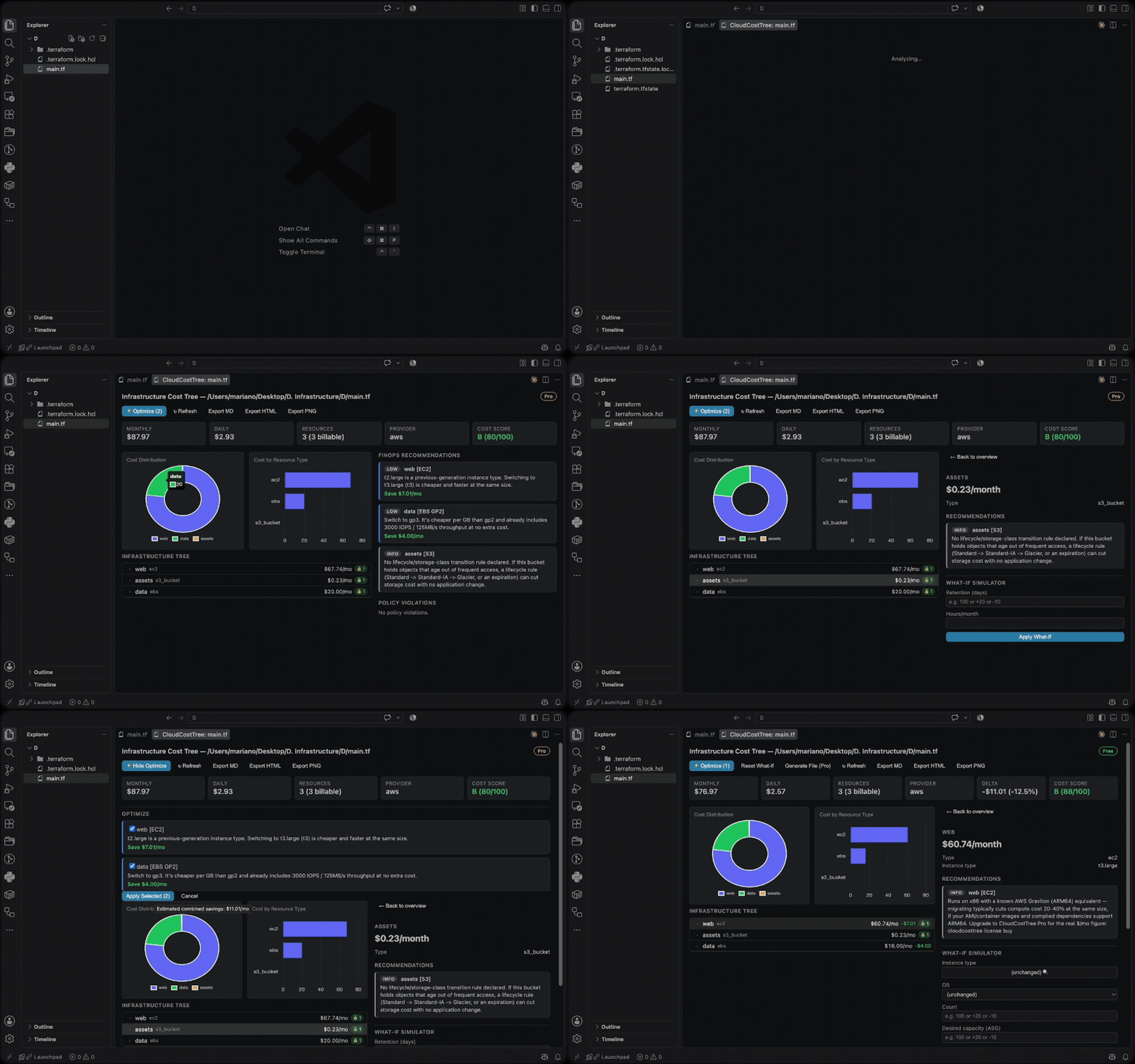
This extension is a thin UI layer over the
cloudcosttree CLI: every
number you see comes from a real cloudcosttree analyze --export json:-
call, not a reimplementation. No pricing/parsing logic is duplicated here.
Requirements
None — the extension downloads the matching cloudcosttree CLI binary for
your OS/CPU automatically the first time you run an analysis (shown as a
one-time "downloading the cloudcosttree CLI" notification). If you already
have cloudcosttree on your PATH (e.g. installed via
curl -fsSL https://cloudcosttree.com/install.sh | sh, or built from
source), the extension uses that instead of downloading its own copy. To
pin a specific binary yourself, set the cloudcosttree.binaryPath setting.
Privacy
No file contents, file names, paths, project/workspace names, cloud
resource data, credentials, or cost figures are ever transmitted anywhere —
all analysis runs locally through the cloudcosttree CLI on your own
machine. The only thing this extension ever sends is a single anonymous
usage ping when you run a CloudCostTree command, so we know the extension
has real users: extension version, VS Code version, OS, and a random
non-identifying id — nothing about what you analyzed. This respects VS
Code's own telemetry setting; set "telemetry.telemetryLevel": "off" to
disable it like any other extension's telemetry.
Features
- Analyze: right-click a
.tf/.tfstate/.json/.yamlinfrastructure file (or run the command with one open), or right-click a folder — a Terragrunt root or an Atmos stack directory — to open an interactive report. CloudFormation templates, CDK-synthesized output (cdk.out/<StackName>.template.json), and Pulumi stack exports are all plain.json/.yaml, so they're covered by the same file-based analysis. - Compare: right-click a file → "Select as Baseline for Compare", then right-click a second file → "Compare with Baseline" to see the cost delta between them — added/modified/removed resources, per-resource deltas, and the current-state tree with delta badges. Mirrors VS Code's own native "Select for Compare" / "Compare with Selected" two-step flow. File-based only for now — a Terragrunt/Atmos directory can be analyzed but not yet selected as a Compare baseline/target.
- Collapsible tree grouped by module/stack, with cost, policy-violation coloring, and a savings badge per resource.
- Pie + bar charts (cost distribution, cost by resource type).
- Click any resource for its full details, its own FinOps recommendations,
its policy violations, and a What-If Simulator form scoped to fields
that actually apply to it (instance type, IOPS, Multi-AZ, ...) — powered
entirely by the CLI's existing
--whatifflags. EC2 instance type and RDS instance class fields open a native, type-to-filter picker over the real, currently-priced catalog (1,300+ EC2 types, 250+ RDS classes) instead of a plain dropdown. - Export the current view as Markdown, HTML (via the CLI), or PNG (a snapshot of the whole panel).
- Follows the VS Code color theme automatically (styled with
--vscode-*CSS variables — no separate dark/light code path). - Usage-aware FinOps (Pro): turn on the
cloudcosttree.withUsagesetting to enrich Analyze/Compare with real AWS data — the same--with-usagethe CLI has always had (real CPU-based right-sizing, live Spot pricing, confirmed orphaned EBS volumes/snapshots, unassociated Elastic IPs, empty-target-group load balancers, real Lambda cost/memory correction,mixed_instances_policyresolution, and a fleet-size-outlier check — see the main project README's Usage-aware FinOps section for the full list). Turning it on for the first time shows a one-time confirmation dialog, since this is the one feature that calls your own AWS account: it uses the exact same default credential chain the CLI already does (environment variables, a shared profile, SSO, or an instance role) — inherited from however VS Code itself was launched, so make sure it can see the credentials you want it to use. This is independent of anyprofileargument on a.tffile's ownprovider "aws"block, which only Terraform itself reads — to point this feature at a named profile,export AWS_PROFILE=<name>in the shell VS Code was launched from (or set it as the default profile) before opening it. Decline the dialog and the setting reverts itself to off. Real network calls across several AWS services/regions make this run noticeably slower than a normal analysis (the loading overlay says so); non-fatal issues (missing credentials, an unresolvable region, and on Free, an upgrade nudge instead of a failure) show up as a dismissible banner in the panel instead of being silently swallowed. The resulting recommendations need no special UI — they show up in the existing FinOps Recommendations panel like any other finding. The panel header always shows a small plan pill — amber "Pro" or green "Free" — inferred from the CLI's own stderr notes (there's no dedicated license-tier field on the report), so it stays accurate whether or not this particular run happened to include real usage data.
Settings
| Setting | Description |
|---|---|
cloudcosttree.binaryPath |
Path to the CLI binary (default: cloudcosttree on PATH) |
cloudcosttree.pricesPath |
Price catalog JSON (default: the CLI's own default) |
cloudcosttree.policiesPath |
policies.yaml path (default: CLI auto-detection) |
cloudcosttree.includeGovernance |
Also show governance-only FinOps recommendations |
cloudcosttree.withUsage |
CloudCostTree Pro: enrich with real AWS data (--with-usage) — see above |