



Your code carries secrets. AI tools don't forget them.
CleanMyPrompt intercepts API keys, credentials, and PII before they reach Copilot — and compresses your code to cut token costs by 30–70%. Runs 100% locally. Zero network calls. No login.
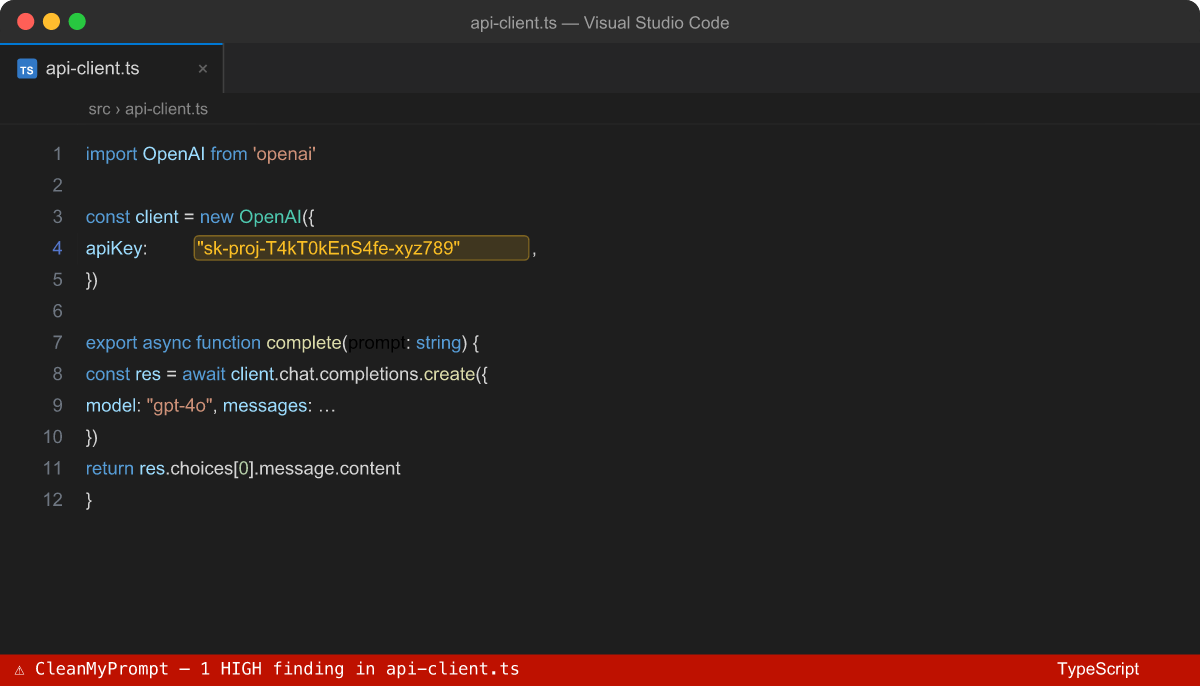
Why you need this
Every time you paste code into Copilot Chat, your IDE quietly sends the full file context to OpenAI's servers. That includes the API keys, database passwords, and JWT tokens sitting three lines above where you're working.
CleanMyPrompt sits between your editor and your AI assistant and stops that from happening — automatically, in real time, without interrupting your flow.
And while it's there, it cuts the token noise: stripping dead comments, unused imports, and verbose type scaffolding so the AI sees exactly what it needs and nothing else.
How it works
| Step | What happens |
|---|---|
| 1. Install | Extension activates automatically — no config, no login |
| 2. Write code | Red/yellow squiggles appear instantly on every secret or PII pattern |
| 3. Before Copilot | @cleanmyprompt or right-click → Redact removes secrets before AI receives anything |
Pillar 1 — 🛡 Security: Intercept before it leaks
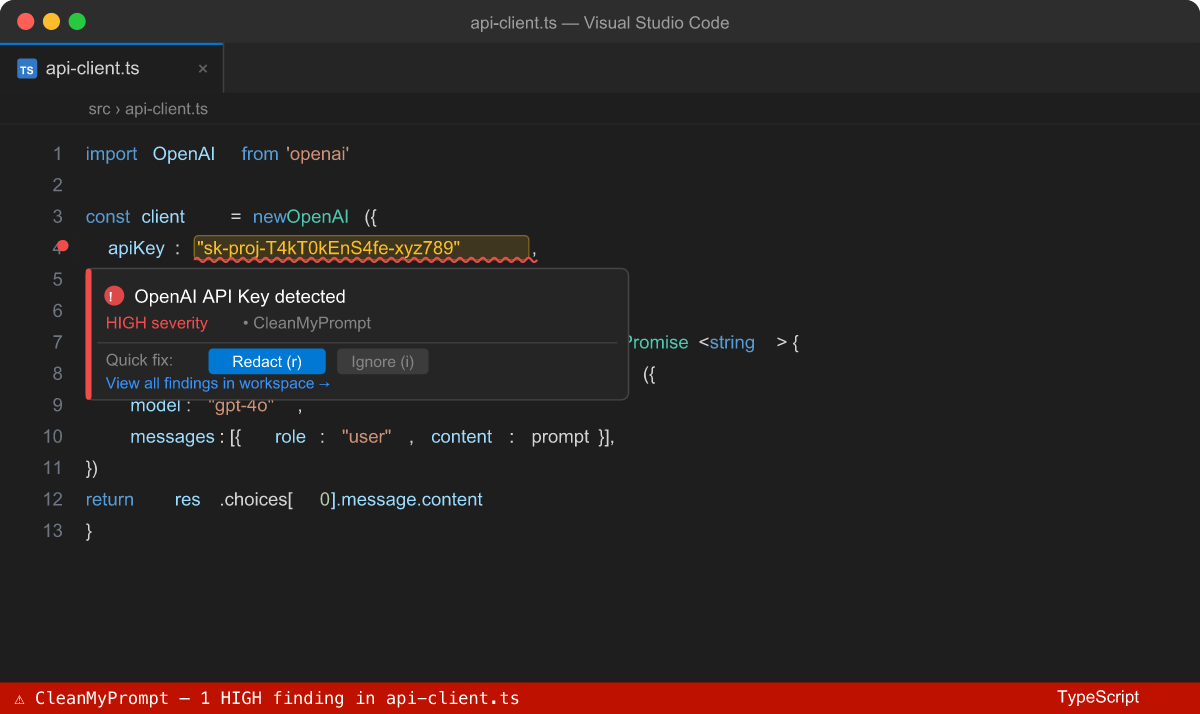
Real-time inline squiggles on every secret pattern — API keys, tokens, passwords, PII — in any language. Hover for context. One click to redact.
What it catches (35+ patterns)
| Category | Examples |
|---|---|
| AI / Cloud API Keys | OpenAI sk-proj-..., Anthropic, Stripe sk_live_..., AWS AKIA..., GitHub ghp_..., Google AIza..., Azure |
| Auth Tokens | JWT, Bearer tokens, PEM private keys, SSH private keys, OAuth secrets |
| Credentials | Hardcoded passwords, connection strings with user:pass@, .env assignments |
| PII | Email, phone (international), US SSN, credit card (Luhn-validated), IBAN |
| Code patterns | password = "...", Authorization: 'Bearer ...', os.environ['SECRET'] = '...' |
Supported: JavaScript, TypeScript, Python, Java, Go, Rust, C/C++, C#, Ruby, PHP, Swift, Kotlin, SQL, Shell, YAML, JSON, TOML, Markdown, HTML — and more.
One-click Redact
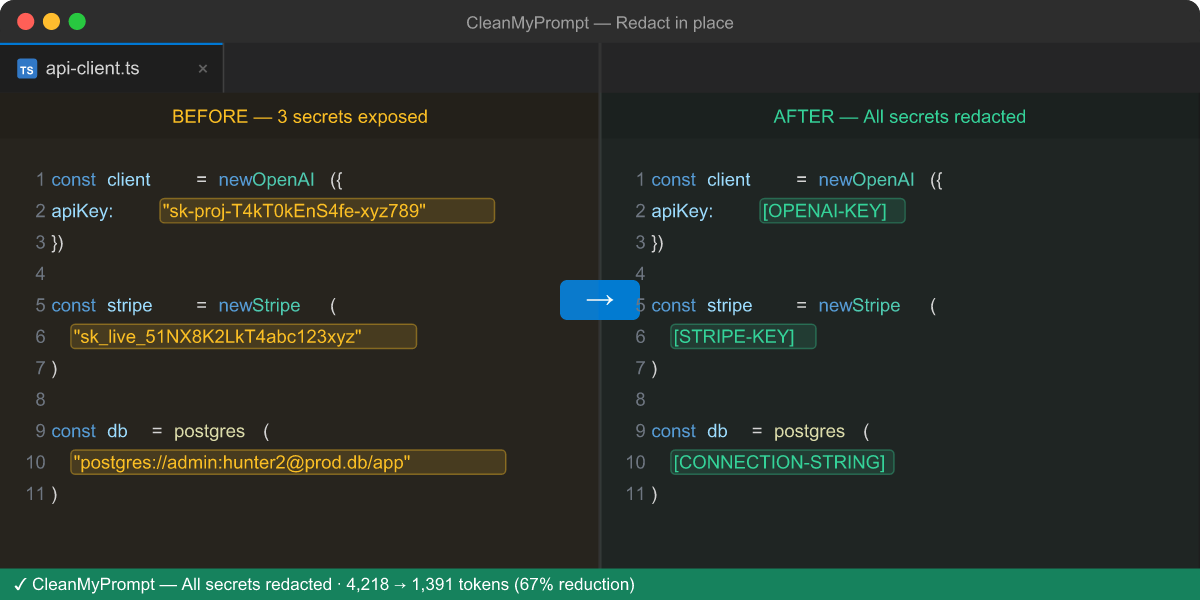
Right-click anywhere in a file → Redact. Or use the shortcut:
- macOS:
Cmd+Shift+Alt+R(selection) ·Cmd+Shift+Alt+F(full file) - Windows/Linux:
Ctrl+Shift+Alt+R(selection) ·Ctrl+Shift+Alt+F(full file)
Before and after:
OPENAI_API_KEY=sk-proj-abc123xyz         →    OPENAI_API_KEY=[OPENAI-KEY]
Authorization: Bearer eyJhbGci...        →    Authorization: Bearer [BEARER-TOKEN]
postgres://admin:[email protected]/app     →    [CONNECTION-STRING]
[email protected]                       →    [EMAIL]
All replacements are undoable. The diff viewer shows exactly what changed.
Explorer Risk Badges
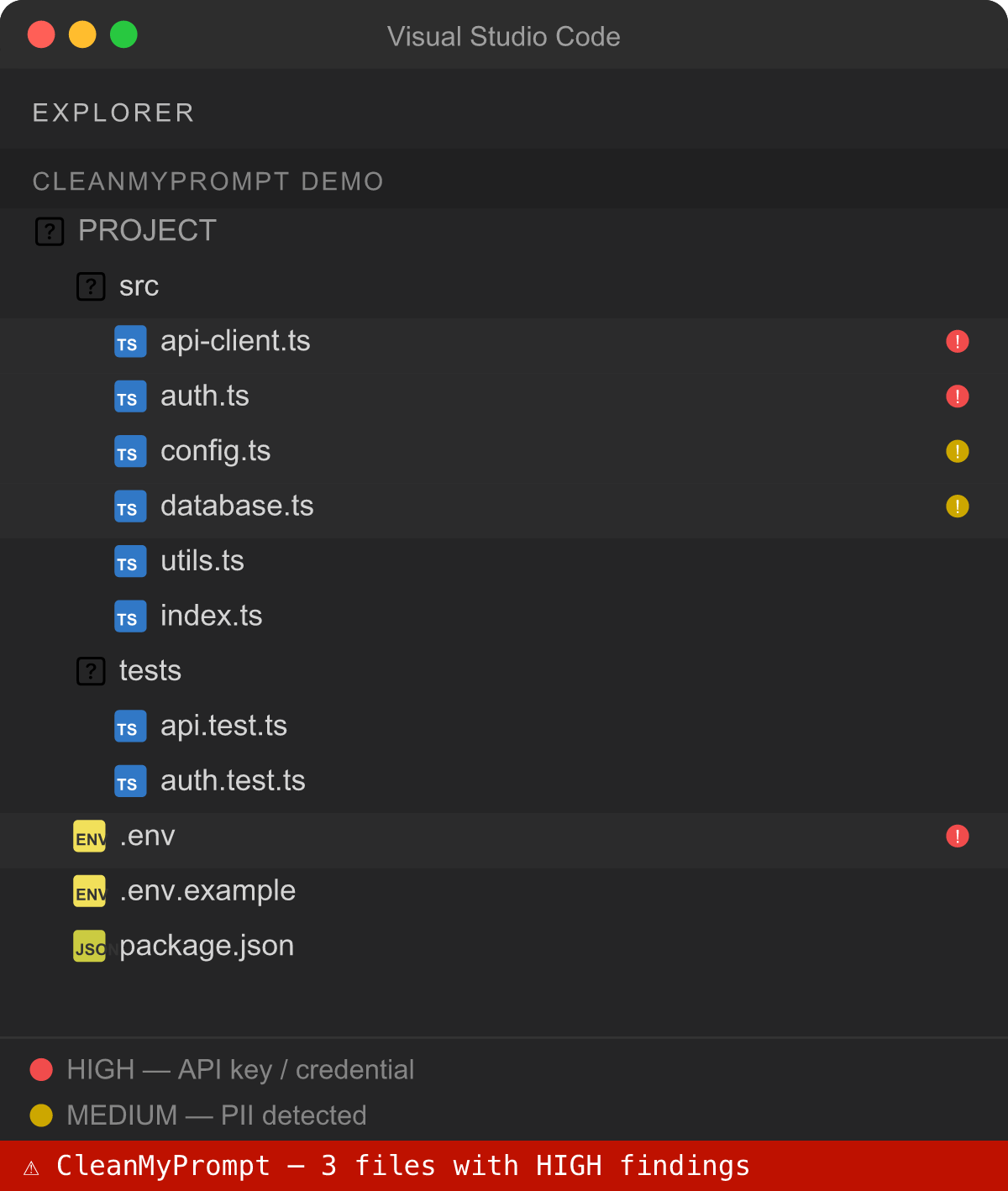
Every file in the Explorer tree gets a live risk badge:
- 🔴 RED — high-severity secret (API key, private key, credential)
- 🟡 YELLOW — PII or medium-risk pattern
Scans the workspace silently in the background on startup. Updates as you type.
Secret Propagation Graph
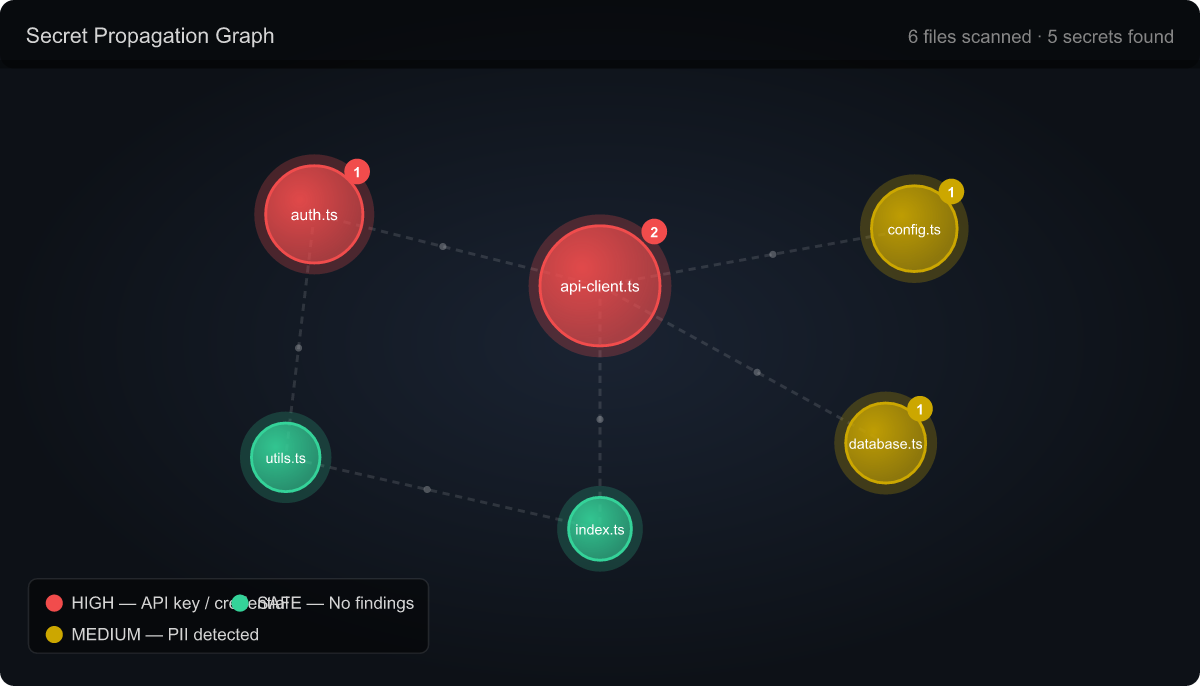
Command palette → CleanMyPrompt: Secret Propagation Graph
A force-directed interactive graph showing every file that contains or imports secrets — and how they flow between files. Know exactly how far a leaked credential could travel in your codebase.
@cleanmyprompt — Copilot Chat participant
@cleanmyprompt /scan      — full risk report for the active file
@cleanmyprompt /squeeze   — show token savings before/after compression
@cleanmyprompt fix this auth handler, it keeps 401ing
When you use @cleanmyprompt, your message is sanitised before Copilot receives it. Secrets are stripped, code is compressed. Copilot gets context, not credentials.
Pillar 2 — ⚡ Token Intelligence: Send less, get more
The problem
Verbose code bloats Copilot's context window. License headers, JSDoc blocks, unused imports, triple-blank-lines, redundant type scaffolding — none of it helps the AI. It just burns tokens and dilutes the signal.
Token Squeeze (Cmd+Shift+Alt+S)
The squeeze command uses your language server to confirm which imports are actually unused (not regex guessing — real LSP reference checks), then applies a multi-pass compression pipeline:
- Remove unused imports (LSP-confirmed)
- Strip license / copyright headers
- Collapse JSDoc → single-line summaries
- Remove non-structural comments and debug logs
- Compact verbose type/interface blocks
- Eliminate trailing whitespace and redundant blank lines
Real-world result on a 300-line TypeScript service file:
Before:   4,218 tokens   ████████████████████████████████
After:    1,391 tokens   ████████████
Saved:    2,827 tokens   (67% reduction)
Side-by-side diff shows exactly what changed — approve or undo with one click.
LSP Analysis
Command palette → CleanMyPrompt: LSP Analysis
Opens a detailed report showing token cost per function, class, and method across the active file. Includes LSP-confirmed unused imports and a cross-file secret propagation summary. Know exactly where your token budget is going before you squeeze.
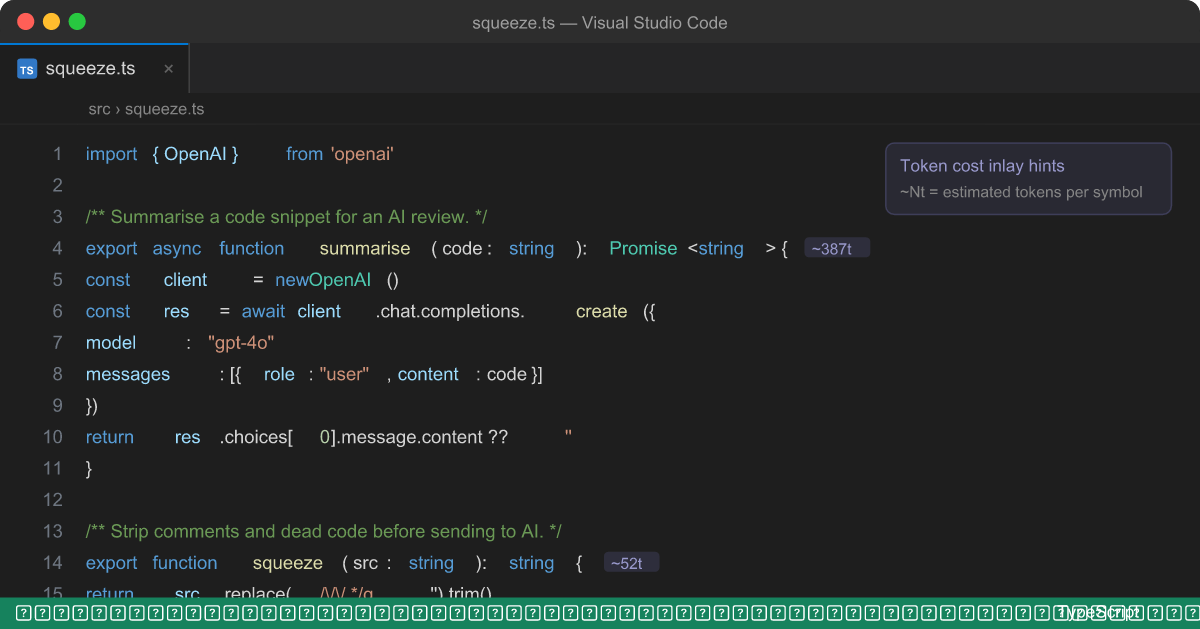
Token Cost Inlay Hints
Enable: cleanmyprompt.showTokenInlayHints: true
Shows estimated token cost inline next to every function, method, and class definition as you write — so you can make compression decisions without leaving the editor.
Token Counter Status Bar
The status bar shows a live running total of tokens saved in the current session. Gives you a concrete number to show your team when justifying the workflow.
Compliance
Command palette → CleanMyPrompt: Compliance Report
Generates a session audit trail covering every redaction and squeeze operation — file names, timestamps, operation types, finding counts, and tags. Exportable as JSON. Suitable for GDPR, HIPAA, and SOC 2 documentation.
Custom Detection Rules
Add your own patterns in .cleanmypromptrc.json at the project root:
{
  "rules": [
    {
      "id": "internal-service-token",
      "tag": "INTERNAL-TOKEN",
      "pattern": "int_[a-zA-Z0-9]{32}",
      "severity": "error",
      "message": "Internal service token — must not be sent to any AI model"
    },
    {
      "id": "customer-id",
      "tag": "CUSTOMER-ID",
      "pattern": "cus_[a-zA-Z0-9]{14}",
      "severity": "warning",
      "message": "Stripe customer ID — PII under GDPR"
    }
  ]
}
Settings
| Setting | Default | Description |
|---|---|---|
cleanmyprompt.enableDiagnostics |
true |
Inline squiggles for every finding |
cleanmyprompt.minimumSeverity |
warning |
error · warning · information |
cleanmyprompt.enableStatusBar |
true |
Risk indicator + token counter in status bar |
cleanmyprompt.enableCodeLens |
true |
Click-to-redact CodeLens above each finding |
cleanmyprompt.enableCodeRules |
true |
Detect hardcoded passwords and Bearer tokens |
cleanmyprompt.squeezeLevel |
aggressive |
safe = whitespace + comments · aggressive = also unused imports + type blocks |
cleanmyprompt.showTokenInlayHints |
false |
Token cost next to every function and class |
cleanmyprompt.auditLog |
true |
Append audit log entry for every operation |
Privacy — 100% Local
- Zero network calls. All scanning and squeezing runs entirely in the VS Code extension host process — nothing leaves your machine.
- Zero telemetry. No usage data, no crash reports, no analytics. Ever.
- No account or login. Install and use immediately.
- All detection rules are bundled in the extension. You can inspect them — they're not a black box.
Requirements
- VS Code 1.90 or later
- GitHub Copilot — required only for the
@cleanmypromptChat participant and token counter - Diagnostics, redact, squeeze, graph, badges, and inlay hints all work without Copilot
Enterprise & Teams
Need team-wide custom rule sets, centralised audit log exports, SSO integration, custom compliance report templates, or on-prem deployment?
Contact us at cleanmyprompt.io →
License
Personal and open-source use is available at no cost.
| Use case | License required |
|---|---|
| Individual developer, personal projects | ✅ No license required — install and use |
| Open-source projects (public repo) | ✅ No license required — install and use |
| Internal tooling at a company (any size) | 💼 Commercial license required |
| Integrating into a commercial product or SaaS | 💼 Commercial license required |
| Team/enterprise deployment | 💼 Commercial license required |
Commercial licenses include team management, audit log export, SSO, compliance report templates, and priority support. Get a commercial license →