Manage and switch Claude Code API endpoint profiles — no Claude Code login required, just plug in your API key and go.




⚡ What is this?
Claude Code connects to an AI backend via API. When you use providers like DeepSeek, Alibaba Qwen, or a local proxy, you need to set environment variables (ANTHROPIC_BASE_URL, ANTHROPIC_AUTH_TOKEN, etc.) in your editor's settings.json.
This extension gives you a sidebar UI to manage those configurations as named profiles and switch between them with a single click. No more digging through JSON files by hand.
🚫 No Claude Code account needed. This extension only writes environment variables to
settings.json. You bring your own API key from any Anthropic-compatible provider — it works immediately after you fill in the API endpoint and token. No login, no registration, no account required.
🚀 Quick Start — Add Your First Profile (3 Steps)
The simplest operation: add a profile, apply it, done.
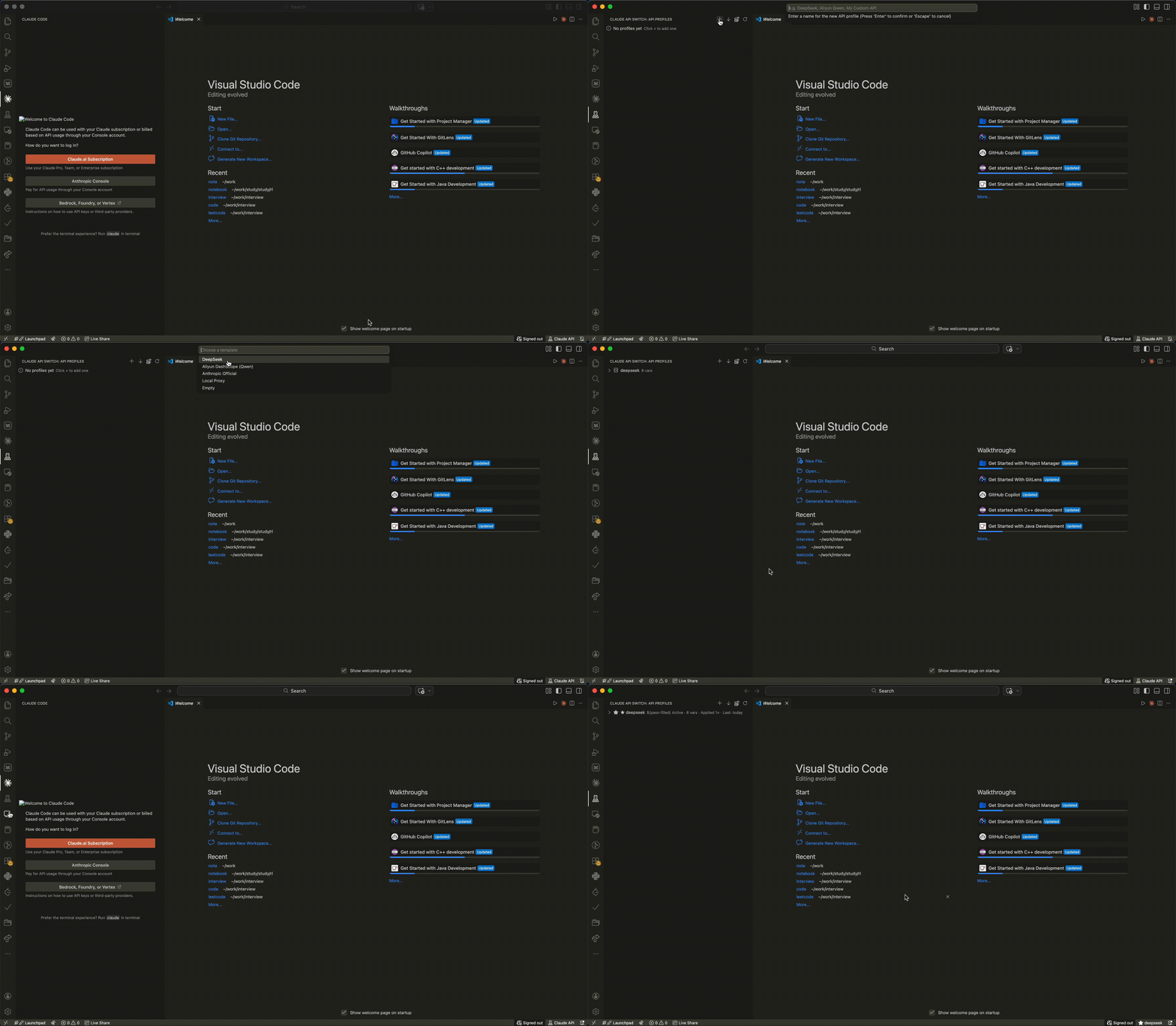
Step ① — Open the sidebar
Click the server icon $(server-environment) in the activity bar (left edge of your editor). The "API Profiles" panel slides open.
Step ② — Click + and fill in your key
Click the + button in the sidebar toolbar → Enter a name (e.g. My DeepSeek) → Pick a template (DeepSeek / Aliyun / Anthropic / Local Proxy).
A web form opens with most fields pre-filled. The only thing you need to do is replace ANTHROPIC_AUTH_TOKEN with your actual API key, then click Save.
Step ③ — Apply and test
- Click the ✓ (Apply) inline button on your new profile → writes the config to
settings.json - Click the ▶ (Test) button → verifies the endpoint is reachable and shows latency + model info
That's it. Claude Code is now using your configured API. The whole process takes under 30 seconds.
🖥️ Extension Interface — Where to find everything
The extension is designed so you can figure it out just by looking at the sidebar:
| UI Element | Location | What it does |
|---|---|---|
| Sidebar panel | Activity bar (left edge) | Lists all your profiles with inline action buttons |
| + button | Sidebar toolbar | Add a new profile |
| ↓ button | Sidebar toolbar | Capture current settings.json config as a profile |
| 🔄 button | Sidebar toolbar | Quick switch between profiles |
| ⋯ menu | Sidebar toolbar | Export All / Import Profile(s) from JSON |
| ✓ Apply | Inline on each profile | One-click write to settings.json |
| ▶ Test | Inline on each profile | Test the API endpoint (latency, model, errors) |
| ✎ Edit | Inline on each profile | Open the web form editor |
| Status bar | Bottom of editor window | Shows current profile — click to quick-switch |
| Command palette | Cmd+Shift+P |
Search "Claude API Switch" for all commands |
Each profile in the sidebar shows its name, notes preview, and usage count — active profile is marked with a ★ star.
✨ Features
| Feature | Description |
|---|---|
| 📋 Profile CRUD | Create, edit, duplicate, and delete API profiles with an intuitive web form |
| ⚡ One-Click Apply | Apply any profile to instantly update claudeCode.environmentVariables |
| 🧪 API Testing | Test connectivity to each endpoint — reports latency, model info, token usage, and error diagnostics |
| 📊 Usage Tracking | Tracks how many times each profile was applied, with timestamps and test history |
| 🔄 Quick Switch | Cmd+Shift+P or click the status bar to swap profiles instantly |
| 📝 Profile Notes | Add descriptions to profiles (account info, expiry dates, etc.) |
| 🎨 Templates | Pre-built templates for DeepSeek, Aliyun Qwen, Anthropic, Local Proxy |
| 📥 Import from Current | Capture whatever is in settings.json right now as a profile |
| 📤 Bulk Export/Import | Backup or share all profiles as a single JSON file; import accepts a single profile or a whole file |
| 🔧 JSON Editor | Toggle the editor between Form and JSON views — Save validates the syntax before updating |
| 🌐 Auto-Detect Editor | Works with Cursor, VS Code, VSCodium, Windsurf, and other VS Code-based editors |
| 🐛 Debug Tools | Built-in debug commands to inspect state and test the storage pipeline |
📸 Demo
🧩 Why use this?
| Scenario | Without this extension | With this extension |
|---|---|---|
| Switch between DeepSeek and Aliyun | Manually edit settings.json each time |
One click in the sidebar |
| Test if a new API key works | curl commands or write a script |
Click the ▶ Test button |
| Share config with teammates | Copy-paste JSON fragments | Export profile → send file → they import |
| Try a new model provider | Look up URLs, models, edit JSON | Pick a template, fill in the key, done |
| Track which key you use most | Manual notes | Built-in usage stats with timestamps |
🚀 Installation
Install from VSIX
- Download the latest
.vsixfile from GitHub Releases - Open VS Code / Cursor
- Go to Extensions (
Cmd+Shift+X) → … menu → Install from VSIX… - Select the downloaded
.vsixfile - Reload the editor
Or from the command line:
# VS Code
code --install-extension claude-switch-1.1.1.vsix

# Cursor
cursor --install-extension claude-switch-1.1.1.vsix
From Source (Development)
git clone https://github.com/zhhwss/claude_switch.git
cd claude-switch
# Open in VS Code / Cursor and press F5 to launch Extension Development Host
📋 Profile Format
Single Profile (.json)
{
  "name": "DeepSeek Production",
  "notes": "Main production account, expires 2026-12-31",
  "variables": [
    { "name": "ANTHROPIC_BASE_URL", "value": "https://api.deepseek.com/anthropic" },
    { "name": "ANTHROPIC_AUTH_TOKEN", "value": "sk-..." },
    { "name": "ANTHROPIC_MODEL", "value": "deepseek-v4-pro[1m]" },
    { "name": "ANTHROPIC_DEFAULT_OPUS_MODEL", "value": "deepseek-v4-pro[1m]" },
    { "name": "ANTHROPIC_DEFAULT_SONNET_MODEL", "value": "deepseek-v4-pro[1m]" },
    { "name": "ANTHROPIC_DEFAULT_HAIKU_MODEL", "value": "deepseek-v4-flash" },
    { "name": "CLAUDE_CODE_SUBAGENT_MODEL", "value": "deepseek-v4-flash" },
    { "name": "CLAUDE_CODE_EFFORT_LEVEL", "value": "max" }
  ]
}
Bulk Export (profiles.json)
[
  { "name": "DeepSeek", "notes": "...", "variables": [...] },
  { "name": "Aliyun Qwen", "notes": "...", "variables": [...] }
]
🔧 Commands Reference
| Command | How to access | Description |
|---|---|---|
Add API Profile |
Sidebar + | Create a new profile |
Edit Profile |
Inline ✎ | Edit profile in web form |
Edit Profile as JSON |
Right-click | Open the editor in JSON mode — toggle between Form and JSON views, Save validates the syntax first |
Apply Profile |
Inline ✓ | Write to settings.json |
Test API Connection |
Inline ▶ | Test endpoint connectivity |
Quick Switch Profile |
Cmd+Shift+P |
Fast profile switching |
Duplicate Profile |
Right-click | Clone a profile |
Import Profile from Current Settings |
Sidebar ↓ | Capture current config |
Export Profile as JSON |
Right-click | Export single profile |
Export All Profiles |
Sidebar ⋯ | Bulk backup — all profiles as one JSON file |
Import Profile from JSON |
Sidebar ⋯ | Import a single profile — also accepts an Export-All file (imports all) |
Import Profiles from JSON |
Sidebar ⋯ | Bulk import — also accepts a single profile object |
View Current Config |
Cmd+Shift+P |
Inspect active settings |
Clear Usage Statistics |
Cmd+Shift+P |
Reset usage counters |
Refresh Profiles |
Sidebar ↻ | Refresh the tree view |
🧩 Supported Environments
The extension automatically detects which editor it's running in by locating settings.json:
| Editor | Settings Path (macOS) |
|---|---|
| Cursor | ~/Library/Application Support/Cursor/User/settings.json |
| VS Code | ~/Library/Application Support/Code/User/settings.json |
| VSCodium | ~/Library/Application Support/VSCodium/User/settings.json |
| Windsurf | ~/Library/Application Support/Windsurf/User/settings.json |
| Code - OSS | ~/Library/Application Support/Code - OSS/User/settings.json |
Also works on Windows and Linux with platform-aware path detection.
🛠 Development
git clone https://github.com/zhhwss/claude_switch.git
cd claude-switch
# Open in VS Code / Cursor
# Press F5 to launch Extension Development Host
Debug Commands
Debug: Show Extension State— Inspect all profiles, active ID, settings path, and current configDebug: Create Test Profile— Create a test profile bypassing the webview to verify the storage pipeline
Project Structure
claude_switch/
├── package.json           # Extension manifest
├── extension.js           # All extension logic (single file, zero npm dependencies)
├── .github/workflows/     # CI/CD for publishing
├── images/                # Icon files
├── LICENSE                # MIT
├── CHANGELOG.md
├── CONTRIBUTING.md
├── README.md
└── README_zh.md
📦 Publishing
VS Code / Cursor Marketplace
# Install vsce
npm install -g @vscode/vsce

# Create a publisher (one-time)
# https://marketplace.visualstudio.com/manage/createpublisher

# Package & publish
vsce package
vsce publish

# Or publish to Open VSX Registry
npm install -g ovsx
ovsx publish
CI/CD (GitHub Actions)
- Create a Personal Access Token from Azure DevOps
- Add it as a GitHub secret:
VSCE_PAT - (Optional) Add an Open VSX token as
OVSX_PAT - Push a version tag:
git tag v1.0.0 && git push --tags
🤝 Contributing
Contributions are welcome! See CONTRIBUTING.md for guidelines.
Ideas for contributions:
- Additional API provider templates
- Cost estimation based on token usage
- Workspace-specific profile auto-switching
- i18n / localization
- More comprehensive API response parsing
📄 License
MIT © 2026 Claude API Switch Contributors. See LICENSE for details.