Run and monitor several Claude Code agents across your git worktrees, from one side panel.
Each worktree is an isolated checkout, so parallel agents never step on each other's files. This panel puts every worktree, its git state, its pull request and its running agents in one view.
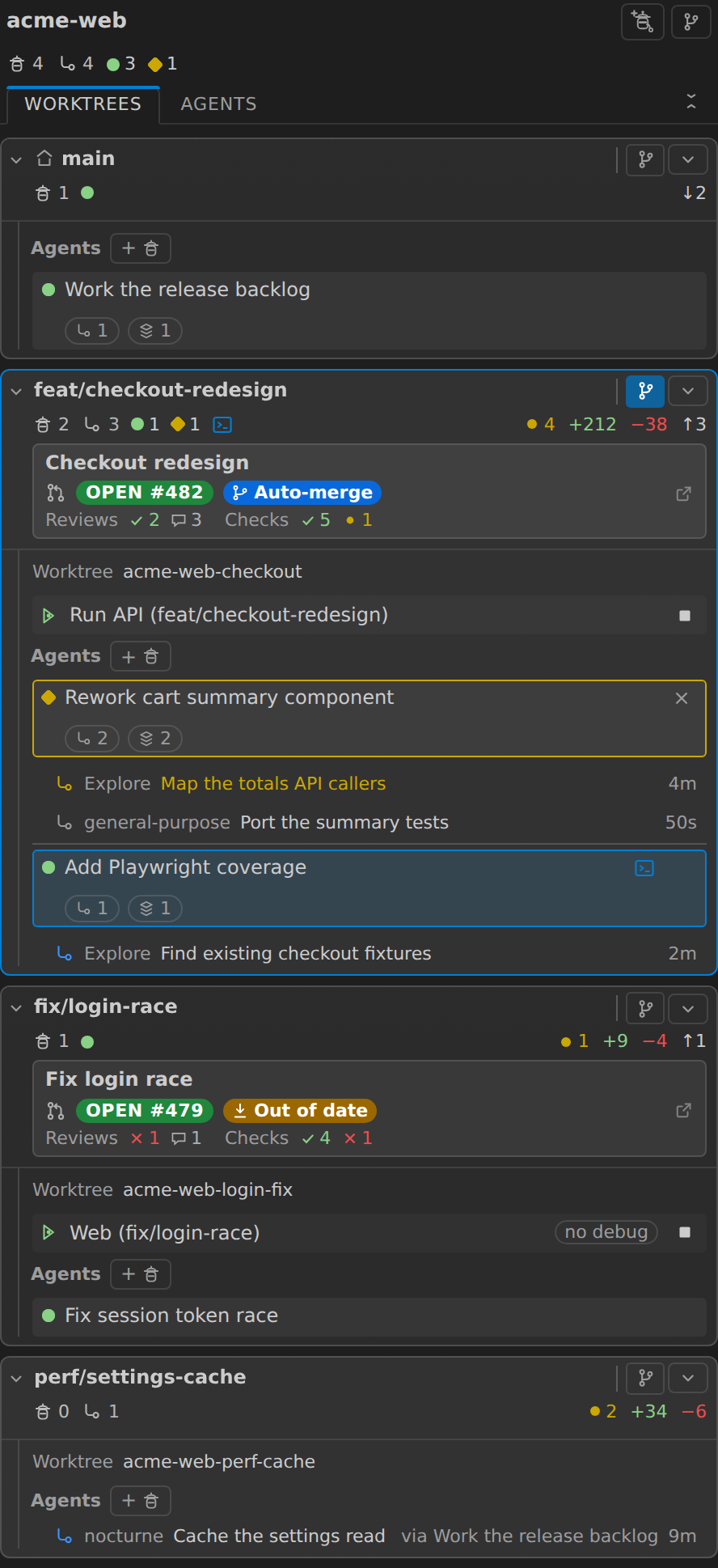
- Every worktree at once: changed files,
+/-lines, ahead/behind. - Start a Claude agent in any worktree in one click, or create a worktree and an agent together.
- Live agent status: active, waiting, idle. Activity Bar badge when one is blocked on you.
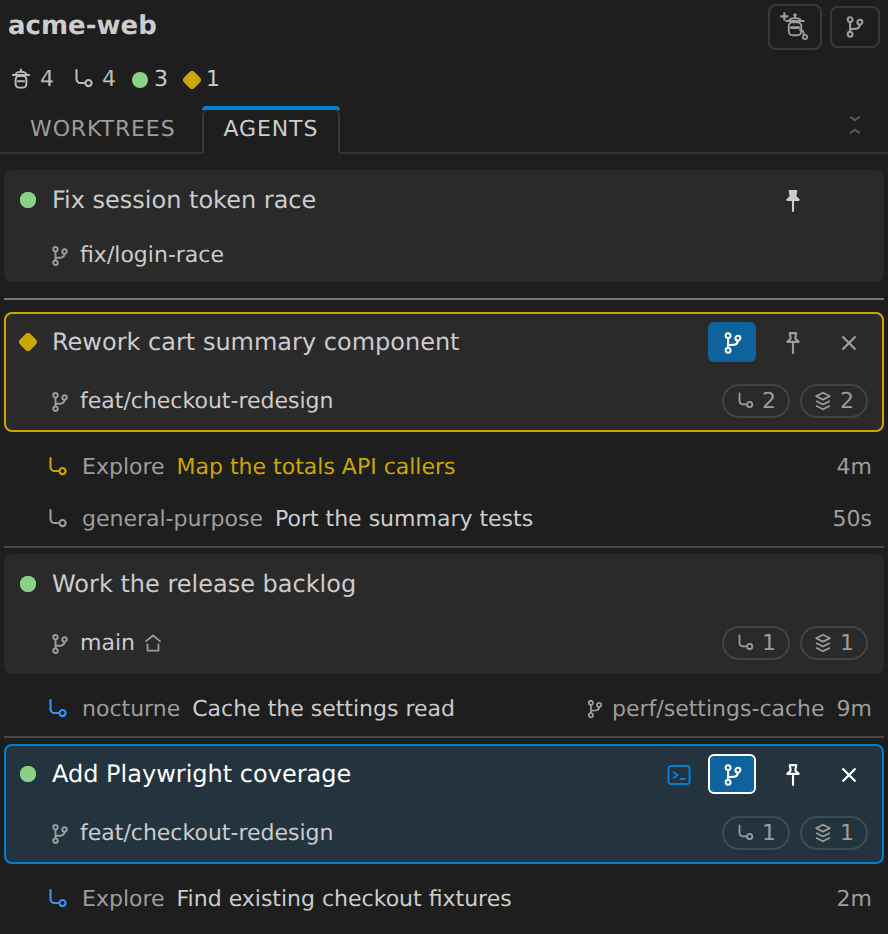
- Switch the panel to an agents view: every agent in the repo in one list, waiting ones first, each row naming the branch it is working on. Pin the one you are shepherding and it stays at the top, or point Source Control at the worktree it is working in without leaving the list.
- PR state, CI checks and reviews on the card. No browser tab.
- Run or debug a worktree's launch configuration without opening a second window.
- Search a worktree, or open a file from it, in your current window.
- A Branches tab for every branch in the repo.
- Four worktrees in the height one card used to take.
Agents
- A Claude CLI session in any worktree, each in its own terminal.
- Agent & Worktree creates a worktree with
claude -wand starts an agent in it in one step. The card appears with the agent already on it. - Reveal or stop any session, including agents you started by hand in a terminal. Rows find their terminal by which one the process is actually in, so Reveal and Stop hit the right session. One in another VS Code window says so.
- The agent whose terminal is open is highlighted, so you never type to the wrong one.
- In the agents list, pin the sessions you are watching: they hold the top of the list however busy the rest of it gets, and unpin themselves when they end.
- Terminal tabs are titled by Claude Code itself and track each session's current topic. Background tabs included, and the tab you are reading is never pulled away.
- Live subagents are listed under their agent with what each is doing and for how long, and clear themselves when they finish.
- Fan-out across worktrees: a subagent working in another worktree is listed on that worktree's card, naming the agent that sent it. Clicking it opens the parent's terminal.
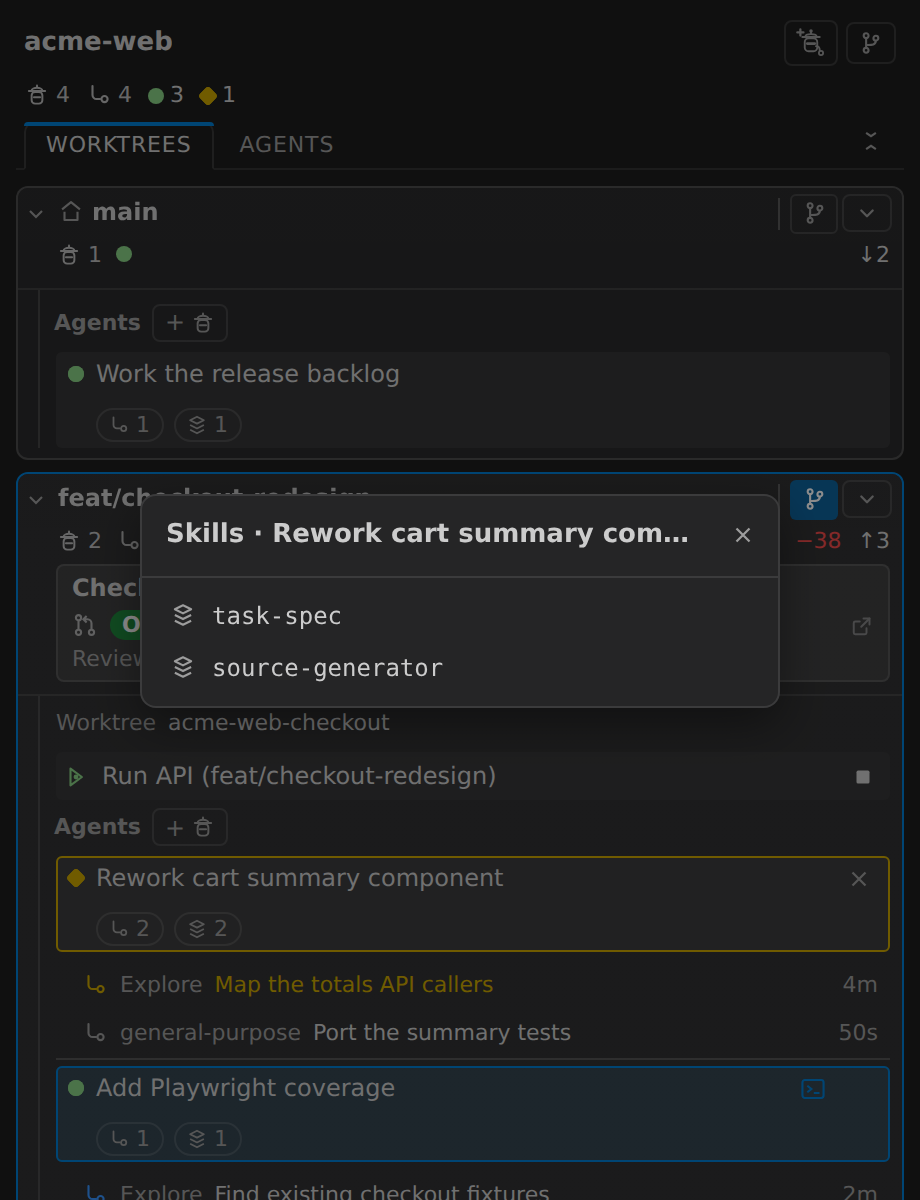
- Skill chips show which Claude skills an agent has used.
- Dead sessions retire themselves, so reopening a window shows agents that are actually running.
All of them in one list
Two tabs at the foot of the panel header, Worktrees and Agents, switch between the worktree cards and an agents view: every agent in the repository as one list, whatever worktree it is in, with the waiting ones at the top.
Each row names the branch it is working on, so two agents with similar summaries are still easy to tell apart, and keeps everything the card row has - click to reveal its terminal, stop it, see its subagents and skills. Subagents hang under the agent that spawned them, each naming its own worktree when it was given one.
A row also carries the Source Control button the cards have, so "show me what this one is changing" is one click on the agent you are reading rather than a trip back to its card. The worktree the Source Control view is currently on is filled in, on whichever view you are looking at.
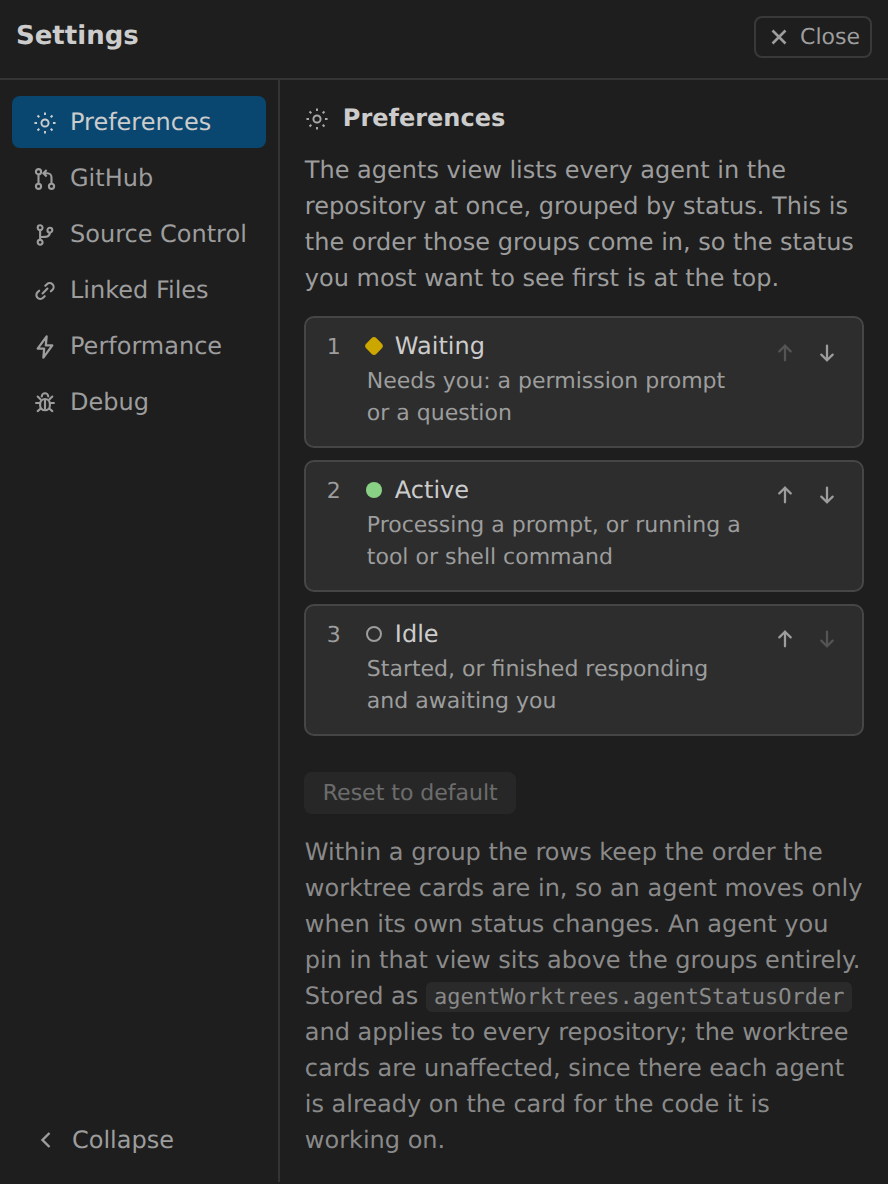
Rows are grouped by status, waiting first out of the box. That order is yours: Settings → Preferences moves the statuses up and down, so if you would rather watch what is running than what is blocked, put active on top. The panel remembers which view you were in.
The pin on a row beats the grouping. Pin the one or two sessions you are actually shepherding and they hold the top of the list, whatever they are doing and however busy the rest of it gets, with a rule marking where the pinned ones end. Click the pin again to let a row drop back into its group; an agent that ends takes its pin with it.
| Every agent in one list | Choosing the order |
|---|---|
 |
 |
Status
| Status | When |
|---|---|
| idle | started, or finished responding and awaiting you |
| active | processing a prompt, or running a tool or shell command |
| waiting | needs you: a permission prompt or a question |
Status comes from the session files Claude Code already keeps. Nothing to set up, nothing to approve, nothing sent over the network, and nothing written to your Claude settings. Hooks that earlier versions asked you to install are removed automatically; hooks you added yourself are left alone.
The Activity Bar badge counts waiting agents only, so it always means an agent needs you.
Pull requests
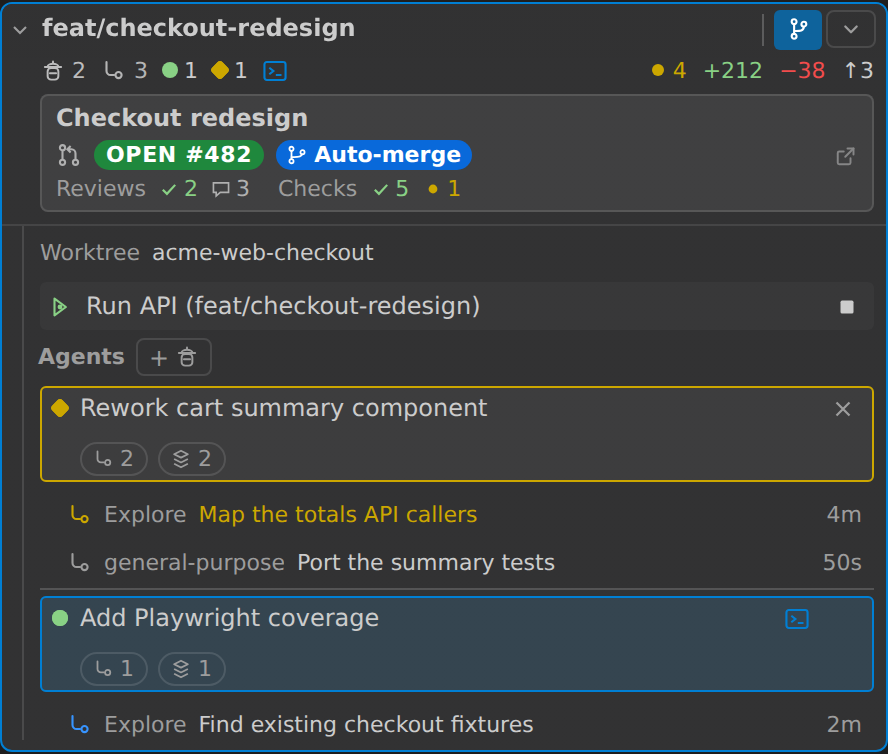
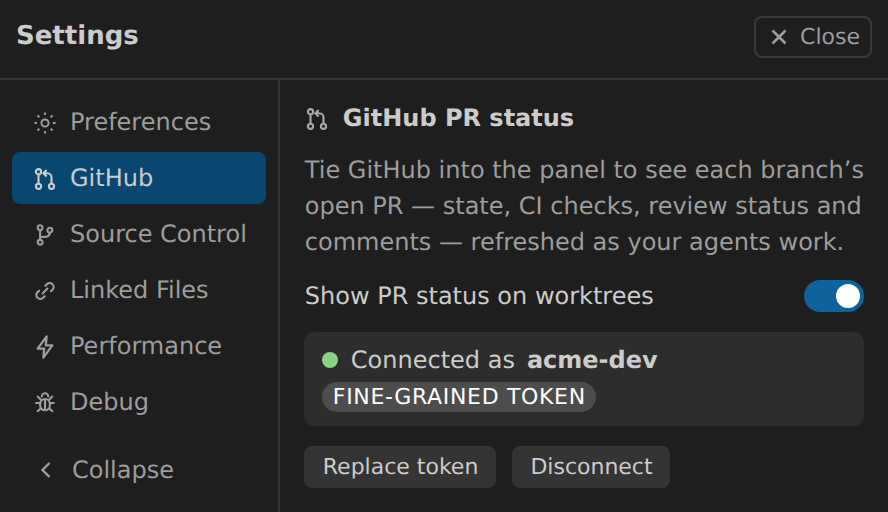
Every card links its branch to GitHub with no token and no setup. Connect a token and the card grows a PR rollup:
- Title, state, CI checks, reviews, comment count.
- Out of date and Auto-merge pills.
- Refreshed as your agents work, plus a per-card refresh.
- Always the PR for the branch checked out right now, so a merged branch's PR clears instead of lingering.
| On the worktree card | Connecting a token |
|---|---|
 |
 |
Branches view
A full editor tab listing every branch in the repo, local and remote-only.
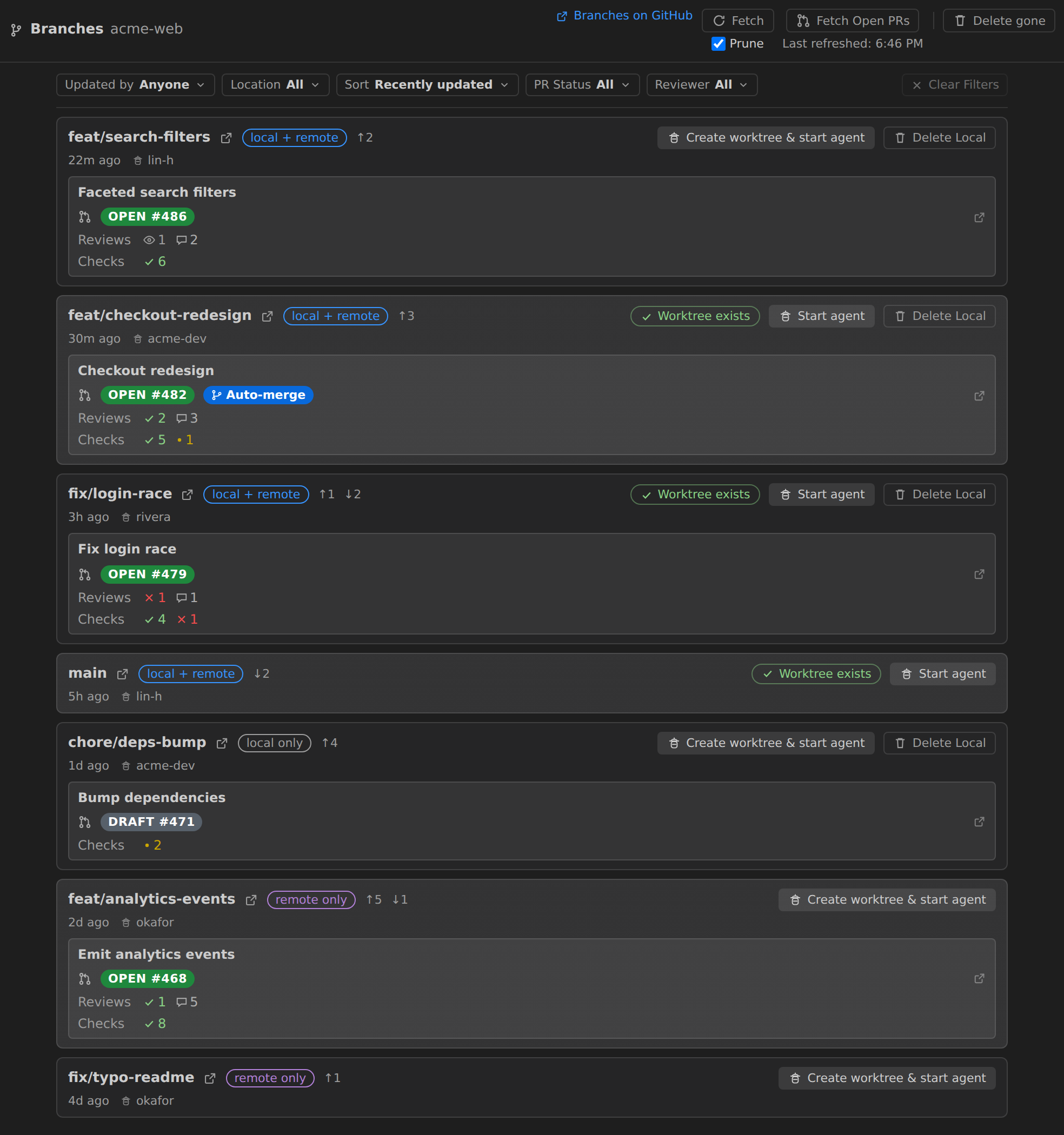
- Start agent on branches with a worktree, Create worktree & start agent on the rest. A remote-only branch is checked out as a new local tracking branch.
- Last-updated time, author, location tag and ahead/behind, all from local git with no token.
- Filter and sort by updater, location, PR status, or review-requested-from-you. Your choices are remembered.
- Fetch and prune to refresh ahead/behind and drop dead refs.
- Delete Local never touches the remote. It warns about unpushed commits and handles squash-merged branches without asking you to force it.
- Delete gone clears every local branch whose remote is gone, in one confirmation.
New worktrees land in .claude/worktrees/, the same place claude -w puts them.
Linked files
A new worktree only gets the files git tracks, so the gitignored local config your build or tests need is missing and they fail.
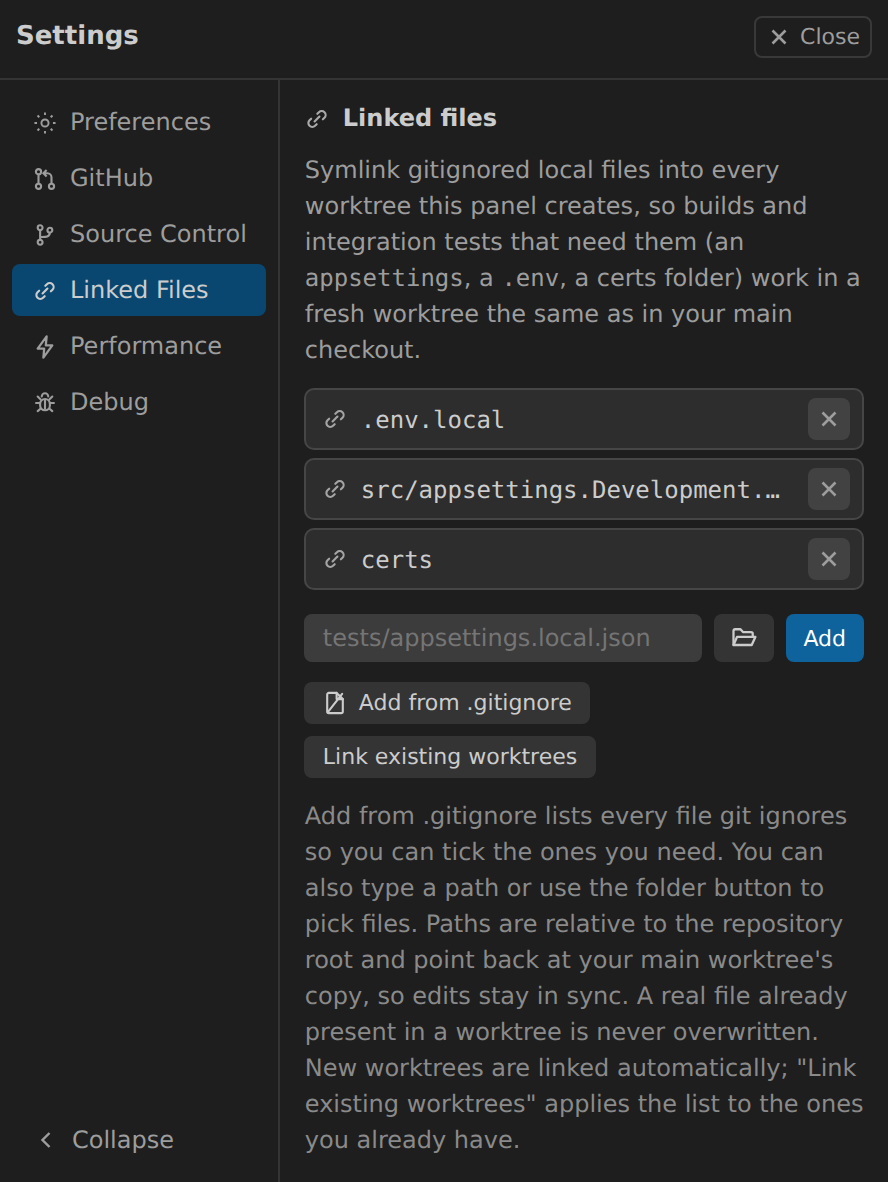
- List the paths once per repository; every worktree gets them symlinked in, including worktrees the panel did not create.
- The list belongs to the repository, so it reads the same from any worktree.
- Add from .gitignore lists what git ignores so you can tick what you need.
Whole folders like
node_modulescollapse to one row. - Links point at your main worktree's copy, so editing once updates everywhere.
- Link existing worktrees applies the list to the ones you already have.
- A file a worktree genuinely owns is never overwritten.
- Windows works without Developer Mode or admin rights (junctions, then hard links).
Run and Debug a worktree
VS Code always launches out of your main folder. Each card gets a Debug button instead, shown only on worktrees that have launch configurations.
- Any configuration from that worktree's own
launch.json, so a branch that added one offers it. - Run with the debugger, or click the play icon on a row to run without breakpoints. Compounds work too.
${input:...}prompts work, from the worktree's owninputs, and a compound asks once for a shared input.${workspaceFolder}, the working directory and anypreLaunchTaskall point at the worktree, so you debug what you just changed. A failed build launches nothing.- Stop it from the same card: each session gets a row on the worktree it runs in.
Cards built to be scanned
Every card is two lines at rest, and one click shuts them all.
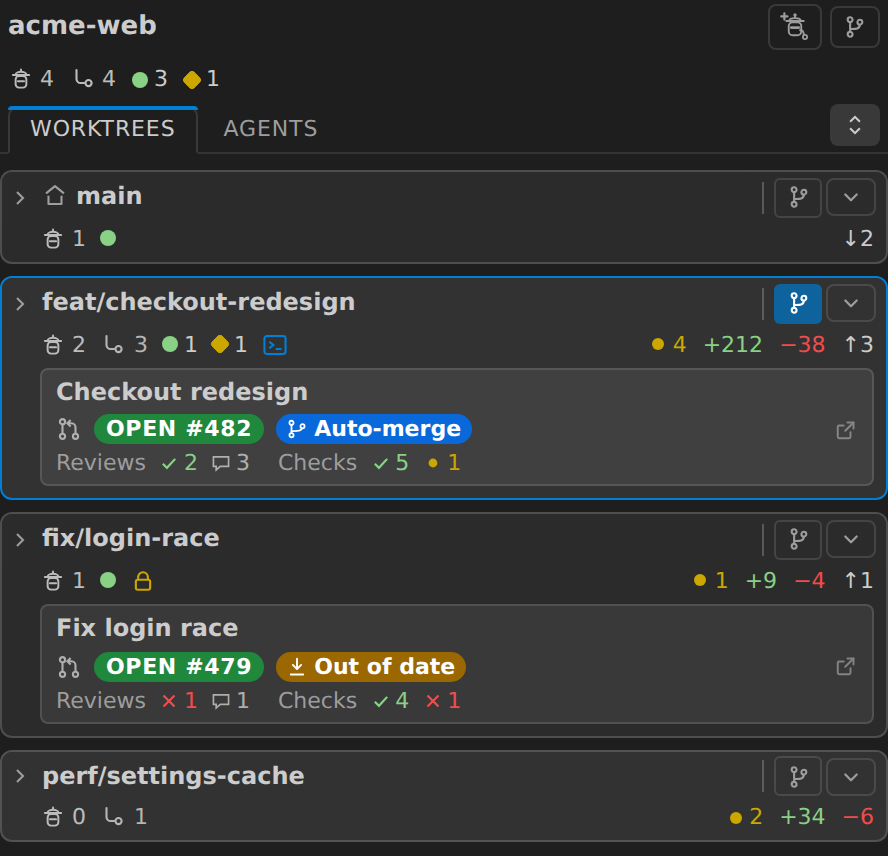
- Nothing is dropped at two lines: branch, agent and subagent counts, status dots and git totals.
- The PR stays one block, with reviews and checks sharing a line, split by a rule so the two sets of checkmarks never blur together.
- Names stay put while you scroll: a card's header pins above its own agent rows, so you never reveal a terminal from the card below the one you meant.
- Click the name to open a card, not the whole line. A vertical rule marks where the toggle stops, and the hover highlight shows exactly what the click will hit. Cards no longer light up as a whole, so what highlights is what is actually clickable.
- The name line stays a name line. Past that rule: the Source Control scope pill and a caret menu holding switch branch, refresh, search, find file, run or debug, open in a new window, view on GitHub and delete. New agent sits beside the Agents heading.
- The worktree's own directory is a labelled
Worktreeline in the body, with the full path on hover. Cards are titled by branch, which is what you scan for. - Glyphs instead of pills for your primary working directory (a house) and for locked or detached worktrees.
- The outlined card is the one you are typing into, not the one that happens to be your open folder.
- A repo-wide agent summary under the repository name, so "is anything waiting on me" is one glance.
- The agent list scrolls instead of folding, so a busy worktree cannot push every card below it off screen.
- One button opens or shuts every card and says which it will do. Your open cards are remembered.
Search and find files without leaving your window
A worktree is not part of your open workspace, so Find in Files and
Ctrl/Cmd+P never see it. Two buttons per card fix that.
- Search this worktree opens the search view already scoped to it.
- Find file in this worktree lists its files and opens the one you pick, right here.
- The list matches what
Ctrl/Cmd+Pwould show: tracked and untracked, nothing gitignored. - Your workspace is untouched: no Explorer entry, no reload, no agent disturbed.
Also included
- Open in a new window, focusing an existing one rather than duplicating it.
- Switch a worktree's branch, or create a new one.
- Delete a worktree in one confirmation that says upfront what it touches (agents, uncommitted changes, unpushed commits) and can delete the branch too. Leftover folders git could not remove are cleaned up.
- Stale lock cleanup for dead sessions. Locks you placed are never touched.
- Source Control scoping, so the SCM view follows the worktree you pick - from a worktree's card or from any agent row in the agents view.
- A Performance tab: git's
statusaccelerators for this repo, with a switch for each, plus how often the panel rechecks worktrees. - A Preferences tab: the order the agents view groups its statuses in, moved with an up/down control per status.
- Buttons that show their work: slow actions swap their icon for a spinner.
- A settings nav that folds to icons on a narrow sidebar.
Requirements
- The Claude Code CLI (
claude) on yourPATH. giton yourPATH.- A workspace whose first folder is inside a git repository.
Getting started
- Install the extension and open a folder that is a git repository.
- Open Agent Worktrees from the Activity Bar.
- Click Agent on any worktree, or Agent & Worktree to create both at once.
Troubleshooting
Panel slow or empty? Settings, Debug tab, turn on Debug tracing. Every git command and GitHub request is logged with its duration and result to the "Agent Worktrees" output channel. Off by default, and request headers, which carry your token, are never logged.
Slow on a big repository, especially on Windows? Per-worktree git status is
usually the cost. Settings, Performance tab shows whether this repository has
git's untracked cache and filesystem monitor on, with a switch for each. Both make
git status skip work it has already done.
Each switch writes one of this repository's own git settings
(core.untrackedCache, core.fsmonitor). Nothing global, nothing committed, and
turning it off puts it back. A switch you cannot move says why on its own row: an
unsuitable filesystem, a git older than 2.37, an unsupported platform, or a
monitor you already run yourself.
The same tab has Recheck every, how often git status re-runs for a worktree
an agent is working in. It applies only to worktrees not open in the Source
Control view, which refresh on VS Code's own git events instead.
Privacy
Runs entirely on your machine, collects no telemetry. It reads local git state and
the session files Claude Code keeps for itself, and writes nothing to your
~/.claude tree. The only network requests it makes are to the GitHub API, and
only once you connect a token.