A Visual Studio Code extension that computes and displays cyclomatic complexity metrics inline for multiple programming languages. Cyclomatic complexity is a software metric used to indicate the complexity of a program by measuring the number of linearly independent paths through the source code.
Features
🎯 Multi-Language Support
- C/C++: Full support with preprocessor directive handling
- Java: Comprehensive method complexity analysis
- JavaScript/TypeScript: Modern web development support
- Python: Scripting language support with proper indentation handling
📊 Accurate Complexity Calculation
- McCabe's Cyclomatic Complexity: Industry-standard metric
- Language-specific parsing: Tailored algorithms for different languages
- Preprocessor-aware: Special handling for C/C++ preprocessor directives
- Real-time updates: Calculations update as you type
👁️ Visual Feedback
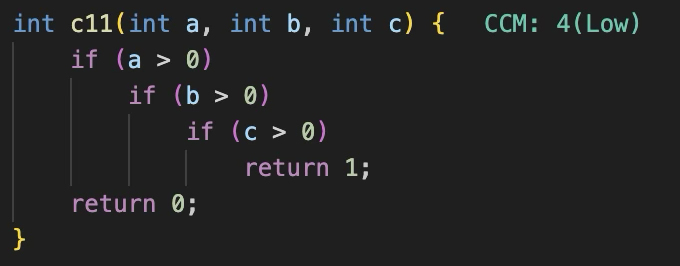
- Inline display: Complexity scores shown next to each function
- Color coding: Instant visual feedback based on complexity level
🔧 Preprocessor Directive Handling (C/C++)
- Smart chain detection: Identifies
#if/#elif/#elsechains - Independent block counting: Properly handles standalone
#ifdef/#ifndef - Consistent rules: Same calculation regardless of macro definitions
⚡ Performance
- Debounced analysis: Prevents performance issues during typing
- Efficient parsing: Minimal impact on editor responsiveness
- Zero configuration: Works out of the box
⌨️ Usage
IDE Usage
- Open any supported file in the editor, and you will see the CCM scores and complexity inline next to each function. It is updated as you type.
Command Palette Usage
- Open command palette by pressing
Ctrl+Shift+P(Windows/Linux) orCmd+Shift+P(Mac). - Select CCM: Analyze — Computes cyclomatic complexity for all supported files under a given path (file or directory). Results are saved as
ccm_analysis.csvin the workspace root and displayed in an output panel. - Select CCM: Update — Inserts or update
@complexity <Level>docstring tags in source code for all functions across all supported files under a given path.
Both commands prompt for a path (absolute or relative to the workspace root).
How It Works
Complexity Calculation
The extension uses McCabe's cyclomatic complexity formula with a base complexity of 1, adding 1 for each decision point:
ifstatements (includingelse if)forloopswhileloopscasestatements (in switch blocks)- Ternary operators (
? :) - Logical operators (
&&,||) in some languages - Exception handling (
catch,except)
Preprocessor Directive Handling (C/C++)
| Construct | Rule |
|---|---|
#if/#elif/#else chain |
+1 (only one branch is active) |
#ifdef/#elif/#else chain |
+1 (only one branch is active) |
Independent #ifdef X block |
+1 each (macro value unknown) |
Independent #ifndef X block |
+1 each (macro value unknown) |
Real-time Analysis
Code is analyzed as you type, with debouncing to prevent performance issues. Complexity scores update automatically on save or after a brief pause in typing.
Color Coding
| Score | Color | Meaning |
|---|---|---|
| ≤ 10 | 🟢 Green | Low complexity — generally acceptable |
| 11–20 | 🟡 Yellow | Medium complexity — acceptable but marginal |
| 21–30 | 🟠 Orange | High complexity — consider refactoring |
| 31–50 | 🔴 Red | Very high complexity — needs immediate attention |
| > 50 | 🔴 Red | Critical complexity — Untestable |
Use Cases
- Code Review: Quickly identify complex functions during code reviews
- Refactoring: Target complex functions for simplification
- Quality Gates: Enforce complexity limits in CI/CD pipelines
- Educational: Help developers understand code complexity concepts
Limitations
- Nested functions are counted as part of the parent function
Technical Details
- Pure JavaScript implementation with no external dependencies
- Modular design with separated core logic from VS Code integration
- Verified with comprehensive test suite for each supported language