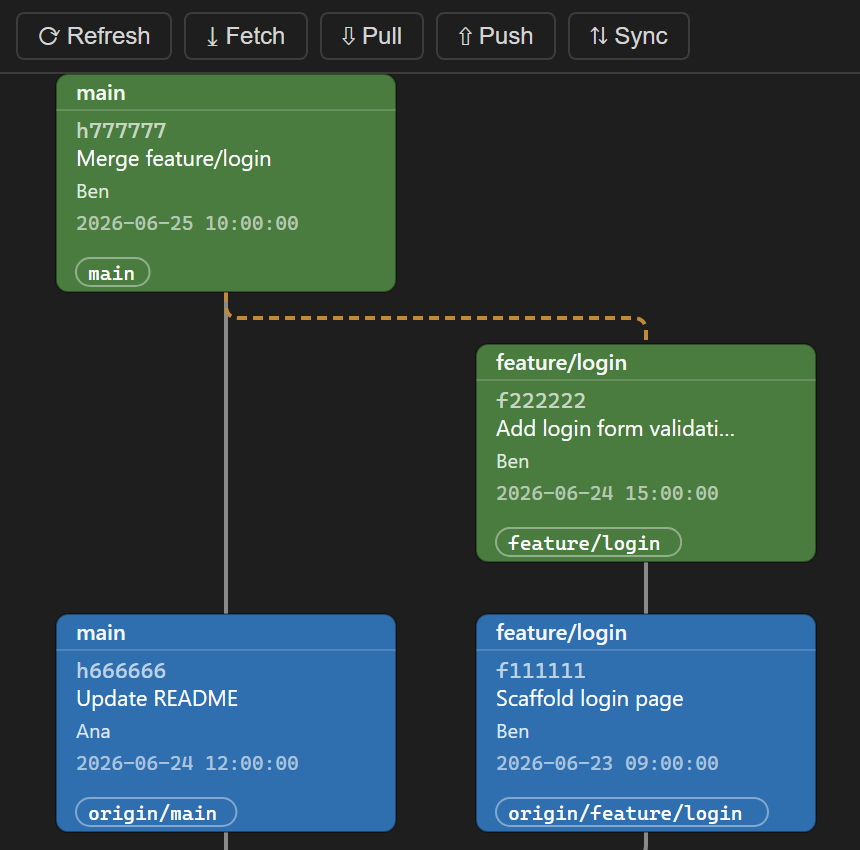
A TortoiseSVN-style revision graph for Git inside Visual Studio 2022 and 2026. Commits, local & remote branches, and tags are displayed as connected, color-coded boxes — just like SVN's classic revision graph.
▶ Try the live demo in your browser — no install required; runs the real renderer on a sample repository.
How to open
- Open a folder or solution that is inside a Git repository.
- Go to View → Other Windows → Revision Graph.
The graph loads automatically and shows the full commit DAG of the current repository.
Features
- DAG layout — commits arranged in columns per branch with connecting lines.
- Color-coded nodes — HEAD/current branch (red), local branches (green), remote branches (blue), tags (yellow), plain commits (grey).
- Right-click a commit → "Create branch from here…" — creates a new branch at that commit using the native Git CLI, then refreshes the graph.
- Checkout a commit directly from the graph.
- Copy SHA of any commit.
- Zoom & pan the graph canvas.
Other hosts
Also available for VS Code and JetBrains IDEs (IntelliJ IDEA, Android Studio, DevEco Studio, WebStorm, PyCharm, GoLand, etc.).
Source code & license
- Source code: https://github.com/HunKonTech/git_Revision_Graph
- License: Business Source License 1.1 — free for personal, internal, and non-commercial use. Selling, reselling, or offering the software as a paid product or service is not permitted. Converts to MPL 2.0 four years after each version's release.
Git Revision Graph (Magyar)
Egy TortoiseSVN-stílusú revíziógraf Git-hez Visual Studio 2022 és 2026 számára. A commitok, helyi és távoli ágak, valamint tagek összekötött, színkódolt dobozokként jelennek meg — pont úgy, mint az SVN klasszikus revíziógrafja.
▶ Próbáld ki az élő demót a böngésződben — telepítés nélkül; a valódi megjelenítő fut egy minta-repozitóriummal.
Megnyitás
- Nyiss meg egy mappát vagy megoldást, amely egy Git repozitóriumon belül van.
- Lépj a Nézet → Egyéb ablakok → Revision Graph menüpontba.
A gráf automatikusan betölti az aktuális repozitórium teljes commit-fáját.
Funkciók
- DAG elrendezés — a commitok áganként oszlopokba rendezve, összekötő vonalakkal.
- Színkódolt csomópontok — HEAD/aktuális ág (piros), helyi ágak (zöld), távoli ágak (kék), tagek (sárga), sima commitok (szürke).
- Jobb klikk egy commitra → "Ág létrehozása innen…" — új ágat hoz létre az adott committól a natív Git CLI-vel, majd frissíti a gráfot.
- Checkout — commit közvetlen kivétele a gráfból.
- SHA másolása bármely commithoz.
- Nagyítás és mozgatás a gráf felületén.
Más hosztokon
Elérhető VS Code-hoz és JetBrains IDE-khez is (IntelliJ IDEA, Android Studio, DevEco Studio, WebStorm, PyCharm, GoLand, stb.).
Forráskód és licenc
- Forráskód: https://github.com/HunKonTech/git_Revision_Graph
- Licenc: Business Source License 1.1 — személyes, belső és nem-kereskedelmi célú használatra ingyenes. A szoftver eladása, továbbértékesítése, vagy fizetős termékként/szolgáltatásként történő kínálása nem megengedett. Verziónként a megjelenéstől számított négy év után MPL 2.0 licencre vált.