One keystroke to copy the full dotted key path from any YAML file to your clipboard.




What it does
Place your cursor on any YAML key and press Cmd+Alt+Y (Mac) / Ctrl+Alt+Y (Win/Linux). The full dotted path is copied to clipboard instantly — no config, no setup.
en:
  api:
    problems:
      server_error: 'Oops, something went wrong'  # ← cursor here
Clipboard: en.api.problems.server_error
Demo
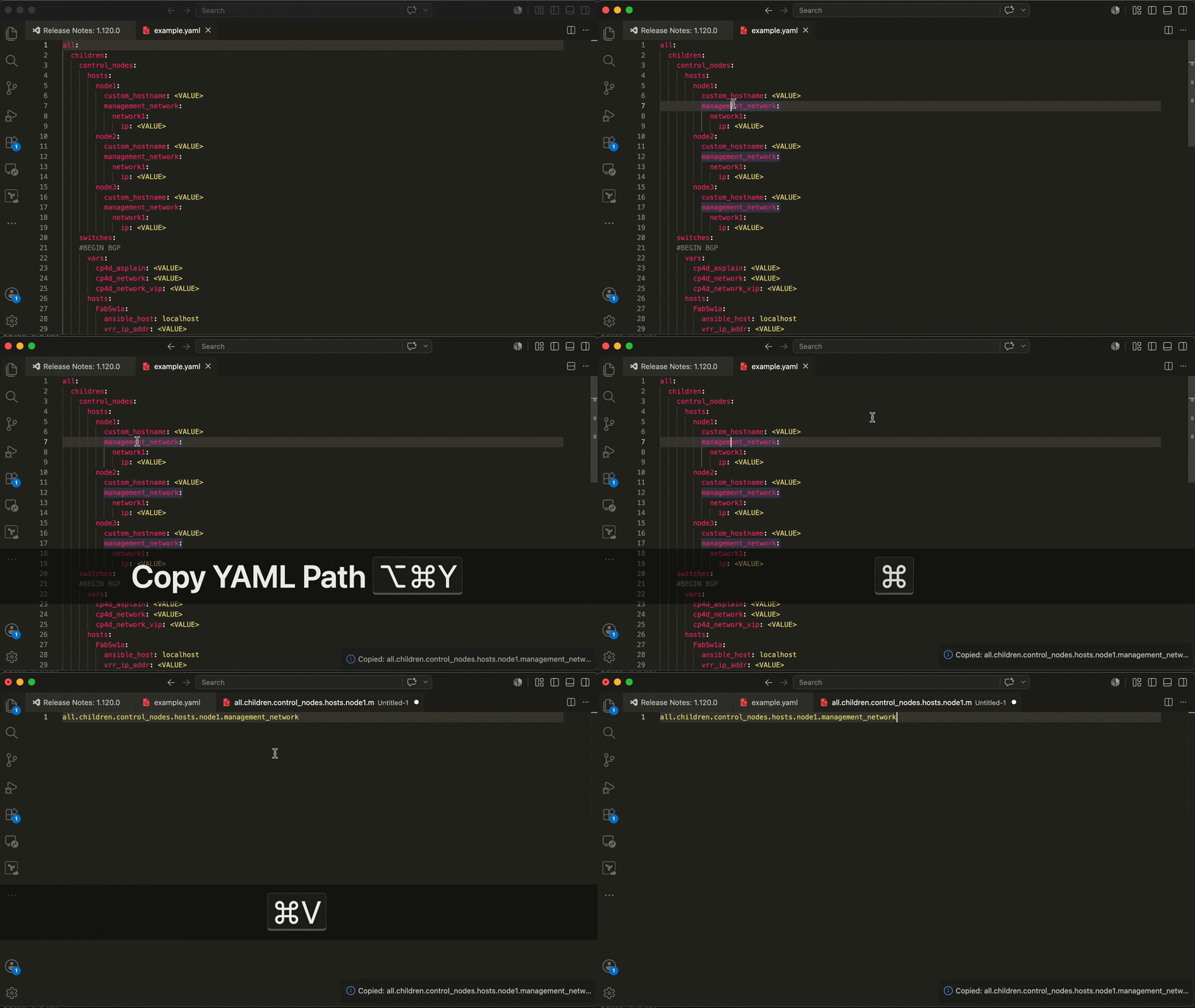
Features
- Instant — resolves full dotted path at any nesting depth
- Three triggers — keybinding, Command Palette, right-click context menu
- Smart — skips blank lines, comments, array items when resolving parents
- Colon-safe — handles values with colons (URLs, timestamps)
- Zero config — works on all
.yml/.yamlfiles out of the box - Tiny — 1 KB bundled, activates only when a YAML file is open
Usage
Keybinding
| Platform | Shortcut |
|---|---|
| macOS | Cmd + Alt + Y |
| Windows / Linux | Ctrl + Alt + Y |
Command Palette
Cmd+Shift+P → type Copy YAML Path → Enter
Context Menu
Right-click in any YAML file → Copy YAML Path
Examples
Rails i18n locales
en:
  activerecord:
    errors:
      models:
        user:
          attributes:
            email:
              taken: 'has already been taken'
              # → en.activerecord.errors.models.user.attributes.email.taken
Kubernetes / Docker Compose
services:
  web:
    environment:
      DATABASE_URL: postgres://...  # → services.web.environment.DATABASE_URL
GitHub Actions
jobs:
  build:
    runs-on: ubuntu-latest  # → jobs.build.runs-on
Any nested config
feature_flags:
  payments:
    stripe:
      webhook_secret: sk_live_...  # → feature_flags.payments.stripe.webhook_secret
Configuration
Exclude prefixes
In i18n workflows the locale key is often implicit — your code calls t('base.action'), not t('en.base.action'). Configure yaml-path-copy.excludePrefixes to strip those leading segments automatically.
settings.json:
{
  "yaml-path-copy.excludePrefixes": ["en"]
}
With this set, placing your cursor on server_error below:
en:
  api:
    problems:
      server_error: 'Oops, something went wrong'
…copies api.problems.server_error instead of en.api.problems.server_error.
Multiple prefixes are supported (e.g. ["en", "ar"]). The first matching prefix is stripped.
Rebinding the shortcut
Cmd+K Cmd+S → search yaml-path-copy.copyPath, or add to keybindings.json:
{
  "key": "cmd+shift+c",
  "command": "yaml-path-copy.copyPath",
  "when": "editorLangId == yaml"
}
Requirements
- VS Code
1.63.0or newer - No runtime dependencies
Known Limitations
- Flow-style YAML (
{key: value}inline) — path resolves tonull - Multi-document YAML (
---separator) — each document treated independently - Anchors / aliases (
&anchor,*alias) — alias key name copied, not anchor's path
Release Notes
See full CHANGELOG.
0.3.0
excludePrefixessetting for stripping locale/namespace prefixes before copying
0.2.1
- CI fixes: Node.js 24, publish from vsix, GitHub release permissions
- Version bump automation with CHANGELOG guard
0.2.0
- Initial stable marketplace release
Contributing
git clone https://github.com/ldrner/yaml-path-copy
npm install
npm run watch      # rebuild on save
# Press F5 in VS Code → Extension Development Host opens
npm run test:unit  # unit tests
npm run lint       # ESLint
Open an issue before large changes.
License
MIT © Ilia Kriachkov