Built for the AI era: high-fidelity rendered diffs for Markdown plans, specs, skills, reports, and docs.
Demo
The demo shows what mddiff is built for: reviewing AI-generated Markdown changes as rendered documents, with clearer handling for rewrites, tables, lists, code blocks, and larger structural edits.
Why mddiff
AI coding agents now generate and rewrite large amounts of Markdown: plans, specs, skills, reports, implementation notes, changelogs, and documentation.
As AI writes more, human review becomes more important.
Markdown is ultimately read as a document, not as source code. Rendered diffs help bridge that gap, but rendering alone is not enough.
Many rendered diff tools struggle to preserve review fidelity as Markdown structures become more complex. Tables, lists, rewritten sections, and larger structural edits often degrade into noisy or misleading diffs that are difficult to review with confidence.
mddiff is built around high-fidelity document review. It aligns and renders changes in a way that preserves meaning across complex Markdown structures, helping reviewers understand what actually changed instead of fighting diff noise.
Whether you’re reviewing a skill generated by Claude Code, a design document rewritten by Codex, an AI-generated report, or a large README update, mddiff helps you focus on the document changes that matter.
Highlights
- High-fidelity rendered diffing — Review Markdown as a document, with clearer handling for inline edits, links, paragraphs, lists, tables, code blocks, and rewritten sections.
- Review-oriented change handling — Small edits stay precise; heavier rewrites fall back to clean whole-block replacements instead of noisy word-level scrambling.
- Table-aware and structure-aware diffs — Preserve review fidelity across rows, columns, cells, lists, and larger document structures.
- Two review modes — Use inline diff for document-flow review, or row-aligned side-by-side diff for structured comparison.
- Git-aware workflows — Compare working tree edits, staged changes, unstaged changes, revisions, and commit pairs directly from VS Code.
- Diff minimap — Scan the document at a glance, then click or drag to jump between changes.
- Floating table of contents — Navigate large Markdown diffs with an always-available document outline.
- Multiple review themes — Switch between light and dark rendered backgrounds for different reading environments and preferences.
- Local editor experience — No browser, no daemon; review rendered Markdown diffs directly inside VS Code.
Use It
Open rendered diffs from multiple Markdown review workflows:
- Review uncommitted changes directly from Source Control.
- Review historical revisions from the Commit Graph.
- Compare any two Markdown files by selecting them in the Explorer.
mddiff integrates naturally with existing VS Code workflows, so you can review rendered Markdown diffs wherever you normally compare changes.
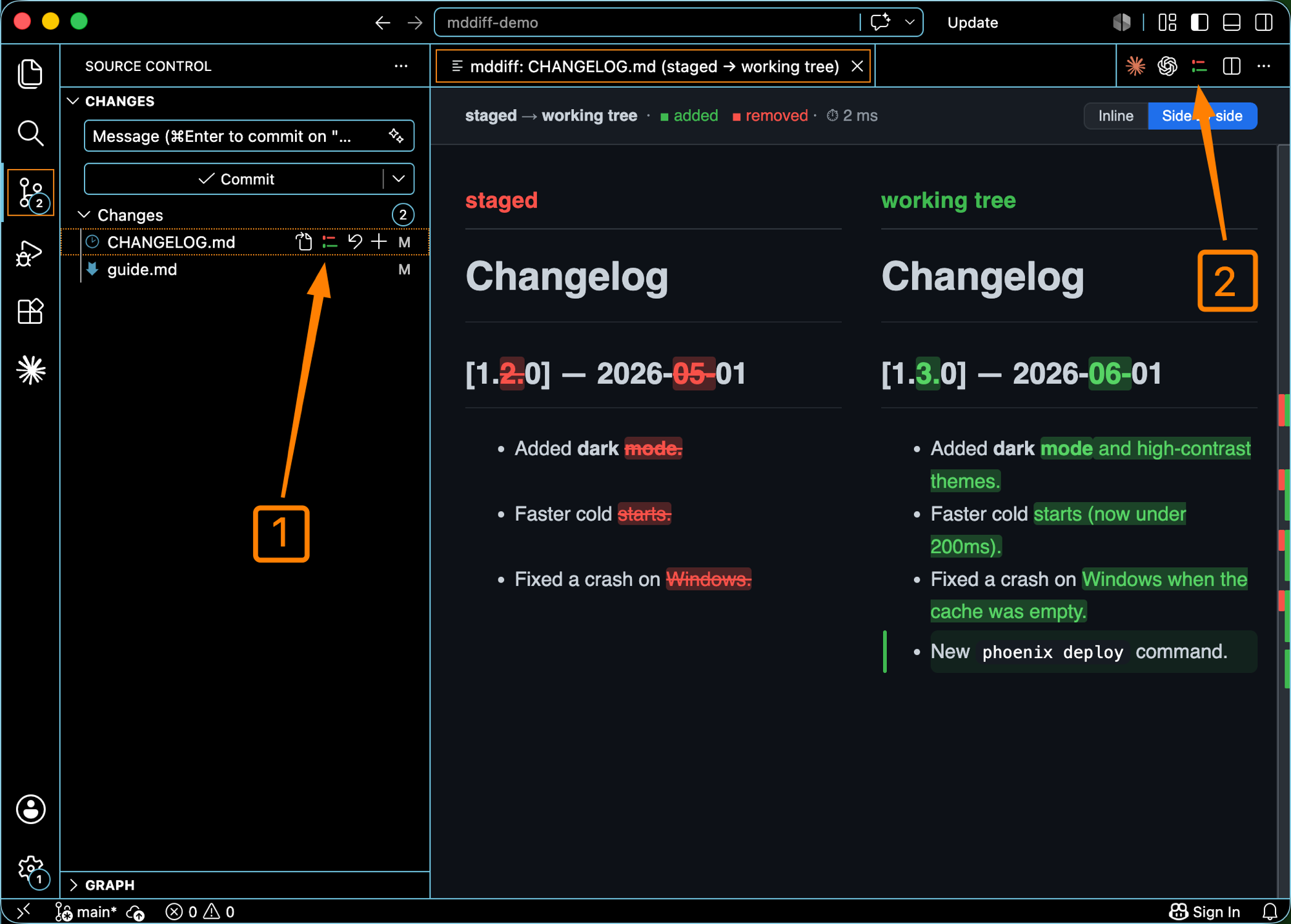
In the shot: ① the Source Control glyph, ② the editor title-bar button — both open a rendered diff.
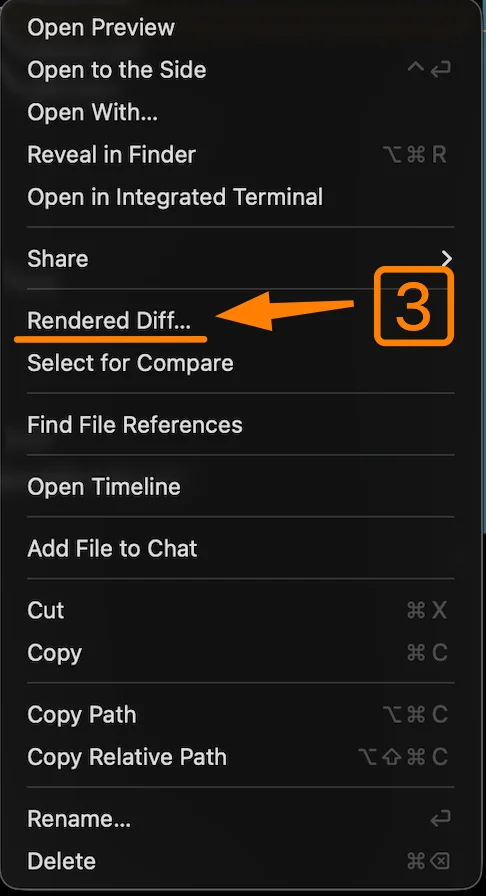
In the shot: ③ the Explorer right-click menu — choose Rendered Diff… on a markdown file.
Install
Open Extensions in VS Code, search mddiff, and click Install — or run:
code --install-extension awesomele.mddiff
The same diff engine also ships as a Homebrew CLI (macOS) that opens the diff in your browser:
brew install awesomele/tap/mddiff
Troubleshooting
Not seeing the entry points after installing? Reload the window — open the Command Palette (Cmd/Ctrl+Shift+P) and run Developer: Reload Window. A window that was already open keeps the previous extension state until it is reloaded.
Feedback & feature requests
Bug reports, feature requests, and general feedback are welcome — email [email protected].
License
mddiff is distributed as a free-to-use proprietary developer tool.
The VS Code extension, mddiff core, the Homebrew-distributed binary, and related tooling are not open source and are not licensed under MIT.
Third-party open-source dependencies remain governed by their respective licenses.