
Give every AI tool a memory of your codebase.
Dot is a local-first context memory daemon. This extension connects VS Code to your local Dot daemon so Copilot Chat and other AI tools start every session already knowing your code, your conventions, and the decisions behind them.
Local. Private. Model-agnostic. Nothing leaves your machine.
What it does
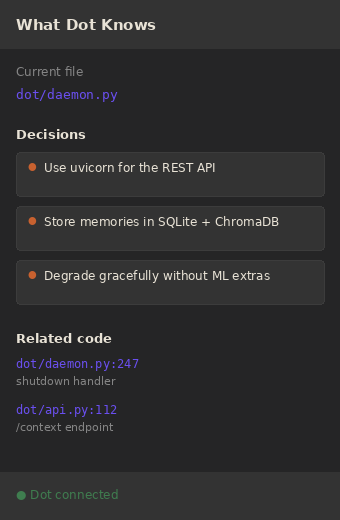
- "What Dot Knows" sidebar. For the file you have open, see the related code and the captured decisions Dot has on hand. Click any entry to jump to it.
- Copilot Chat integration. Dot registers a Language Model tool, so you can
type
#dotContextin Copilot Chat and pull ranked project context on demand. - One-click decision capture. Select code or a chat takeaway and run
Dot: Capture This Decisionto remember it for every future session. - Inline decision markers. Lines with a captured decision get a subtle hover marker so the "why" is never lost.
- Auto-start. When you open a Dot-initialized workspace, the daemon starts on its own.
Requirements
You need the Dot daemon installed and running. It is a small Python package:
pip install dot-context[ml]
cd your-project
dot init
dot daemon start
See the full installation guide.
Commands
Open the Command Palette and type "Dot":
| Command | What it does |
|---|---|
Dot: Capture This Decision |
Remember a decision from a selection or chat |
Dot: Show Context for Current File |
Preview what Dot would inject |
Dot: Force Re-index Project |
Re-index the workspace now |
Dot: Start Daemon / Dot: Stop Daemon |
Control the background daemon |
Dot: Open Dashboard |
Open the local web dashboard |
Settings
| Setting | Default | Description |
|---|---|---|
dot.apiUrl |
http://127.0.0.1:7337 |
Base URL of the local Dot daemon |
dot.autoStartDaemon |
true |
Start the daemon when a Dot workspace opens |
dot.injectIntoCopilot |
true |
Register Dot as a Copilot context tool |
dot.tokenBudget |
4000 |
Token budget for assembled context |
Privacy
Everything runs locally. Embeddings are generated on your CPU, storage is
SQLite on your disk, and the extension only talks to 127.0.0.1. Your source
code never leaves your machine.
Learn more
MIT License.