



VSCode client for DimFort —
the dimensional-homogeneity checker for Fortran. Thin Language Server
Protocol client: spawns dimfort lsp and forwards your Fortran
sources to it; the server publishes diagnostics back, and VSCode
renders them as squiggles and entries in the Problems panel.
Want a hands-on look first? See the DimFort tour — a short, self-contained Fortran file that exercises the most common diagnostics, with a line-by-line walkthrough.
Install
1. Install DimFort itself
The extension needs the dimfort binary on PATH. Install with
pipx (recommended on Homebrew Python /
modern Linux distros where PEP 668 blocks pip install):
pipx install 'dimfort[lsp]'
dimfort --version
2. Install the extension
VSCode — from the Extensions panel, search "DimFort" and click
Install. Or from the command palette (Cmd/Ctrl+P):
ext install arrialvictor.dimfort-vscode
VSCodium / Cursor / Theia / code-server — from the Open VSX gallery. Most of these clients have Open VSX as the default gallery; search "DimFort" in the Extensions panel:
ext install dimfort.dimfort-vscode
From .vsix (any client) — for offline / air-gapped installs or
when a marketplace isn't reachable:
curl -L -o dimfort-vscode.vsix \
  https://github.com/ArrialVictor/DimFort-VSCompanion/releases/latest/download/dimfort-vscode.vsix
code --install-extension dimfort-vscode.vsix
Open any .f90 file — DimFort lights up. Settings → search
dimfort to see toggle commands.
Features beyond plain diagnostics
-
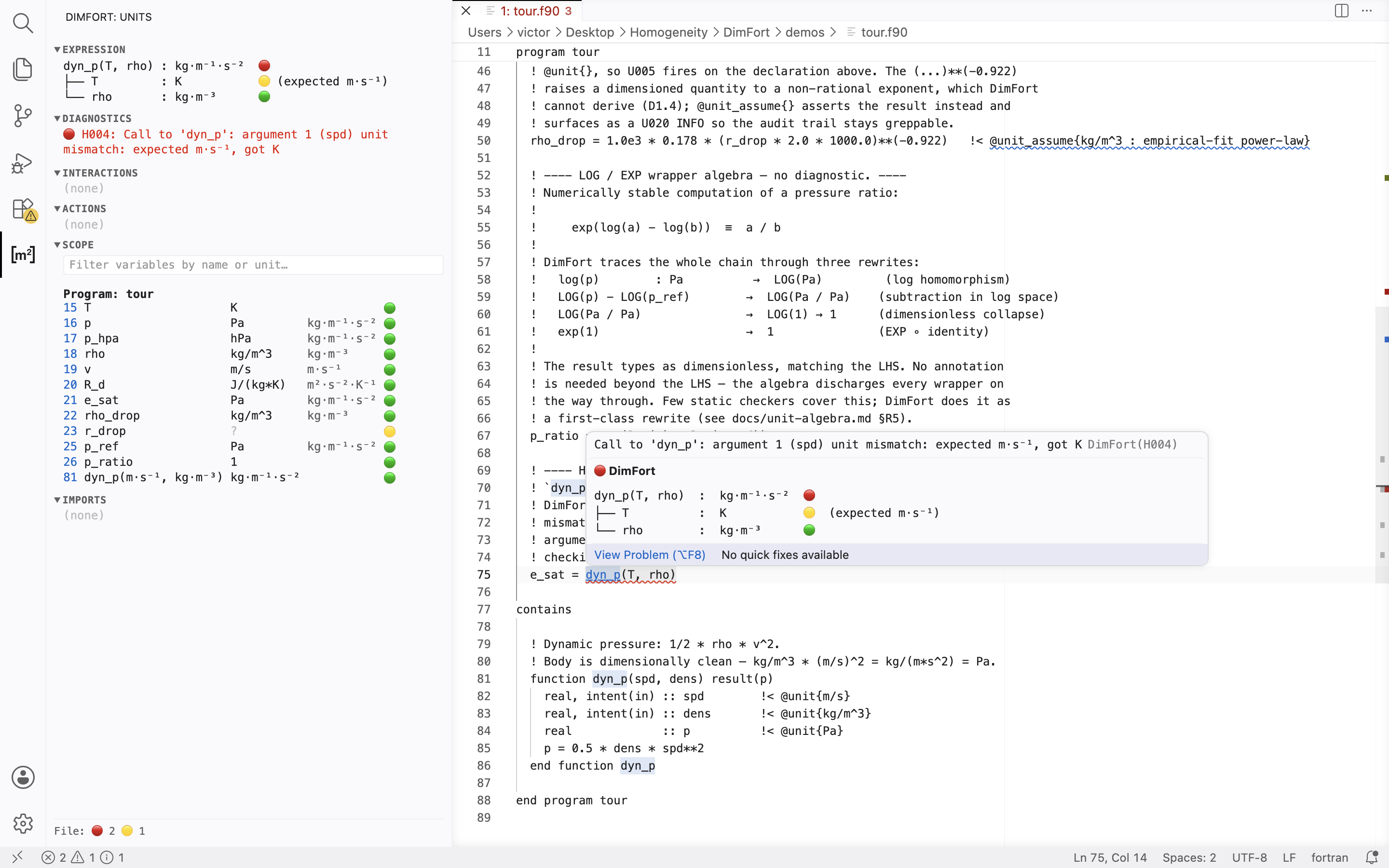
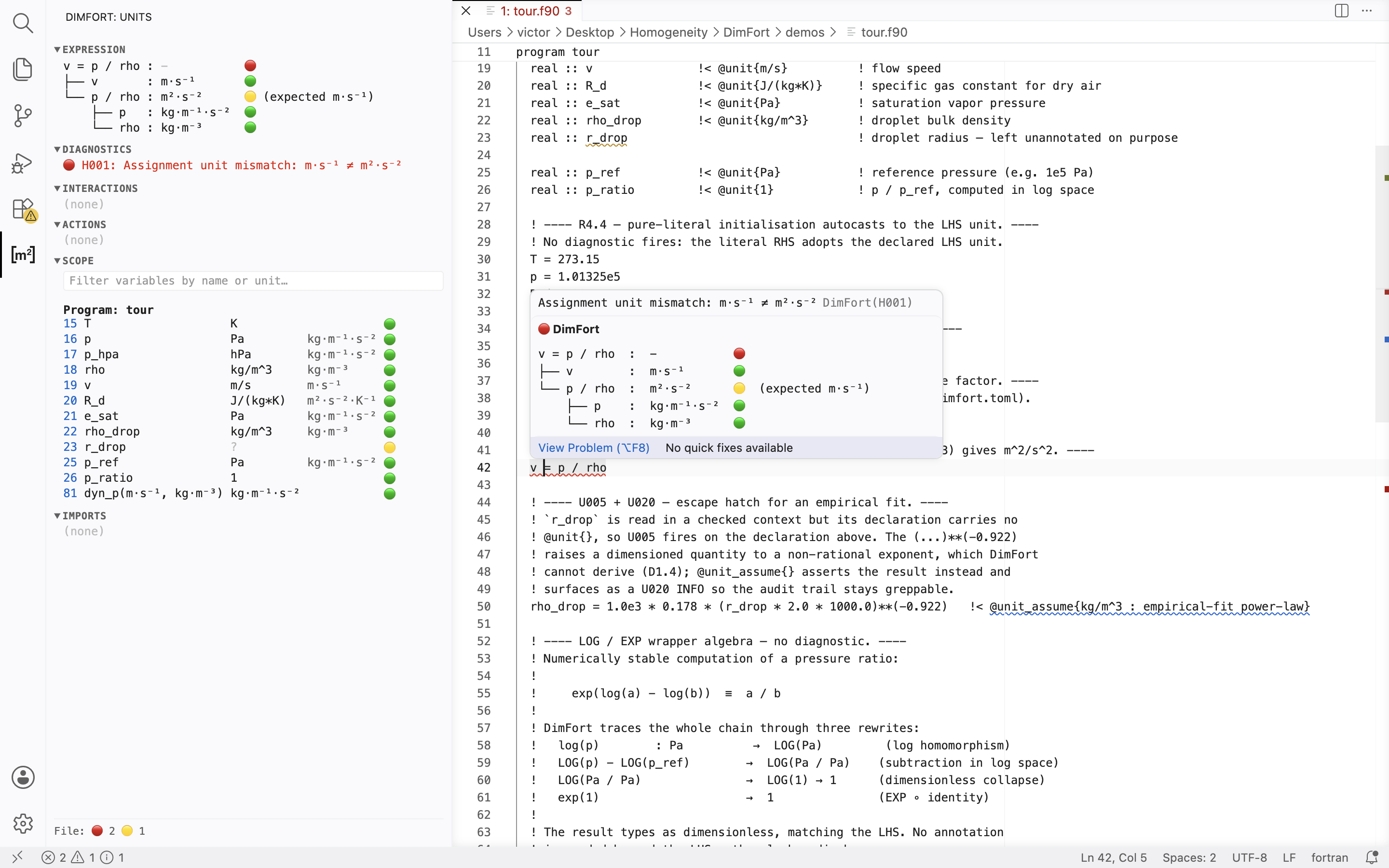
Hover — one setting, DimFort: Hover (
dimfort.hover), picks the level of detail and applies to every hover surface:disabled(no hover — the side panel is the unit surface),short, ordetailed.- On a call (function or subroutine) — same tree layout as the
side panel: root row
name(args) : retwith the overall verdict marker, and one child row per actual argument labelled by the source expression, with(expected <formal>)on a mismatch. Subroutines have no return unit so the root readsname(args) : ?and paints 🟡.Detailedadds a sub-tree under any computed actual showing how its unit was derived. - On an expression —
Shortis a one-line homogeneity check on assignments and relational expressions, a barename : unithover on identifiers, and the resolved unit on computed sub-expressions.Detailedis the full unit-algebra tree (every node tagged with its resolved unit and a per-row 🟢/🟡/🔴 marker that pinpoints where a violation fires or a leaf is unannotated). The header marker aggregates the worst row: 🔴 mismatch, 🟡 partial, 🟢 clean. Cycle the level with DimFort: Cycle Hover Verbosity; the side panel is unaffected (always detailed). The full layout spec lives in DimFort's hover-ui.md.
- On a call (function or subroutine) — same tree layout as the
side panel: root row
-
Extract literal to a named PARAMETERquick-fix on H010 D1.5 warnings (the1. + speedregularisation pattern). PressCmd+.on the yellow squiggle, type a name in the input box, and the refactor inserts a typed PARAMETER declaration and rewrites the literal use site. -
Add @unit{}quick-fix on undeclared symbols. -
Inlay hints show ghost-text units inline next to each variable reference (toggle with
DimFort: Toggle Inlay Hints). -
Go-to-definition on variables and procedure calls.
-
Completion inside
@unit{}annotations, sourced from the active unit table. -
Coverage visualisation — per-line status in one of two visual encodings (mutually exclusive). Off by default; toggle with DimFort: Cycle Coverage Visualisation (Disabled → Gutter → Background):
- Gutter — one dot per line in the left margin, in four tiers: green (verified), yellow (needs attention), red (hard fire), blue (unparsed). Lines with no unit semantics (control flow, blank lines, string assignments) carry no dot.
- Background — low-alpha background tint behind each in-scope line, in the same four tiers. Heavier visual weight; reads at a glance without scanning the gutter column.
Configuration
Settings (under DimFort in the Settings UI):
dimfort.executable— path to thedimfortbinary. Default is justdimfort(must be on$PATH). Override if the binary lives in a virtualenv:/path/to/.venv/bin/dimfort.dimfort.trace.server— set toverboseto see every LSP message in Output → DimFort. Useful for debugging.dimfort.inlayHints.enabled,dimfort.completion.enabled,dimfort.codeActions.enabled,dimfort.gotoDefinition.enabled— per-feature toggles. The palette also exposes them asDimFort: Toggle …commands.dimfort.hover— hover verbosity:disabled/short/detailed(defaultshort). Cycle withDimFort: Cycle Hover Verbosity. The side panel is unaffected — it is always detailed. The server reloads automatically when anydimfort.*setting changes.dimfort.maxWorksetSize— cap on the number of files in a single check pipeline (default 40). Restart the language server after changing.dimfort.externalModules— extra module names treated as external (noU007diagnostic when they're missing from the workspace). Extends the built-in allowlist.dimfort.cache.mode— content-hash cache for the workspace check:read-write(default),read-only, oroff. Withread-write, warm re-runs replay cached diagnostics for files whose source, includes, and dependencies haven't changed (a benchmark workspace measured ~33 s cold → ~20 s warm). Palette commandDimFort: Cycle Content-Hash Cache (Off / Read-only / Read-write)cycles all three modes. Invalidation triggers and the design are documented in DimFort/docs/usage.md#content-hash-cache.dimfort.cache.dir— optional override for the cache directory. Empty (default) means.dimfort-cache/under the first workspace folder.dimfort.scale.mode— opt-in scale/magnitude checking (S001multiplicative,S002affine-offset):auto(default — defer to the projectdimfort.toml[scale] enabled),on, oroff.on/offoverride the toml for the editor session. Cycle withDimFort: Cycle Scale Checking.dimfort.panel.enabled— reveal the side panel on activation (defaulttrue— set thisfalseto keep it closed and open it yourself from the DimFort activity-bar icon).dimfort.panel.debounceMstunes its cursor-follow refresh.
Default stance: the side panel is on and hover defaults to short — both cursor-following unit surfaces. Inlay hints default off (redundant beside the panel/hover) and the cache defaults to read-write. Adjust any of these in Settings.
Side panel
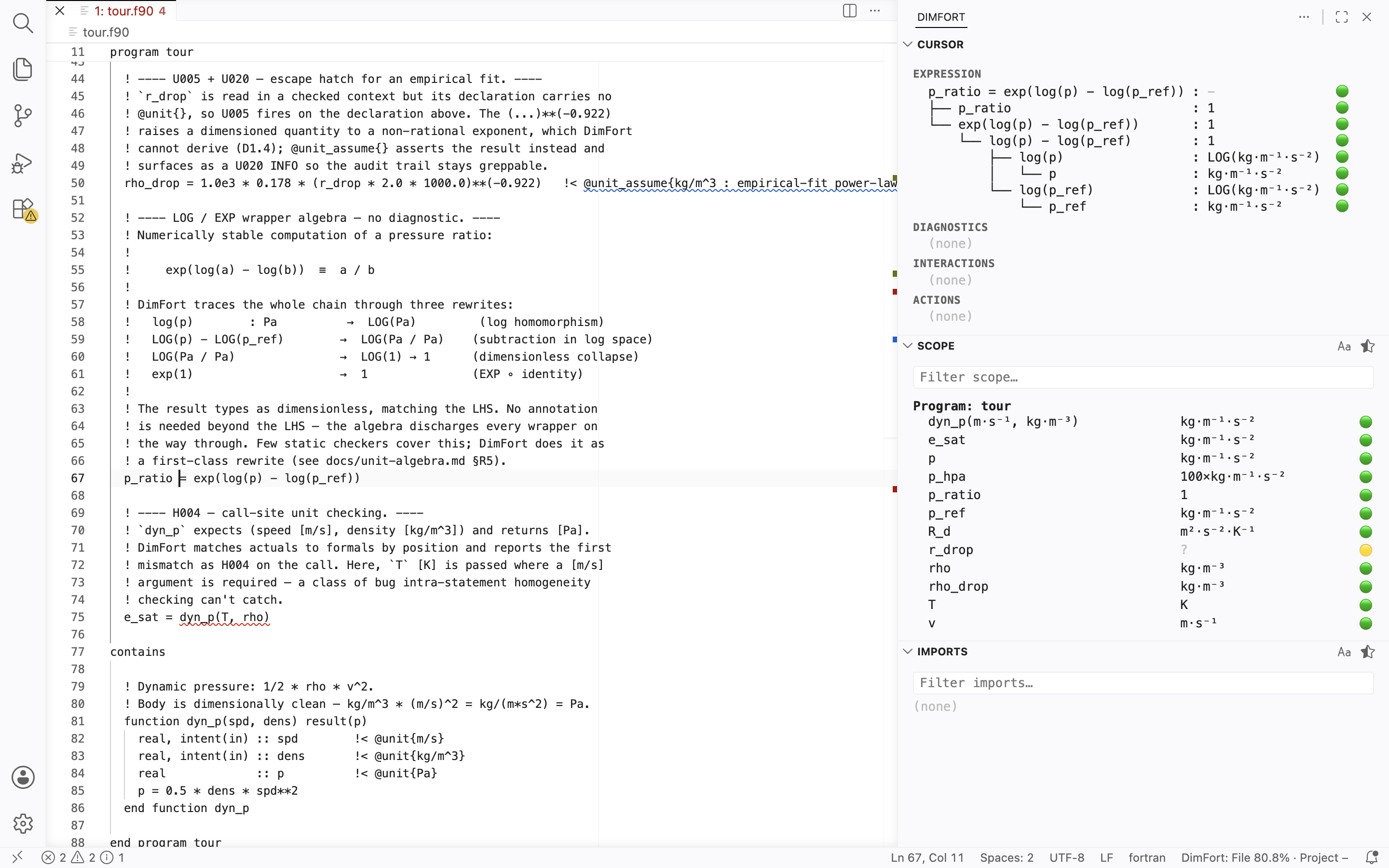
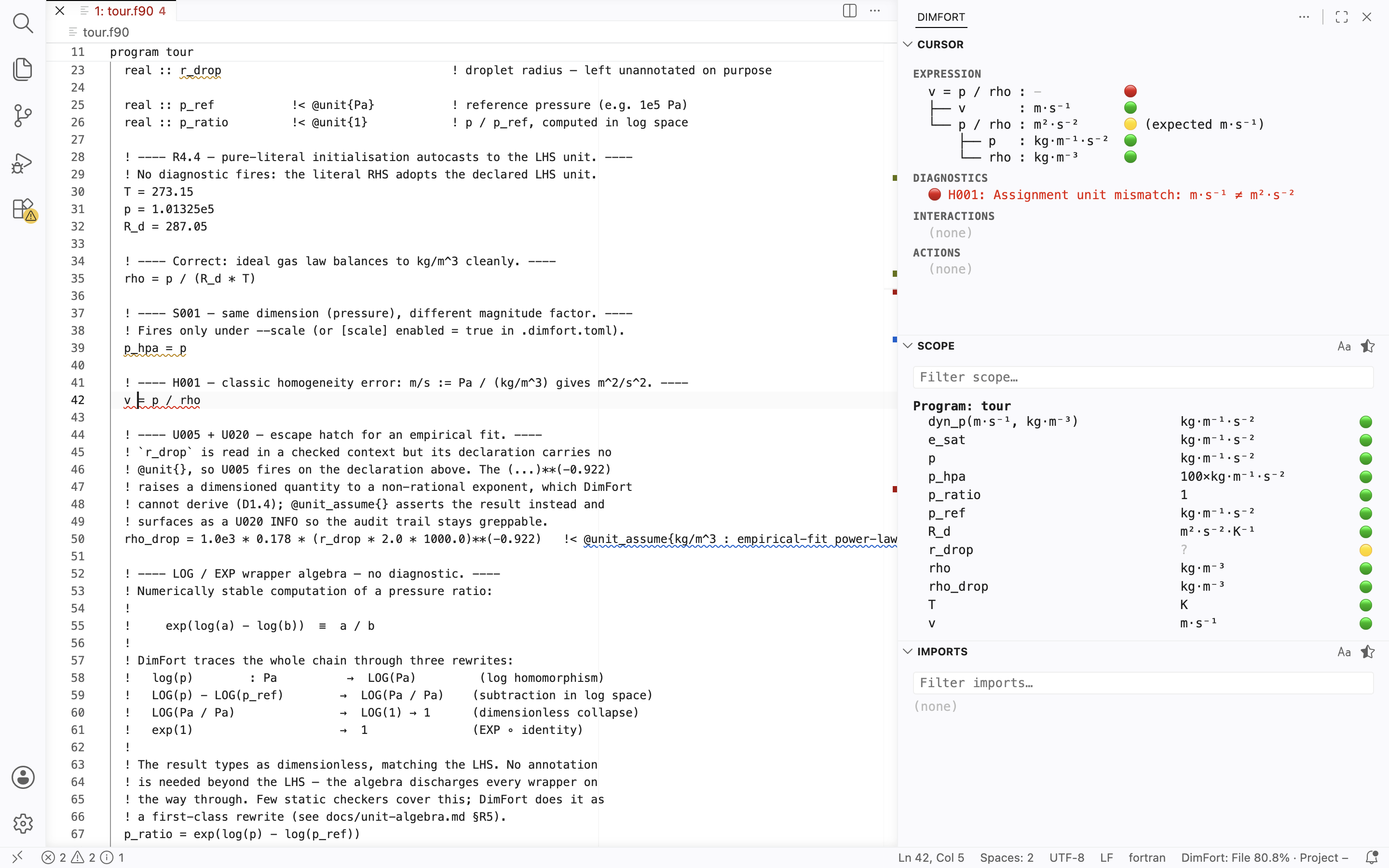
A cursor-following side panel rendering the six DimFort sections — Expression, Diagnostics, Interactions, Actions, Scope, Imports. The full description of what each section shows is the canonical side-panel reference; the controls below are the VSCode-specific bits.
Toggle: open by default. The DimFort activity-bar icon
toggles the panel; the palette command DimFort: Show Side Panel
does the same.
Settings:
dimfort.panel.enabled— set tofalseto keep the panel closed on attach.
Filters: the Scope and Imports sections each carry an inline filter box (name / unit / module).
Restoring panel layout: each view (Cursor / Scope / Imports) can
be independently dragged to the bottom panel or secondary sidebar,
collapsed, or hidden via right-click on its title bar. If you drag a
view out and can't get it back via right-click menus, run the
command palette View: Reset View Locations — it restores all
DimFort views (and every other extension's views) to their default
positions. The "+ Add View" affordance only re-adds hidden views,
not views moved to another location, so dragged-out views need
either a manual drag back or the reset command.
Commands
All commands are available from the Command Palette (Cmd/Ctrl+Shift+P) under the DimFort: category. Settings live under the dimfort.* namespace.
| Command | Effect |
|---|---|
DimFort: Restart Language Server |
Restart the LSP server (dimfort.restartLanguageServer). |
DimFort: Status |
Append a timestamped snapshot of the current DimFort settings + LSP client state to the DimFort Output channel, then reveal that channel (dimfort.status). |
DimFort: Open Config… |
Quick-pick between the project configuration file (dimfort.toml) and the project units file (units.toml). Each opens if it exists, or creates a stub via a sub-pick (Empty file vs Reference template). Auto-wires [units].file = "units.toml" into dimfort.toml so the server picks up the new units file immediately (dimfort.openConfig). |
DimFort: Check Workspace |
Run the workspace-wide unit check; refreshes the status-bar Coverage: segment (dimfort.checkWorkspace). |
DimFort: Toggle Inlay Hints |
Toggle inlay hints; restarts the server (dimfort.toggleInlayHints). |
DimFort: Toggle Unit Completion |
Toggle unit-name completion; restarts (dimfort.toggleCompletion). |
DimFort: Toggle Code Actions |
Toggle code actions; restarts (dimfort.toggleCodeActions). |
DimFort: Toggle Go to Definition |
Toggle go-to-definition; restarts (dimfort.toggleGotoDefinition). |
DimFort: Cycle Hover Verbosity (Disabled / Short / Detailed) |
Cycle hover verbosity; restarts (dimfort.cycleHover). |
DimFort: Cycle Content-Hash Cache (Off / Read-only / Read-write) |
Cycle the content-hash cache mode through all three values (dimfort.cycleCache). |
DimFort: Clear Content-Hash Cache |
Delete the .dimfort-cache/ directory and restart (dimfort.clearCache). |
DimFort: Show Side Panel |
Open the side panel (dimfort.togglePanel). |
DimFort: Cycle Scale Checking (Auto / On / Off) |
Cycle scale checking; auto defers to dimfort.toml (dimfort.cycleScale). |
DimFort: Cycle Coverage Visualisation (Disabled / Gutter / Background) |
Cycle the per-line coverage layer; no LSP restart (dimfort.cycleCoverage). |
DimFort: Toggle Cursor View |
Show / hide the Cursor view (Expression / Diagnostics / Interactions / Actions). Flips dimfort.show.cursor (dimfort.toggleCursor). |
DimFort: Toggle Scope View |
Show / hide the Scope view. Flips dimfort.show.scope (dimfort.toggleScope). |
DimFort: Toggle Imports View |
Show / hide the Imports view. Flips dimfort.show.imports (dimfort.toggleImports). |
DimFort: Cycle Sort Mode (…) |
Cycle the panel sort mode shared by Scope and Imports (line / alphabetic / status); palette + title-bar icon variants (dimfort.cycleSortMode, …alpha, …status). |
DimFort: Cycle Unit Display (…) |
Cycle the unit-display mode shared by Scope and Imports (input / canonical / both); palette + title-bar icon variants (dimfort.cycleUnitDisplay, …canonical, …both). |
The full cross-companion mapping (which Nvim / Emacs command each row corresponds to) lives in DimFort's docs: see editor-integration/commands.md.
Develop locally
If you want to contribute or run from source rather than the marketplace build:
git clone https://github.com/ArrialVictor/DimFort-VSCompanion.git
cd DimFort-VSCompanion
npm install
npm run compile
Then open the folder in VSCode and press F5 — a second window launches with your local build of the extension.
Packaging a .vsix
Requires Node ≥ 20.18 (older Node breaks @vscode/vsce's
undici transitive dependency). On macOS:
brew install node@20
export PATH="/opt/homebrew/opt/node@20/bin:$PATH"
Then:
npm install --save-dev @vscode/vsce
npm run compile
npx vsce package --allow-missing-repository
You'll get a dimfort-vscode-<version>.vsix. Install with
code --install-extension dimfort-vscode-<version>.vsix.
License
MIT.