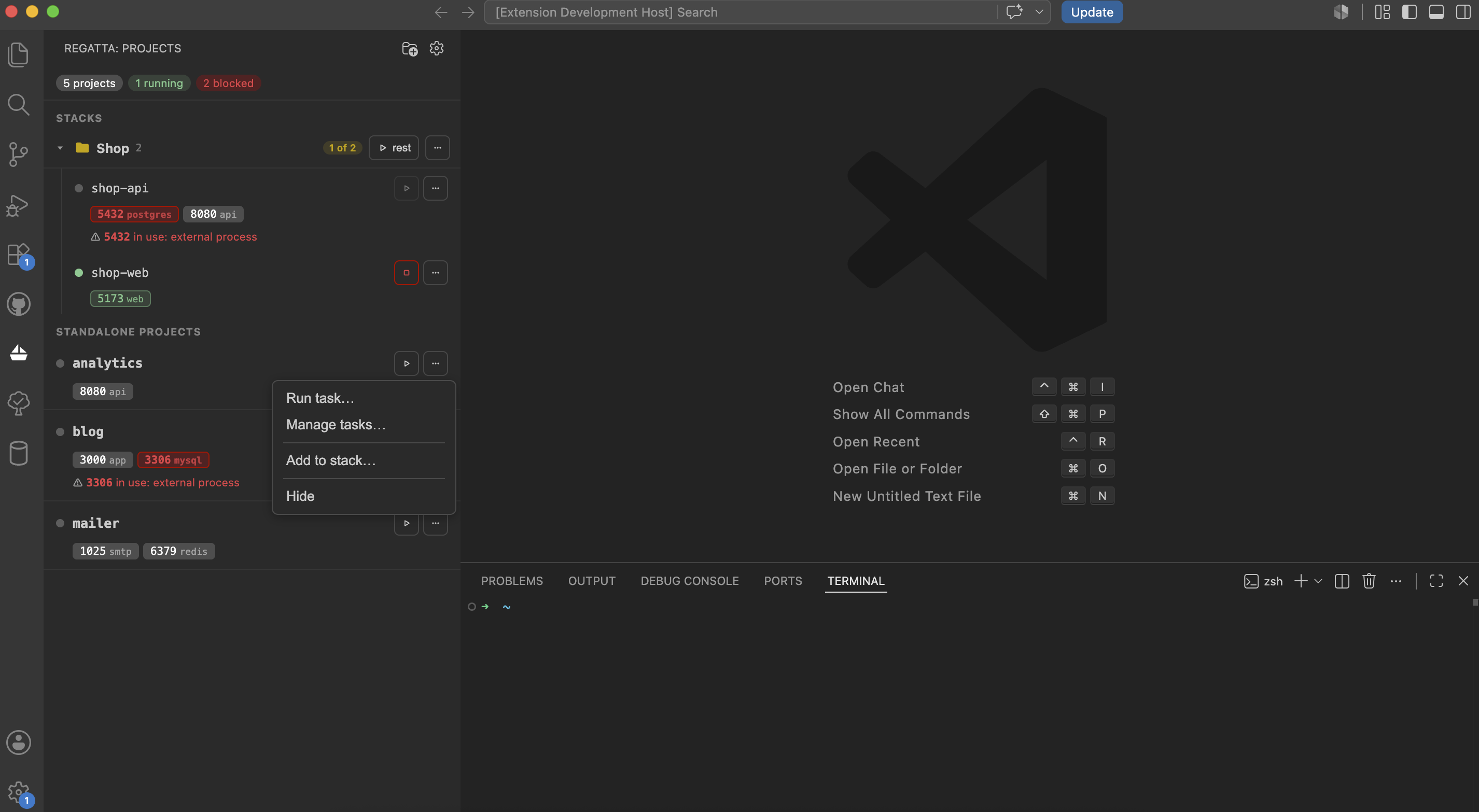
A control panel for local multi-project Docker setups. Regatta lives in the VS Code
sidebar, discovers your docker-compose projects, shows their status and ports, and
flags port conflicts between them – so juggling ~10 local projects stops being manual
port-wrangling.

Features
- Project discovery – scans the folders you configure for
docker-compose*.yml/compose*.ymland lists every project it finds. - Status at a glance – running / stopped per project, with a live summary of how many are running and how many are blocked.
- Start / stop – one click per project, straight from the sidebar.
- Stacks – group projects that belong together (e.g. an API and its frontend) into a collapsible folder and start or stop them as one.
- Port intelligence – shows each project's host ports and detects conflicts:
- green – the port is served by this running project;
- red – the port is already taken (by another project, a Docker container, or an external process) → starting is blocked;
- amber – the port might be in use (a process owned by you) → start stays enabled with a warning.
- Live updates – reflects container start / stop in real time via
docker events, with no polling. - Logs – open a running project's live logs in a terminal.
- Configurable folders – point Regatta at the folders that hold your projects, add and remove them from a built-in manager, and tune how deep it scans.
Requirements
- VS Code
^1.90 - Docker with the
docker composeCLI available on yourPATH
Getting started
Install Regatta from the VS Code Marketplace – search for it in the Extensions view
(Cmd/Ctrl+Shift+X), or grab it from the
Marketplace page.
Open the Regatta view from the Activity Bar. On first run the panel is empty – click Add folder (or run Regatta: Add Folder) and point it at the folder(s) that contain your projects.
Settings
regatta.roots– folders Regatta scans for docker-compose projects; when empty, it falls back to the open workspace folders. Default[].regatta.scanDepth– how many folder levels deep to scan from each root; higher finds more deeply nested projects but scans slower. Default3.
Commands
- Regatta: Add Folder – pick folders to scan for projects.
- Regatta: Manage Folders – view, add, and remove scan folders.
- New stack – group two or more projects into a stack.
How it works
Conflicts are dynamic: a port only counts as taken when something is actually
listening on it. With everything stopped there are no conflicts. Start a project and it
occupies its ports; any stopped project that declares one of those ports becomes
blocked, with the reason shown inline. Occupancy is detected machine-wide – a bind test
(which matches how Docker itself binds), lsof for your own processes, and docker ps
for container port maps – and attributed to a named holder wherever possible.
Status
Live on the VS Code Marketplace and in daily use. Actively developed – issues and ideas are welcome.
MIT © Anna Morozenko