
Git stash for your AI coding sessions.
Snapshot what your AI was doing. Your teammate runs one command and picks up exactly where you left off — in whichever AI tool they use.



The problem
When teams "vibe code" with AI, context is lost at every handoff:
- Dev A spends three hours building a feature with Claude Code. Plans, retries, dead ends.
- Dev A stops for the day. The next morning Dev B opens Cursor — has no idea what was tried.
- They ask the AI; the AI hallucinates (no shared memory).
- Tokens wasted. Hours wasted. Dev A gets woken up on Slack.
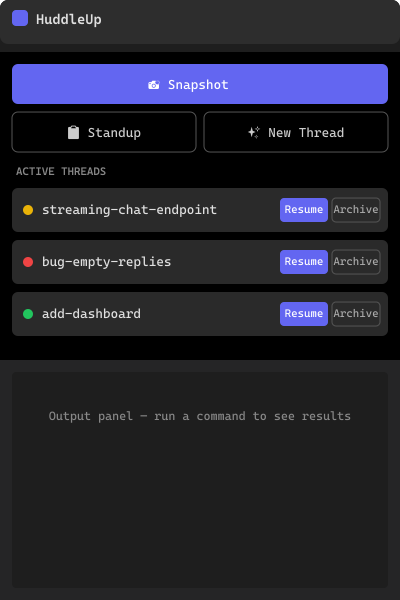
The HuddleUp VS Code extension fixes this with two buttons in your sidebar.
What it does
Two buttons. That's the whole pitch.
| Button | What happens |
|---|---|
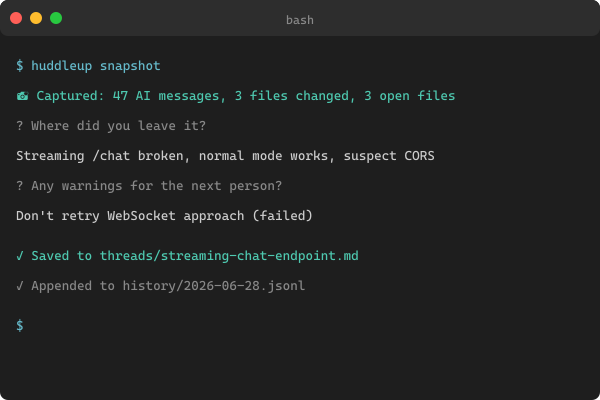
| 📸 Snapshot | Captures your active AI session — git diff, open files, last messages from Claude / Cursor / Copilot / Codex / Windsurf, and a one-line note. Writes it to a thread file in .huddleup/threads/. Commits to git, ready for the next teammate to pull. |
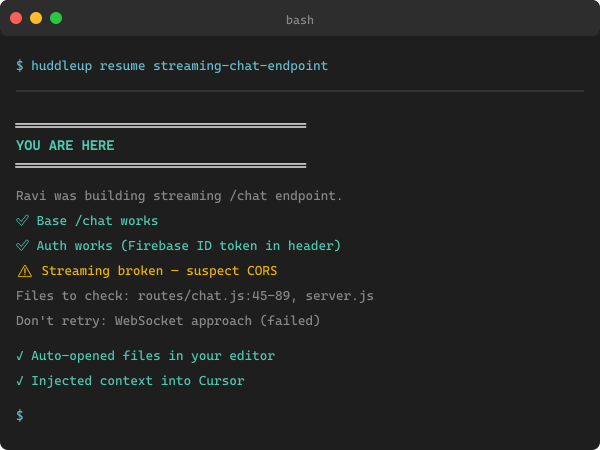
| ▶ Resume | Pick a thread. Get a "YOU ARE HERE" briefing in your terminal. Relevant files auto-open. Full context injected into your AI tool so the next prompt has memory. |
Add Standup and New Thread and you've covered the daily loop.
Screenshots
Sidebar panel — Snapshot, Resume, Standup, threads at a glance
Snapshot flow — capture without leaving the editor
Resume briefing — every teammate gets the same picture
Why HuddleUp (vs. just CLAUDE.md or .cursor/rules/)
Static rules files (CLAUDE.md / .cursor/rules/) |
HuddleUp | |
|---|---|---|
| Tells the AI your project conventions | ✅ | ✅ |
| Captures what you just tried and what failed | ❌ | ✅ |
| Works across Claude, Cursor, Copilot, Codex, Windsurf | ❌ (one per tool) | ✅ |
| Teammate picks up mid-task without a Slack message | ❌ | ✅ |
| The AI auto-saves before tokens run out | ❌ | ✅ (Token Exhaustion Protocol) |
HuddleUp isn't a replacement for CLAUDE.md — it generates CLAUDE.md, plus .cursor/rules/huddleup.mdc, AGENTS.md, and .windsurfrules from one source of truth, and adds the live snapshot/resume layer on top.
Quick start
1. Install the CLI (one-time, anywhere on your machine)
npm install -g huddleup
Or pin via npx huddleup@latest if you'd rather not install globally.
2. Install this extension
Search HuddleUp in the VS Code Extensions panel and click Install.
Cursor / VSCodium / Windsurf users — coming on Open VSX shortly.
3. Initialize your project
cd your-project
huddleup init
This creates:
.huddleup/charter.md— your project's single source of truth (stack, conventions)..huddleup/threads/— work threads..huddleup/history/— append-only event log.CLAUDE.md,.cursor/rules/huddleup.mdc,AGENTS.md,.windsurfrules— auto-generated config for every AI tool.
4. Use the sidebar
Open the HuddleUp activity-bar icon. Hit 📸 Snapshot before you walk away from your desk. Your teammate hits ▶ Resume and is exactly where you left off.
Commands
Every sidebar button has a command-palette twin (Ctrl/Cmd + Shift + P):
| Command | What it does |
|---|---|
HuddleUp: Snapshot current session |
Save current work state to a thread |
HuddleUp: Resume a thread |
Pick a thread; load briefing + open files + inject context |
HuddleUp: Show team standup |
Show all active threads + today's activity |
HuddleUp: Create new thread |
Start a new work item |
HuddleUp: List threads |
List every active thread |
HuddleUp: Refresh sidebar |
Refresh the HuddleUp panel |
Settings
| Setting | Default | Description |
|---|---|---|
huddleup.cliPath |
npx huddleup |
Command used to invoke the CLI. Change to an absolute path if npx is slow on first run, or to a project-local install. |
Token Exhaustion Protocol
The config files generated by huddleup init carry this instruction for the AI:
"When this session is near token exhaustion (~10% remaining), execute
huddleup snapshotto save the full session state before context is lost."
So even if you forget to snapshot, the AI will. Tested with Claude Code and Cursor; relies on the model honoring the instruction in its system prompt.
Requirements
- VS Code 1.85+ (also runs in Cursor / VSCodium once we ship to Open VSX).
- Node.js 20+ on your machine — needed by the CLI.
- Git in your project (snapshots include the diff).
- A project with
huddleup initalready run.
How the snapshot is built
You click 📸 Snapshot
        │
        ▼
┌─────────────────────────────────────────┐
│  CLI auto-captures:                     │
│  • git diff (staged + unstaged)         │
│  • currently open files                 │
│  • last N AI messages (auto-detected    │
│    from Claude / Cursor / Copilot /     │
│    Codex / Windsurf session files)      │
└─────────────────────────────────────────┘
        │
        ▼
┌─────────────────────────────────────────┐
│  CLI asks you 1 question (30 seconds):  │
│  "Where did you leave it?"              │
└─────────────────────────────────────────┘
        │
        ▼
┌─────────────────────────────────────────┐
│  Writes to .huddleup/threads/<name>.md  │
│  Appends to .huddleup/history/          │
└─────────────────────────────────────────┘
        │
        ▼
   Commit + push → teammate runs ▶ Resume
Full architecture in the main repo's CONTRIBUTING.md.
Building from source
git clone https://github.com/anandsundaramoorthysa/huddleup
cd huddleup/vscode-huddleup
npm install
npm run build
npm run package    # produces vscode-huddleup-<version>.vsix
Install the resulting .vsix via Extensions → ⋯ → Install from VSIX….
Changelog
See CHANGELOG.md.
Contributing
Pull requests welcome — see CONTRIBUTING.md. Bug reports and feature ideas go to GitHub Issues.
Security
Found a vulnerability? Please report it privately — see SECURITY.md.
Questions?
- 🐛 Bugs — github.com/anandsundaramoorthysa/huddleup/issues
- 💬 Discussion — github.com/anandsundaramoorthysa/huddleup/discussions
- 📧 Email — [email protected]
HuddleUp is open source under AGPL-3.0. Built by @anandsundaramoorthysa.