A VS Code extension that bundles the day-to-day work with GitLab and Claude Code: time tracking on issues, a GitLab MCP server for Claude Code, management of skills & agents, and AI-assisted code reviews — all sharing one GitLab token and a connection lamp in the status bar.
Contents
- What can the extension do?
- Quick start
- GitLab personal access token
- Features in detail
- Settings
- Commands
- Requirements
What can the extension do?
| Area | In short |
|---|---|
| ⏱️ Time tracking | Timer or calendar entries on GitLab issues, buffered locally, synced to GitLab timelogs on demand. Plus purely local issues with no GitLab link. |
| 🟦 Jira time tracking | The same booking flow for Jira Cloud issues — entries sync as Jira worklogs (REST + API token). Shown alongside GitLab in the same calendar. |
| 🔌 GitLab MCP | One click enables the GitLab MCP server for Claude Code (CLI in the terminal) — token kept secure, never written to disk in clear text. |
| 🟦 Atlassian MCP | One click enables the official Atlassian (Jira/Confluence) MCP server for Claude Code — OAuth in the browser, no token to manage. |
| 🧩 Skills & agents | A dedicated page to enable/disable Claude Code skills and agents (bundled templates + your own files) — and to install skills, agents and plugins from remote GitHub sources. |
| 🔍 Code reviews | Starts a Claude review of a merge request or the local branch — results in chat, as draft notes, or posted directly to the MR. |
| ✅ To-Do board | A standalone Kanban board with custom columns and drag&drop cards; due dates surface in the status bar. Stored machine-globally, independent of issues. |
| 📊 Claude session usage | A cross-project overview of all your local Claude Code sessions — token usage per session/project and an estimated (subscription-hypothetical) USD cost. |
| 🗂️ Feature tasks | A live board visualizing the Claude Code feature-workflow queue (.claude/feature-tasks.json) — running/queued chains, dependencies and file conflicts. |
| 🚦 Pipeline / CI status | The newest GitLab pipeline or GitHub Actions run of your current branch, live in the status bar — with job logs, retry/cancel, failure notifications and one-click Claude root-cause analysis. |
| 🕹️ Agent Office | A pixel-art office visualizing your live Claude Code subagents: every agent walks in, works at a desk with a speech bubble showing its current tool call, and hands its result to the coordinator when done. |
| 🔨 Task Runner | Up to five workspace tasks on global shortcuts (F7, Ctrl+F7, Shift+F7, Ctrl+Shift+F7, Alt+F7), assigned on the Task Runner page; re-triggering restarts a still-running task. |
Quick start
- Set the GitLab URL:
Settings→actifsourceTools.gitlabUrl, e.g.https://gitlab.example.com. - Set the token: Command Palette (
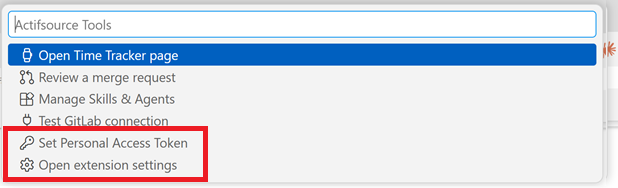
Ctrl+Shift+P) →Actifsource Tools: Set Personal Access Token(scopeapi, see below). - Open the panel:
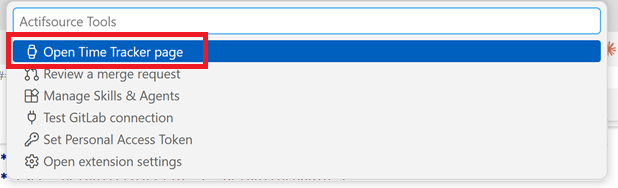
Actifsource Tools: Open(or click the green dot in the status bar). - (optional) Enable MCP for Claude:
Actifsource Tools: Enable GitLab MCP for Claude Code.
GitLab personal access token
The extension both reads and writes to GitLab (creating/deleting timelogs, posting review comments). Therefore:
- Scope:
api(full read/write).read_apiis not enough once times are synced or reviews are posted. - Account role: at least Reporter (issues + time + comments), Developer recommended for the full MR review workflow.
- The token is stored only in
vscode.SecretStorage(on Windows via DPAPI) — never insettings.jsonor~/.claude.json.
Create it in GitLab: User Settings → Access Tokens → scope api.
Features in detail
1. Time tracking
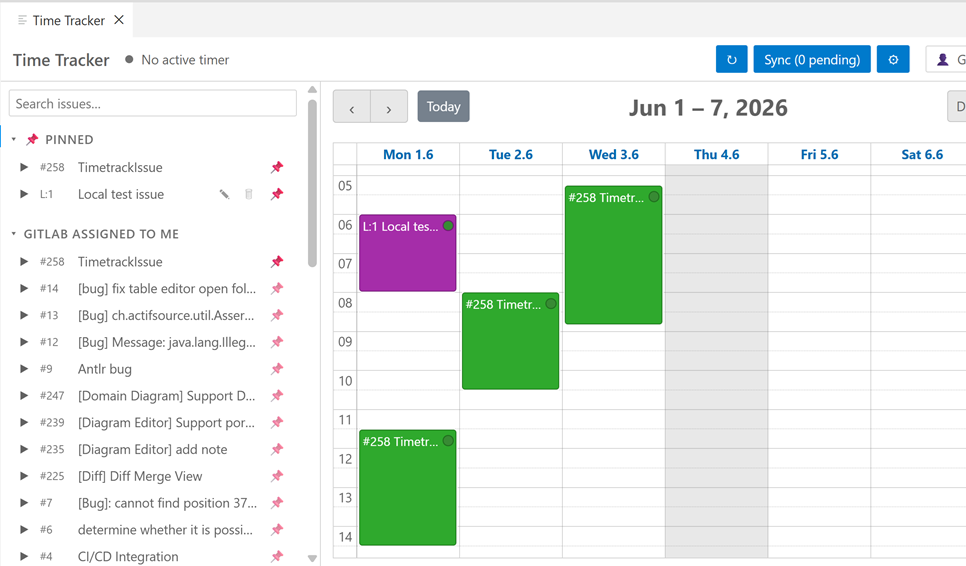
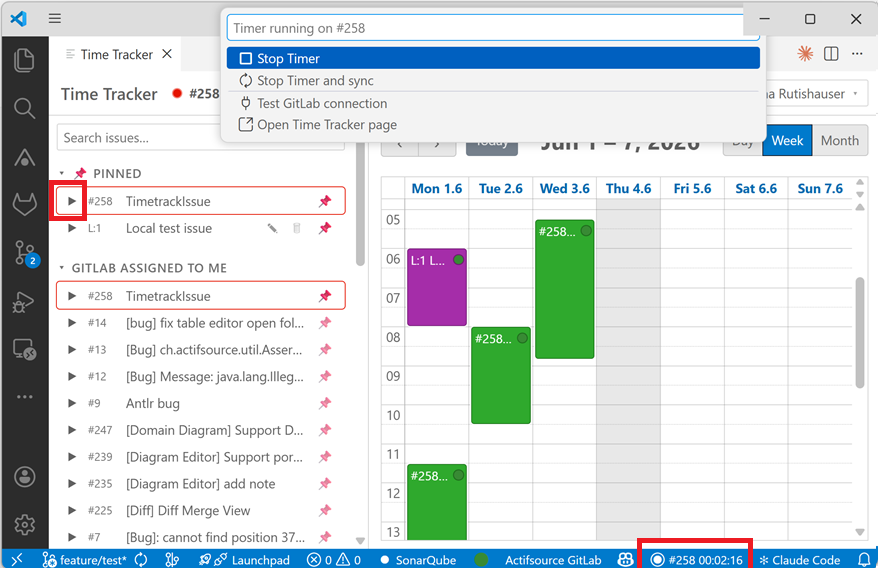
- Issue list with sections: pinned, GitLab — assigned to me, local, and
optionally project/group (see
defaultProjectId/defaultGroupId). - Issue search: typing filters the loaded issues (title, ticket id
#258/258, Jira key); a "🌐 Search globally" entry in the results extends the search server-side across all enabled GitLab and Jira accounts — including issues assigned to other users and closed issues (struck through, sorted last). Exact Jira keys (PROJ-123) are found globally too. - Exactly one active timer that survives webview and VS Code restarts.
- Calendar (day/week/month): create/edit entries via context menu, move them by drag; 24-hour axis.
- Traffic-light dot per entry: 🔴 not synced · 🟡 changed, not synced yet · 🟢 synced.
- Sync sends each booking as a GitLab timelog (GraphQL
timelogCreate/timelogDelete) — one entry = one timelog, with no negative correction rows in the time-tracking report. Editing the same entry multiple times is collapsed into a single sync (no duplicates). - Local issues (
L:<n>): purely local, machine-global issues with no GitLab link — bookable in the calendar, pinnable; "synced" into a global file. - Transfer booked time: right-click a local issue to move all of its booked time onto a picked ticket (GitLab, Jira or another local issue). Nothing is sent to a server automatically — the retargeted entries land in the pending queue and are booked on the next manual Sync. The local issue is kept (empty); blocked while a timer runs on it.
- Month report: a monthly timesheet view (tickets × days with per-day, per-ticket and grand totals) next to the calendar. Data is fetched from the server per month, so closed issues are included; the calendar shows the same server-backed history for past months as read-only entries.
- Clickable issue ids: the ticket id in the calendar, the month report and the issue list opens the ticket in the browser (GitLab/Jira; local issues have no URL).
- Issue agent actions: right-click a GitLab/Jira issue to run Claude Code on it — Refine (work out the spec), Plan (work out the implementation plan), Implement (autonomous subagent: branch, code, verify, commit — optionally in a git worktree) and Ask, each in the terminal or the Claude Code view.
- View another user (read-only): shows their assigned issues and their logged time — no editing/booking. The user search spans all enabled GitLab and Jira accounts.
Jira time tracking (worklogs)
The same booking flow as GitLab, but for Jira Cloud — entries sync as Jira worklogs.
- Configure
actifsourceTools.jira.url(e.g.https://your-site.atlassian.net) andactifsourceTools.jira.email, then runActifsource Tools: Set Jira API Tokenwith a token from id.atlassian.com (stored in SecretStorage). Optional:jira.defaultProjectKey,jira.jql. - Jira issues appear in a "Jira assigned to me" section (assignee = currentUser(), plus the optional project/JQL) and book time in the same calendar as GitLab/local entries.
- Sync creates/deletes Jira worklogs (one entry = one worklog); editing replaces the worklog. Reconcile pulls in your own worklogs and removes locally-deleted ones.
- Only your own worklogs are touched (matched by Atlassian account id).
2. GitLab MCP for Claude Code
Enables the GitLab MCP server (@zereight/mcp-gitlab) for Claude Code in the integrated
terminal — so Claude can work with GitLab directly (issues, MRs, comments …).
- The command
Actifsource Tools: Enable GitLab MCP for Claude Codewrites agitlabentry into the user-global~/.claude.jsonand injects the token as an environment variable into new integrated terminals. - Reuse: uses the same token and URL as time tracking — no second token needed.
GITLAB_API_URLis derived fromgitlabUrl. - Secure:
~/.claude.jsononly contains the reference${GITLAB_PAT}, never the value. - After enabling: open a new integrated terminal, start
claude, run/mcp. Actifsource Tools: GitLab MCP Statusshows a checklist (token, entry,npxon PATH …).
Atlassian (Jira/Confluence): Actifsource Tools: Enable Atlassian MCP for Claude Code
adds the official Atlassian remote MCP server as a native SSE entry
({ "type": "sse", "url": "https://mcp.atlassian.com/v1/sse" }) to ~/.claude.json.
Authentication is OAuth 2.1 — a browser window opens in Claude Code on first use;
no token is stored or configured. It targets your Atlassian Cloud site(s) via the
hosted gateway (not your site URL directly). Enable/disable/status are also in the green-dot menu.
More MCP servers, each with enable/disable/status commands and green-dot menu entries:
GitHub MCP (token-based, used by the GitHub PR review), Actifsource MCP (local
server, URL/port configurable) and Playwright MCP (browser automation, optional CDP
endpoint to attach to a running browser). Actifsource Tools: MCP Status (all servers)
shows one combined checklist.
3. Manage skills & agents
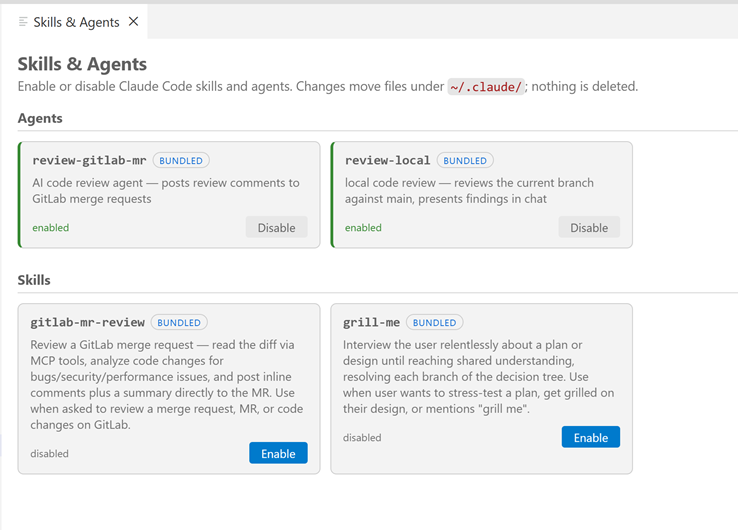
A dedicated page (Actifsource Tools: Manage Skills & Agents) to enable/disable Claude
Code skills and agents — bundled templates and your own files under ~/.claude/.
- Enable moves/writes into the live directory (
~/.claude/agents/<name>.mdor~/.claude/skills/<name>/) that Claude Code scans at session start. - Disable moves it into a disabled store — never deleted, fully reversible.
- Visible before enabling: an agent's requested tools/model, whether a skill ships scripts/, and an origin badge (bundled/user).
- A hand-authored file of the same name is never overwritten (conflict is shown).
- With
actifsourceTools.autoUpdateAgentAndSkill(default on), managed copies are refreshed from the latest bundled version at startup. - The page also manages memory, CLAUDE.md chapters and status-line scripts
(bundled
ai/statusLine/*wired into~/.claude/settings.json).
Remote sources (skills, agents & plugins from GitHub)
The page also lists artifacts from GitHub repositories — configured in
actifsourceTools.remoteSources or added via the "Add remote source…" wizard:
- Remote skills and agents appear alongside the local ones and can be installed, updated and uninstalled per card. Installs are pinned to the resolved commit SHA and are never auto-updated — an Update button appears when the source moved on.
- Plugins get their own section and are installed through the
claudeCLI (claude plugin install). Plugin installs and skills shippingscripts/require an explicit confirmation. - A collapsible Remotes section shows every configured source with an enable/disable checkbox; bundled default sources and plugins ship with the extension. Private repositories are accessed with a registered GitHub account's token (public ones work anonymously).
4. Code reviews
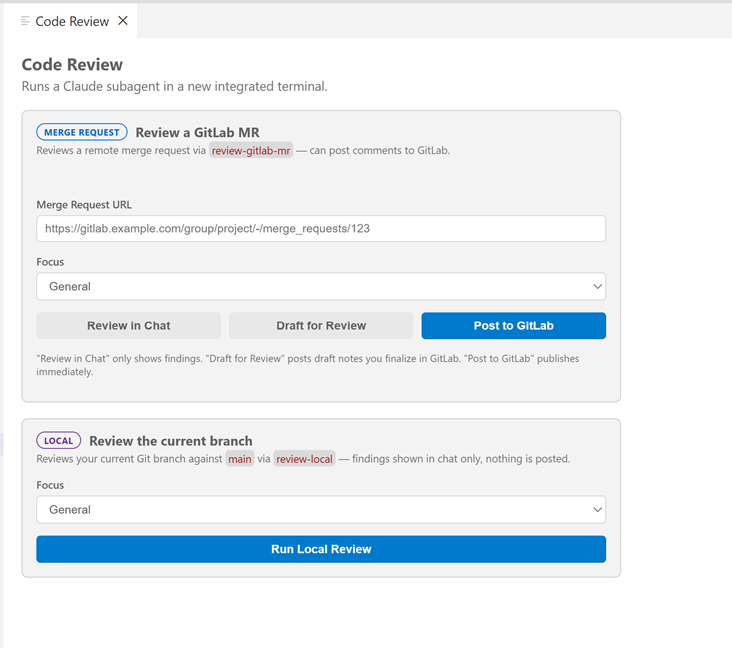
The page Actifsource Tools: Review a Merge Request starts a Claude review in a new
integrated terminal — two clearly separated variants:
- 🔵 Merge Request / Pull Request: one smart URL field accepts GitLab MR and GitHub
PR URLs and picks the matching agent (
review-gitlab-mr/review-github-pr), then Review in Chat, Draft for Review, or Post directly. GitHub reviews use GitHub's pending-review model (inline comments inside a review). - 🟣 Local (
review-local): reviews the current branch againstmain, results in chat only — nothing is posted, no token/MCP required.
The required review agent must be enabled; if it is not, the page blocks the review and offers to enable it. MR reviews additionally require MCP and a token to be ready.
5. To-Do board
A standalone Kanban page (Actifsource Tools: Open To-Do Page) — separate from issues and
the timer, for quick personal tasks.
- Columns with custom names: add, rename, delete and reorder (◀▶).
- Cards = title + optional due date + notes, with 5 fixed colors; drag&drop between
columns and to reorder.
Done(checkbox, strikethrough) andarchivedare separate states; a top-bar toggle switches the whole board between Active and Archived views. - Due-date reminder in the status bar: while any active to-do is due today or overdue,
a
🔔 <count>item appears (tooltip lists them, click opens the board), tinted by the highest-priority color among them. - Ticket references: a card can reference 0–n tickets (GitLab/Jira/local) as clickable chips, with navigation in both directions (ticket → board, board → ticket) and a Create To-Do from Ticket command.
- Saved workspace context (💾): a card can carry at most one snapshot of your workspace — open editors, cursor positions, breakpoints and branch metadata — restored explicitly via commands (with or without branch switch). Nothing is saved or restored automatically, and the working tree is never touched (no stash, no commit).
- Stored machine-globally in
todo-data.json; the folder is overridable viaactifsourceTools.todoStorageDirectory.
6. Claude session usage
A standalone page (Actifsource Tools: Claude Session Usage) giving the cross-session,
historical view that Claude Code's native /usage (current session only) doesn't provide.
- Reads Claude Code's own local transcripts (
~/.claude/projects/**/*.jsonl) — not the extension's data — and lists every session grouped by project. - Per session: token usage (input / output / cache-write / cache-read, per model), duration and message count, plus an estimated USD cost.
- Cost is an estimate. Because you are typically on a subscription, the $ figure is
hypothetical "as-if-API"; tokens are shown primary, $ small. Pricing is fetched live from
Anthropic's public pricing page (toggle
actifsourceTools.claudeSessionUsage.fetchLivePricing) with a built-in fallback. - Right-click a session to copy a context link (a prompt pointing Claude at that
transcript) or resume the session in a terminal (
claude --resume).
7. Feature tasks
A standalone board (Actifsource Tools: Feature Tasks) that visualizes the Claude Code
feature-workflow task registry (.claude/feature-tasks.json) — the plan → review →
background-implementation queue.
- Queue columns: one column per running task, with queued tasks stacked under the task they wait on; tasks with no running blocker collect in a "Waiting to run" column.
- Dependencies drawn as arrows / chips ("waits for" / "blocks"), and file conflicts between a queued task and its blockers highlighted in red.
- Each card shows its execution mode (workspace / worktree / chat) and, when available, the session channel title; collapsed by default, running cards show a progress strip.
- Finished (3 newest) + collapsible History; delete finished tasks or "Clear finished". The file is polled every 5 s while visible and never modified except by explicit deletes. A banner warns if the feature workflow isn't set up.
8. Pipeline / CI status
A status bar item showing the newest GitLab pipeline or GitHub Actions workflow run of the branch checked out in the workspace — no extra configuration: the repo's git remote is matched by host against your registered GitLab/GitHub accounts.
- At a glance: icon + pipeline number per state (running with job progress like
test 2/5, passed, failed with red background, pending, canceled, manual action with yellow background,CI: nonewhen the branch never ran a pipeline). The tooltip lists all stages/jobs with status and duration. - Click menu: open the pipeline in the browser, show jobs and view a job log inside VS Code, retry failed jobs, cancel a running pipeline, refresh, and jump to older pipelines of the branch. Actions only appear when they make sense in the current state.
- Notifications: when one of your own pipelines fails (trigger user = token owner),
a warning toast offers Show Log, Analyze with Claude and Ignore — at most once per
pipeline. An optional success toast (
pipelineStatus.notifyOnSuccess, default off) reports a previously running pipeline turning green. - Analyze with Claude: fetches the failed jobs' logs (trimmed to the relevant tail), saves them to temp files and starts Claude Code in a terminal with the pipeline context — goal: a clear root cause and a concrete fix suggestion. Works best with the GitLab/GitHub MCP enabled (the action offers the setup if it isn't).
- Polling: fast while a pipeline is running (default 10 s), slow otherwise (default 60 s), immediate refresh on branch switch; both intervals are settings. Connection problems degrade silently to an "unavailable" state — never error popups.
9. Agent Office
A pixel-art office (Actifsource Tools: Agent Office) that visualizes live Claude Code
subagent activity of the current workspace — read from the local session transcripts
under ~/.claude/projects/, no API calls.
- The coordinator (your main Claude session) sits at the top desk; every subagent walks in through the door and takes a seat: 5 fixed workstations first, then the meeting table, then standing room around it (at most 40 figures are drawn, the rest are counted in the top bar).
- While working, a figure "types" with a speech bubble showing its current tool call
(
📖 file.ts,🔍 "pattern",💻 build, …); finished agents carry a folder to the coordinator, hand it over ("✔ done!") and leave through the door. - Ambient behavior: stalled agents fetch a coffee, thinking agents step to the whiteboard, writing agents visit the printer (one per spot, with cooldowns). The idle coordinator takes coffee/printer breaks and waters the plants — and runs back to his desk the moment work starts.
- Detects direct agents, workflow-tool runs and git-worktree agents; a session picker covers the recent sessions of the workspace. Click a figure for task, state, tool calls, tokens and an Open transcript button.
10. Task Runner
Up to five workspace tasks on global keybindings — for the "rebuild" reflex without leaving the keyboard, wherever the focus is (editor, terminal, webview, explorer).
- Assign tasks on the Task Runner page (
Actifsource Tools: Task Runner, also in the lamp menu): one row per slot with the default keybinding, a task input with suggestions, and Run/Clear buttons. Values are stored in the workspace settings (actifsourceTools.taskRunner.task1…task5). - Default shortcuts: Run Task 1
F7, 2Ctrl+F7, 3Shift+F7, 4Ctrl+Shift+F7, 5Alt+F7(mac:Cmdinstead ofCtrl). Pressing a shortcut again while its task still runs terminates and restarts it. - While a slot is empty its shortcut is inactive and the keys keep their normal binding.
- A previously configured
buildTask.nameis migrated to Run Task 1 automatically.
Status bar
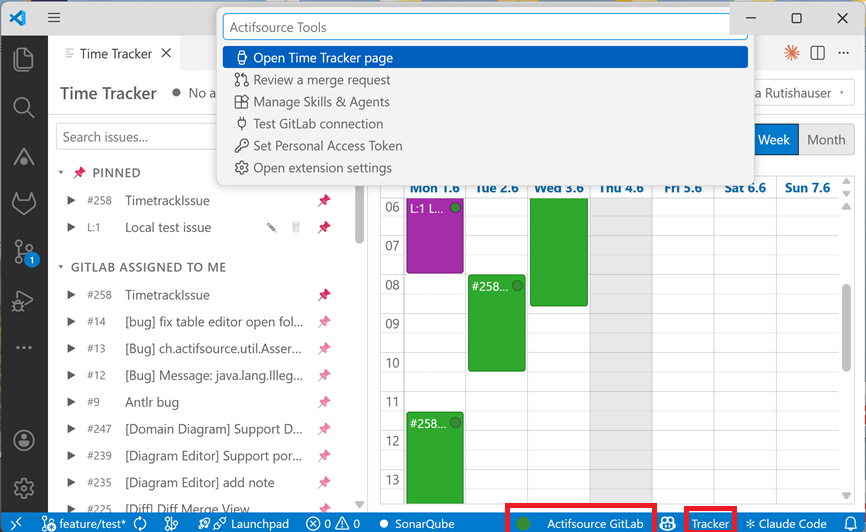
On the left the Tracker item (active timer / pinned issues to start one), next to it "● Actifsource Tools" with a connection lamp:
- ⚪ grey = not configured · 🔴 red = connection failed · 🟢 green = connected.
- Clicking the dot opens a menu: Time Tracker page, Review, Skills & Agents, test connection, set token, settings.
- Next to it the CI item with the current branch's pipeline status (see Pipeline / CI status); click it for pipeline actions.
- Right of the tracker the Claude usage item (
5h 39% · 7d 27%) with Claude Code's session and weekly rate-limit usage; turns red above 80%, click refreshes. Requires Claude Code credentials on this machine; disable viaclaudeUsage.enabled.
Settings
All under the prefix actifsourceTools.:
| Setting | Type | Default | Purpose |
|---|---|---|---|
accounts |
array | [] |
Registered accounts (managed via Add/Manage Accounts). Per-account scope can be edited here: GitLab projectId/groupId, Jira projectKey/jql. |
roundTo |
1 | 5 | 15 | 30 | 1 |
Round time slots to N minutes on sync. |
gitlabMCP.enabled |
boolean | false |
Register the GitLab MCP server for Claude Code. |
gitlabMCP.oauth |
boolean | true |
Use OAuth (native remote) for the GitLab MCP instead of a personal access token. |
gitlabMCP.readOnly |
boolean | false |
Run the GitLab MCP server in read-only mode (token mode only). |
gitlabMCP.accountId |
string | "" |
Registered GitLab account the MCP targets (set via Enable GitLab MCP). |
atlassianMCP.enabled |
boolean | false |
Register the official Atlassian (Jira/Confluence) remote MCP server (OAuth, no token). |
githubMCP.enabled |
boolean | false |
Register the GitHub MCP server (PAT via Authorization header; requires a registered GitHub account). |
githubMCP.accountId |
string | "" |
Registered GitHub account the MCP targets (set via Enable GitHub MCP). |
actifsourceMCP.enabled |
boolean | false |
Register the local Actifsource MCP server. |
actifsourceMCP.url |
string | http://localhost |
Base URL of the local Actifsource MCP server. |
actifsourceMCP.port |
number | 8085 |
Port of the local Actifsource MCP server. |
playwrightMCP.enabled |
boolean | false |
Register the Playwright MCP server (npx @playwright/mcp@latest, stdio). |
playwrightMCP.cdpEndpoint |
string | http://127.0.0.1:9222 |
CDP endpoint to attach to a running browser; empty lets Playwright launch its own. |
autoUpdateAgentAndSkill |
boolean | true |
Update managed skills/agents from the bundle at startup (remote installs are never auto-updated). |
remoteSources |
array | [] |
GitHub repos ({name, repo, ref?, path?, accountId?, enabled?}) offering skills/agents/plugins on the Skills & Agents page; installs are pinned to a commit SHA. |
todoStorageDirectory |
string | "" |
Folder for the To-Do board's todo-data.json (empty = global storage; leading ~ expanded). |
claudeSessionUsage.fetchLivePricing |
boolean | true |
Fetch live model pricing from Anthropic for the session-usage cost estimate (fallback: built-in prices). |
pipelineStatus.enabled |
boolean | true |
Show the CI pipeline status of the current branch in the status bar. |
pipelineStatus.notifications |
boolean | true |
Notify when one of your own pipelines fails (independent of the status bar item). |
pipelineStatus.notifyOnSuccess |
boolean | false |
Also notify when one of your own, previously running pipelines succeeds. |
pipelineStatus.pollIntervalSeconds |
number | 60 |
Refresh interval while no pipeline is running. |
pipelineStatus.activePollIntervalSeconds |
number | 10 |
Refresh interval while a pipeline is running or pending. |
claudeUsage.enabled |
boolean | true |
Show Claude Code's session (5h) and weekly (7d) rate-limit usage in the status bar (red above 80%). |
claudeUsage.pollIntervalSeconds |
number | 60 |
Claude usage refresh interval in seconds. |
taskRunner.task1 … task5 |
string | "" |
Workspace tasks run by the Run Task 1–5 shortcuts (F7, Ctrl+F7, Shift+F7, Ctrl+Shift+F7, Alt+F7; empty = shortcut inactive). Assigned on the Task Runner page. |
Commands
All in the Command Palette under "Actifsource Tools: …":
| Command | Effect |
|---|---|
Open |
Open the Time Tracker panel. |
Set Personal Access Token |
Store the GitLab token in SecretStorage. |
Clear Personal Access Token |
Remove the token. |
Test Connection |
Check the connection to GitLab (updates the lamp). |
Refresh Issues |
Reload the issue list. |
Sync Pending Changes |
Sync pending bookings to GitLab. |
Stop Timer |
Stop the active timer. |
Enable / Disable GitLab MCP for Claude Code |
Write/remove the MCP entry. |
GitLab MCP Status |
Show the status checklist. |
Enable / Disable Atlassian MCP for Claude Code |
Write/remove the Atlassian (OAuth) MCP entry. |
Atlassian MCP Status |
Show the Atlassian MCP status checklist. |
Enable / Disable GitHub / Actifsource / Playwright MCP for Claude Code |
Write/remove the respective MCP entry (each with its own Status command). |
MCP Status (all servers) |
One combined checklist over all MCP servers. |
Manage Skills & Agents |
Open the skills/agents page. |
Review a Merge Request |
Open the review page (GitLab MR, GitHub PR + local). |
Open To-Do Page |
Open the To-Do Kanban board. |
Create To-Do from Ticket |
Create a card referencing a picked GitLab/Jira/local ticket. |
Save Context on To-Do / Restore Context (with/without branch switch) / Discard Saved Context |
Save/restore/discard a workspace context on a to-do card. |
Add / Remove Ticket Reference to To-Do |
Manage a card's ticket references. |
Claude Session Usage |
Open the Claude session usage overview. |
Feature Tasks |
Open the feature-workflow task board. |
Agent Office |
Open the pixel-art subagent visualization. |
Add Account / Manage Accounts / Account Info |
Register and manage GitLab/Jira/GitHub accounts. |
Run Task 1 … Run Task 5 |
Run the workspace task of a slot (F7, Ctrl+F7, Shift+F7, Ctrl+Shift+F7, Alt+F7). |
Task Runner |
Open the Task Runner page to assign tasks to the five slots. |
Set / Clear Jira API Token |
Store/remove the Jira API token in SecretStorage. |
Test Jira Connection |
Check the Jira connection and reload Jira issues. |
Pipeline Actions |
Open the pipeline click menu (same as clicking the CI item). |
Refresh Pipeline Status |
Poll the current branch's pipeline immediately. |
Open Pipeline in GitLab |
Open the displayed pipeline in the browser. |
Show Pipeline Jobs / Job Log |
List the jobs; pick one to view its log in an editor tab. |
Retry Failed Pipeline Jobs |
Retry the failed jobs of the displayed pipeline. |
Cancel Running Pipeline |
Cancel the running pipeline. |
Analyze Pipeline Failure with Claude |
Start a Claude root-cause analysis of the failed pipeline. |
Requirements
- VS Code ≥ 1.85.
- GitLab (self-hosted or gitlab.com) with a PAT (scope
api). - For MCP/reviews: Claude Code (CLI) installed and on
PATH, plus Node.js/npx(the MCP server runs vianpx @zereight/mcp-gitlab).